Forum Discussion

victoriaroose1821
Dec 02, 2022Copper Contributor
2 cells affected by the same amount
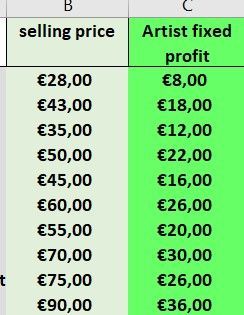
Hi there, I am sending a pricing file to a client to decide what cost they would like to sell their items for. and based on that cost, their profit will be affected. I have in one cell as...

HansVogelaar
Dec 02, 2022MVP
Right-click the sheet tab.
Select 'View Code' from the context menu.
Copy the code listed below into the worksheet module.
Switch back to Excel.
Save the workbook as a macro-enabled workbook (*.xlsm).
Users opening the workbook should enable macros.
Remark: I hope the profits are random examples - the profit for a selling price of €45 is lower than that for a selling price of €43...
Private Sub Worksheet_Change(ByVal Target As Range)
    Dim oldValue As Double
    Dim newValue As Double
    If Target.CountLarge > 1 Then Exit Sub
    If Intersect(Range("B2:B" & Rows.Count), Target) Is Nothing Then Exit Sub
    Application.ScreenUpdating = False
    Application.EnableEvents = False
    If Target.Value = "" Or Not IsNumeric(Target.Value) Then
        Target.Offset(0, 1).ClearContents
    Else
        newValue = Target.Value
        Application.Undo
        oldValue = Val(Target.Value)
        Target.Value = newValue
        Target.Offset(0, 1).Value = Target.Offset(0, 1).Value + newValue - oldValue
    End If
    Application.EnableEvents = True
    Application.ScreenUpdating = True
End Sub
victoriaroose1821
Dec 02, 2022Copper Contributor
Amazing, exactly what I needed thank you.
The prices and profit are based on production costs, shipping, tax, transaction fees of each item (column A). Which the client is aware of 🙂
Thank you so much!
The prices and profit are based on production costs, shipping, tax, transaction fees of each item (column A). Which the client is aware of 🙂
Thank you so much!