Forum Discussion

Pinning: Where & How
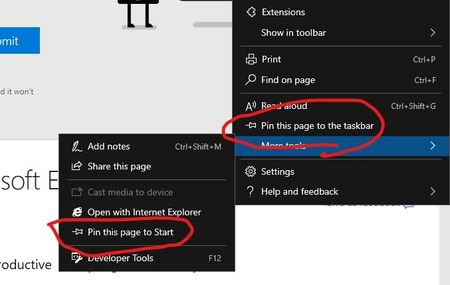

Since johnjansen is collecting feedback on this topic, I'd like to add my vote. I like to pin pages to the taskbar, too; I hide desktop icons, I've removed every tile from the Start screen and I rarely use the start menu, because most of what I need is on the taskbar.
No-one has mentioned IE's nifty way of doing it: just drag the favicon from the address bar to the taskbar to pin it. Not so simple when using touch, perhaps, and Edge doesn't show the favicon in the address bar.
We also need a simple way to edit pinned site shortcuts. My principal reason for this is to be able to change the icon used; Microsoft properties, for example, used all to have different favicons. Now most of them seem to use the same (but not absolutely identical) coloured Windows, which makes it impossible to distinguish at a glance between, say, a pinned page at support.microsoft.com and one at techcommunity.microsoft.com. The icon for a pinned app can apparently easily be changed using the shortcut's properties dialogue, but it doesn't seem to have any effect.
The other thread I think you were referring to was started by someone who only wanted Pin to Start. Again, it's clear that what users want is choice.

Noel Burgess Drew1903 johnjansen I didn't mention the IE drag to Taskbar approach, but actually also prefer it over the menu Pin to Taskbar of legacy Edge. This would definitely be my preferred method.
I fully agree that all three choices need to be available, and separate from each other. I also rarely use the Start menu and have an empty desktop. But people have different ways of working, requirements or preferences.
Having a choice is important and having a simple way to exercise each choice is also important.
- Drew1903May 29, 2019Silver Contributor
ms4132 @Noel Burgess @Drew1903 @johnjansen
It is SO nice to see the shared support & commonly held similar view on this! Likely there are many more who feel the same. And, yes, the drag-n-drop for sites to the taskbar with IE was/is cool. I, too, have long wished we, still, had that.
And, yes, Windows (& Edge) prides itself on giving End Users choice & customization. That must not be lessened or changed in Edge C.
Cheers,
Drew
