Forum Discussion

Updates Not Installing by Install Deadline

Hi ctowens ,
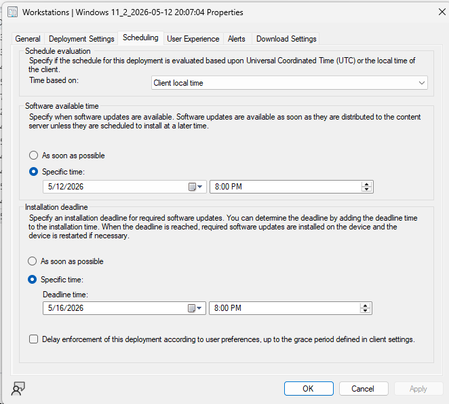
Available time = The time when updates become visible in Software Center and can be manually installed. ConfigMgr does not force anything at this point, it just makes them available.
Deadline = The time when automatic installation starts. If the client hasn't installed the updates by this date, ConfigMgr takes over and enforces the installation.
If you manually installed before the deadline but Software Center still shows "will install after [deadline]", it's most likely just a compliance/status reporting delay or a pending restart state, not an actual deployment problem.
To make updates install automatically during a Maintenance Window with a reboot, you only need to do two things:
- Define a Maintenance Window on the collection and make sure "Apply this schedule to: Software updates" is selected
- Set the deployment deadline to fall inside an active Maintenance Window
For example, if your MW is 8:00 PM – 2:00 AM every day, set your deadline to 9:00 PM. Once the deadline is reached, the device is already inside an active MW, so ConfigMgr will automatically install the updates and reboot the device if needed.
Hope this helps.