Forum Discussion

Purview DLP Behaviours in Outlook Desktop

Hi,
These are known issues
Override without justification (Send Anyway without selecting a reason)
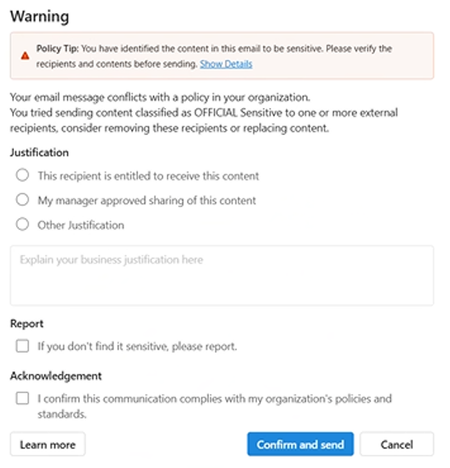
This is actually expected behavior unless you explicitly enforce justification via configuration. By default, Outlook presents the oversharing dialog but does not gate the send action on the user completing a justification. To enforce this you need to configure the following.
GPO:
Classic Outlook
Specify wait time to evaluate sensitive content at Software\Policies\Microsoft\office\16.0\Outlook\options\Mail
Registry:
Key: DLPWaitOnSendTimeout (DWORD)
New Outlook
Registry via Exchange Online Mailbox parameter in Powershell (there is no Policy option)
Connect-ExchangeOnline
#for the entire organization
Set-OrganizationConfig -DLPWaitOnSendEnabled $true -DLPWaitOnSendTimeout 25
#for specific mailbox only
Set-Mailbox -Identity "email address removed for privacy reasons" -DLPWaitOnSendEnabled $true -DLPWaitOnSendTimeout 25
#verify the setting
Get-OrganizationConfig | Select-Object DLPWaitOnSendEnabled, DLPWaitOnSendTimeout
On the timeout value the following:
0 = user immediately sees "Send Anyway" — effectively no enforcement
1–9998 = Outlook waits that many seconds for evaluation to complete before allowing override (25–60 seconds is a practical range)
9999 (default) = mail will not be sent until DLP evaluation fully completes — strictest option
Inconsistent policy tip display
The two build you mentioned (Click-to-run vs MSO) are different build types and can render the oversharing dialog differently. This is a known inconsistency in classic outlook across mixed build environments.
On a broader note
Classic Outlook is on a deprecation path, so rendering inconsistencies are unlikely to receive dedicated fixes. New Outlook has a more consistent and actively developed experience; migration is worth considering as a longer-term solution.

Spot on with the Classic Outlook take. It’s definitely on its way out, and chasing rendering bugs or registry hacks for DLP tips feels like a losing battle at this point.
I’ve shifted away from relying on those inconsistent native "tips" and moved to a unified platform to handle sensitive data across the board. I'm using AnySecura’s Sensitive Information Outbound Control now.
It handles exactly what OP is looking for—external sharing triggers, policy tips, and configurable non-blocking actions—but it’s much more consistent. The best part is it isn't just tied to Outlook; it covers IM apps, web uploads, and multiple mail clients under one set of rules. It saves a lot of time compared to fighting with M365 GPOs and PowerShell just to get an override button to behave.