Forum Discussion

ROLLING OUT: SharePoint Online team sites + Office 365 Groups & Pages
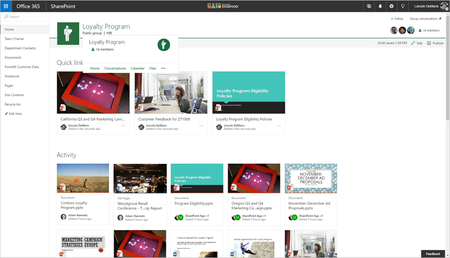

 Microsoft
We're currently rolling out to select users within first release (so tenants that selected individual people, not the entire tenant).
We'll move to the next ring of full first release tenants shortly, starting with 10%.

Ok, now have this for pages in my dev tennant with a selected FR user. A good start but quite basic. Even the banner image is fixed. I expect it will change though. I like that the new pages are mobile friendly but the experience of navigating to Office 365 itself is still pretty horrible with lots of switches to inconsistent views.
First it goes to some blue and white custom mobile ui. From there I select my site, which has a new type of page, however the old limited UI is still used unless I go into SitePages. When I do it changes to a responsive doc library page. At this point I can select from a drop down menu "home", which leads back to the limited UI.
Only switching to PC view actually gives you the new, responsive mobile pages. The link to site content gives the responsive page, but the link to documents gives a responsive page with no navigation..
I can see it's going in the right direction but the mobile experience is a long way off of being usable.
- Michael PerrySep 10, 2016Iron Contributor
Another issue in general but the new pages in particular is what is the obsession in Office 365 in opening everything in a new tab. On the new pages:-
Documents or pages in quick links: new tab
Hyperlinks in text: new tab
Top bar link navigation: new tab
Users find this sort of behaviour very confusing. Is there a way to stop it?
- Dean_GrossOct 15, 2016Silver ContributorMy client was complaining about this also. Have you found an answer?
- Michael PerryOct 16, 2016Iron Contributor
Nope. However if you really need to I have found that in sharepoint designer you can just copy the system generated home.aspx of a group/site. System pages don't have the banner.
Also trying to edit the .aspx page in designer gives access denied but it looks like the differnce might be
<mso:PageLayoutType msdt:dt="string">Home</mso:PageLayoutType>
vs
<mso:PageLayoutType msdt:dt="string">Article</mso:PageLayoutType>
Probably best not to mess with it though as there may by unintened consequences.
