Forum Discussion

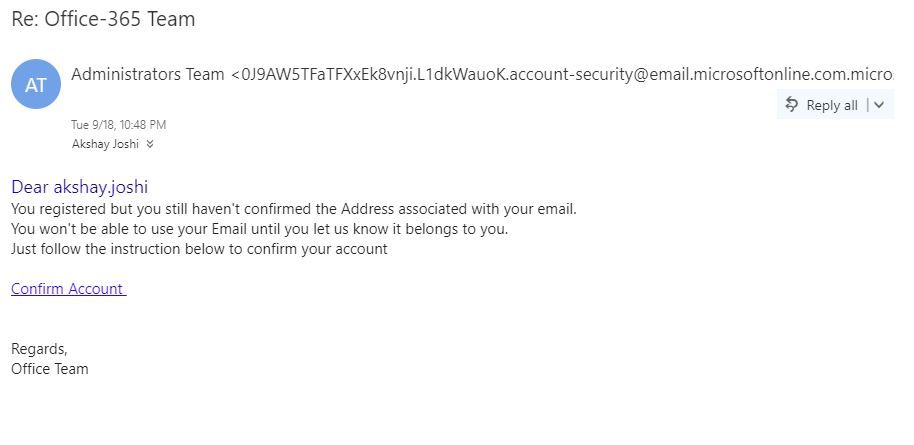
Spam/Phishing Mails in O365

Well you could at least try something like this:
1. Analyze the header and collect ip-address
2. Add the ip-address to blacklist.
If the sender keeps changing the email route, look for something consistant in the email,and create a transport rule to drop or at least quarantine the objects.
- Robert WoodsOct 02, 2018Steel Contributor
Exchange Online Protection should be able to stop these emails from being delivered. The amount my organization receives is ridiculous.
I do deploy transport rules to help, it has grown to 4 rules now due to the amount of phrasing I have to watch for. I spend more time approving email in my daily admin duties now then ever before and that should not be the case with all of the new smart tools.
We buy up to ATP and most of the time that does not even stop the links from working. We have an open ticket with support, they told us to delete the policy and readd it. I am almost ready to give up. I should not have to go purchase Barracuda or Proofpoint or some other solution.
I am willing to work with ANY EOP EXPERT that can help me tune it to stop this crazy approval process that I have going on.
 dgillespie-adfAug 03, 2020Brass Contributor
Robert Woods I have been doing the same fine-tuning with mail flow rules and am currently looking at 3rd party cloud-based email filters. Has anything changed since 2018 for you?
- Robert WoodsAug 03, 2020Steel Contributor
dgillespie-adf Unfortunately we ditched EOP in favor of Mimecast, which has presented its own set of challenges. I actually long for the days of EOP, and will be moving back when our 3 years with mimecast is complete.