Forum Discussion

Dsum
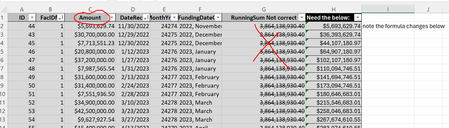
- Nov 14, 2024
Hi,
The criteria concatenation in
DSum("Amount","tblDrawsDetails","FacIDfk=" & [FacIDfk] And [ID]<=[ID])) AS RunningSum
should be
DSum("Amount","tblDrawsDetails","FacIDfk=" & [FacIDfk] & " And ID<=" & [ID])) AS RunningSum
Servus
Karl
****************
Access Forever News DevCon
Access-Entwickler-Konferenz AEK


ahh I had the quotes messed up. I didnt notice that.
It worked perfectly.
I did end up basing it on a date instead of an ID:
RunningSumDate: DSum("Amount","tblDrawsDetails","FacIDfk=" & [FacIDfk] & " And nz([DateRecd],0) <=" & Format$(Nz([DateRecd],0),"\#mm\/dd\/yyyy\#"))

you can't use DSum() on your RunningSum because:
- there are ID that have big ID yet earlier date (maybe late entry?)
- there are dates that fall on the same date (facIDfk = 3 , sep-26-2023, 3 records).
so your last hope is the function i provided.
- Tony2021Nov 14, 2024Steel Contributor
Hi Arnel,
Yes, you are correct with your points above.
I dont think #2 is as concerning though since I think <= on [DateRecd] would capture those records where they are on the same dates.
Could the function be revised to base it on the [DateRecd] instead of the [ID]? If too time consuming I can use the Dsum since it does work.
RunningSum: DSum("Amount","tblDrawsDetails","FacIDfk=" & [FacIDfk] & " And nz([DateRecd],0) <=" & Format$(Nz([DateRecd],0),"\#mm\/dd\/yyyy\#"))
thank you sir!
- Nov 14, 2024
Hi,
so your last hope is the function i provided.
or a combination of date and ID.
Servus
Karl
****************
Access Forever, News, DevCon
Access-Entwickler-Konferenz AEK- arnel_gpNov 14, 2024Steel Contributor
or a combination of date and ID.
try your suggestion and you will see that the second record has RunningTotal, the same as it's amount (30,700,000.00) when the RunningTotal should be, up to that record, 36,393,629.74.