Forum Discussion

Connecting match to a dropdown list
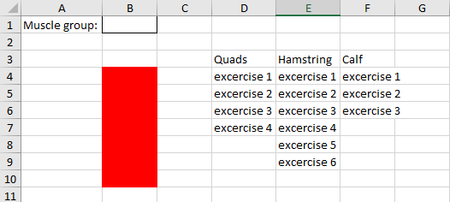
- Jan 12, 2021
It will be better if you indicate on which version of Excel you are - are you with dynamic arrays, LET() function?
Couple of more variants
=INDEX($D$4:$F$36,SEQUENCE(COUNTA(INDEX($D$4:$F$36,0,MATCH($B$1,$D$3:$F$3,0)))),MATCH($B$1,$D$3:$F$3,0))
or
=INDEX($D$4:$F$36,ROW(INDIRECT("A1:A"&COUNTA(INDEX($D$4:$F$36,0,MATCH($B$1,$D$3:$F$3,0))))),MATCH($B$1,$D$3:$F$3,0))


SergeiBaklan Riny_van_Eekelen, Thank you both for your fast response. I really like your ideas, but there is one problem. If I add more exercises the cells in the red collum won't add them automatically. Is there a way I can add excercises in for example quads and that is will show in the red cells?

Lucdejong One way would be to expand the named range for each muscle group by one empty cell at the bottom and insert new exercises above that empty cell. Then, the named range will expand with the insertion of a new item and INDIRECT will display the expanded range automatically.
- LucdejongJan 12, 2021Copper Contributor
Riny_van_Eekelen when I try to do that i get this
In E7 I added Ex7, but it doesn't show it in B19. What am I doing wrong?
- Riny_van_EekelenJan 12, 2021Platinum Contributor
Lucdejong Forget about the INDEX functions as the one with INDIRECT seems to work for your.
I've redefined each of the named ranges so that the include the options plus one extra cell (coloured green, just to visualise it). Now, to void the empty cells in the lists to show up as zeros, you need to use custom formatting to suppress them.
Right-click a green cell, press Insert, select to Shift cells down. Enter a new item in the list. Have done that in the attached file. See if it works for you.