Forum Discussion

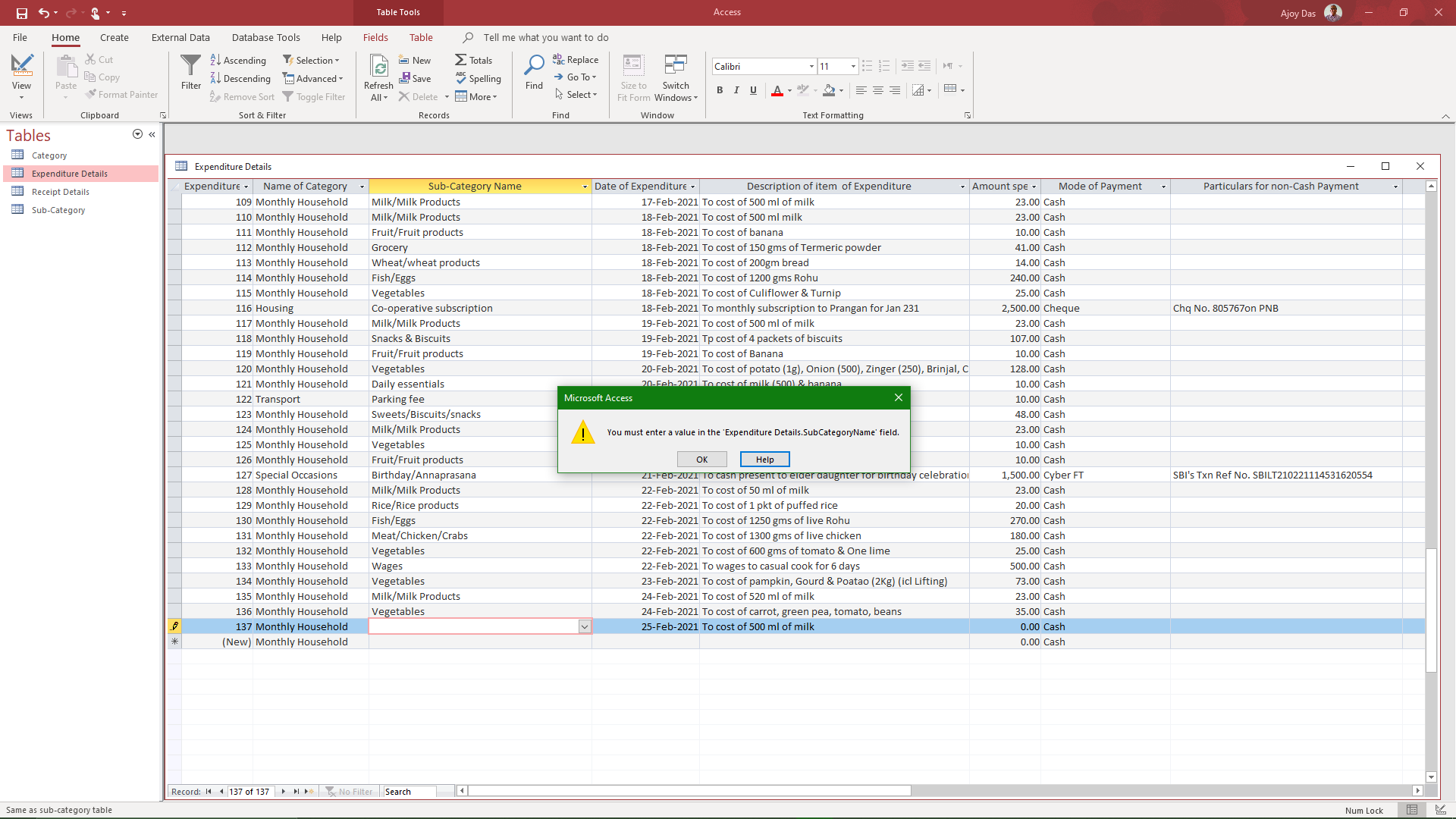
Access error screen does not close after Ok button of error message is clicked
I have been using Microsoft Office and Access for decades, But have never before faced a problem like the one I am going to describe below before the current version of Windows 10.
When by mistake a data type different from the one provided for is inserted in a field an error message pops up saying "you must enter a value in the field, with two buttons 'OK' and "Help" at the bottom of the error screen. When OK or cross at the top right of the screen is clicked the error screen should go to enable entry of correct data in the related field. But this does not happen; the screen only blinks when either the OK button below or the cross on the top right is clicked. I tried several times with the same result. I went for the online repair of Office 365 and tried again but the result had been the same. Request a solution as early as possible from anyone in the tech community.
14 Replies
 BeverlyJMcKCopper Contributor
I found that if I hold the Esc key for a couple of seconds the error goes away.
 Isla37Copper ContributorHello,
Has a solution been found? I'm going through the exact same thing and ive been all night trying to figure out how to fix it, When i press and hold ESC it would get out of the warning message but would delete some data along. Someone please help!!!!!!- HaNguyen1207Copper ContributorI also encounter the same issue. Did you find a solution to this? Please tell me if you did!
 cclee470Copper ContributorI encountered the same problem. Did you find a fix for it?
- George_HepworthSilver Contributor
Which event triggers this error? It could be that you are in a loop where the error is raised over and over because you need to undo a control that has the invalid attempted value in it, but until you remove that invalid value, the same error is raised again. I'm thinking perhaps a Before Update event would be the most likely.
 Ajoy DasCopper Contributor
Hi George
No, this is not a loop event. It occurred when I opened the Access app and was entering the first record of the day while erroneously entered a data of type different from what was set up for that field.
No. It was not Before the Update situation. The office 365 and Windows update were both up-to-date when this happened.
- George_HepworthSilver Contributor
Sorry, perhaps I was not as clear as I hoped. I'm not talking about an update to the software. I'm talking about an Update event in a control on the form. Like this example, where failing to cancel and undo the attempted invalid entry sends the event into a loop as it tries to update, can't because of the response to the question, but still has the wrong value, so it triggers the before update event again.
Private Sub cboTestTimeOfDayID_BeforeUpdate(Cancel As Integer)Dim lngMealItemCount As Long
With Me
If MsgBox(Prompt:="Click ""Yes"" to confirm you want to change this meal.", _
Buttons:=vbYesNo + vbCritical, _
title:="Change a Saved Meal?") = vbNo Then
Cancel = True
.cboTestTimeOfDayID.Undo
End If
End With
Exit Sub
End Sub