Forum Widgets
Latest Discussions

Driver signing (EV certificate) fails before 9am.
I would be nice to be able to codesign my driver before 9am sometimes, being in Japan that presumably means before midnight GMT. If I try, I get an error "future date" from the Validation section in New Hardware Submission. Unless it is something I do wrong? I do use " /uselocaltime". This is not a new issue, never been able to. Wait until 9am and codesign of the very same binary works fine.lordlundmanJul 22, 2026Copper Contributor24Views0likes1Comment
DPS service
Hi, a { text-decoration: none; color: #464feb; } tr th, tr td { border: 1px solid #e6e6e6; } tr th { background-color: #f5f5f5; } I’m wondering whether I can intentionally create a failure scenario that the Diagnostic Policy Service (DPS) would be able to troubleshoot—perhaps something related to memory, power, USB, or audio. I’d like to verify whether DPS is actively detecting and troubleshooting these types of errors in Windows. Thank you so much in advance! AishaAisha325Jul 07, 2026Copper Contributor37Views0likes1CommentStrange File Structure
Trying to clean up a USB drive and ran into something strange. D:\>dir "New folder" Volume in drive D is ESD-USB Volume Serial Number is A862-A0DD Directory of D:\New folder 01/12/2026 05:22 AM <DIR> . 01/12/2026 05:22 AM <DIR> .. 0 File(s) 0 bytes 2 Dir(s) 26,539,491,328 bytes free But I can't delete "New Folder". Then: D:\>dir "New folder" /q /r Volume in drive D is ESD-USB Volume Serial Number is A862-A0DD Directory of D:\New folder 01/12/2026 05:22 AM <DIR> \Everyone . 01/12/2026 05:22 AM <DIR> \Everyone .. 0 File(s) 0 bytes 2 Dir(s) 26,539,491,328 bytes free Seems to be hidden folders. D:\>cd "New folder" D:\New folder>dir Volume in drive D is ESD-USB Volume Serial Number is A862-A0DD Directory of D:\New folder 01/12/2026 05:22 AM <DIR> . 01/12/2026 05:22 AM <DIR> .. 0 File(s) 0 bytes 2 Dir(s) 26,539,491,328 bytes free D:\New folder>dir /q /r Volume in drive D is ESD-USB Volume Serial Number is A862-A0DD Directory of D:\New folder 01/12/2026 05:22 AM <DIR> \Everyone . 01/12/2026 05:22 AM <DIR> \Everyone .. 0 File(s) 0 bytes 2 Dir(s) 26,539,491,328 bytes free D:\New folder>dir \Everyone Volume in drive D is ESD-USB Volume Serial Number is A862-A0DD Directory of D:\ File Not Found D:\New folder>dir \Everyone /q /r Volume in drive D is ESD-USB Volume Serial Number is A862-A0DD Directory of D:\ File Not Found What is going on?sabermanJun 02, 2026Copper Contributor39Views0likes1CommentFeature Request: More Cursor/Pointer Roles
We need a feature that makes us customize the cursor roles (below)! Because Linux has more cursor roles, we cannot customize them in Windows. Cursor Roles Suggested: No drop - arrow with a no sign overlay Column Resize - horizontal resize but for grid resizing Row Resize - vertical resize but for grid resizing Vertical text - I-beam rotated 90 degrees Grab - open hand Grabbing - closed hand Cell - bold plus sign Copy - arrow with a plus overlay Alias - arrow with an iron chain overlay Zoom In - magnifying glass with plus sign overlay Zoom Out - magnifying glass with minus sign overlay Tags/Keywords: pointer, cursor, mouse, customizable, customILoveDogs5335May 30, 2026Copper Contributor33Views0likes0CommentsThe New Activation Portal Is Partly Broken But It Is a MAJOR Inconvenience For Me & Others.
I Run Windows 7 Ultimate x64 And I need to Activate Windows, I am used to the new aka.ms/aoh replacing the phone line. But I Have Activated Windows XP & Vista Without Any Problems Multiple Times, I Tested It Too, Tried 7, Starter, Home, Pro, Ultimate, Even x32 & x64. Though, No matter what, everything BUT Windows 7 Works. This Is Clearly a Server Sided Issue And I've Had This problem for the past months maybe even about a year. (The Product Key I Am Using Is Not Public on The Internet So It's Not Blocked/Used Publicly By Everyone, it is the same product key that came with the CD) And I Can Say For Certain This is a Server Sided Issue. Please Help. And Thank You For Your Time.MorganDevMar 25, 2026Copper Contributor256Views0likes1CommentFollow up to Azure Host OS Article
When will there be a follow up to the Azure Host OS article? It would be great to learn more about how the NT kernel is being used inside Microsoft outside of standard Windows. This is the article: https://techcommunity.microsoft.com/blog/windowsosplatform/azure-host-os-%E2%80%93-cloud-host/3709528SteskaljMar 04, 2026Steel Contributor48Views0likes0CommentsAllow developers to create their own user space
It would be wonderful if Microsoft and the windows team documented how developers could create their own userspace. The NT Kernel was designed for this, and it would allow better extensibility of the overall OS. It also would be a way to partial opensource Windows. You could license the kernel at a low price, and let others build the user space. This would be in the vain of the original WSL, but it would allow any developer skilled enough to bring enhancements to the system.SteskaljJan 07, 2026Steel Contributor32Views0likes0Comments
Unable to copy desktop files to external drive on Windows 10...
I am trying to get a new computer set up for a friend. I have done this many times for other people, but something is wrong with this one. Every time I try to copy the desktop files to an external drive (all of them are PDFs, with one image), nothing happens. I drag and drop them - nothing copies. There are no errors, either. I have tried two different externals - both formatted exFAT. There is literally no reason for this to be happening. If anyone know what to check, your input will be greatly appreciated. Thanks in advance. P.S. Too bad that Microsoft isn't smart enough to create a way to move the files easily between computers WITHOUT needing a Microsoft account to do so. Apple had had them beat at this for many, many years now. I can literally fire up a new Mac, and transfer all of my files - INCLUDING applications - in less than 2 hours. Pretty sad...1971ChevelleNov 30, 2025Copper Contributor31Views0likes0CommentsWindows Update, ESU, System Restore fail, fill C: drive
My C: drive on my laptop running Windows 10 Home has gone from about 20 GB free to 133 MB free after aborting Windows 11 installation, trying to sign up for ESU and trying several times to use System Restore to put things back the way they were. I'm hoping you can tell me where to look for the leftover files that are causing my C: drive to be so full. Here's roughly what I did, in order: I set Restore Points between the steps below. In Windows Update, chose to update from Windows 10 to Windows 11 24H2. After a lot of downloading, I got an error saying C: was full, that I should attach an external drive and remove about 5 GB from the disk. I tried for a while but realized that installing Windows 11 could fill my C: drive and make the computer useless. So I canceled the update. I read that ESU (which extends Windows 10 updates for a year) requires a Microsoft account to sign up. I only use local accounts because I'm often not on the Internet, and a Microsoft account requires me to be online. I created a Microsoft account with administrator privileges. From there, I ran Windows Update... but didn't see the option to join ESU. Then I went to the local adminstrator account and tried Windows Update again. I don't remember what happened, but I couldn't get ESU. The worst is that this changed my local admin account to a Microsoft account!! I tried System Restore to (I hoped) un-do the change to my local admin account, remove the Microsoft admin account, and un-do the files that were clogging my C: drive. But System Restore failed because there wasn't enough disk space. I tried earlier restore points, but for some reason they had been deleted. I started a chat with Microsoft support, then had to restart the chat after the first reboot during System Restore. The agents ran Disk Cleanup and also cleaned up various folders. That gave me about 3 GB free... not near the 20 GB I used to have. Luckily, the agent was able to restore my previous admin from a Microsoft account to a local account. What I think I need to know is what folders Windows Update, ESU, and System Restore use. I'm hoping I can go there, find the files changed yesterday afternoon / evening, and see that they take up nearly 20 GB... then I'd delete those files. For example, does ESU signup create C:\Windows\XYZ123? If you have any other suggestions, I'd sure appreciate them!mpeekOct 13, 2025Copper Contributor62Views0likes0Comments
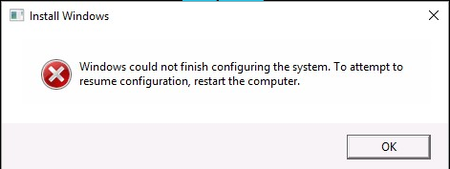
"Install Windows Windows could not finish configuring the system..." Stuck!
Tried to reset my wife's laptop to factory settings by reinstalling Windows. At one stage of the process after an automatic restart I got this error message. I then hit Shift/F10 to open Command Prompt and input "cd oobe" and hit Enter. I then input "msoobe" and hit Enter. Now the laptop displays a spinning circle of white dots with the caption "Just a moment..." and has been doing so for the past five hours. After this length of time I'm assuming that it's stuck and nothing will happen. What can I do?CustomstratSep 30, 2025Copper Contributor143Views0likes2Comments