Forum Widgets
Latest Discussions

Process Monitor, a minor FYI / feedback / bug report
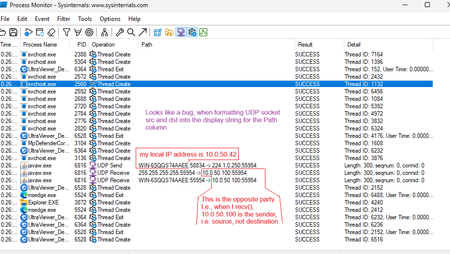
Big thanks to the Sysinternals team for the Process Monitor :-) that helps - I don't see why this is not a standard part of Windows :-) To the point: Apart from other things, Process Monitor can trace network socket API calls. I find this very useful right now, trying to troubleshoot a misbehaving proprietary app, where I do not know if it's the Windows Firewall dropping the incoming UDP packets, or the app itself. Well it seems that in my case it's the app, because I see the desired UDP responses coming in, in a packet sniffer (= before the firewall) and in Process Monitor (= at the sockets API level = after firewall). The app does get the response packet, and, apparently, ignores it :-) Further to the point: When tracing those UDP packets, i.e. send() and recv() API calls, Process Monitor helpfully displays the src and dst IP (or machine name) and UDP port numbers in the "Path" column (this is where filenames and directory paths normally appear, when tracing file access). And, when weaving the string for display, it apparently swaps the src and dst in recv()'ed packets, i.e. in the RX direction. I hope I'm interpreting this correctly. Just mu two cents worth. Thanks for your attention :-)frrJul 03, 2026Copper Contributor46Views0likes2Comments
Bugs in RAMMAP and ZOOM it, Contig question/improvement
I use the latest versions of Sysinternals' RAMMAP, ZOOM-it and Contig. 1. RAMMAP still contains a bug. Start the program and open the "Process" tab. You will see that RAMMAP truncates the names of the processes to the 1st 14 characters of the process names. If the name of a process is e.g. 30 characters long (including the extension) then RAMMAP only displayes the 1st 14 characters and then the last 16 characters are not shown at all. I brought this bug to the attention of Microsoft in the past but this hasn't been fixed yet. 2. The latest versions of ZOOMit fail to start on my Windows 7 system. It then generates an error. Something along the lines of "Failed to start". This applies to both the 32 bit and 64 bit versions. Previous version of ZOOMit in the past did run & start on my system. 3. Is CONTIG able to defragment directory files themselves ? If so, then what should I type in MSDOS ? These can be fragmented as well. A program called DEFRAGGLER is capable to defrag directory files itself but not CONFIG !!! In Windows MS-DOS one can target the directory itself by using a dot ("."). E.g. "CD c:\windows\." This targets the directory itself. To be added to CONTIG as well in a future version.Willy2Jun 16, 2026Copper Contributor28Views0likes1Comment
DebugView v. 5.0 freezes
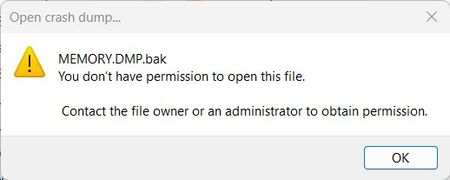
It appears that if the file C:\Windows\MEMORY.DMP exists, DebugView/UI will freeze completely if permission to open/read the file hasn't been granted. DebugView is also incapable of telling what it's trying to do at the time (ie. trying to process a crash dump file). Running DebugView under a non-Administrative account & trying to process a renamed crash dump file yields the following error message:ziczacApr 11, 2026Copper Contributor58Views0likes1Comment roark_hApr 08, 2026Copper Contributor32Views0likes0Comments
Migrate RDCMAN to another PC?
I have a RDCMAN.cfg with approx. 50 stored connection to other PC or servers. Maybe about 5 of them have stored passwords, the other have only stored login-names without password. I got a new PC and copied the rdcman.cfg to new PC, but now on every startup of RDCMAN I get an incredible long error message like: There were problems decrypting some credentials. Click OK to copy the details to the clipboard. Custom passwords: path .. server .... password ... Key is not valid for defined state ... repeat it 50 times .. How can I migrate my data to new PC?SolvedPierre-de-la-VerreJan 19, 2026Tin Contributor399Views0likes1CommentRequest: Versioned download URLs
Hi, The download URLs listed on https://learn.microsoft.com/nb-no/sysinternals/downloads/ all seem to point to the latest version of each Sysinternal tools. This is usually preferable, but causes problems for tools such as Chocolatey that validates the checksum of the ZIP file after download (see https://github.com/chocolatey-community/chocolatey-packages/blob/master/automatic/sysinternals/tools/chocolateyInstall.ps1). Checksum validation will then fail after each Sysinternal release since the file content have changed but not the URL (see https://github.com/chocolatey-community/chocolatey-packages/issues/2751). ASK: Would it be possible for the Sysinternal team to also offer download URLs that contain the version, so that Chocolatey and similar tools can start assuming a constant checksum for a given download URL? Thanks in advance, Fredrik OrderudforderudDec 08, 2025Tin Contributor119Views2likes2Comments
Compare 2 promon files
Hello, How to compare 2 procmon files from different desktops for a troubleshoot, which tool can be used ? Thanks SkakskakNov 24, 2025Copper Contributor104Views0likes2CommentsRDCMan v3.1: Recent Built-In Group Not Working
I am using Remote Desktop Connection Manager v3.1 (on Windows 11 Enterprise, 24H2) and have found the following two issues... The "Recent" Built-In Group doesn't work...the recently connected servers do not appear in this group (this fails for my colleague too). If you click on the URL shown in the "About" Dialogue box then RDCMan errors and then crashes! (Again, this too fails for my colleague). Many thanks! LeeleewilmottNov 04, 2025Copper Contributor278Views0likes0CommentsAutologon v3.10 fails to set password for Server 2025
When attempting to setup AutoLogon for Windows Server 2025, the AutoAdminLogon, DefaultDomainName, DefaultUserName are all set, though it does not appear to be setting the encrypted password correctly where ever autologon stores that value. I have tested it working successfully on Windows Server 2022.BGleasonOct 07, 2025Copper Contributor91Views0likes0CommentsHow to check the certificate when using RDCMan 3.1
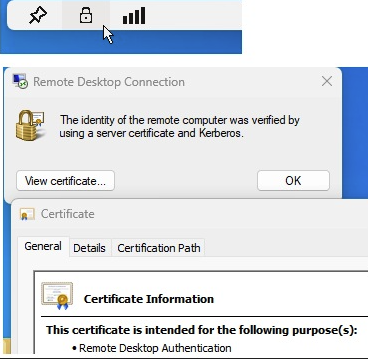
Hi all, Is there an easy way to check the Certificate used within RDCMan 3.1 tool, while remoting to different servers? I'm struggling to find this option, not sure if it even exists... Thanks.SokratisZotosAug 19, 2025Brass Contributor66Views0likes0Comments