Forum Widgets
Latest Discussions
Microsoft MSIX Packaging Tool Fails to create package due to AppXManifest (Typelib/Version/LibFlag)
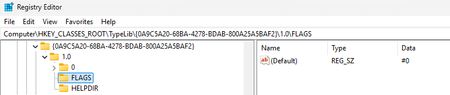
The MMPT will fail to save the package after capturing an installation of Altova XmlSpy Enterprise. This is due to the MMPT reading a reading a registry string value for a Com Version and adding it into the AppXManifest in an incorrect form that violates the COM schema extension validation ST_VersionCom. The error from the MMPT log: [11/10/2025 11:17:46 AM] [Debug] MakeAppx : error: Failure at packageWriter2->Close( manifestStream, contentGroupMapStream.Get()) - 0x80080204 - The specified package format is not valid: The package manifest is not valid. [11/10/2025 11:17:46 AM] [Debug] MakeAppx : error: Error info: /*[local-name()="Package" and namespace-uri()="http://schemas.microsoft.com/appx/manifest/foundation/windows10"]/*[local-name()="Extensions" and namespace-uri()="http://schemas.microsoft.com/appx/manifest/foundation/windows10"][1]/*[local-name()="Extension" and namespace-uri()="http://schemas.microsoft.com/appx/manifest/com/windows10"][1]/*[local-name()="ComInterface" and namespace-uri()="http://schemas.microsoft.com/appx/manifest/com/windows10"][1]/*[local-name()="TypeLib" and namespace-uri()="http://schemas.microsoft.com/appx/manifest/com/windows10"][2]/*[local-name()="Version" and namespace-uri()="http://schemas.microsoft.com/appx/manifest/com/windows10"][1]/@LibraryFlag [11/10/2025 11:17:46 AM] [Debug] '#0' violates pattern constraint of '[0-9a-fA-F]'. [11/10/2025 11:17:46 AM] [Debug] The attribute 'LibraryFlag' with value '#0' failed to parse. [11/10/2025 11:17:46 AM] [Debug] Cleaning up output file "\\?\%UserProfile%\Desktop\Altova-XmlSpy_28.0.0.0_x64__xwfzvwzp69w2e.msix". [11/10/2025 11:17:46 AM] [Debug] MakeAppx : error: Failure at (CreatePackage( overwrite, hashAlgorithm, fileList, outputPath, manifestStream.Get(), forceCompressionNone, performanceOptions, encryptPackage, encryptionOptions, cgmPath, mainPackagePathForResourceExemption, makepriExeFullPath)) - 0x80080204 - The specified package format is not valid: The package manifest is not valid. [11/10/2025 11:17:46 AM] [Debug] MakeAppx : error: Package creation failed. [11/10/2025 11:17:46 AM] [Debug] MakeAppx : error: 0x80080204 - The specified package format is not valid: The package manifest is not valid. [11/10/2025 11:17:46 AM] [Error] MakeAppx.exe failed, exit code = 1 [11/10/2025 11:17:46 AM] [Error] Error Finalizing Package: Process MakeAppx.exe failed with exit code 1. The values in the registry placed by the application that were captured: And the produced AppXManifest file contained: <com:TypeLib Id="744838d2-7537-47e2-affa-6e0d5fbb61c9"> <com:Version VersionNumber="1.0" LocaleId="0" LibraryFlag="#0"> <com:Win32Path Path="VFS\ProgramFilesX64\Altova\SharedBetweenVersions\AltovaScc32to64Bridge.exe" /> </com:Version> </com:TypeLib> As a workaround, it is possible to manually remove the '#' character from the LibraryFlag field in the AppXManifest allows the package to save. The MMPT should properly read this value as if it were a REG_DWORD of value 0 and generate a valid AppXmanifest. This is a common registry interpretation to make. Alternatively, as the value of 0 is meaningless, the parameter could be dropped, but if the vendor had requested "#1" this should also be handled.142Views0likes0Comments
Shortcut icons disappear
Hello! I wanted to add shortcuts of some applications to my desktop, then I found out it's impossible for a normal user. You have to either attach it to the task bar or the Start menu, and pray Microsoft won't mess up with your Start menu layout in the next update (happened twice already). I found out this discussion and followed the instructions (going to explorer.exe shell:AppsFolder and creating shortcuts from there), but it only worked for a few minutes. In less than 10 minutes, two of the six shortcuts I've created using this method had their icons replaced by white paper icons. After restarting the computer, only one remained with its original icon (Figma Desktop). And after updating Figma, it completely disappeared (not leaving just a white paper, the shortcut completely vanished from the desktop). When I go to the same folder, they are iconless there as well. So, how can I make desktop shortcuts that keep their nice icons even after restarting or updating the software? Thanks in advance!WicCaesarOct 31, 2025Copper Contributor121Views0likes0CommentsRemoval of an AppX/MSIX package leaving unwanted clutter in the user registry.
MSIX is supposed to be a clean uninstall. However, I have some detected some unnecessary garbage left behind when uninstalling under HKCU\Software\Classes. Take a package and install it. Then Uninstall it. Repeat that a few times. Open Regedit. Browse to HKCU\Software\Classes. Do a find on the package name,. You will find there is a key starting with AppX (followed by random looking letters) with subkeys Application, DefaultIcon, and possibly Shell. These were added during the installation of the package. Keep searching (F3). You will find the same information under an AppX... key for each package you originally installed. This does not appear to be due to delayed removal, as they remain weeks or months later.130Views0likes0Comments
Appx Package Leaves Behind DLLs on Uninstall (Pipeline vs Local Debug Build)
Hello everyone, I'm encountering an issue with my WPF application that's packaged as an appx file for sideloading. I'm new to this area, so any guidance or suggestions would be greatly appreciated. Issue Overview: Pipeline Build (Release): The appx package generated in our build pipeline (with code signing) installs and runs as expected. However, after uninstalling the app, certain DLLs remain in the Windows app folder. Local Build (Debug): When I generate the appx package locally using Visual Studio in Debug mode and perform the install/uninstall on the same device, the DLLs are cleaned up properly. I didn't changed any property in the appxmanifest.xml other than the publisher name and the certificate.timepasser00Feb 17, 2025Copper Contributor89Views0likes0Comments
Self-Signed Certificate in User Store Causes MSIX Installation Error
I created a self-signed certificate by following the official documentation provided https://learn.microsoft.com/en-us/windows/msix/package/create-certificate-package-signing The documentation instructs users to add the self-signed certificate to the current user's certificate store like so: New-SelfSignedCertificate -Type Custom -Subject "CN=Contoso Software, O=Contoso Corporation, C=US" -KeyUsage DigitalSignature -FriendlyName "Your friendly name goes here" -CertStoreLocation "Cert:\CurrentUser\My" -TextExtension @("2.5.29.37={text}1.3.6.1.5.5.7.3.3", "2.5.29.19={text}") However, when the certificate is added to the user-specific certificate store (Cert:\CurrentUser\My), attempting to install the signed msix file produces the following error: This app package’s publisher certificate could not be verified. Contact your system administrator or the app developer to obtain a new app package with verified certificates. The root certificate and all immediate certificates of the signature in the app package must be verified (0x800B010A). I had to resolve this by adding the certificate to the local machine certificate store (Cert:\LocalMachine\TrustedPeople) instead. Does anyone have insights into why adding the certificate to the user-specific store causes the aforementioned issue, despite this being what's suggested in the documentation?vanillafontFeb 13, 2025Copper Contributor1.1KViews0likes0Comments
How to convert msix to msi?
Hello, I am currently working with a Windows application packaged as an .msix file, which is used for connecting to Azure Virtual Desktops (AVD). I need to convert this .msix package to an .msi package. Additionally, I am looking for a way to convert a Microsoft Store app into an .msi package. Challenges: Converting MSIX to MSI: I need a reliable method or tool to convert the existing .msix file to an .msi file without using Advanced Installer (didn't work). Microsoft Store App to MSI: I also need guidance on how to package a Microsoft Store app as an .msi. If anyone is familiar with these processes, especially in the context of the windows app (yes there is an app named "windows app"), your help would be greatly appreciated. Thank you!HodniFeb 12, 2025Copper Contributor478Views0likes0Comments
MSIX appinstaller UpdateSettings
I have an MSIX and associated appinstaller file. Within the AppInstaller I have various Update settings such as OnLaunch / HoursBetweenUpdateCheck =0, ShowPrompt=true and automaticBackgroundTask. When I install the app using the appinstaller, this works, and the app launches. If I then close the app, and try to launch it again, the appinstaller prompt is launched, but with the message "Cannot Open App Package : failed due to unknown reason". In logs, I have the message "Error code: Activation is blocked due to the .appinstaller update settings for this app.. Activation phase: Deployment". Anyone come across anything like this? I have tried changing the AppInstaller Uri and the MainPackage Uri to local files (C:), mapped network drives and UNC paths. But the same appinstaller works for the initial installation, then fails on the update check.PeterCaugheyJan 15, 2025Copper Contributor134Views0likes0Comments
Understanding App Isolation Behavior in MSIX: Issue with System State Restoration After Crash
We have an application built with .NET Forms, while the security components (DLLs) are developed in C++. Recently, we packaged our application using MSIX (App Isolation) and signed it with a self-signed certificate. The Application launches and functions as expected. However, when we introduce an intentional crash (e.g., a null pointer exception), the system does not restore the changes made by the application, such as hiding the taskbar. Our understanding was that App Isolation would help revert any system modifications after a crash, but it seems this isn't the case. Is this expected behavior for App Isolation in MSIX, or are we missing something in our configuration? Any insights on ensuring system state restoration would be appreciated.Tamil_MDec 02, 2024Copper Contributor54Views1like0CommentsUnderstanding App Isolation Behavior in MSIX: Issue with System State Restoration After Crash
We have an application built with .NET Forms, while the security components (DLLs) are developed in C++. Recently, we packaged our application using MSIX (App Isolation) and signed it with a self-signed certificate. The Application launches and functions as expected. However, when we introduce an intentional crash (e.g., a null pointer exception), the system does not restore the changes made by the application, such as hiding the taskbar. Our understanding was that App Isolation would help revert any system modifications after a crash, but it seems this isn't the case. Is this expected behavior for App Isolation in MSIX, or are we missing something in our configuration? Any insights on ensuring system state restoration would be appreciated.Tamil_MDec 02, 2024Copper Contributor59Views0likes0Comments

Tags
- MSIX76 Topics
- appinstaller9 Topics
- msix packaging tool7 Topics
- APPX5 Topics
- MSIX Packaging Tools4 Topics
- appattach3 Topics
- MSIX AppAttach launch failure3 Topics
- MSIX LIMITATIONS3 Topics
- Access MSIX Container3 Topics
- UWP3 Topics