Forum Widgets
Latest Discussions

WSL Install Failures - 2.7.8.0
For those deploying new MCC servers, you may run into an error installing the distro for WSL, this appears to be due to a bug in WSL 2.7.8.0. Affecting KVM & AMD CPU devices. WSL 2.7.9 should be available shortly to mitigate this issue. Errors seen: Error code: Wsl/InstallDistro/Service/RegisterDistro/CreateVm/0x800705b4 Error code: Wsl/InstallDistro/0x80072eff Failure, expected Distro: Ubuntu-24.04. No Distros found. The same errors will be seen when running 'wsl --install' which defaults to downloading Ubuntu. https://github.com/microsoft/WSL/issues/40783marty5Jul 11, 2026Brass Contributor89Views1like1Comment
Import SSL failed 'Distribution Ubuntu-24.04-Mcc is not accessible from gMSA context'
I’m looking for assistance with troubleshooting issues importing a new SSL certificate purchased from Digicert. We are running MCC v2.0.0.2124_e with deployment application v1.0.24.0. Successfully generated the CSR, sent to Digicert and downloaded the signed certificate. Upon importing the certificate with gMSA on Windows Server 2022 we receive an error message "IMPORT_RESULT: FAILED, Certificate import failed”. I believe this is due to a known issue with the older deployment scripts v1.0.24.0. The following post acknowledges the issue and shows resolved in v1.0.26.0. Instructions mention “Then you may proceed to re-deploy your Connected Cache node…”. Is re-deploying the MCC node is required to fix the issue? I just updated the deployment scripts to v1.0.26.0 and attempted the certificate import again. Received error message "IMPORT_RESULT: FAILED, ERROR: Distribution Ubuntu-24.04-Mcc is not accessible from gMSA context”. Please let me know how to proceed. I can provide the logs for troubleshooting. If we need to start from scratch, do I need to generate another CSR request? Finally, are we able to use the Digicert certificate that we just purchased?mr-robotoJul 08, 2026Tin Contributor24Views0likes1CommentReminder: Intune-managed Win32 app delivery will be HTTPS-only, affecting Connected Cache customers
Starting today, Intune will be enforcing HTTPS-only delivery for managed Win32 app content Why this matters for Connected Cache customers: if HTTPS isn't configured on your cache nodes, clients that previously pulled Intune Win32 app content through Connected Cache can still download content, but those requests bypass cache nodes and fall back to CDN. This behavior can increase internet egress and bandwidth usage. This enforcement was previously announced in February via Message Center and the Intune Tech Community blog: How to enable HTTPS support for Microsoft Connected Cache for Enterprise and Education. Get started with the following documentation: Configure HTTPS on your cache nodes HTTPS setup on Windows HTTPS setup on Linux Validate HTTPS functionality Validate HTTPS on Windows Validate HTTPS on Linux Additionally, you can verify Intune Win32 HTTPS enforcement on a client machine Open C:\ProgramData\Microsoft\IntuneManagementExtension\Logs\AppWorkload.log. Find log entries that include the app download URL for the app assignment you are validating. Confirm the URL is HTTPS (for example, starts with https://). Optionally correlate with Delivery Optimization status to verify whether bytes are being served from cache versus CDN. Configuration Manager customers If you're using Configuration Manager distribution points with Connected Cache, review and apply the published hotfix and prerequisites: Connected Cache update for Microsoft Configuration Manager versions 2409, 2503, and 2509 (KB33247081). If you'd find it useful, reply in this thread and we can also post a step-by-step TLS setup walkthrough video for the Connected Cache community.adityamiddhaJun 25, 2026Microsoft1.2KViews2likes3CommentsInstall failed at Attempting to get task info for MCC Install Scheduled Task
Built a fresh Windows Server 2025 from March 2026 ISO and installed Hyper-V / WSL. After reboots I ran the script. It failed at the scheduled task step. Not sure how to troubleshoot this? Tried to re-run install script and errored out differently. I attached the logs. I renamed from .log to .docx to trick the attachment filter.Solvedhoyty76Apr 27, 2026Steel Contributor371Views1like9Comments
Windows 11 :: Return Code: 13631746
Hi Trying to install Cache Node on Windows 11 and it fails with the below error: System.Management.Automation.RuntimeException: Failure: MCC failed to install during provisioning command line, please check install from registered task install logs to diagnose issue and retry, Return Code: 13631746 Checked the log "WSL_Mcc_Install_FromRegisteredTask_Transcript_01-13-2025_03-19-26.txt" and last few lines shared below Get:37 http://security.ubuntu.com/ubuntu jammy-security/multiverse amd64 c-n-f Metadata [224 B] Fetched 15.2 MB in 2s (7274 kB/s) Reading package lists... E: Could not get lock /var/lib/dpkg/lock-frontend. It is held by process 1934 (unattended-upgr) E: Unable to acquire the dpkg frontend lock (/var/lib/dpkg/lock-frontend), is another process using it? E: Could not get lock /var/lib/dpkg/lock-frontend. It is held by process 1934 (unattended-upgr) E: Unable to acquire the dpkg frontend lock (/var/lib/dpkg/lock-frontend), is another process using it? ./installiotedge.sh: line 352: /etc/docker/daemon.json: No such file or directory ./installiotedge.sh: line 353: /etc/docker/daemon.json: No such file or directory ./installiotedge.sh: line 355: /etc/docker/daemon.json: No such file or directory Failed to restart docker.service: Unit docker.service not found. Hit:1 https://packages.microsoft.com/ubuntu/22.04/prod jammy InRelease Hit:2 http://security.ubuntu.com/ubuntu jammy-security InRelease Hit:3 http://archive.ubuntu.com/ubuntu jammy InRelease Hit:4 http://archive.ubuntu.com/ubuntu jammy-updates InRelease Hit:5 http://archive.ubuntu.com/ubuntu jammy-backports InRelease Reading package lists... E: Could not get lock /var/lib/dpkg/lock-frontend. It is held by process 1934 (unattended-upgr) E: Unable to acquire the dpkg frontend lock (/var/lib/dpkg/lock-frontend), is another process using it? Rules updated Rules updated (v6) Rules updated Haven't faced this error in other installation done on the same type of configurationSolvedbindumadhavaMar 30, 2026Brass Contributor680Views0likes5CommentsLarge Intune Win32 apps don't seem to cache
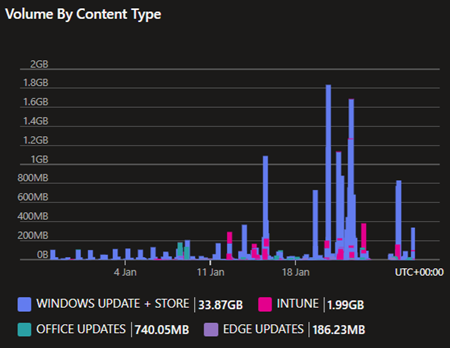
I was hoping to see one of our MCC's cache some large Intune Win32 app packages. One is around 28GB and a couple of others are around 18GB. This is within Intune's Win32 app size limit. It's for a self-deploying Autopilot build and these are large sets of maps and documents. All packages deploy accurately given the download time needed. We have 700 to build. The Internet service available at build sites is not really sufficient. An MCC seemed like the perfect solution. Unfortunately, there is apparent evidence that the packages are not being cached. Not only do they not appear to register in the metrics, each device takes all day to build. Obviously, the more we try to do at once, the worse it gets. Here is a screenshot of the metrics for the last 30 days: This cache is dedicated to our PC Build Room's VLAN subnet. As you can see, Intune content only seems to account for 1.99GB when it should be much more than this. The MCC is 300GB in size. Being able to diagnose why the MCC is not caching these Win32 app packages would be extremely useful. Is it our infrastructure or something else? I have an open support case and also posted about it in the MCCP. Microsoft reps advised that MCC should be able to support these packages.AndrewMcN_SFRSFeb 01, 2026Brass Contributor193Views0likes0CommentsWin 2025 - MCC Install Failure
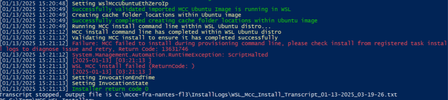
WSL_Mcc_Install_Transcript [08/11/2025 14:41:51] Completed configuration of port forwarding [08/11/2025 14:41:51] Setting WslMccUbuntuEthZeroIp [08/11/2025 14:41:51] Creating cache folder locations within Ubuntu image [08/11/2025 14:41:51] Successfully completed creating cache folder locations within Ubuntu image [08/11/2025 14:41:51] Running MCC install command line within WSL Ubuntu distro... [08/11/2025 14:45:27] MCC install command line has completed within WSL Ubuntu distro [08/11/2025 14:45:27] Validating MCC install to ensure it has completed successfully [08/11/2025 14:45:27] Failure: MCC failed to install during deployment, please check install from registered task install logs to diagnose issue and retry, Return Code: 13631746 [08/11/2025 14:45:27] System.Management.Automation.RuntimeException: ScriptHalted [08/11/2025 14:45:27] [2025-08-11] [02:45:27 PM] [08/11/2025 14:45:27] WSL MCC install failed (ReturnCode: 13633026) [08/11/2025 14:45:27] [2025-08-11] [02:45:27 PM] [08/11/2025 14:45:27] Setting InvocationExitCode [08/11/2025 14:45:27] Setting InvocationErrorMessage [08/11/2025 14:45:27] Setting LastCompletedInstallStep Unregistering. [08/11/2025 14:45:28] Unregistered base Ubuntu image version: Ubuntu-24.04-Mcc after successful install of MCC WSL_Mcc_Install_FromRegisteredTask_Transcript [✓] Certificate matches expected thumbprint! Geo certificate verification successful. Fetching Geo response... % Total % Received % Xferd Average Speed Time Time Time Current Dload Upload Total Spent Left Speed 100 270 100 270 0 0 29 0 0:00:09 0:00:09 --:--:-- 62 Using default MCC KV host. [!] Only 1 cert(s) found. Server may not be sending full chain. MCCKV certificate verification failed. Exiting. [08/11/2025 14:45:26] MCC install has completed within WSL Ubuntu distroSolvedmarty5Dec 10, 2025Brass Contributor676Views0likes4Comments
Question regarding update requests on the MCC node
So, as I have understood it, the MCC requires an update request to be requested 3 times by different devices before it actually starts to download it to cache it. 1. How many downloads does the MCC node download at the same time? 2. Does the MCC node keep a que list? 3. Does an update request ever "time out" on the MCC node or is it kept forever until reaching 3? What we have seen on the lab with 10 laptops, it is struggling to get more than 20% updates distributed from the MCC node. We re-install the laptops with the same USB installer multiple times when Windows reports it to be updated, so all of them are installed on the same build level every time. 4. How many times do we need to "re-install" windows until all updates are cached?MakkyDec 09, 2025Copper Contributor30Views0likes0CommentsCheck cache status on MCC node
Is it posssible to check/monitor the amount of data the MCC node has cached? Since the MCC downloads updates only when requested 3x by the clients, it would be good to know how much % of an update is actually cached. This would give the most value when troubleshooting the MCC and the distribution of updates. We have configured a MCC in our LAB with 10 connected clients, and the amount of data shared varies too much for each client.MakkyDec 02, 2025Copper Contributor83Views1like0Comments


Tags
No tags to show