Forum Widgets
Latest Discussions

DPM 2025 UR1 Agent Install Failed
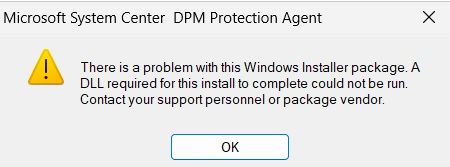
Hi, I have fresh installed DMP server with the following stack: Windows Server 2025 Standard SQL Server 2022 Reporting Services 2022 After DPM install I updated to UR1 without agent deployment. I have new cluster Windows Server 2025 Cluster Nodes and I would like protect with the new DPM but agent install is failed with the following message: Install protection agent on HOSTNAME failed: Error 313: The agent operation failed because an error occurred while running the installation program on HOSTNAME. Error details: Fatal error during installation (0x80070643) Recommended action: Review the log files on HOSTNAME: [windir]\temp\msdpm*.log and take appropriate action. Retry the operation, and if the error persists, restart the computer and then retry the operation again. I find this in the log: Product: Microsoft System Center DPM Protection Agent -- Error 1723. There is a problem with this Windows Installer package. A DLL required for this install to complete could not be run. Contact your support personnel or package vendor. Action _CheckCertificatesConfigured, entry: CheckCertificatesConfigured, library: C:\WINDOWS\Installer\MSI6206.tmp Error 1723. There is a problem with this Windows Installer package. A DLL required for this install to complete could not be run. Contact your support personnel or package vendor. Action _CheckCertificatesConfigured, entry: CheckCertificatesConfigured, library: C:\WINDOWS\Installer\MSI6206.tmp Action ended 12:11:00: _CheckCertificatesConfigured. Return value 3. I tied these steps: 1. I can deploy dpm agent from my previous dpm 2022 server with success to the host 2. I copied the dmp agent installer to the host from the original DPM 2025 installer 10.25.25.0 and I can install the agent with success 3. I copied the dmp agent installer to the host from the updated UR1 environment 10.25.39.0 but i can't install and got this error message witch is almost the same what I find in the log I think something is wrong with the updated UR1 agent. I am looking for solution.Antal_KabatekFeb 26, 2026Brass Contributor190Views2likes2Comments
DPM used for Sharepoint doesn't clean catalog table
Hi All, we are using DPM for saving our SP farms in DEV, TEST and PROD environment. On DEV farm (quite small) we don't have any kind of issue and both recovery point tasks and SharePoint Catalog Task are executed without errors. On TEST and PROD, instead we are often facing some errors (MDF in use, VSS issues and so on) and for this reason we had to completely delete and re-create the protection groups and we even deleted the data inside. So we started from the scratch. Nevertheless even if we completely deleted ALL the protection groups without retaining data, our DPM database kept growing steadily and no data have been cleaned or removed. Above all we noticed the following table continuing to grow: tbl_RM_SharePointRecoverableObject In addition we found in some DPM database tables that the deleted protection group are still present in the table but they are marked as deleted. But even if they are in this state, the DPM doesn't clean anything and the DB still growing... The MaintenanceJob CatalogPruning it's executed but it does absolutely anything. So my question is: Are there jobs that clean up all this obsolete data? Isn’t there any maintenance to clear everything out? Thanks AntonioaviggianoSep 24, 2025Copper Contributor33Views0likes0CommentsDPM Backup Issue – Replica Inconsistent
Hi, We are using Microsoft SCDPM and everything was working fine until recently. We suddenly started receiving the error “replica is inconsistent.” There were no VM migrations and no configuration changes. Running a consistency check does not fix the problem. The only way we can make it work is to remove the machine from the protection group, select the option to delete the existing data, and then re-add it. This means we lose all previous backups. After four to six days the same issue comes back again, affecting random VMs and not always the same ones. Is there any other way to resolve this without losing backup history? Where can I look at the logs to understand the root cause? Is there still any way to get Microsoft support for DPM?Whatever1Sep 08, 2025Copper Contributor133Views0likes0Comments
DPM 2025 failing with SharePoint Subscription Edition
I recently upgraded from SharePoint 2019 to Subscription Edition. I was able to back SP 2019, but not the new version. It gives errors such as the following: Retry the operation. If backup is failing for a SQL instance or Sharepoint Farm, make sure SQL OLEDB driver version 19.3.3 or higher is installed on protected computer. I have tried both 9.3.5 and 9.4.1 of the OLE DB drivers without success, on both the SharePoint and SQL servers. In the past, I only installed this driver on the SQL server. I believe there may be some incompatibility with OLE DB 9.4.1 as with it installed the non-farm related databases also fail intermittently with this message, but not with the 9.3.5 driver. I'm using SQL Server 2022. Both DPMRA and SYSTEM have sysadmin roles on the SQL server. Anyone having this type of problem?simdocJun 16, 2025Tin Contributor165Views0likes3CommentsLink to the social group for backup (DPM and Azure)
Hi ! All welcome and invite to the facebook group "https://www.facebook.com/groups/SCDPM/"! What can you do in this group? publish the articles about Microsoft Backup System (DPM, Azure Backup, etc); help each other answering a question; ask a question; leave feedback;Eugene LeitanMay 16, 2017Tin Contributor371Views0likes0CommentsGet Started with DPM
What is Data Protection Manager (DPM)? System Center 2012 – Data Protection Manager (DPM) is an enterprise backup system. Using DPM, you can back up (copy) data from a source location to a secondary target location. If the original data is unavailable because of planned or unexpected issues, you can restore the data from the secondary location. You can use DPM to back up application data from Microsoft servers and workloads, and to back up file data from servers and client computers. You can create full backups, incremental backups, differential backups, and bare-metal backups to completely restore a system. Read the full documentation on TechNet.Lana O'BrienOct 07, 2016Former Employee542Views1like0Comments