Forum Widgets
Latest Discussions

Offie 365 log in window suddenly disappears.
I have an Office 365 subscription, and when I try to open a file (Word or Excel), a window tells me to connect to my account. I type my email, and another window opens, but for only a second, not leaving me enough time to type in my password. I've deleted and reinstalled the app without success. The MS support was not able to help and advised I post here for help. Thank you!aubelineApr 02, 2026Copper Contributor84Views0likes1CommentOnly Powerpoint templates in Create in Office.com
Why do I see only our Organisation Powerpoint templates in https://m365.cloud.microsoft/create/?auth=2 In the desktopapp alle are accesible Word, Powerpoint, Excel, but not online. Anyone? This: Connect-SPOService Set-SPOTenant ` -OrganizationAssetsLibraryUrl https://tenant.sharepoint.com/sites/sjablonen/OfficeTemplates ` -OrganizationAssetsLibraryType OfficeTemplateLibraryAndré MaasFeb 25, 2026Brass Contributor130Views0likes5Comments
My Feedback Portal account is bugged out.
I changed my Microsoft password a year ago, and it updated everywhere other than the Feedback Portal. As a result, I get an error when I try to login, or do anything on the page. Microsoft account support's suggestion was to login to the Feedback Portal which is insane given I'm having issues accessing it. How can I get this issue resolved? I've got three separate support tickets now and they keep asking me to wait 24 hours to get the issue resolved. Can someone from the Feedback Portal team please contact me to resolve this?" This is what Microsoft Support have said: "understand your frustration, and yes—this is an account‑related issue because the Feedback Portal is still tied to your old alias, which causes login conflicts and forces you out. Your Microsoft account itself signs in correctly, but the Feedback Portal is pulling outdated identity data that you cannot update on your own. Since you cannot access the Portal to submit feedback, directing you back there is not a workable solution. What you need is for Support to escalate this to the internal Identity/Feedback Platform engineering team so they can manually correct the outdated alias mapping on the backend. In this situation, the Feedback Portal and Tech Community teams are the ones who manage and maintain that specific platform. Because the issue appears on the Feedback Portal side—even though your Microsoft account is working normally—only their dedicated team can make the necessary corrections on their end. That’s why we are guiding you to connect with them through the links provided: https://techcommunity.microsoft.com/ or https://feedbackportal.microsoft.com/feedback. They will be able to review the portal‑specific account data and assist you further. I understand why this is frustrating. Since you’re unable to stay signed in to the Feedback Portal, I completely see why posting there isn’t possible for you. However, I do need to be transparent: I’m not able to escalate this issue directly to the Feedback Portal team, as they don’t provide internal escalation channels for us and only accept requests through their own platform. "bobbyeagleFeb 02, 2026Brass Contributor60Views0likes1Comment
Microsoft 365 emails are not working currently. I see it's in the news but I don't see anything here
We're not receiving emails since 1300 Eastern Time, my business is being affecteed heavily. I see it's in the news but there is no topic about this here.rortizJan 22, 2026Copper Contributor136Views1like1Comment
Office home and business Premium "service unavailable", product key activation
I purchased office home and business premium through a third-party service and have successfully redeemed the product key and manage to get through the first step of activating my lifetime subscription. However, when I am navigated to the 64g or 32g page, I select the appropriate gig for the product purchased, and once I initiate this download, I am brough to a page indicating that service is unavailable "we are having technical difficulties. I have deleted all previous versions of word on my device, and followed each step shown available. This is my second time purchasing this product due to having similar issues and am hope that this post will provide me the guidance necessary to finally activate this service to my current Microsoft account. Thank you in advance.JFloresJan 03, 2026Copper Contributor198Views0likes1CommentBest Practices for Hybrid Cloud Deployments with Microsoft 365 & Azure
Hi everyone, I’m Jaxon Varr 👋 I’ve been working with Microsoft 365 and Azure for a while now, and I’m looking to refine our hybrid cloud deployment strategy. Right now we’re integrating Azure AD with on-prem identity services and expanding into Azure Virtual Desktop. Does anyone have recommendations for best practices around security, identity sync, and performance optimization when connecting Microsoft 365 services with Azure? I’d love to hear real-world insights or helpful resources. Thanks in advance!Jaxon-VarrDec 31, 2025Copper Contributor280Views0likes0Comments
Network connectivity test TCP Connection results unreliable
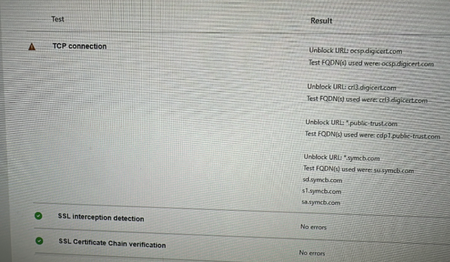
My team has spent the last 2 business days trying to get the https://connectivity.office.com/ TCP connection test to complete successfully to appease the Microsoft Unified Support Team. They don't want to take our MS Teams crash diags until they see SSL Interception Detection and TCP connection tests passing successfully. We can't get TCP connection tests to pass, we get one of the following: Success Attempt #1 Success, Attempt #2 Failure Any number of errors to unblock URLs such as (but not limited to) ocsp.digicert.com,ocspx.digicert.com,ocsp.omniroot.com,su.symcb.com,sr.symcb.com,sd.symcb.com,s1.symcb.com,sa.symcb.com We figured it was something with the corporate network but that's not the case. Last night we had about 50 employees try this test from their home (personal) computers that have no connection to our corporation. The TCP Connection test fails on home (consumer) PCs. What's the story with this TCP Connection check?BenConradSep 30, 2025Copper Contributor821Views1like2CommentsMicrosoft 365 network connectivity test hanging on Running web browser tests
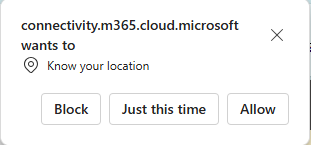
Hi community, I have this issue on different devices and from different locations. Whenever I visit https://connectivity.m365.cloud.microsoft/ and want to run the test, I select "Add location" instead of "Automatically detect location", because I'm on a laptop without GPS and don't wont to use the WiFi recognition. I start typing the town, select it from the list of choices, and click on "Run test". Nevertheless, a pop-up comes asking for access to location services, to which I select "Block" After that, the web application gets stuck on "Running web browser tests" and is not showing any results. I had this issue on Windows 10 and on Windows 11, and on Chrome and on Edge. Any idea how to solve this?BoSoloJul 23, 2025Copper Contributor636Views0likes5CommentsReleased the full version of M365 connectivity test tool (MCT) in GCC environment
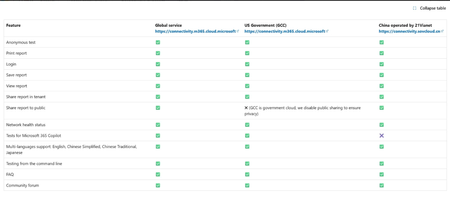
I am pleased to announce that we have successfully released the full version of the M365 connectivity test tool (MCT) in the GCC environment today. This investment will ensure excellent network connectivity and user experience across all clouds, including around 5 millions users in GCC. You can find the updated public documentation at [here] and the table below shows the feature comparison across all clouds. Please let us know if you have questions, thanksAres ChenJun 18, 2025Microsoft532Views1like0CommentsWebsocket connections to critical Microsoft 365 domains
We continue to get warnings on our tenant regarding Websocket connectivity errors. Full message states: We've detected WebSocket Secure (WSS) failures to the following unified domains. I can't publish the wildcarded URLs here, but you'll know the ones I mean from your M365 admin networking connectivity insights page. I don't understand this as we effectively have those domains whitelisted/bypassing https inspection etc and everything seems to be working as normal. Nothing has been changed as far I'm aware. Anyone else seen this warning in their tenancy? Anything else we can check or try to sort the issue. Or is it just something to note?? We have a support ticket in - but on doing the initial check nothing is showing up. Our networking team have confirmed with me that the connection sends data to Microsoft uninspected. For that reason, it shouldn’t cause the websocket errors that are being reported.ML79Jun 17, 2025Copper Contributor1.2KViews0likes3Comments



Tags
- office 365156 Topics
- exchange49 Topics
- deployment14 Topics
- migration13 Topics
- microsoft 365 groups11 Topics
- microsoft 365 apps6 Topics
- Network connectivity6 Topics
- hybrid6 Topics
- networking5 Topics
- Skype for Business4 Topics