Recent Discussions

Exempt a specific container in MDC
You don't need a full exemption for this — the built-in policy behind "Immutable (read-only) root filesystem should be enforced for containers" already supports per-container and per-image exclusions natively, which is more precise than exempting at the resource/cluster level. This recommendation is implemented via the Azure Policy Add-on for Kubernetes (Gatekeeper constraint) as part of Defender for Cloud's data plane hardening. The underlying policy definition supports these parameters: excludedContainers — exclude by container name excludedImages — exclude by image (supports prefix matching, e.g. myregistry.azurecr.io/legacy-app:*) excludedNamespaces — exclude entire namespaces (e.g., kube-system, useful for system pods that legitimately can't run read-only) To configure: Defender for Cloud → Recommendations → select this recommendation → Take action tab, where you can set these parameters directly without touching raw policy JSON. Alternatively, if you manage policy via Environment Settings → Security policies → Standards, you can set the same parameters on the standard assignment. Given you said multiple containers across airflow/db1, airflow/sql1, etc. show "Unhealthy" — if these are legitimate exceptions (e.g., a database container that needs to write to its filesystem by design, not just a misconfiguration), excludedContainers naming each container is the cleanest fix and keeps the recommendation enforcing everywhere else in the cluster. I'd reserve a full policy exemption (Azure Policy exemption resource) for cases where you need it tracked for compliance/audit purposes specifically — the parameter-based exclusion is the more "native" and maintainable fix for ongoing operational cases like this.28Views0likes0CommentsExempt - Azure CSPM Recommendation" (Terraform exemption
The reason you're not finding a standalone policyAssignmentId/policyDefinitionId for this specific recommendation is that it isn't a standalone assignment — it's one control inside the built-in CSPM initiative (the "ASC Default" / Microsoft Cloud Security Benchmark assignment). That initiative does have an assignment ID; you just need to target the specific control within it, not look for a separate one. In azurerm_resource_policy_exemption (or the subscription/resource-group variants), the relevant fields are: policy_assignment_id → the ID of the initiative assignment (ASC Default / MCSB), not a per-recommendation assignment policy_definition_reference_ids → an array scoping the exemption to just this one control instead of the whole initiative resource "azurerm_resource_policy_exemption" "function_app_network_exemption" { name = "exempt-function-network-restriction" resource_id = azurerm_linux_function_app.example.id policy_assignment_id = data.azurerm_subscription_policy_assignment.asc_default.id policy_definition_reference_ids = [ "<reference-id-for-the-specific-control>" ] exemption_category = "Waiver" # or "Mitigated" if an equivalent control exists expires_on = "2026-12-31T00:00:00Z" } To find the policy_definition_reference_id for this specific control: in the Azure Portal, go to Policy → Definitions, search for "Restricted network access should be configured on Internet exposed Function app" to get its definition ID, then open the initiative definition (ASC Default) and find the matching entry in its policyDefinitions[].policyDefinitionReferenceId array — that string is what goes in the array above. Two things worth deciding upfront before automating this: Waiver vs Mitigated — if you've genuinely restricted access another way (e.g., Private Endpoint), use Mitigated so it's distinguishable from accepted risk in reporting. Consider whether the exemption belongs at the resource scope (just this Function App) vs resource group/subscription — narrower is safer, but if you have a pattern of similar apps, a tagged-based resourceSelectors block can scale this without per-resource blocks.45Views0likes0CommentsRemediation Workflow Automation — Biggest Gap vs. Competing Exposure Management Platforms?
Exposure graph and attack path correlation in MSEM are genuinely strong — the cross-domain visibility (endpoints, identities, cloud, external surface) is one of the better implementations I've worked with, especially for shops already standardized on the Microsoft stack. The gap I keep running into is closed-loop remediation orchestration. Right now, when an attack path or critical exposure is identified, there's no native way to auto-generate a ticket, assign ownership, and track an SLA against it — that handoff still has to be built externally (Logic Apps, Sentinel playbooks, or a 3rd-party ITSM integration). This isn't just my experience; it's echoed in published Gartner Peer Insights reviews of the product, where users specifically flag the absence of in-platform workflows to raise tickets automatically and route them to the owning team. For comparison, Qualys built this natively into their Enterprise TruRisk Platform (QFlow) — automatic ticket creation in ServiceNow/Jira, ownership assignment, and SLA tracking, all without manual handoffs. Tenable One markets "workflow automation" as a core differentiator of its unified platform for the same reason: it's what turns continuous detection into continuous risk reduction, not just a better dashboard. Questions for the team / community: Is closed-loop ticketing/SLA tracking on the roadmap natively, or is the expectation that this stays external (Logic Apps/Sentinel)? For those running MSEM at scale — how are you currently bridging this gap operationally? Custom playbooks, or a 3rd-party orchestration layer on top?44Views0likes0CommentsExempt a specific container in MDC
I have this recommendation showing in defender. Immutable (read-only) root filesystem should be enforced for containers There are multiple containers inside AKS that are showing as "Unhealthy" airflow/db1 airflow/sql1 airflow/scheduler1 Is there a way to exempt a specific container or the whole recommendation has to be exempted. Thanks34Views0likes0Comments
Microsoft.Security/policies GET endpoint returning 404 — deprecated? What is the replacement?
Hi, We are using the Azure Security Center REST API (api-version=2015-06-01-preview) to retrieve security policies for a subscription. We are hitting a 404 Not Found error on the Get endpoint while the List endpoint works fine. Looking for clarification on whether this resource type has been deprecated and what the modern replacement is. --- Endpoints in use List Security Policies (WORKING): GET https://management.azure.com/subscriptions/{subscriptionId}/providers/microsoft.Security/policies?api-version=2015-06-01-preview This returns a valid JSON response with an array of policies, each having an id, name, type, and a properties object containing policyLevel, recommendations, pricingConfiguration, securityContactConfiguration, etc. Get Security Policy by Name (BROKEN): GET https://management.azure.com/subscriptions/{subscriptionId}/resourceGroups/{resourceGroupName}/providers/Microsoft.Security/policies/{policyName}?api-version=2015-06-01-preview --- Error received Not Found for url: https://management.azure.com/subscriptions/<sub-id>/resourceGroups/AzureEventHubIT-resource-group/providers/Microsoft.Security/policies/AzureEventHubIT-resource-group?api-version=2015-06-01-preview HTTP Status: 404 Not Found --- What we've observed - The List endpoint works and returns policies whose id values follow this exact structure: /subscriptions/{sub-id}/resourceGroups/{rg-name}/providers/microsoft.Security/policies/{policy-name} - The policy name in the List response matches the resource group name (1:1 mapping), so we are passing the correct value to the Get endpoint. - Despite using the exact name and resource group from the List response, the Get endpoint returns 404. - We also checked the https://learn.microsoft.com/en-us/rest/api/defenderforcloud/operation-groups?view=rest-defenderforcloud-2015-06-01-preview and noticed that Security Policies does not appear as a documented operation group in any version — including 2015-06-01-preview. The only documented groups for that version are: Discovered Security Solutions, Locations, Operations, and Tasks. --- Questions 1. Has the Microsoft.Security/policies resource type at the resource group scope been officially deprecated or removed? If so, is there a migration guide or announcement? 2. Why does the List endpoint still respond successfully while the individual Get endpoint returns 404? Is the List endpoint returning legacy/cached data? 3. What are the recommended replacement APIs for the functionality that was in the old policies resource? Specifically we need equivalents for: - properties.pricingConfiguration → Is this now covered by https://learn.microsoft.com/en-us/rest/api/defenderforcloud/pricings/get?view=rest-defenderforcloud-2024-01-01? - properties.recommendations (patch, antimalware, diskEncryption, etc.) → Is this now https://learn.microsoft.com/en-us/rest/api/defenderforcloud/assessments?view=rest-defenderforcloud-2020-01-01? - properties.securityContactConfiguration → Is this now Microsoft.Security/securityContacts (2020-01-01-preview)? 4. Is there any announced retirement date for the List endpoint as well? Any official documentation links or migration guides would be very helpful. Thank you.44Views0likes0CommentsMicrosoft Defender for Cloud
For security operations teams managing Microsoft 365 and Azure environments, knowing which event logs to monitor in the Defender portal is fundamental. The right logs give you visibility into identity threats, device compromise, and policy violations before they escalate. Here are the most critical event log categories: ## 1. Sign-In Logs (Entra ID) **Location:** Microsoft Entra ID > Sign-in logs Monitor failed sign-ins, unfamiliar locations, Conditional Access failures, and risky sign-ins flagged by Identity Protection. Identity is the primary attack surface—these logs detect credential compromise and lateral movement. ## 2. Audit Logs (Entra ID) **Location:** Microsoft Entra ID > Audit logs Track changes to user accounts, privilege escalations, Conditional Access modifications, and application consent grants. Unauthorized administrative changes can bypass security controls. ## 3. Device Compliance Logs (Intune) **Location:** Microsoft Intune > Devices > Monitor Monitor non-compliant devices, enrollment failures, and policy errors. Non-compliant endpoints represent unmanaged risk. ## 4. Threat & Vulnerability Management **Location:** Microsoft Defender > Endpoints > TVM Track critical vulnerabilities, missing updates, and exposed credentials. Proactive vulnerability management prevents exploitation. ## 5. Alerts and Incidents (Defender XDR) **Location:** Microsoft Defender > Incidents & Alerts Your central SOC dashboard—monitor high-severity alerts for ransomware, credential theft, and lateral movement across endpoints, identities, email, and apps. ## 6. Cloud App Activity Logs **Location:** Defender for Cloud Apps > Activity log Detect unusual file downloads, admin activity from unmanaged devices, and OAuth app permissions. These logs reveal unauthorized data exfiltration and risky SaaS behavior. ## 7. Email Threat Logs **Location:** Microsoft Defender > Email & Collaboration > Threat Explorer Monitor phishing attempts, malware attachments, and spoofed emails. Email remains the most common attack vector. ## 8. Cloud Security Alerts **Location:** Microsoft Defender for Cloud > Security alerts Track misconfigurations, policy violations, and threats across Azure subscriptions and hybrid workloads. Essential for cloud infrastructure protection and compliance monitoring. ## How to Use These Logs Effectively 1. Set up automated alerts in Sentinel 2. Establish baselines to detect anomalies 3. Correlate across sources for full attack context 4. Automate response with AIR features 5. Review high-severity logs weekly **Microsoft Defender XDR Documentation:** https://learn.microsoft.com/en-us/microsoft-365/security/defender/ **Entra ID Monitoring:** https://learn.microsoft.com/en-us/entra/identity/monitoring-health/ **Microsoft Defender for Cloud:** https://learn.microsoft.com/en-us/azure/defender-for-cloud/ Monitoring the right logs is the foundation of a strong security posture. Start here, tune your alerts, and build the visibility your SOC needs. #MicrosoftDefender #CyberSecurity #SOC #DefenderXDR #ThreatHunting #SecurityOperations #EntraID #Microsoft365 #ZeroTrust #DefenderForCloud268Views0likes0Comments
Updating SDK for Java used by Defender for Server/CSPM in AWS
Hi, I have a customer who is Defender for Cloud/CSPM in AWS. Last week, Cloud AWS Health Dashboard lit up with a recommendation around the use of AWS SDK for Java 1.x in their organization. This version will reach end of support on December 31, 2025. The recommendation is to migrate to AWS SDK for Java 2.x. The issue is present in all of AWS workload accounts. They found that a large amount of these alerts is caused by the Defender CSPM service, running remotely, and using AWS SDK for Java 1.x. Customer attaching a couple of sample events that were gathered from the CloudTrail logs. Please note that in both cases: assumed-role: DefenderForCloud-Ciem sourceIP: 20.237.136.191 (MS Azure range) userAgent: aws-sdk-java/1.12.742 Linux/6.6.112.1-2.azl3 OpenJDK_64-Bit_Server_VM/21.0.9+10-LTS java/21.0.9 kotlin/1.6.20 vendor/Microsoft cfg/retry-mode/legacy cfg/auth-source#unknown Can someone provide guidance about this? How to find out if DfC is going to leverage AWS SDK for Java 2.x after Dec 31, 2025? Thanks, TerruMCAS logcollector docker image : 0 logs received
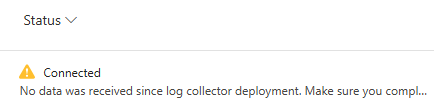
I followed that documentation : https://learn.microsoft.com/en-us/defender-cloud-apps/discovery-docker-ubuntu?tabs=ubuntu My Collector is displaying a connected status in the console : But as you can see, no data was received, and if I do a collector_status -P on my docker : I checked all possible logs files, nothing helped me So if someone can help about that.. Thank you !107Views0likes0Comments
Automate Defender for Cloud settings: FIM, Vulnerability Assessment, and Guest Configuration Agent
I’m working on automating the configuration of Microsoft Defender for Cloud – Server Plans across multiple subscriptions (100+), including any newly deployed subscriptions. The goal is to avoid manual changes and ensure compliance from day one. Current Setup: I’ve used the built-in policy: Configure Microsoft Defender for Servers plan, which successfully enables: Defender for Cloud Plan P2 Endpoint Protection Agentless scanning I attempted to copy this policy and add parameters for Vulnerability Assessment, but the assignment fails with an error. What I’ve Tried: For File Integrity Monitor: Policy name → Configure ChangeTracking Extension for Windows virtual machines For Vulnerability Assessment: Policy name → Configure machines to receive a vulnerability assessment provider Assigning these policies works on my non-prod subscription, but the toggle in Defender for Cloud → Environment Settings remains No. Challenge: How can I ensure these options (File Integrity Monitoring, Vulnerability Assessment, and preferably Guest Configuration Agent) are automatically enabled for: All existing subscriptions Any new subscriptions created in the future Goal: No manual intervention in Defender for Cloud portal Fully automated via Azure Policy or another recommended approach uestions: Is there a way to extend the built-in policy or create a custom initiative that enforces these settings at the subscription level? Are there ARM templates, Bicep modules, Powershell scripts or REST API calls that can toggle these settings programmatically? Any best practices for ensuring compliance across multiple subscriptions? Any help is much appreciated and looking forward to your expertise! Thank you in advance. Best Regards, Pascal Slot237Views1like0CommentsAbout Defender for Cloud aggregated logs in Advanced Hunting
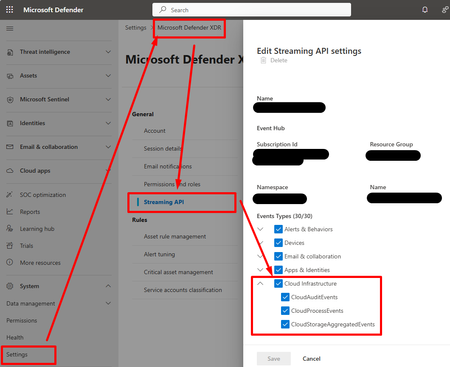
Hi, I create this threat hoping that the Microsoft team will read and hopefully provide insights about future changes and roadmap. When SOC teams use a non-Microsoft SIEM/SOAR, they need to export logs from M365 and Azure, and send them to the third-party SIEM/SOAR solution. • For M365 logs, there is the M365XDR connector that allows exporting logs using an Event Hub. • For Azure logs, we used to configure diagnostics settings and send them to an Event Hub. This began to change with new features within Defender for Cloud (c.f. picture).: • Defender for Resource Manager now sends Azure Activity logs to M365XDR portal, and can be exported using M365XDR Streaming API • Defender for Storage now sends logs to M365XDR portal, and can be exported using M365XDR Streaming API (c.f. https://www.youtube.com/watch?v=Yraeks8c8hg&t=1s). This is great as it is easy to configure and doesn't interfere with infrastructure teams managing operational logs through diagnostic settings. I have two questions : • Is there any documentation about this? I didn't find any? • What can we expect in the future weeks, months regarding this native logs collection feature through various Defender for Cloud products? For example, can we expect Defender for SQL to send logs to M365XDR natively? Thanks for you support!98Views1like0Comments
Playbooks with MDCA
I am attempting to integrate MDCA alerts with freshdesk as per the e.g. https://learn.microsoft.com/en-us/defender-cloud-apps/flow-integration I have E5 without teams licenses. I created the flow, Once from playbooks in MDCA portal and once in power automate directly and went to create a policy to test it out but the option "Sent to power automate" from the policy is always greyed out. Alerts are not automatically detected in the flow unless the action in the policy is set to send to power automate which again is greyed as option in the policies. Also playbooks tab in the MDCA portal does not show the flows I created before, It shows empty, Seems link is broken between MDCA and PowerAutomate. Any reason for this, Any Idea about this? Thanks in advance.131Views0likes0CommentsMISRA support in Defender
I want to check for MISRA C code compliance. The idea is to check for MISRA C compliance when asking for a Pull Request. If the code fails on those checks, the PR will not be created. This way, we enforce MISRA compliance before integrating the code to the repository. I am not seeing MISRA in the list of standards under - Regulatory Compliance>>Subscriptions>> Security Po;icies84Views0likes0CommentsRuntime protection - Microsoft Defender for Cloud DevOps Security (Defender CSPM)
Hi team! The current support status for Microsoft Defender for Cloud DevOps Security (Defender CSPM) and runtime protection across services are this one : Fully Supported for Runtime Protection Azure Kubernetes Service (AKS) Amazon Elastic Kubernetes Service (EKS) are there more runtime in the product roadmap (Azure Container Apps, AWS, Fargate for Amazon ECS, Azure Functions, AWS Lambda)? Thanks
Microsoft Defender for Cloud - Servers & Apps Question
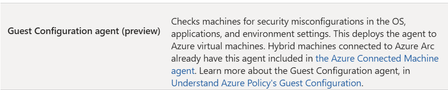
Hi, while learning about the Microsoft Defender for Cloud (MDC) Cloud Workload Protection (CWP), I have seen below points. Servers: When we opt for MDC CWP for servers, I see Agentless scanning for machines and along with it below, But we already have "Carbon Black" which handles the above role of Guest Configuration agent. So, my question is, If I enroll for MDC - Cloud workload protection: As we need to have a security/defender tool installed on Azure machines (In this case Guest Configuration agent). Would this then replace "Carbon Black" as we already, have it? Or do we see this MDC - Cloud workload protection for Servers as additional apart from Carbon Black? Apps: We have our Azure Apps protected by Cloudflare and VNet Integration which are with our firewall-based routes, do we still need to enroll for App Service protection by MDC CWP. Please advise on above 2 areas. Thanks77Views0likes0CommentsFilter out BYOD devices from blocking unsanctioned apps
Hi there, I've encountered an issue. When I tag a cloud app as unsanctioned, it gets blocked as expected. However, we use BYOD mobile devices that are Entra registered along with app protection policies, and the unsanctioned apps are being blocked outside the managed apps. For example, an unsanctioned app gets blocked in unmanaged safari browser on BYOD iOS device. I can't find information on how to limit the enforcement scope to only managed apps on BYODs or how to limit the enforcement scope to company-managed devices. Please help.88Views0likes0CommentsDefender for Servers
Defender for servers is part of Defender for Cloud CWP. We do not use this product, however we have interest in logging Servers both on-premise and multi cloud tenants to Sentinel workspace. Couple of ways to accomplish: Defender for Servers in passive - Since we're currently not subscribed can we get data in with ARC + AMA + Defender extension across multi cloud tenant? Objective is to NOT pay for Defender for Servers p1/p2 instead log Events for detections Azure Monitor Agent and Data Collection Rule with logging level (Common, Minimal, Custom) I've ideas on both but I'm leaning towards Defender for Servers in passive with Defender Extension and AMA. Will this automatically get charge as part of Defender for Server CWP or it flat out won't work if not enabled? I can't get straight answer on this from anyone and I don't have full blown tenant owner permission to test this. When asked there is wait time to get response from other teams. I'm interested getting data in via Defender in Passive relying and relaying partner as Defender Extension and ARC+AMA. Let me know your thoughts!62Views0likes0Comments
DevOps Security: MDC-ADO integration through Service account
Hi All, Is it possible to integrate MDC-ADO Integration with Service Account? When I attempted to authorize ADO in MDC during the integration process, it appears to only accept individual accounts. Does anyone have insights on how to utilize a Service Account for this integration?Cost Calculator for Defender for Cloud (Public Preview)
Did you know Microsoft Defender for Cloud has a built-in cost calculator to easily calculate the costs of protected resources in your cloud environment? No? Well, I didn’t either until I stumbled upon the button in the MDC portal myself. Apparently, Microsoft announced the preview for the MDC cost calculator last month, on February 19, 2025. With this post, I’m sharing my experience with this new cost calculator for Microsoft Defender for Cloud, providing guidance and comparing available options to calculate the costs. https://myronhelgering.com/cost-calculator-for-defender-for-cloud/Sensitivity Data Flag will not be deleted after Settings are changed
We have a lot of storage accounts which are flaged with risk factor "Sensitive Data" which also means all storage Accounts which have this label have risklevel critical. We deactivated Sensitive Data Scan but nothing happens As I got it correct once a resource is flagged with "Sensitive Data" the flag will not delete anymore What we did so far: turn off/on/off… the data scanning turn off/on/off Data sensitivity deselect all of different data sensitivity categories like Finance, PII, and Credentials turn off/on/off threshold for sensitive data labels turn off/on complete Defender There is also a support ticket where the support can the recommendation was to open a discussion here to have the product team look at this error (#2502031420002278)93Views0likes0Comments





Events
Recent Blogs
- Recent public disclosures have reinforced why building foundational security matters. Security researchers and leading AI labs have highlighted scenarios where autonomous AI systems were able...Aug 05, 2026796Views1like1Comment
- *This will be the last monthly MDC newsletter. To keep up with the latest, please visit: What's new in MDC What's new in Defender for Cloud? Multiple container security features are now General...Aug 03, 2026203Views1like0Comments