Recent Discussions

Defender for Cloud Container Workloard AWS EKS
Hi, We're onboarding an AWS environment with EKS clusters into Defender for Cloud. The AWS connector is configured correctly and everything up to the final step works: the clusters are discovered and visible in the portal, Defender creates its access entries, authenticates into the clusters, and actively polls them (agentless coverage is healthy). However, the Azure Arc onboarding never initiates. The "Auto provision Defender's sensor for Azure Arc" component is enabled, but Defender never issues the Microsoft.Kubernetes/connectedClusters/write — the Azure Activity Log shows zero attempts of any status, so no connectedCluster is ever created, no azure-arc/mdc namespaces appear, and the Defender sensor is never deployed.134Views0likes2Comments
Exempt a specific container in MDC
You don't need a full exemption for this — the built-in policy behind "Immutable (read-only) root filesystem should be enforced for containers" already supports per-container and per-image exclusions natively, which is more precise than exempting at the resource/cluster level. This recommendation is implemented via the Azure Policy Add-on for Kubernetes (Gatekeeper constraint) as part of Defender for Cloud's data plane hardening. The underlying policy definition supports these parameters: excludedContainers — exclude by container name excludedImages — exclude by image (supports prefix matching, e.g. myregistry.azurecr.io/legacy-app:*) excludedNamespaces — exclude entire namespaces (e.g., kube-system, useful for system pods that legitimately can't run read-only) To configure: Defender for Cloud → Recommendations → select this recommendation → Take action tab, where you can set these parameters directly without touching raw policy JSON. Alternatively, if you manage policy via Environment Settings → Security policies → Standards, you can set the same parameters on the standard assignment. Given you said multiple containers across airflow/db1, airflow/sql1, etc. show "Unhealthy" — if these are legitimate exceptions (e.g., a database container that needs to write to its filesystem by design, not just a misconfiguration), excludedContainers naming each container is the cleanest fix and keeps the recommendation enforcing everywhere else in the cluster. I'd reserve a full policy exemption (Azure Policy exemption resource) for cases where you need it tracked for compliance/audit purposes specifically — the parameter-based exclusion is the more "native" and maintainable fix for ongoing operational cases like this.43Views0likes0CommentsExempt - Azure CSPM Recommendation" (Terraform exemption
The reason you're not finding a standalone policyAssignmentId/policyDefinitionId for this specific recommendation is that it isn't a standalone assignment — it's one control inside the built-in CSPM initiative (the "ASC Default" / Microsoft Cloud Security Benchmark assignment). That initiative does have an assignment ID; you just need to target the specific control within it, not look for a separate one. In azurerm_resource_policy_exemption (or the subscription/resource-group variants), the relevant fields are: policy_assignment_id → the ID of the initiative assignment (ASC Default / MCSB), not a per-recommendation assignment policy_definition_reference_ids → an array scoping the exemption to just this one control instead of the whole initiative resource "azurerm_resource_policy_exemption" "function_app_network_exemption" { name = "exempt-function-network-restriction" resource_id = azurerm_linux_function_app.example.id policy_assignment_id = data.azurerm_subscription_policy_assignment.asc_default.id policy_definition_reference_ids = [ "<reference-id-for-the-specific-control>" ] exemption_category = "Waiver" # or "Mitigated" if an equivalent control exists expires_on = "2026-12-31T00:00:00Z" } To find the policy_definition_reference_id for this specific control: in the Azure Portal, go to Policy → Definitions, search for "Restricted network access should be configured on Internet exposed Function app" to get its definition ID, then open the initiative definition (ASC Default) and find the matching entry in its policyDefinitions[].policyDefinitionReferenceId array — that string is what goes in the array above. Two things worth deciding upfront before automating this: Waiver vs Mitigated — if you've genuinely restricted access another way (e.g., Private Endpoint), use Mitigated so it's distinguishable from accepted risk in reporting. Consider whether the exemption belongs at the resource scope (just this Function App) vs resource group/subscription — narrower is safer, but if you have a pattern of similar apps, a tagged-based resourceSelectors block can scale this without per-resource blocks.65Views0likes0CommentsRemediation Workflow Automation — Biggest Gap vs. Competing Exposure Management Platforms?
Exposure graph and attack path correlation in MSEM are genuinely strong — the cross-domain visibility (endpoints, identities, cloud, external surface) is one of the better implementations I've worked with, especially for shops already standardized on the Microsoft stack. The gap I keep running into is closed-loop remediation orchestration. Right now, when an attack path or critical exposure is identified, there's no native way to auto-generate a ticket, assign ownership, and track an SLA against it — that handoff still has to be built externally (Logic Apps, Sentinel playbooks, or a 3rd-party ITSM integration). This isn't just my experience; it's echoed in published Gartner Peer Insights reviews of the product, where users specifically flag the absence of in-platform workflows to raise tickets automatically and route them to the owning team. For comparison, Qualys built this natively into their Enterprise TruRisk Platform (QFlow) — automatic ticket creation in ServiceNow/Jira, ownership assignment, and SLA tracking, all without manual handoffs. Tenable One markets "workflow automation" as a core differentiator of its unified platform for the same reason: it's what turns continuous detection into continuous risk reduction, not just a better dashboard. Questions for the team / community: Is closed-loop ticketing/SLA tracking on the roadmap natively, or is the expectation that this stays external (Logic Apps/Sentinel)? For those running MSEM at scale — how are you currently bridging this gap operationally? Custom playbooks, or a 3rd-party orchestration layer on top?60Views0likes0CommentsExempt - Azure CSPM Recommendation
We are implementing creating exemptions on policies through Terraform. Is there a way to exempt this specific Azure CSPM standard policy "Restricted network access should be configured on Internet exposed Function app" through Terraform since it does not have any policyassignmentid and policyid. I think this standard policy cannot be exempted with this code. Please confirm. My understanding is this is Assessment type and has no policy id or policy assessment id. I can exempt through Azure Portal but not from Terraform. Any guidance is greatly appreciated. resource "azurerm_subscription_policy_exemption" "this" { for_each = local.subscription_exemptions name = each.key subscription_id = each.value.resource_id policy_assignment_id = each.value.policy_assignment_id policy_definition_reference_ids = each.value.policy_definition_reference_ids exemption_category = each.value.category expires_on = each.value.expires_on description = "Ticket: ${each.value.ticket} | ${each.value.remediation_plan}" metadata = jsonencode(merge(var.tags, { owner = each.value.owner ticket = each.value.ticket risk_level = each.value.risk_level remediation_plan = each.value.remediation_plan approved_by = each.value.approved_by approval_date = each.value.approval_date environment = var.environment managed_by = "terraform" })) } Thanks, Anshu123Views0likes1CommentExempt a specific container in MDC
I have this recommendation showing in defender. Immutable (read-only) root filesystem should be enforced for containers There are multiple containers inside AKS that are showing as "Unhealthy" airflow/db1 airflow/sql1 airflow/scheduler1 Is there a way to exempt a specific container or the whole recommendation has to be exempted. Thanks46Views0likes0Comments
Microsoft.Security/policies GET endpoint returning 404 — deprecated? What is the replacement?
Hi, We are using the Azure Security Center REST API (api-version=2015-06-01-preview) to retrieve security policies for a subscription. We are hitting a 404 Not Found error on the Get endpoint while the List endpoint works fine. Looking for clarification on whether this resource type has been deprecated and what the modern replacement is. --- Endpoints in use List Security Policies (WORKING): GET https://management.azure.com/subscriptions/{subscriptionId}/providers/microsoft.Security/policies?api-version=2015-06-01-preview This returns a valid JSON response with an array of policies, each having an id, name, type, and a properties object containing policyLevel, recommendations, pricingConfiguration, securityContactConfiguration, etc. Get Security Policy by Name (BROKEN): GET https://management.azure.com/subscriptions/{subscriptionId}/resourceGroups/{resourceGroupName}/providers/Microsoft.Security/policies/{policyName}?api-version=2015-06-01-preview --- Error received Not Found for url: https://management.azure.com/subscriptions/<sub-id>/resourceGroups/AzureEventHubIT-resource-group/providers/Microsoft.Security/policies/AzureEventHubIT-resource-group?api-version=2015-06-01-preview HTTP Status: 404 Not Found --- What we've observed - The List endpoint works and returns policies whose id values follow this exact structure: /subscriptions/{sub-id}/resourceGroups/{rg-name}/providers/microsoft.Security/policies/{policy-name} - The policy name in the List response matches the resource group name (1:1 mapping), so we are passing the correct value to the Get endpoint. - Despite using the exact name and resource group from the List response, the Get endpoint returns 404. - We also checked the https://learn.microsoft.com/en-us/rest/api/defenderforcloud/operation-groups?view=rest-defenderforcloud-2015-06-01-preview and noticed that Security Policies does not appear as a documented operation group in any version — including 2015-06-01-preview. The only documented groups for that version are: Discovered Security Solutions, Locations, Operations, and Tasks. --- Questions 1. Has the Microsoft.Security/policies resource type at the resource group scope been officially deprecated or removed? If so, is there a migration guide or announcement? 2. Why does the List endpoint still respond successfully while the individual Get endpoint returns 404? Is the List endpoint returning legacy/cached data? 3. What are the recommended replacement APIs for the functionality that was in the old policies resource? Specifically we need equivalents for: - properties.pricingConfiguration → Is this now covered by https://learn.microsoft.com/en-us/rest/api/defenderforcloud/pricings/get?view=rest-defenderforcloud-2024-01-01? - properties.recommendations (patch, antimalware, diskEncryption, etc.) → Is this now https://learn.microsoft.com/en-us/rest/api/defenderforcloud/assessments?view=rest-defenderforcloud-2020-01-01? - properties.securityContactConfiguration → Is this now Microsoft.Security/securityContacts (2020-01-01-preview)? 4. Is there any announced retirement date for the List endpoint as well? Any official documentation links or migration guides would be very helpful. Thank you.64Views0likes0CommentsExposure-Driven Security in the Modern Enterprise
The idea is simple — but powerful: It’s not just about detecting threats. It’s about identifying and prioritizing the exposures that make those threats possible. Attack path analysis, identity risk correlation, misconfiguration visibility, privilege exposure… all connected in a single risk context. So I’d like to ask the community: How are you currently measuring exposure in your environment? – Are you mapping attack paths across identities, endpoints, and cloud workloads? – Are privileged identities part of your exposure prioritization model? – Are remediation efforts aligned with actual exploitability or just severity level? In your view, what is the biggest challenge when moving from reactive detection to proactive exposure reduction? Curious to hear how others are integrating Exposure Management into their Zero Trust architecture.Microsoft Defender for Cloud
For security operations teams managing Microsoft 365 and Azure environments, knowing which event logs to monitor in the Defender portal is fundamental. The right logs give you visibility into identity threats, device compromise, and policy violations before they escalate. Here are the most critical event log categories: ## 1. Sign-In Logs (Entra ID) **Location:** Microsoft Entra ID > Sign-in logs Monitor failed sign-ins, unfamiliar locations, Conditional Access failures, and risky sign-ins flagged by Identity Protection. Identity is the primary attack surface—these logs detect credential compromise and lateral movement. ## 2. Audit Logs (Entra ID) **Location:** Microsoft Entra ID > Audit logs Track changes to user accounts, privilege escalations, Conditional Access modifications, and application consent grants. Unauthorized administrative changes can bypass security controls. ## 3. Device Compliance Logs (Intune) **Location:** Microsoft Intune > Devices > Monitor Monitor non-compliant devices, enrollment failures, and policy errors. Non-compliant endpoints represent unmanaged risk. ## 4. Threat & Vulnerability Management **Location:** Microsoft Defender > Endpoints > TVM Track critical vulnerabilities, missing updates, and exposed credentials. Proactive vulnerability management prevents exploitation. ## 5. Alerts and Incidents (Defender XDR) **Location:** Microsoft Defender > Incidents & Alerts Your central SOC dashboard—monitor high-severity alerts for ransomware, credential theft, and lateral movement across endpoints, identities, email, and apps. ## 6. Cloud App Activity Logs **Location:** Defender for Cloud Apps > Activity log Detect unusual file downloads, admin activity from unmanaged devices, and OAuth app permissions. These logs reveal unauthorized data exfiltration and risky SaaS behavior. ## 7. Email Threat Logs **Location:** Microsoft Defender > Email & Collaboration > Threat Explorer Monitor phishing attempts, malware attachments, and spoofed emails. Email remains the most common attack vector. ## 8. Cloud Security Alerts **Location:** Microsoft Defender for Cloud > Security alerts Track misconfigurations, policy violations, and threats across Azure subscriptions and hybrid workloads. Essential for cloud infrastructure protection and compliance monitoring. ## How to Use These Logs Effectively 1. Set up automated alerts in Sentinel 2. Establish baselines to detect anomalies 3. Correlate across sources for full attack context 4. Automate response with AIR features 5. Review high-severity logs weekly **Microsoft Defender XDR Documentation:** https://learn.microsoft.com/en-us/microsoft-365/security/defender/ **Entra ID Monitoring:** https://learn.microsoft.com/en-us/entra/identity/monitoring-health/ **Microsoft Defender for Cloud:** https://learn.microsoft.com/en-us/azure/defender-for-cloud/ Monitoring the right logs is the foundation of a strong security posture. Start here, tune your alerts, and build the visibility your SOC needs. #MicrosoftDefender #CyberSecurity #SOC #DefenderXDR #ThreatHunting #SecurityOperations #EntraID #Microsoft365 #ZeroTrust #DefenderForCloud281Views0likes0Comments
Defender for servers (P1)
Hey guys, I enabled my Defender for cloud trial licens (P1) for my Windows servers. They are onboarded and i can see them visually in the (security.microsoft.com) EDR Portal. My enforcement scope is set to Intune - so all my AV policies etc are created there. I want to create a AV Policy for my Windows servers but i can't see the objects in Entra. What is best practice. To register them in Entra manually or should it automaticlly create a object in Entra during the onboarding process? Can't create & assign a AV policy etc until i create a group and put all my servers into that group. Any ideas? Also might be worth mentioning i see that they are managed by "unknown" and not Microsoft Sense? Should i point back the scope to the Defender portal? Whilst my endpoints are managed by Intune.281Views0likes1CommentUpdating SDK for Java used by Defender for Server/CSPM in AWS
Hi, I have a customer who is Defender for Cloud/CSPM in AWS. Last week, Cloud AWS Health Dashboard lit up with a recommendation around the use of AWS SDK for Java 1.x in their organization. This version will reach end of support on December 31, 2025. The recommendation is to migrate to AWS SDK for Java 2.x. The issue is present in all of AWS workload accounts. They found that a large amount of these alerts is caused by the Defender CSPM service, running remotely, and using AWS SDK for Java 1.x. Customer attaching a couple of sample events that were gathered from the CloudTrail logs. Please note that in both cases: assumed-role: DefenderForCloud-Ciem sourceIP: 20.237.136.191 (MS Azure range) userAgent: aws-sdk-java/1.12.742 Linux/6.6.112.1-2.azl3 OpenJDK_64-Bit_Server_VM/21.0.9+10-LTS java/21.0.9 kotlin/1.6.20 vendor/Microsoft cfg/retry-mode/legacy cfg/auth-source#unknown Can someone provide guidance about this? How to find out if DfC is going to leverage AWS SDK for Java 2.x after Dec 31, 2025? Thanks, TerruMCAS logcollector docker image : 0 logs received
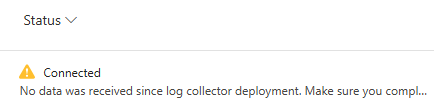
I followed that documentation : https://learn.microsoft.com/en-us/defender-cloud-apps/discovery-docker-ubuntu?tabs=ubuntu My Collector is displaying a connected status in the console : But as you can see, no data was received, and if I do a collector_status -P on my docker : I checked all possible logs files, nothing helped me So if someone can help about that.. Thank you !128Views0likes0Comments
Automate Defender for Cloud settings: FIM, Vulnerability Assessment, and Guest Configuration Agent
I’m working on automating the configuration of Microsoft Defender for Cloud – Server Plans across multiple subscriptions (100+), including any newly deployed subscriptions. The goal is to avoid manual changes and ensure compliance from day one. Current Setup: I’ve used the built-in policy: Configure Microsoft Defender for Servers plan, which successfully enables: Defender for Cloud Plan P2 Endpoint Protection Agentless scanning I attempted to copy this policy and add parameters for Vulnerability Assessment, but the assignment fails with an error. What I’ve Tried: For File Integrity Monitor: Policy name → Configure ChangeTracking Extension for Windows virtual machines For Vulnerability Assessment: Policy name → Configure machines to receive a vulnerability assessment provider Assigning these policies works on my non-prod subscription, but the toggle in Defender for Cloud → Environment Settings remains No. Challenge: How can I ensure these options (File Integrity Monitoring, Vulnerability Assessment, and preferably Guest Configuration Agent) are automatically enabled for: All existing subscriptions Any new subscriptions created in the future Goal: No manual intervention in Defender for Cloud portal Fully automated via Azure Policy or another recommended approach uestions: Is there a way to extend the built-in policy or create a custom initiative that enforces these settings at the subscription level? Are there ARM templates, Bicep modules, Powershell scripts or REST API calls that can toggle these settings programmatically? Any best practices for ensuring compliance across multiple subscriptions? Any help is much appreciated and looking forward to your expertise! Thank you in advance. Best Regards, Pascal Slot262Views1like0CommentsAbout Defender for Cloud aggregated logs in Advanced Hunting
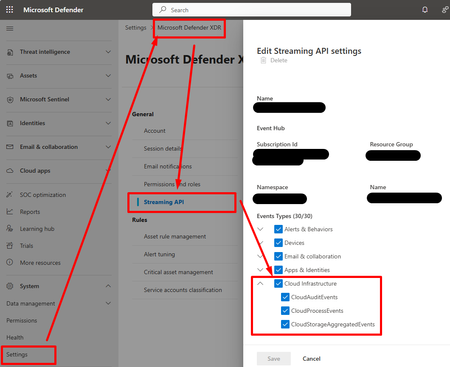
Hi, I create this threat hoping that the Microsoft team will read and hopefully provide insights about future changes and roadmap. When SOC teams use a non-Microsoft SIEM/SOAR, they need to export logs from M365 and Azure, and send them to the third-party SIEM/SOAR solution. • For M365 logs, there is the M365XDR connector that allows exporting logs using an Event Hub. • For Azure logs, we used to configure diagnostics settings and send them to an Event Hub. This began to change with new features within Defender for Cloud (c.f. picture).: • Defender for Resource Manager now sends Azure Activity logs to M365XDR portal, and can be exported using M365XDR Streaming API • Defender for Storage now sends logs to M365XDR portal, and can be exported using M365XDR Streaming API (c.f. https://www.youtube.com/watch?v=Yraeks8c8hg&t=1s). This is great as it is easy to configure and doesn't interfere with infrastructure teams managing operational logs through diagnostic settings. I have two questions : • Is there any documentation about this? I didn't find any? • What can we expect in the future weeks, months regarding this native logs collection feature through various Defender for Cloud products? For example, can we expect Defender for SQL to send logs to M365XDR natively? Thanks for you support!102Views1like0CommentsProblem Automatic Log Upload - Defender for Cloud Apps
Hello Community, I have a strange problem with the activity in the Title. I have create Data Sources from Fortinet And a Log collector With the correct documentation that is linked https://learn.microsoft.com/en-us/defender-cloud-apps/discovery-docker-ubuntu-azure?tabs=centos So i have a Fortinet Firewall that send by SYSLOG log to the VM Ubuntu in Azure, i have deploy docker, Ubuntu receive log from firewall, i see traffic is correct. But from Cloud Apps connector remains into "Connected" state. Regards, GuidoSolved491Views1like3Comments
Restricting access to non SSO apps
I have multiple non SSO apps that my users need to access. I am looking to permit access but limit what actions users can take when visiting these apps/sites such as: blocking file uploads, blocking data download, restricting logins, etc to limit shadow IT. Is there a way to do this within MDCA? Session control policies, activity policies and access policies require the apps be onboarded or SSO configured which is not feasible for the numerous apps in scope. If not MDCA, what other services have you used to accomplish this?287Views0likes1CommentDefender for Cloud DCR
Enabling Defender for Servers Plan 2 and creating a custom DCR to enable the 500MB ingestion into log analytics. The workspace I am sending the logs to is connected to Sentinel. When I looked at creating the DCR I received this pop-up If I enable the Sentinel connector, will this duplicate the cost of the logs or will the connector just enable the data to be surfaced in Sentinel?424Views0likes2CommentsIs setting an index tag in Azure Defender for Cloud during file write an atomic operation?
Hi, When using Azure Defender for Cloud, is setting an index tag at the same time as writing a file considered an atomic operation? Or is there a propagation delay before the tag becomes fully available and effective for search and policy enforcement? Any insights or official documentation references would be appreciated!171Views0likes2Comments







Events
Recent Blogs
- Recent public disclosures have reinforced why building foundational security matters. Security researchers and leading AI labs have highlighted scenarios where autonomous AI systems were able...Aug 05, 20261.2KViews1like1Comment
- *This will be the last monthly MDC newsletter. To keep up with the latest, please visit: What's new in MDC What's new in Defender for Cloud? Multiple container security features are now General...Aug 03, 2026327Views1like0Comments