Recent Discussions

AllowAnonymous attribute not working
Hi, I have a .NET Core 10 MVC web app and I want to create views that can be viewed without requiring login. I have tried adding [AllowAnonymous] both to my controller and to individual views, but the user always gets redirected to the login screen. I am thinking that it must be due to the setup in my Program.cs. Here is my Program.cs : var builder = WebApplication.CreateBuilder(args); // Add services to the container. var connectionString = builder.Configuration.GetConnectionString("DefaultConnection") ?? throw new InvalidOperationException("Connection string 'DefaultConnection' not found."); builder.Services.AddDbContext<ApplicationDbContext>( options => options.UseSqlServer( builder.Configuration.GetConnectionString("DefaultConnection"), x => x.MigrationsAssembly("PBP"))); builder.Services.AddDatabaseDeveloperPageExceptionFilter(); builder.Services.AddIdentity<ApplicationUser, IdentityRole>(options => options.SignIn.RequireConfirmedAccount = true) .AddEntityFrameworkStores<ApplicationDbContext>() .AddDefaultUI() .AddDefaultTokenProviders(); //require this for editing syncfusion datagrid builder.Services.AddMvc().AddNewtonsoftJson(options => { options.SerializerSettings.ContractResolver = new DefaultContractResolver(); }); builder.Services.AddTransient<IEmailSender, EmailSender>(); builder.Services.Configure<AuthMessageSenderOptions>(builder.Configuration); builder.Services.AddTransient<SessionHelper>(); builder.Services.AddApplicationInsightsTelemetry(new Microsoft.ApplicationInsights.AspNetCore.Extensions.ApplicationInsightsServiceOptions { ConnectionString = builder.Configuration["APPLICATIONINSIGHTS_CONNECTION_STRING"] }); //session //https://learn.microsoft.com/en-us/aspnet/core/fundamentals/app-state?view=aspnetcore-7.0 builder.Services.AddDistributedMemoryCache(); builder.Services.AddSession(options => { options.IdleTimeout = TimeSpan.FromSeconds(1200); options.Cookie.Name = ".PBP.Session"; options.Cookie.IsEssential = true; }); builder.Services.ConfigureApplicationCookie(options => { //options.ExpireTimeSpan = TimeSpan.FromSeconds(1800); //default is 14 days options.LoginPath = "/Identity/Account/Login"; options.SlidingExpiration = true; }); var app = builder.Build(); // Configure the HTTP request pipeline. if (app.Environment.IsDevelopment()) { app.UseMigrationsEndPoint(); } else { app.UseExceptionHandler("/Home/Error"); // The default HSTS value is 30 days. You may want to change this for production scenarios, see https://aka.ms/aspnetcore-hsts. app.UseHsts(); } app.UseHttpsRedirection(); app.MapStaticAssets(); app.UseRouting(); app.UseAuthorization(); app.UseSession(); app.UseForwardedHeaders(new ForwardedHeadersOptions { ForwardedHeaders = ForwardedHeaders.XForwardedFor | ForwardedHeaders.XForwardedProto }); app.MapControllerRoute( name: "default", pattern: "{controller=Home}/{action=Index}/{id?}").WithStaticAssets(); app.MapRazorPages().WithStaticAssets(); app.Run(); Can anybody advise me on if this is the issue and if so what changes I need to make so that I can successfully use AllowAnonymous? Many thanks, Mike46Views0likes3Comments
Simple request for Visual Studio's Find and Replace operation
Doing a Find + Replace operation in VS, I could wish there was an option, when selecting to do so over the whole project or solution, to choose which types of files to include or exclude. For example, in a classic Web Forms project, I'd like to omit the designer pages. I've been caught out by this ore than once ... :( (More fool I...)72Views2likes2CommentsHttp requests from client to server project with cookie auth
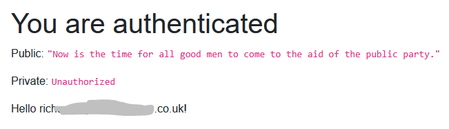
Start a new Blazor app with individual accounts. Add a controller to the server project. [ApiController] [Route("api/[controller]")] [Authorize] public class TestController : ControllerBase { private readonly ILogger _logger; public TestController(ILogger logger) { _logger = logger; } [HttpGet("public")] [ProducesResponseType(typeof(string), StatusCodes.Status200OK)] [AllowAnonymous] public IActionResult GetPublic() { return Ok(JsonConvert.SerializeObject("Now is the time for all good men to come to the aid of the public party.")); } [HttpGet("private")] [ProducesResponseType(typeof(string), StatusCodes.Status200OK)] public IActionResult GetPrivate() { return Ok(JsonConvert.SerializeObject($"Now is the time for all good men and {User.Identity.Name} to come to the aid of the private party.")); } And route it in in Program.cs ... builder.Services.AddControllers(); // + ... app.MapControllers(); // + Create a HttpClient for the API public class CookieHandler : DelegatingHandler { public CookieHandler() { InnerHandler = new HttpClientHandler() { AllowAutoRedirect = false }; } protected override Task SendAsync( HttpRequestMessage request, CancellationToken cancellationToken) { request.SetBrowserRequestCredentials(BrowserRequestCredentials.Include); request.Headers.Add("X-Requested-With", ["XMLHttpRequest"]); return base.SendAsync(request, cancellationToken); } } public class LocalHttpClient : HttpClient { public LocalHttpClient(CookieHandler h) : base(h) { } } in the <em>client</em> project and register it in <em>both</em> the client and the server project. builder.Services.AddTransient(); builder.Services.AddTransient(); Update the client side page Auth.razor to use it @page "/auth" @using Microsoft.AspNetCore.Authorization @attribute [Authorize] @* @rendermode InteractiveWebAssembly *@ @rendermode InteractiveAuto @inject LocalHttpClient _HttpClient @code{ protected override async Task OnInitializedAsync() { HttpResponseMessage rx = await _HttpClient.GetAsync("https://localhost:7131/api/Test/public"); Public = await rx.Content.ReadAsStringAsync(); rx = await _HttpClient.GetAsync("https://localhost:7131/api/Test/private"); Private = await rx.Content.ReadAsStringAsync(); if(!rx.IsSuccessStatusCode) { Private = (Private ?? "") + rx.StatusCode.ToString(); } await base.OnInitializedAsync(); } string Public { get; set; } string Private { get; set; } } <PageTitle>Auth</PageTitle> <h1>You are authenticated</h1> <p>Public: <code>@Public</code></p> <p>Private: <code>@Private</code></p> <AuthorizeView Context="AuthorizeViewContext"> Hello @AuthorizeViewContext.User.Identity?.Name! </AuthorizeView> The authorisation doesn't work.74Views0likes1CommentGetting a ConnectionString empty error in a webapi project with .net 10
I'm running in .NET 10 with the most recent update for everything. I'm in EF. I'm ASP.NET Core. Below is my program.cs file. Inside of the program.cs file, when I call to get my connection string, I get back what I expect. When I hit the LoginController, I see the settings in the IConfiuguration that is handed in. However, when I set a breakpoint in the FSMUserStore constructor, I check the context that is handed in, and it's connection string is not set correctly (at all). I've run through Visual Studio debugger so many times, and tried so many things, I'm just lost on this. I think the problem is in how I am setting up for dependency injection in the program.cs file, but I've tried so many things that I don't know what else to try. Anyone have a suggestion? using ElmahCore.Mvc; using Microsoft.AspNetCore.Authentication.JwtBearer; using Microsoft.AspNetCore.Identity; using Microsoft.EntityFrameworkCore; using Microsoft.IdentityModel.Tokens; using Portal.Libraries; using PortalDataModels.Models; using System.Text; using Twilio.TwiML.Voice; var builder = WebApplication.CreateBuilder(args); IConfiguration configuration = new ConfigurationBuilder() .AddJsonFile("appsettings.json") .AddEnvironmentVariables() .Build(); // connString get's the correct value var connString = configuration.GetConnectionString("DefaultConnection"); // Add services to the container. // For Entity Framework builder.Services.AddDbContext<PortalDataModels.Models.POA_CSMContext>(options => options.UseSqlServer(configuration.GetConnectionString(connString))); builder.Services.AddScoped<IUserStore<FSMUser>, FSMUserStore>(); builder.Services.AddIdentity<FSMUser, IdentityRole>() .AddEntityFrameworkStores<POA_CSMContext>() .AddUserManager<UserManager<FSMUser>>() .AddSignInManager<SignInManager<FSMUser>>() .AddDefaultTokenProviders(); builder.Services.AddElmah<ElmahCore.Sql.SqlErrorLog>(options => { options.ConnectionString = connString; options.SqlServerDatabaseTableName = "Elmah_Error"; //Defaults to ELMAH_Error if not set options.OnPermissionCheck = context => false; }); // Adding Authentication builder.Services.AddAuthentication(options => { options.DefaultAuthenticateScheme = JwtBearerDefaults.AuthenticationScheme; options.DefaultChallengeScheme = JwtBearerDefaults.AuthenticationScheme; options.DefaultScheme = JwtBearerDefaults.AuthenticationScheme; }) // Adding Jwt Bearer .AddJwtBearer(options => { options.SaveToken = true; options.RequireHttpsMetadata = false; options.MapInboundClaims = false; options.TokenValidationParameters = new TokenValidationParameters() { ValidateIssuer = true, ValidateAudience = true, ValidAudience = configuration["Jwt:ValidAudience"], ValidIssuer = configuration["Jwt:ValidIssuer"], IssuerSigningKey = new SymmetricSecurityKey(Encoding.UTF8.GetBytes(configuration["Jwt:Key"])) }; }); builder.Services.AddScoped<UserManager<FSMUser>>(); builder.Services.AddControllers(); // Learn more about configuring OpenAPI at https://aka.ms/aspnet/openapi builder.Services.AddOpenApi(); var app = builder.Build(); // Configure the HTTP request pipeline. if (app.Environment.IsDevelopment()) { app.MapOpenApi(); } app.UseHttpsRedirection(); app.UseAuthentication(); app.UseAuthorization(); app.MapControllers(); app.Run();133Views0likes1Comment
Need help with ClickOnce deployment on .NET Framework 4.7.2 – "Unidentified program" warning
Hello, I have a WinForms application built on .NET Framework 4.7.2 that I'm publishing using ClickOnce from Visual Studio Community 2022 (official Microsoft version). Even after signing the application with a valid SHA256 V3 self-signed certificate, when I publish and try to install it via ClickOnce, I receive a warning saying the program is unidentified. Additionally, when I try to install the application on a machine that has antivirus software, the antivirus flags the program precisely because of the missing/certificate validation issue. How should I proceed? I'd like to know the correct way to publish with ClickOnce so that the application is fully recognized as valid by Windows, since I'm running into these antivirus validation problems. Thanks in advance for any guidance!78Views0likes1Comment
Configure registry permissions
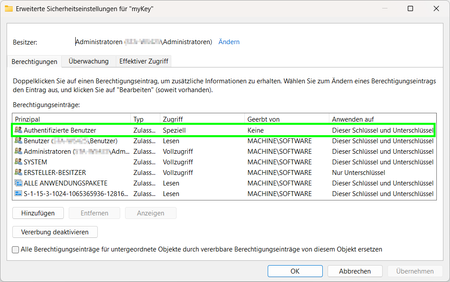
Hi I have strange problem to set specific permission to a registry key. According to Microsoft's https://learn.microsoft.com/en-us/dotnet/api/system.security.accesscontrol.registrysecurity?view=net-10.0, it should work like this: private static RegistryKey CreateRegistryKey(RegistryKey parentPath) { RegistryKey childKey = parentPath.CreateSubKey("myKey"); RegistryAccessRule rule = new RegistryAccessRule( new SecurityIdentifier(WellKnownSidType.AuthenticatedUserSid, null), RegistryRights.ReadKey | RegistryRights.Delete, InheritanceFlags.ContainerInherit, PropagationFlags.None, AccessControlType.Allow); RegistrySecurity childACL = childKey.GetAccessControl(); childACL.AddAccessRule(rule); ShowSecurity(childACL); childKey.SetAccessControl(childACL); return childKey; } But if the code is executed in a windows service, I missing my permission!? How can this be? Am I doing something wrong? Have I overlooked something?88Views0likes1Comment
Entity Framework DB permissions
I want to use Entity Framework with a .Net 9 app but have had difficulty finding information on what DB permissions it needs in the app database. I've found a couple old StackOverflow posts but having created a user with the recommended db_datareader, db_datawriter and db_ddladmin and updated the app connection string to use it and now the app won't start. What more does it need?108Views0likes1CommentPaytmgateway integration throwing exception error
While integration paytmgateway to my asp.net project, throwing exception "exception occurred while verifying checksum. Invalid padding can't be removed. What to do? I put every data right like merchant key ,MID etc . Plz guide me73Views0likes0Comments.NET
Hi everyone! 👋 I’m new to this community and currently learning .NET App Development. I’m really excited to join and connect with developers here. I believe the discussions and knowledge shared in this community are very valuable, especially for beginners like me. I’m looking forward to learning from your experiences and improving my development skills. If you have any tips, recommended resources, or advice for someone starting with .NET, I would really appreciate it. Happy to be part of this community! 😊130Views3likes2CommentsBlazor parameter passed by reference
I got the impression that in Blazor parameters are always effectively passed by value which is why you need to use EventCallback for two-way binding to send a change in the parameter value back up to the component that passed it. But not so; reference types really are passed by reference. Therefore if a child component updates a parameter value that is a reference type then the value in the parent is changed and all you need to do is call `StateHasChanged` on the parent. Is this as intended? Have I misunderstood the documentation? Example: https://drive.google.com/file/d/1i1Rh36nHU1Z2voyHDtLVZ9GyziLw9AQq/view?usp=sharing (Don't seem to be able to attach here and it's not really feasible to inline a whole Blazor project.)286Views0likes2Comments
SharePoint List View Threshold Error while Fetching 5000+ Records in list.
I am fetching data from a SharePoint list that contains more than 5000 records inside my function. While retrieving the data, I am getting the following error: “Flow Reminders→ The attempted operation is prohibited because it exceeds the list view threshold.” Scenario: The SharePoint list has 5000+ items. Data is being fetched programmatically. The error occurs during query execution. What I need help with What is the recommended and best-practice approach to retrieve large datasets from a SharePoint list without hitting the list view threshold? Questions: What is the recommended approach to fetch large data from a SharePoint list without hitting the list view threshold? Any suggestions, examples, or documentation references would be greatly appreciated. Thanks.94Views0likes1CommentVisualize Workflows and Architecture with Mermaid Charts in Visual Studio 2026
Modern software systems are more complex than ever. Microservices talk to APIs. Background workers process queues. Frontend apps interact with authentication layers, caching services, and databases. In the middle of all this complexity, one thing becomes absolutely critical: clear visualization. With Visual Studio 2026, developers no longer need third-party plugins to visualize workflows and architecture. Visual Studio 2026 renders Mermaid charts directly in the editor — no extensions required. You can write Mermaid syntax yourself or let GitHub Copilot generate it for you. Flowcharts, sequence diagrams, and other visualizations render inline, keeping documentation inside your development workflow. This is more than just a convenience feature. It’s a shift in how developers document, collaborate, and communicate system design. https://dellenny.com/visualize-workflows-and-architecture-with-mermaid-charts-in-visual-studio-2026/1.5KViews1like0Comments
Grant/Revoke permissions to Windows local certificates (certlm) in non-admin mode
I am working on granting/revoking permissions to windows local certificates (certlm) using Visual C++ 2022. The challenge is that this needs to be performed in non-admin privileges. We would need to remove "Everyone" permissions and grant read permissions for our NT Service account to windows local certificates (certlm). Is it possible to perform under non-admin privilege? It would be great help if can get solution for this.99Views0likes1Comment
MSB4184: The expression "[System.IO.Path]::GetDirectoryName('')" cannot be evaluate
Hi got this error now after I updated my VS IDE .... The path is not of a legal form. WinFormsSQLExamplePro C:\Program Files\dotnet\sdk\10.0.102\Sdks\Microsoft.NET.Sdk\targets\Microsoft.NET.Windows.targets <_WinRTRuntimeDllDirectory>$([System.IO.Path]::GetDirectoryName('%(_WinRTRuntimeDllReferencePath.FullPath)'))</_WinRTRuntimeDllDirectory> <_CsWinRTOrTargetingPackLibDirectory>$([System.IO.Path]::GetDirectoryName('$(_WinRTRuntimeDllDirectory)'))</_CsWinRTOrTargetingPackLibDirectory> Note the top most path entry contains a '%' character , whereas the 2nd path contains a '$' character... Not sure what is going on ... (happened after VS update)281Views0likes1CommentEdm Model Generation Fails
Using an Azure ASP.NET MVC API from a Maui app, I am encountering the following error in the app when attempting to access the API. A few days ago, the initalization was working properly. The cloud app has been under further development, but the base api code has not been modified, only the response from the endpoints. The latest release NuGets are in use. What elements are being sought? System.TypeInitializationException: The type initializer for 'GeneratedEdmModel' threw an exception. ---> System.InvalidOperationException: Sequence contains no elements at System.Linq.ThrowHelper.ThrowNoElementsException() at System.Linq.Enumerable.First[TSource](IEnumerable`1 source) at SentryCloud.Models.Container.GeneratedEdmModel.CreateXmlReader()109Views0likes0CommentsWindows Forms user control layout issues at runtime
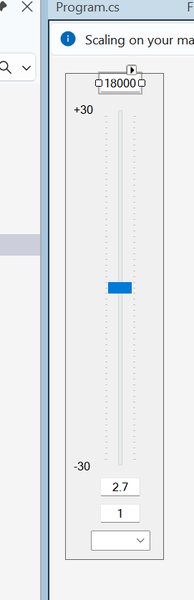
I'm hoping the good folls of this community can help me figure out what's going on with a Windows Forms user control that I created and am trying to use. I created a user control that represents a single band of a parametric equalizer. In the designer, the control looks like this: When I debug the control in the Test Container, things look good: If we take a look at the actual PEQ application that will use the control, things still look OK in the designer: It's only when I fire up the application that things go... awry: What happened to all the TextBoxes? And the ComboBoxes? I''ve got a feeling that the fix for this is something really simple, and I'm going to feel like a complete idiot for not figuring out the obvious. Can anyone tell me what my dumb self did wrong?100Views0likes0CommentsIt appears and error that does not exist
I am using VS 2022 Community and when i develope asp.net apps it happens sometimes that it appears an error that does not exist adn only after many hours of searching for the error or rewriting the same code the app begins to run correctly. Somehitng simmilar happened to any of you ? how can i avoid these strange behaviour of the compiler ? Thank you in advance Luis Martin119Views0likes1Comment