windows forms
71 Topics
Sway Crashing
Microsoft sway keeps crashing and resetting and it makes me very upset. I am trying to work on a newsletter and I keep losing work. I know it is not a browser side issue, I have used 3 different browsers and multiple devices on different Wi-Fi's. Others are also experiencing this same issue.40Views0likes1Comment
Outlook Attachment Organization
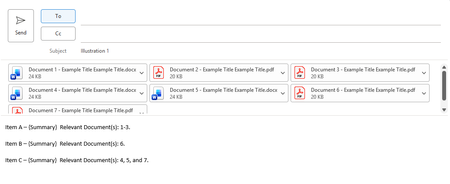
My organization sends out daily emails with long lists of separate items submitted by each team member, with related documents corresponding to each individual item. The current accessibility options for organizing attachments in either Outlook or Outlook (classic)--I use the latter--often make this somewhat of a challenge. The protocol for sending these emails is not going to change within my organization, and I'm not in a position to suggest any kind of third-party subscription (e.g., NetDocuments) to help organize attachments or even to ask my team members to all download a plugin, regardless of the price. So, I've come here to ask for help. The default, of course, is for all documents included in an email to be held within an attachments pane above the message. See Illustration 1. This, however, does not lend itself well to the daily emails. For instance, take Illustration 1 but instead of just seven attachments, imagine 30. Now also imagine 10 items instead of 3, with lengthy paragraphs included in the {Summary} placeholders. This may give you an idea of the issue I am trying to solve. One workaround is to send messages in rich text format. See Illustration 2. This allows each of the documents to appear under the corresponding items and, overall, is much more efficient at organizing attachments for the task at hand. However, the workaround presents several of its own issues. First, my team is not an altogether tech-savvy bunch. The thought of trying to get everyone to remember to send their daily email updates--and only these emails in particular--in rich text format is somewhat of a nonstarter. Second, and more importantly, the appearance of the attachments using this method does not allow for the full document title to be displayed to the reader, which defeats the entire purpose of my endeavor: to make it easy to identify and access documents corresponding to each item in a list without having to open multiple documents at once or sift through a sea of attachments to find the one you're looking for. What I'm hoping for is something akin to what is shown in Illustrations 3a (above) and 3b (below). (Note: I've prepared these illustrations by inserting screenshots of the attachment pane icons below the placeholder text. Clearly, this is not something I've composed using existing features, otherwise I wouldn't be posting this query.) Ideally, one would have the option to choose between a layout akin to either Illustration 3a or Illustration 3b. Thank you!86Views0likes0Comments
Windows insider's glitches
I'm unable to start Valorant since I switched to the windows insider program, it was stopping the vanguard to run. Vanguard is anti-cheat program which was run with the Valorant. I'm using latest windows insider experimental and I'm unable to uninstall it. How would I will solve this problem.100Views0likes0Comments.NET
Hi everyone! 👋 I’m new to this community and currently learning .NET App Development. I’m really excited to join and connect with developers here. I believe the discussions and knowledge shared in this community are very valuable, especially for beginners like me. I’m looking forward to learning from your experiences and improving my development skills. If you have any tips, recommended resources, or advice for someone starting with .NET, I would really appreciate it. Happy to be part of this community! 😊421Views3likes2Comments
Configure registry permissions
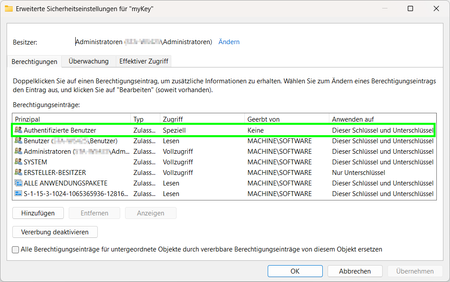
Hi I have strange problem to set specific permission to a registry key. According to Microsoft's https://learn.microsoft.com/en-us/dotnet/api/system.security.accesscontrol.registrysecurity?view=net-10.0, it should work like this: private static RegistryKey CreateRegistryKey(RegistryKey parentPath) { RegistryKey childKey = parentPath.CreateSubKey("myKey"); RegistryAccessRule rule = new RegistryAccessRule( new SecurityIdentifier(WellKnownSidType.AuthenticatedUserSid, null), RegistryRights.ReadKey | RegistryRights.Delete, InheritanceFlags.ContainerInherit, PropagationFlags.None, AccessControlType.Allow); RegistrySecurity childACL = childKey.GetAccessControl(); childACL.AddAccessRule(rule); ShowSecurity(childACL); childKey.SetAccessControl(childACL); return childKey; } But if the code is executed in a windows service, I missing my permission!? How can this be? Am I doing something wrong? Have I overlooked something?327Views0likes1Comment
Windows Forms user control layout issues at runtime
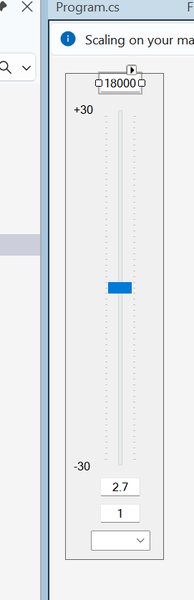
I'm hoping the good folls of this community can help me figure out what's going on with a Windows Forms user control that I created and am trying to use. I created a user control that represents a single band of a parametric equalizer. In the designer, the control looks like this: When I debug the control in the Test Container, things look good: If we take a look at the actual PEQ application that will use the control, things still look OK in the designer: It's only when I fire up the application that things go... awry: What happened to all the TextBoxes? And the ComboBoxes? I''ve got a feeling that the fix for this is something really simple, and I'm going to feel like a complete idiot for not figuring out the obvious. Can anyone tell me what my dumb self did wrong?174Views0likes0Comments
Versioning my Maui Android App
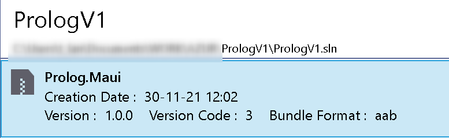
Previously the way to define version code for Android in Maui .csproj file was like this: <!-- Versions --> <ApplicationVersion>3.1.2</ApplicationVersion> <AndroidVersionCode>3</AndroidVersionCode> With the new release of Visual Studio Preview, this has changed to: <ApplicationVersion>3</ApplicationVersion> It works, from Visual Studio, I can bundle a new .aab package (see image below). We see the version code is defined to 3. Unfortunately the version is defined to 1.0.0 and I don't know how to change this. ...when imported on the Google Play Console, it look like this: Unfortunately, when imported I only see the versionCode 3 (which is defined in the .csproj file as ApplicationVersion). What about the versionName (in parentheses) ? Nothing is planned in the .csproj file ? When imported on the Google Play Console, I don't want to have 3 (1.0.0) but I want 3 (3.1.2)... https://developer.android.com/studio/publish/versioning versionCode — A positive integer used as an internal version number. versionName — A string used as the version number shown to users.28KViews0likes8Comments