Forum Widgets
Latest Discussions

Oracle 2.0 Upgrade Woes with Self-Hosted Integration Runtime
This past weekend my ADF instance finally got the prompt to upgrade linked services that use the Oracle 1.0 connector, so I thought, "no problem!" and got to work upgrading my self-hosted integration runtime to 5.50.9171.1 Most of my connection use service_name during authentication, so https://learn.microsoft.com/en-us/azure/data-factory/connector-oracle?tabs=data-factory, I should be able to connect using the Easy Connect (Plus) Naming convention. When I do, I encounter this error: Test connection operation failed. Failed to open the Oracle database connection. ORA-50201: Oracle Communication: Failed to connect to server or failed to parse connect string ORA-12650: No common encryption or data integrity algorithm https://docs.oracle.com/error-help/db/ora-12650/ I did some digging on this error code, and the troubleshooting doc suggests that I reach out to my Oracle DBA to update Oracle server settings. Which, I did, but I have zero confidence the DBA will take any action. https://learn.microsoft.com/en-us/azure/data-factory/connector-troubleshoot-oracle Then I happened across this documentation about the upgraded connector. https://learn.microsoft.com/en-us/azure/data-factory/connector-oracle?tabs=data-factory#upgrade-the-oracle-connector Is this for real? ADF won't be able to connect to old versions of Oracle? If so I'm effed because my company is so so legacy and all of our Oracle servers at 11g. I also tried adding additional connection properties in my linked service connection like this, but I have honestly no idea what I'm doing: Encryption client: accepted Encryption types client: AES128, AES192, AES256, 3DES112, 3DES168 Crypto checksum client: accepted Crypto checksum types client: SHA1, SHA256, SHA384, SHA512 But no matter what, the issue persists. :( Am I missing something stupid? Are there ways to handle the encryption type mismatch client-side from the VM that runs the self-hosted integration runtime? I would hate to be in the business of managing an Oracle environment and tsanames.ora files, but I also don't want to re-engineer almost 100 pipelines because of a connector incompatability.SolvedadaardorMay 12, 2025Tin Contributor8.8KViews3likes16Comments
Error: ORA-12650: No common encryption or data integrity
hi guys, I started getting this weird error in the copy activity, have you seen this error before ? any idea ? Oracle 11.2 Failure happened on 'Source' side. ErrorCode=UserErrorFailedToConnectOdbcSource,'Type=Microsoft.DataTransfer.Common.Shared.HybridDeliveryException,Message=ERROR [HY000] [Microsoft][ODBC Oracle Wire Protocol driver][Oracle]ORA-12650: No common encryption or data integrity algorithm ERROR [HY000] [Microsoft][ODBC Oracle Wire Protocol driver][Oracle]ORA-12650: No common encryption or data integrity algorithm,Source=Microsoft.DataTransfer.ClientLibrary.Odbc.OdbcConnector,''Type=System.Data.Odbc.OdbcException,Message=ERROR [HY000] [Microsoft][ODBC Oracle Wire Protocol driver][Oracle]ORA-12650: No common encryption or data integrity algorithm ERROR [HY000] [Microsoft][ODBC Oracle Wire Protocol driver][Oracle]ORA-12650: No common encryption or data integrity algorithm,Source=,' thank youWilliamScaMar 15, 2024Copper Contributor5.1KViews0likes13Comments
Select text from split function
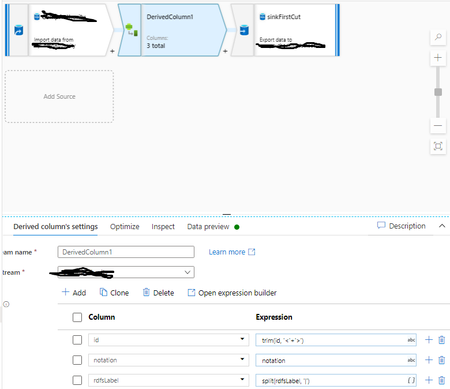
Hi hope someone can help, (I also hope I can explain this issue) I created a pipeline to bring in a CSV, stick it in blob storage and then modify it and stick it in a sql database. But while using data flow to help tidy the contents up I've come unstuck. I created a derived column to split rdfsLabel which contains names of stuff in different languages. Each separated with a |. The issue is that there's no consistency with what order each language is in and each time I run the pipeline the order can change from source. Can someone give me pointer on how to populate a column with the text from the string with @en at the end, once I get this I can then duplicate this for each of the languages and then go in and create another derived column and trim out the language identifiers. I'm hoping its something really silly that I've missed. Thanks in advance JohnSolvedJohn DorrianJan 28, 2021Brass Contributor7.1KViews0likes9Comments
Error in copy activity with Oracel 2.0
I am trying to migrate our copy activities to Oracle connector version 2.0. The destination is parquet in Azure Storage account which works with Oracle 1.0 connecter. Just switching to 2.0 on the linked service and adjusting the connection string (server) is straight forward and a "test connection" is successful. But in a pipeline with a copy activity using the linked service I get the following error message on some tables. ErrorCode=ParquetJavaInvocationException,'Type=Microsoft.DataTransfer.Common.Shared.HybridDeliveryException,Message=An error occurred when invoking java, message: java.lang.ArrayIndexOutOfBoundsException:255 total entry:1 com.microsoft.datatransfer.bridge.parquet.ParquetWriterBuilderBridge.addDecimalColumn(ParquetWriterBuilderBridge.java:107) .,Source=Microsoft.DataTransfer.Richfile.ParquetTransferPlugin,''Type=Microsoft.DataTransfer.Richfile.JniExt.JavaBridgeException,Message=,Source=Microsoft.DataTransfer.Richfile.HiveOrcBridge,' As the error suggests in is unable to convert a decimal value from Oracle to Parquet. To me it looks like a bug in the new connector. Has anybody seen this before and have found a solution? The 1.0 connector is apparently being deprecated in the coming weeks. Here is the code for the copy activity: { "name": "Copy", "type": "Copy", "dependsOn": [], "policy": { "timeout": "1.00:00:00", "retry": 2, "retryIntervalInSeconds": 60, "secureOutput": false, "secureInput": false }, "userProperties": [ { "name": "Source", "value": "@{pipeline().parameters.schema}.@{pipeline().parameters.table}" }, { "name": "Destination", "value": "raw/@{concat(pipeline().parameters.source, '/', pipeline().parameters.schema, '/', pipeline().parameters.table, '/', formatDateTime(pipeline().TriggerTime, 'yyyy/MM/dd'))}/" } ], "typeProperties": { "source": { "type": "OracleSource", "oracleReaderQuery": { "value": "SELECT @{coalesce(pipeline().parameters.columns, '*')}\nFROM \"@{pipeline().parameters.schema}\".\"@{pipeline().parameters.table}\"\n@{if(variables('incremental'), variables('where_clause'), '')}\n@{if(equals(pipeline().globalParameters.ENV, 'dev'),\n'FETCH FIRST 1000 ROWS ONLY'\n,''\n)}", "type": "Expression" }, "partitionOption": "None", "convertDecimalToInteger": true, "queryTimeout": "02:00:00" }, "sink": { "type": "ParquetSink", "storeSettings": { "type": "AzureBlobFSWriteSettings" }, "formatSettings": { "type": "ParquetWriteSettings", "maxRowsPerFile": 1000000, "fileNamePrefix": { "value": "@variables('file_name_prefix')", "type": "Expression" } } }, "enableStaging": false, "translator": { "type": "TabularTranslator", "typeConversion": true, "typeConversionSettings": { "allowDataTruncation": true, "treatBooleanAsNumber": false } } }, "inputs": [ { "referenceName": "Oracle", "type": "DatasetReference", "parameters": { "host": { "value": "@pipeline().parameters.host", "type": "Expression" }, "port": { "value": "@pipeline().parameters.port", "type": "Expression" }, "service_name": { "value": "@pipeline().parameters.service_name", "type": "Expression" }, "username": { "value": "@pipeline().parameters.username", "type": "Expression" }, "password_secret_name": { "value": "@pipeline().parameters.password_secret_name", "type": "Expression" }, "schema": { "value": "@pipeline().parameters.schema", "type": "Expression" }, "table": { "value": "@pipeline().parameters.table", "type": "Expression" } } } ], "outputs": [ { "referenceName": "Lake_PARQUET_folder", "type": "DatasetReference", "parameters": { "source": { "value": "@pipeline().parameters.source", "type": "Expression" }, "namespace": { "value": "@pipeline().parameters.schema", "type": "Expression" }, "entity": { "value": "@variables('sink_table_name')", "type": "Expression" }, "partition": { "value": "@formatDateTime(pipeline().TriggerTime, 'yyyy/MM/dd')", "type": "Expression" }, "container": { "value": "@variables('container')", "type": "Expression" } } } ] }Solvedmartin_larsson_ellevioMay 12, 2025Brass Contributor2.1KViews0likes7CommentsADF - REST API Copy Data Activity - Best Practices
Hey everyone, I'm relatively new to Azure and am using Azure Data Factory (ADF) to extract data from Vonigo via their API. Everything is working, but I'm looking for ways to improve efficiency. Right now it takes 30+ minutes to pull all franchise data for a given report. The challenge is that Vonigo only allows reports to be run for one franchise at a time, and switching franchises requires a separate API call. My current process is: Select a franchise from a list Run all required reports for that franchise Save the results to Blob Storage Move to the next franchise and repeat (We'll eventually ingest the files into our silver layer for transformation.) Speed Issue One thing that significantly slows the pipeline down is that many activities are running sequentially. If I disable sequential execution, I've seen cases where data gets written to the wrong destination or associated with the wrong franchise. Has anyone successfully parallelized a similar process while maintaining data integrity? Are there specific points in the workflow where parallel execution would be safe? Pagination / Loop Issue Originally, I used a Lookup activity to inspect the most recently created file. An If activity would then determine whether the file contained any records: If records existed, increment the page number and continue. If no records existed, end the loop. This worked, but the Lookup activity added noticeable overhead. To improve performance, I changed the logic to use the Copy Activity output instead. Specifically, I'm checking the amount of data read from the last API call. Pages with no records appear to consistently return the same data-read value, so I use that to determine when to stop paging. This approach is much faster, but it feels more fragile since it's relying on an indirect indicator rather than the actual record count. Would you trust the Copy Activity output in this scenario, stick with the Lookup approach, or recommend a different pattern altogether? Thanks for any suggestions.gramesJun 03, 2026Copper Contributor218Views0likes6CommentsOracle 2.0 property authenticationType is not specified
I just published upgrade to Oracle 2.0 connector (linked service) and all my pipelines ran OK in dev. This morning I woke up to lots of red pipelines that ran during the night. I get the following error message: ErrorCode=OracleConnectionOpenError,'Type=Microsoft.DataTransfer.Common.Shared.HybridDeliveryException,Message= Failed to open the Oracle database connection.,Source=Microsoft.DataTransfer.Connectors.OracleV2Core,''Type=System.ArgumentException, Message=The required property is not specified. Parameter name: authenticationType,Source=Microsoft.Azure.Data.Governance.Plugins.Core,' Here is the code for my Oracle linked service: { "name": "Oracle", "properties": { "parameters": { "host": { "type": "string" }, "port": { "type": "string", "defaultValue": "1521" }, "service_name": { "type": "string" }, "username": { "type": "string" }, "password_secret_name": { "type": "string" } }, "annotations": [], "type": "Oracle", "version": "2.0", "typeProperties": { "server": "@{linkedService().host}:@{linkedService().port}/@{linkedService().service_name}", "authenticationType": "Basic", "username": "@{linkedService().username}", "password": { "type": "AzureKeyVaultSecret", "store": { "referenceName": "Keyvault", "type": "LinkedServiceReference" }, "secretName": { "value": "@linkedService().password_secret_name", "type": "Expression" } }, "supportV1DataTypes": true }, "connectVia": { "referenceName": "leap-prod-onprem-ir-001", "type": "IntegrationRuntimeReference" } } } As you can see "authenticationType" is defined but my guess is that the publish and deployment step somehow drops that property. We are using "modern" https://learn.microsoft.com/en-us/azure/data-factory/continuous-integration-delivery-improvements. Would appreciate some help with this!Solvedmartin_larsson_ellevioMay 22, 2025Brass Contributor740Views1like6Comments
ADF validation failing for Azure SQL Sink upsert when fault tolerance (skip rows) enabled
Hi all, I have been getting this error since yesterday, "Fault tolerance is not supported when using azure sql database upsert method." There have been published versions of the data factory where this is working fine. Has Microsoft introduced this additional validation rules recently? How can they introduce this without any proper documentationtejarebbNov 07, 2023Copper Contributor2.5KViews1like6Comments
What is the way to use OUTPUT parameter for an Oracle Stored procedure in ADF pipelines?
I have a oracle database package and i am trying to call a stored procedure inside that package. The procedure has a OUT parameter which we want to use in the activities further in ADF pipelines. But ADF pipelines does not have a way to get the OUT parameter values and use it in pipeline. This is a very important feature.mjain91515Sep 20, 2024Copper Contributor515Views0likes5Comments
ADF Web Activity Missing Response Headers
I may be over looking something, but I can't seem to figure out why the ADF Web Activity does not include the Response Headers. Scenario: I'm using the REST API via ADF Web Activity to Refresh an AAS model. I can call the Refresh (POST) API successfully, but it doesn't provide the Refresh Id in the response. Looking at the https://docs.microsoft.com/en-us/azure/analysis-services/analysis-services-async-refresh#post-refreshes for AAS POST /Refreshes it states the refresh ID is included in the response header. However, the output in ADF does not seem to contain that value. As a result, I have to use the Refreshes (GET) to get the status of the last set of refreshes and fish out the Refresh ID from there. Not ideal, especially since the GET Response isn't ordered chronologically.jonesb321Sep 01, 2021Tin Contributor6.7KViews0likes5CommentsCopy zip files from SharePoint to Azure Blob using adf
I'm currently trying to get a zip file from a Sharepoint folder to my Azure Blob storage. The SharePoint environment belongs to a partner company. I have a personal login/password to manually access this SPO without any kind of VPN or MFA. I was trying to use Azure Data Factory to get the file daily automaticaly. On Azure Data Factory Documentation, I got the impression that I would need to register an App on Azure AD and then, request the Sharepoint owner to give permission to my registered App so I can access it. Is my understanding is correct? And, if so, is there a easier way of doing it? Specially one that does not require me to request the Sharepoint owner to "add" me to his white list.Guilherme_DominguesMar 10, 2021Copper Contributor4.6KViews0likes5Comments

Tags
- azure data factory181 Topics
- Azure ETL48 Topics
- Azure Data Integration42 Topics
- Copy Activity41 Topics
- Mapping Data Flows28 Topics
- Azure Integration Runtime27 Topics
- ADF5 Topics
- azure data factory v23 Topics
- Data Flows3 Topics
- pipeline3 Topics