Forum Widgets
Latest Discussions

Azure Files Manage Access is missing
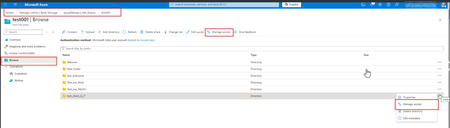
Good day, We have fully and correctly configured an Azure File Share and the associated permissions. All required Azure RBAC roles as well as the necessary data plane permissions are assigned. However, we are observing inconsistent behavior in the Azure Portal regarding the “Manage access” buttons: At times, the “Manage access” buttons are visible: - In the top menu bar of the file share - In the context menu (three‑dot menu) of individual directories At other times, these buttons are not displayed at all, even though: - The same user with the same permissions is used - The same storage account and the same file share are accessed The behavior is sporadic and not reproducible in a controlled manner. Already verified: Required Azure RBAC roles are assigned Required permissions for Azure Files are correctly configured Permissions are effective and functional No error messages are shown in the Azure Portal when the buttons are missing A screenshot showing the state when the functionality was working is here. We would appreciate your support in investigating this issue.Andreas-WPHMar 10, 2026Copper Contributor380Views0likes3Comments
Backing up Azure Files - High cost Read operations
I have found that Azure Files is unusable for large deployments due to the high cost of backups, especially for deployments with lots of small files. Most backup solutions have a changed block tracking mechanism and filter driver that can quickly determine what has changed between the prior backup. If nothing has changed since the last backup, the job quickly makes this determination and the backup job can take seconds to complete. But with Azure Backup backing up Azure Files, it appears to me that each backup has to enumerate every file and blob before making this determination. I first noticed this when I created a 1TB file share and nothing changed with the files from the prior backup and the job took 12 hours to complete. I then looked at my bill and it was $12 in read operations just for that backup where no files have changed. Azure Files is an awesome product, but securing your backups in a vault using Azure Backup just isn't doable from a price perspective. Does anyone know if there are changes on the horizon to Azure Backup in terms of a more robust change block tracking system?TechGeek1Feb 27, 2026Copper Contributor196Views0likes1CommentManage/restore metadata when blob is updated
I'm using an Azure Storage container of block blobs as a data source for an Azure AI Search Index, and I'm using Blob metadata key value pairs for some custom data. But metadata gets wiped when a blob is updated. How are folks managing that? For reference, I've got a CosmosDB set up also for now with a cross-reference I can restore from, but it's manual. I considered using Cosmos as my data source instead, but I also need a place to store/serve media files from related to these records.kathyhurchlaNov 18, 2025Copper Contributor214Views0likes1Comment JohnTMNov 03, 2025Brass Contributor284Views0likes3Comments
Differences between PowerShell and Browser when upload file
Hi All, Anybody have noticed similar behavior? When uploading the file into the storage account that is working find. But if on the same workstation you try to do this using the PowerShell command: Set-AzStorageBlobContent the if fails to: ErrorCode: AuthorizationPermissionMismatch Here is also the longer trace: $sa = get-azstorageAccount -ResourceGroupName RG01 -Name storage01 $strCTX = New-AzStorageContext -StorageAccountName $sa.StorageAccountName $strCTX | Set-AzStorageBlobContent -File C:\temp\test.txt -Container delate -Blob test.txt -Verbose VERBOSE: Performing the operation "Set" on target "test.txt". Set-AzStorageBlobContent: This request is not authorized to perform this operation using this permission. HTTP Status Code: 403 - HTTP Error Message: This request is not authorized to perform this operation using this permission. ErrorCode: AuthorizationPermissionMismatch ErrorMessage: This request is not authorized to perform this operation using this permission. RequestId: 3150eeb6-761e-0096-2edd-56e8bc000000 Time: Tue, 30 Sep 2025 10:25:51 GMT VERBOSE: Transfer Summary -------------------------------- Total: 1. Successful: 0. Failed: 1. Some thing which makes this a bit more odd, is, when I'm looking for the roles and their data accesses, they both looks like following: So I'm not even sure how I do have access to that SA.Petri-XSep 30, 2025Bronze Contributor142Views0likes1Comment
Sentinel to Detect Storage Account Created
Hi Everyone, When trying to generate query to show storage account when they are created, I'm having bad luck of not been able to see it in Sentinel. The KQL query I have is: AzureActivity | where ResourceProviderValue == "MICROSOFT.STORAGE" | where OperationNameValue == "Microsoft.Storage/storageAccounts/write" When the query is running, it generate no output. Even if take away "| where OperationNameValue == "Microsoft.Storage/storageAccounts/write"", I can see the storage account but not specifically when I spun up a test storage account to detect it. I'll appericate if anyone can help me get this query to work. Side note: I have Azure Monitor Alert enable and I get email but I want those alerts to be shown in Sentinel as an incident.cybersal82Aug 13, 2025Copper Contributor278Views0likes2Comments
How to archive diagnostic logs sent to storage account
I need help understanding storage append blobs created by diagnostic settings. When a diagnostic setting is configured to log to a storage account, the logs are created as append blobs. I have compliance requirements that mean I need to retain these blobs in immutable storage for 6 years, however, it seems I cannot use the blob lifecycle management feature to change the access tier of the append blobs to "archive tier". It is only supported for block blobs. This page states "Setting the access tier is only allowed on Block Blobs. They are not supported for Append and Page Blobs." https://learn.microsoft.com/en-au/azure/storage/blobs/access-tiers-overview I feel like the lifecycle management feature is often touted as the answer to how to change the access tier for long-term storage scenarios, but it seems that it does not even work with diagnostic logs, which is pretty baffling. How does Microsoft recommend changing diagnostic logs in a storage account to archive tier storage? The only answer I can see would be to implement some an azure function or logic app to read each blob as it's written and write it back to another storage account as a block blob. But the, how do you when the new file has finished being written to. Nevermind the fact that this violates my immutability requirement.reavopJul 09, 2025Tin Contributor359Views0likes3CommentsUnable to upload .exe files to Azure blob container in Azure Storage Account
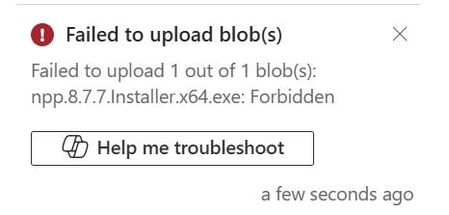
Hi I am trying to upload an exe file to my Azure Blob container but I am getting below ( forbidden ) error. Also when I tried with .txt, .ppt .ps1 extensions I am able to upload those. Is there any restriction MS has for (.exe files). I am having storage I am having owner permission for the Storage Account resource. Kindly Help Thanks and Regards, HirdeshLancelotbaghel30Mar 03, 2025Copper Contributor167Views0likes1CommentEnable ADDS authetication fails
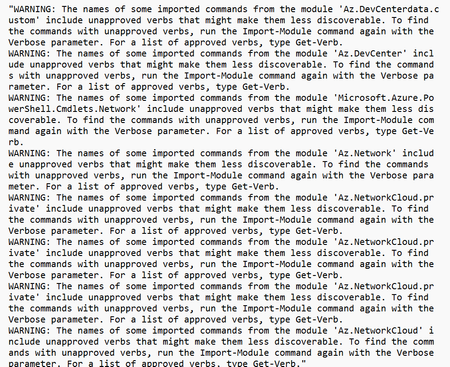
I am trying to execute the Enable ADDS authentication using Azhybridfiles module. when I try to execute the command Join-AzStorageAccount ` -ResourceGroupName $ResourceGroupName ` -StorageAccountName $StorageAccountName ` -SamAccountName $SamAccountName ` -DomainAccountType $DomainAccountType ` -OrganizationalUnitDistinguishedName $OuDistinguishedName it keeps on progressing with below warning but the progress stuck without completing or any error message.KartikDograFeb 25, 2025Brass Contributor155Views0likes1Comment

Tags
- azure blob storage24 Topics
- azure blob15 Topics
- azure files11 Topics
- azure backup8 Topics
- storage explorer7 Topics
- Azure Data Lake4 Topics
- queue storage3 Topics
- Azure Archive3 Topics
- updates2 Topics
- azure disks1 Topic