Forum Widgets
Latest Discussions

Help ! - Hub Spoke Architecture and Routing via NVA
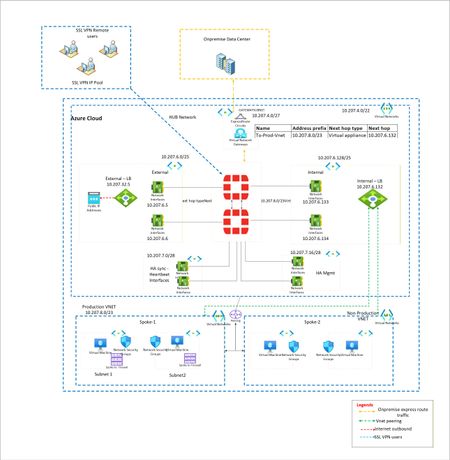
I have a classic example of routing. I want to force all traffic via Fortigate firewalls. EastWest and NorthSouth. However when large Supernet of Azure Vnet is used to route and force the traffic via UDR at gateway subnet, its not working. Because Routes learned at Hub Vnet via Vnet peering is taking precedence. To isolate, i have created multiple small subnet routes for Gateway subnet. Each pointing to spoke vnet and next hop as Fortigate firewall. However this is working, i want to make solution solid. Means if someone creates new vnet in future and peer with Hub, it should not get direct traffic. Is that possible? Or this is typical shortcoming of Azure where routing works with preference to vnet peeering.? Below is architecture -Solved444Views0likes3Comments
How to setup Internet access after All Basic IPs be retired on September 30, 2025
As subject, what can I do to maintain Internet accessSolvedJasonIpSep 22, 2025Copper Contributor107Views0likes1Comment
Hub spoke design with NVA firewall
I have my Azure landing zone setup but it isn't working as i expected. So i have a vnet named vnet-lz-fw-001 with 2 subnets. External and Trusted. I then have a NVA Watchguard Firewall with an interface on each subnet. I then have 2 further vnets, vnet-lz-prod-001 and vnet-lz-id-001. Each of these vnets has peering to vnet-lz-fw-001 but no peering between each other. vnet-lz-prod-001 and vnet-lz-id-001 have user defined routes to point to each other via the trusted interface on the Watchguard NVA The Watchguard firewall has static routes to point to each subnet in the vnets via the Trusted interface gateway address. Virtual machines in both vnet-lz-prod-001 and vnet-lz-id-001 can ping each other, but when they do its not routing via the Watchguard firewall. Is this as expected behavior? Virtual machines in both vnet-lz-prod-001 and vnet-lz-id-001 can ping the trusted interface on the Watchguard Firewall okSolvedjlhall1000Sep 10, 2025Copper Contributor173Views0likes1CommentAzure Firewall has no capacity to maintain source IP on outbound traffic?
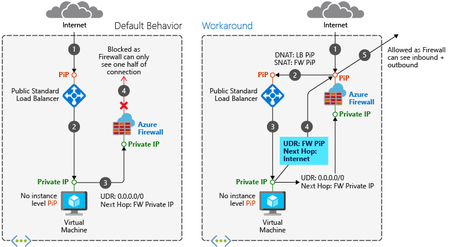
Hello all, My use case: To have multiple static public IP addresses attached to Azure Firewall with SNAT rules configured so that the public IP isn't just randomly selected. We have multiple services that have whitelisting configured for specific public load balancer IPs and now we are trying to move them behind Azure Firewall. Since there is whitelisting on the destination, the public IP being randomly selected won't work. My resources: One instance of premium SKU Azure Firewall. Hub and spoke architecture. Route tables being used to force traffic through Firewall (routed to private IP of firewall) The research I have conducted: I have tried absolutely everything I can think of before coming to this forum and from what I can tell the 4 ways of outbound connectivity provided by Azure are: Default outbound connectivity. Against best practice to do this and won't work since its routing through a virtual appliance (firewall) Associate a NAT gateway to a subnet. This won't work since we have only one instance of Azure Firewall and the requirement for multiple public IPs to be used. Assign a public IP to a virtual machine. Not applicable, sitting in backend pool of a load balancer, single public IP to be used for multiple member servers. Using the frontend IP address(es) of a load balancer for outbound via outbound rules. Needs to go through the firewall, impossible unless we can somehow integrate the firewall between the load balancer and the backend pool? Expanding more on the load balancer scenario, I ran across this documentation in Microsoft Learn. This looks great to tackle the asymmetric routing issue, however, we are only interested in maintaining the source IP for outbound traffic, this would again just use the firewalls public IP for outbound traffic and again randomly select it. Consensus: It seems bizarre to me that Azure has no capacity for static SNAT configuration like most firewalls do. I would have thought a large amount of use cases would require this function. Am I missing something? Is there another workaround? Or is Azure just behind the 8ball with networking. Thanks heaps in advance for any help :) Much Appreciated, usernameone101Solved859Views0likes2Comments
The Subscribtion Dioes not Containst any Registered ASNs
https://learn.microsoft.com/en-us/azure/internet-peering/howto-subscription-association-portal I have follow this documentation and enable Microsoft.Peering. But When I try to add asn it says your subscription Does not contain any registered ASN. Please help me to fix this issue. https://i.is.cc/sEq7Idf.png TrackingID#2407180030009866 This is my Tracking ID please check this issue and response my email which was not address from last 48 hours untill nowSolvedwajid4226594Jul 21, 2024Copper Contributor845Views0likes3Comments
Network assessment
hi folks, for a customer we have to made a "Network assessment" within his current azure environment. Task we plan to use is for a 1st step to use the Network from Insights to see the health, connectivity and traffic information. Next where we want to look is under Network - monitoring-Diagram. Do you have further services, solutions to look or add to make a assessment of the customer network? Thanks for your repliesSolvedcarlichtJun 17, 2024Tin Contributor1.2KViews0likes2Comments
Azure Function with public access disabled
I have disabled public acess of Azure Function. The function is not integrated with VNet and does not have any private endpoint. I confirmed that if I call the function Url from Postman I get 403 Ip Forbidden, which is expected. However, when I configure the function as backend for Api Management intgrated with VNet , I am still able to call it and get 200 Ok response. How is this possible?Solvedkaushikc139Apr 20, 2024Tin Contributor1.9KViews0likes3CommentsExpress route: dedicated and/or private
To my understanding, Expressroute provides a DEDICATED connection via a partner provider to the Azure cloud; avoiding the public internet. Now from what I understand (please someone correct me); this connection is dedicated but not actually private. It private because it avoid the public internet, but not private as far if the connection was intercepted, data by default is not encrypted? So for it to be a private connection as well as dedicated, you need to establish a VPN tunnel(or related privacy enabled configuration) between your on premise and azure hosted service/resource/vnet/etc. Is this correct, or is the connection from on premise to the azure platform via expressroute, is automatically encrypted end to end? but not once into the azure platform itself? At what pointy if any, is express route not private (encrypted)? I'm studying for az104, and I'm trying to get a solid answer, if by default, is express route, dedicated and private; encrypted not just "private by avoiding the public internet". the latter is not truly private, its just segregated from public traffic.SolvedCharles_moralesMar 19, 2024Copper Contributor1.1KViews0likes2Comments
NAT GW operation
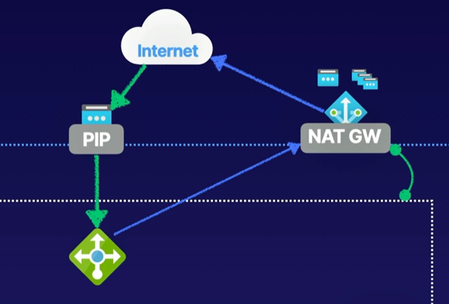
In a course, the below image is used to illustrate the operation of NAT GW. What I don't understand here is how asymmetric traffic is avoided. If an Azure resource is accessed over its associated public IP and the response comes back via the NAT GW performing SNAT using a different IP address, then most probably this traffic would be dropped by any well-behaving source entity. For instance, assuming HTTP traffic, I can't imagine a TCP session established like that. How does this work ?SolvedlafrankhuFeb 02, 2024Copper Contributor719Views0likes2Comments
azure dns and access from a azure vpn connection (openvpn ssl)
Hi there, We are trying to configure a dns server within our private virtual network. We managed to make it working within the virtual networks no issues there. We have users using the Azure VPN client connecting to the Azure private networks via the VPN network gateway. These users can connect to the VMs using the IP addresses but not the DNS names of these VMs. Anyone might now what the issue could be? we first tried the firewall DNS, then we tried a dns running on a VM instance to no avail. Thank youSolvedjmoriss7Jan 11, 2024Copper Contributor1.1KViews0likes3Comments
Tags
- virtual network51 Topics
- vpn gateway27 Topics
- azure firewall25 Topics
- virtual wan18 Topics
- application gateway13 Topics
- load balancer12 Topics
- azure private link10 Topics
- azure dns10 Topics
- azure expressroute10 Topics
- azure front door8 Topics