Forum Widgets
Latest Discussions

DebugView v. 5.0 freezes
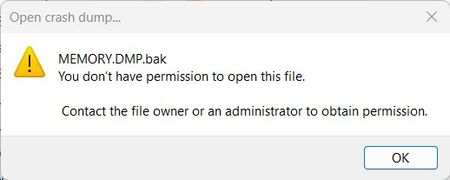
It appears that if the file C:\Windows\MEMORY.DMP exists, DebugView/UI will freeze completely if permission to open/read the file hasn't been granted. DebugView is also incapable of telling what it's trying to do at the time (ie. trying to process a crash dump file). Running DebugView under a non-Administrative account & trying to process a renamed crash dump file yields the following error message:ziczacApr 11, 2026Copper Contributor5Views0likes0Comments roark_hApr 08, 2026Copper Contributor22Views0likes0Comments
Suggestion for ProcessExplorer?
Could not find any public tracker or feedback system for sysinternals suite or process explorer itself (really needs something IMHO if for no other reason just so people can check if if something has already been suggested) Anyway, I would really like if Process explorer could have a graph to watch aggregate NETWORK i/o separate from disk(block) I/O. To avoid having to use multiple tools to to figure out a systems' (and process) network utilization to find issues. In addition, the system information popout window (summary, cpu, memory, i/o, gpu) should both include this on the summary tab, as well as include GPU (which is missing) on the summary tab. If there is an actual place to file such suggestions/feedback that is NOT the forum please let me know.StefanoKMar 22, 2026Copper Contributor82Views1like1Comment
Migrate RDCMAN to another PC?
I have a RDCMAN.cfg with approx. 50 stored connection to other PC or servers. Maybe about 5 of them have stored passwords, the other have only stored login-names without password. I got a new PC and copied the rdcman.cfg to new PC, but now on every startup of RDCMAN I get an incredible long error message like: There were problems decrypting some credentials. Click OK to copy the details to the clipboard. Custom passwords: path .. server .... password ... Key is not valid for defined state ... repeat it 50 times .. How can I migrate my data to new PC?SolvedPierre-de-la-VerreJan 19, 2026Copper Contributor178Views0likes1CommentRequest: Versioned download URLs
Hi, The download URLs listed on https://learn.microsoft.com/nb-no/sysinternals/downloads/ all seem to point to the latest version of each Sysinternal tools. This is usually preferable, but causes problems for tools such as Chocolatey that validates the checksum of the ZIP file after download (see https://github.com/chocolatey-community/chocolatey-packages/blob/master/automatic/sysinternals/tools/chocolateyInstall.ps1). Checksum validation will then fail after each Sysinternal release since the file content have changed but not the URL (see https://github.com/chocolatey-community/chocolatey-packages/issues/2751). ASK: Would it be possible for the Sysinternal team to also offer download URLs that contain the version, so that Chocolatey and similar tools can start assuming a constant checksum for a given download URL? Thanks in advance, Fredrik OrderudforderudDec 10, 2025Copper Contributor99Views2likes2CommentsCompare 2 promon files
Hello, How to compare 2 procmon files from different desktops for a troubleshoot, which tool can be used ? Thanks SkakskakNov 26, 2025Copper Contributor77Views0likes2CommentsRDCMan v3.1: Recent Built-In Group Not Working
I am using Remote Desktop Connection Manager v3.1 (on Windows 11 Enterprise, 24H2) and have found the following two issues... The "Recent" Built-In Group doesn't work...the recently connected servers do not appear in this group (this fails for my colleague too). If you click on the URL shown in the "About" Dialogue box then RDCMan errors and then crashes! (Again, this too fails for my colleague). Many thanks! LeeleewilmottNov 04, 2025Copper Contributor211Views0likes0Comments
Autologon v3.10 fails to set password for Server 2025
When attempting to setup AutoLogon for Windows Server 2025, the AutoAdminLogon, DefaultDomainName, DefaultUserName are all set, though it does not appear to be setting the encrypted password correctly where ever autologon stores that value. I have tested it working successfully on Windows Server 2022.BGleasonOct 07, 2025Copper Contributor74Views0likes0CommentsHow to check the certificate when using RDCMan 3.1
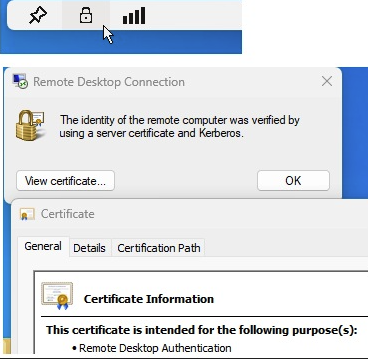
Hi all, Is there an easy way to check the Certificate used within RDCMan 3.1 tool, while remoting to different servers? I'm struggling to find this option, not sure if it even exists... Thanks.SokratisZotosAug 19, 2025Brass Contributor59Views0likes0CommentsAutoruns renders system unbootable
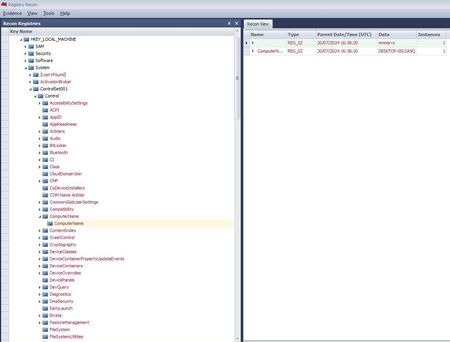
Autoruns renders system unbootable, while using it from within WinPE: Autoruns -> Files -> Analyze Offline System... Last version causing no trouble using it this way is 13.100. https://learn.microsoft.com/en-us/sysinternals/downloads/autoruns Running Autoruns from a fully installed system and using this method does not cause any problems so far. Affected registry hives are SOFTWARE and SYSTEM. Recovering the system or at least some entries is only successful with an (older) existing backup of the registry files. The corrupted registry file SYSTEM even lost the computername. All information off the harddrives are lost too. Registry Recon confirms it. All red entries have been damaged. I am not sure where exactly i should report this. It can easily be reproduced by running it under any WinPE, it happens every time i used it. I like to use the newest versions under PE again. Maybe there is a way to recover the lost entries. I appreciate any help. With kind regardsalphapremiumAug 05, 2025Copper Contributor428Views1like1Comment