Recent Discussions

SQL Server FCI CSV storage flips multiple times into Online (No Access) state and eventually fails
Dear Team, I'm encountering an issue with our SQL Server multi‑instance failover cluster after applying the OS security patches and restarting the second node. Once the second node comes back online, the Cluster Shared Volume (CSV) briefly flips multiple times into Online (No Access) state and eventually fails.(we can make it online manually, but again flips and failed after sometime). To make the SQL cluster available, we either need to shut down the VM or revert the patch. Before the patching, all cluster roles and SQL instances were moved off the node, and the cluster appeared healthy. The issue only occurs after the reboot of the second node. (first node patched and restarted and everything working fine) OS : Windows Server 2025 Standard Patch tried: KB5075899 (February,2026 ) KB5078740 (March,2026) KB5082063 (April 2026 ) KB5087539 (May 2026) Could you please advise if there are any specific checks or steps we should follow during OS patching to prevent CSV access loss? Is it an issue with the patch or something else? Any insights or recommended actions would be really helpful to perform the security OS patch in the server Thanks you!20Views0likes0Comments
Windows server 2025 SQL patching cluster problem.
Dear Team, I have a problem when I am patching upgrade windows server 2025 with KB5091157. After patching is the clustering is not able to join back; it shows the error with credentials. The log error is "Cannot connect sqlxxxxxxx." you do not have administrative privileges on the cluster. Contact your network administrator to request access. Note: The server is not in a different VLAN network.43Views0likes0Comments
SQL Server 2025 Log Shipping Fails with Missing Assembly (sqllogship.exe) on Split-Drive Install
Hello, I am testing SQL Server 2025 in a lab environment and have encountered an issue with log shipping that appears to be related to assembly resolution. Environment: SQL Server 2025 (fresh install, both unattended and manual tested) Windows Server 2022 and Windows Server 2025 (issue occurs on both) SQL binaries installed on E:\ Default system drive is C:\ Issue: When log shipping runs (via SQL Agent job or manually invoking sqllogship.exe), it fails with the following error: Unhandled Exception: System.IO.FileNotFoundException: Could not load file or assembly 'Microsoft.SqlServer.ConnectionInfo, Version=17.100.0.0... Observed Behavior: sqllogship.exe is located at:E:\Program Files\Microsoft SQL Server\170\Tools\Binn\ The required assemblies (e.g., Microsoft.SqlServer.ConnectionInfo.dll) are installed at:C:\Program Files\Microsoft SQL Server\170\Shared\MDS5xSMO\ The sqllogship.exe.config file in SQL Server 2025 includes explicit codeBase entries using relative paths:..\..\Shared\MDS5xSMO\Microsoft.SqlServer.ConnectionInfo.dll Because of this, the application attempts to resolve assemblies at:E:\Program Files\Microsoft SQL Server\170\Shared\MDS5xSMO\which does not exist by default. Workaround: Manually copying the shared SMO directory from C: to E: resolves the issue: C:\Program Files\Microsoft SQL Server\170\Shared\MDS5xSMO → E:\Program Files\Microsoft SQL Server\170\Shared\MDS5xSMO After doing this, log shipping works as expected. Comparison with SQL Server 2022: SQL Server 2022 sqllogship.exe.config is empty It does not rely on explicit codeBase paths Log shipping works without requiring any manual file copies Question: Is this expected behavior in SQL Server 2025, or a potential issue with how sqllogship.exe resolves shared assemblies when SQL is installed on a non-system drive? Specifically: Should Shared\MDS5xSMO also be installed on the same drive as the SQL binaries? Or should sqllogship.exe.config be updated to use absolute paths instead of relative ones? Would appreciate any confirmation or guidance from others who may have encountered this. Thanks!127Views1like1Comment
SQL Server 2025 Express - service starts with delay of some hours after restart of computer
Dear Community, we started using SQL Server 2025 Express but experienced problems with the start of service at startup. When the computer is restarted, the service is not started. I observed this on nearly all installations and in one case it took kinda exactly 2 hours to start the service (or it was somehow delayed but without any trace in settings or windows logs). When we start the service manually or by batch script it is starting properly at startup ... What exactly causes this? We only have this issue with 2025 Express and i have not yet found similar cases in the internet. Thank you, kind regardsSolved54Views1like3CommentsDocumentation contradictory
Hi, ALL, Page https://learn.microsoft.com/en-us/sql/t-sql/statements/create-database-transact-sql?view=sql-server-ver17&tabs=sqlpool states [quote] SIZE, MAXSIZE, and FILEGROWTH parameters can be set when a UNC path is specified for the file. [/quote] However later on that same page it states [quote] SIZE can't be specified when the os_file_name is specified as a UNC path. [/quote] I think those 2 sentences contradicts each other.....72Views0likes1CommentFailure to run SSMS
Hi, ALL, For sometime I had both MSVC 2010 and 2017 installed on my laptop. Recently I needed space and decided to remove the old version. Unfortunately I thin I killed one of the SSMS libraries, because while it successfully starts, trying to go to the "New Query" window, Im getting the error "Library not registered". The server itself operates just fine as I can connect to it. Is there anyway to make it work again? Than you.83Views0likes1CommentExtended Event with app_name doesn't work properly
Hello, When I create an extended event to capture all the SELECT on the instance, it works : CREATE EVENT SESSION [YourSession] ON SERVER ADD EVENT sqlserver.sql_statement_completed( ACTION(sqlserver.client_hostname,sqlserver.database_name,sqlserver.nt_username,sqlserver.session_id,sqlserver.session_nt_username,sqlserver.sql_text,sqlserver.username) WHERE ([sqlserver].[like_i_sql_unicode_string]([sqlserver].[sql_text],N'%SELECT%'))) ADD TARGET package0.event_file(SET filename=N'S:\Program Files\Microsoft SQL Server\MSSQL16.FORMATIONMSSQL\MSSQL\Backup\YourSession_Target.xel',max_file_size=(2),max_rollover_files=(2)) WITH (MAX_MEMORY=2048 KB,EVENT_RETENTION_MODE=ALLOW_MULTIPLE_EVENT_LOSS,MAX_DISPATCH_LATENCY=3 SECONDS,MAX_EVENT_SIZE=0 KB,MEMORY_PARTITION_MODE=NONE,TRACK_CAUSALITY=OFF,STARTUP_STATE=OFF) GO I can see all the SELECT that I execute on SSMS, but, when I use the app_name ACTION, it doesn't work anymore : CREATE EVENT SESSION [YourSession] ON SERVER ADD EVENT sqlserver.sql_statement_completed( ACTION(SQLSatellite.AppName,sqlserver.client_hostname,sqlserver.database_name,sqlserver.nt_username,sqlserver.session_id,sqlserver.session_nt_username,sqlserver.sql_text,sqlserver.username) WHERE ([sqlserver].[like_i_sql_unicode_string]([sqlserver].[sql_text],N'%SELECT%'))) ADD TARGET package0.event_file(SET filename=N'S:\Program Files\Microsoft SQL Server\MSSQL16.FORMATIONMSSQL\MSSQL\Backup\YourSession_Target.xel',max_file_size=(2),max_rollover_files=(2)) WITH (MAX_MEMORY=2048 KB,EVENT_RETENTION_MODE=ALLOW_MULTIPLE_EVENT_LOSS,MAX_DISPATCH_LATENCY=3 SECONDS,MAX_EVENT_SIZE=0 KB,MEMORY_PARTITION_MODE=NONE,TRACK_CAUSALITY=OFF,STARTUP_STATE=OFF) GO Do you have any clue about why the extended event doesn't capture the SELECT when the action AppName is selected ? It is a bug ? It is because like I select the AppName field, if my session doesn't have any "app name" it doesn't capture it ? Regards, Alktor441Views0likes3Comments
MS ODBC and OLE DB failed
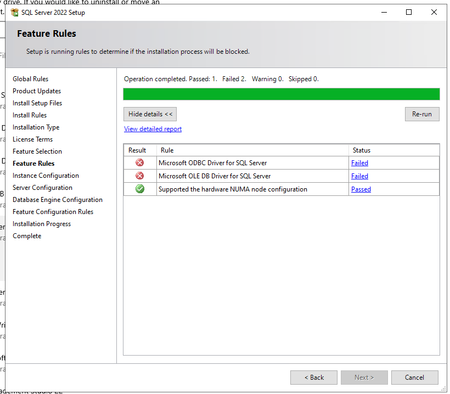
Hello, In SQL Server 2022 (16.0.4250.1) showed two fails and can´t continue (see screenshot) On system are installed those versions of ODBC and OLE DB System was previously working (not stopped on this window for fail). We did repair of both installation and restart pc, but not helpful. Whta and how to repair it, please? Thank you.72Views0likes1CommentA bizarre situation - SQL query finds no records when record is present.
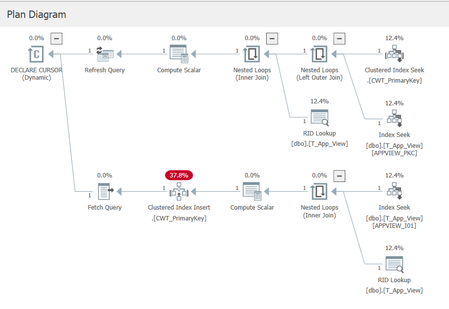
I am trying to troubleshoot a bizarre situation, and looking for either an explanation of the cause, or assistance in determining the cause. The situation is esoteric (to say the least), so I'll need to paint a picture. I am using SQL 2019 Enterprise for testing. Our database has Allow Snapshot Isolation set to true, and the Is Read Committed Snapshot On is also true. We have a table called T_App_View, with essentially these important fields (plus some audit fields not shown): CREATE TABLE T_App_View ( C_Id int not null, C_Type varchar( 20 ) not null, C_Entity varchar( 250 ) not null, C_Specialisation varchar( 250 ) null, CONSTRAINT APPVIEW_PKC PRIMARY KEY NONCLUSTERED( C_Id ) ) We have an index on (Type, Entity, Specialisation): create unique index APPVIEW_I01 on T_App_View( C_Type, C_Entity, C_Specialisation ) And from a historical hangover we have a view against the table that is used for queries: CREATE VIEW dbo.VS_App_View AS SELECT * FROM dbo.T_App_View WITH CHECK OPTION The table is used to define "UI views" for our application, and contains about 1000 records. As part of commissioning a new database, we use a tool to load data into this table, and then the data basically sits there unchanged. Each time the tool is run it deletes any old data in the table, before populating the new data. The tool deletes the old data row-by-row rather than using a truncate table statement or similar. When our web tier is asked to provide the "definition" of a view, it performs a query on VS_App_View using the three compound key components of Type, Entity, and Specialisation. A dynamic cursor is used (a historical hangover from many years ago). A typical query would look similar to this: SELECT appview.C_Id, appview.C_Entity_Id, appview.C_Specialisation, appview.C_View_Type FROM dbo.VS_App_View appview WHERE appview.C_View_Type = 'DETAIL' AND appview.C_Entity_Id = 'a' AND appview.C_Specialisation = 'Finance' We are using the standard isolation level of Read Committed (which means Read Committed Snapshot in reality). Notice the select statement is not using an option of READCOMMITTED in the query. The fun part Sometimes when we do a lookup in SQL Server, the above query finds no matching records. This bug is very evasive, we cannot reproduce it, and it appears maybe once or twice a month, and other months not at all. It is not limited to specific key values, it just appears to happen randomly (or the pattern is obscure enough that we cannot yet see it). Our QA team experienced the find failure the other day and one of our developers jumped into SSMS and ran the query manually and sure enough it came back with no records found. And now the bizarre bit: The developer ran the query directly against the T_App_View table, and the record appeared. He then re-ran the query against the View, and the record appeared. We have the Query Store enabled for this database and I can see two plans matching the above query (one for a null specialisation, and one for a non-null specialisation). The query plans look odd (due to the dynamic cursor presumably) because even though the index guarantees a maximum of one matching record, the query plan still shows a temporary table being constructed along with a clustered index for that table. I feel like I am reasonably proficient in SQL Server but this one has me stumped. ChatGpt suggested it is a query plan issue, but I'm skeptical as I've never heard of a query plan not finding a record. I've only experienced query plan issues in terms of performance impacts. Has anyone ever come across such a situation? Is Snapshot Isolation part of the problem here, or database statistics, or the fact we are deleting an entire table of records individually and then repopulating them (resulting in bad statistics)? Should we have used WITH( READCOMMITTEDLOCK ) for this query perhaps? Any suggestions on how to troubleshoot effectively, as in what to look at and for? Thanks in advance for any help.136Views0likes3CommentsKerberos double hop delegation on SQL Linked Server fails on AG listener after RC4 disablement
Environment 3 Node- SQL Server 2022 with Availability Group Windows Server 2022 - Linked Server configured with Kerberos delegation (double-hop scenario) - RC4 encryption recently disabled via GPO The Problem After disabling RC4 in the domain (not sure of this root cause), Kerberos delegation through a Linked Server stopped working — but only when connecting via the **AG listener name**. Connecting via the **node name** works fine. I try to migrate my service account to gMSA and I've recreate all SPN and all delegation for the new account, but the issue is the same: Authentication works if the linked server us the node name, if it use the Listener AG name the connection fail with ------------------------------ Login failed for user 'NT AUTHORITY\ANONYMOUS LOGON'. (Microsoft SQL Server, Error: 18456) Connection Id 6d654295-0538-4837-b900-ff65c9e86ee9 at 2026-04-29 11:59:25Z I Confirmed via Kerberos event logging (Event ID 4769 on DC)** On a healthy request (node name), ticket encryption type is `0x12` (AES256). - Confirmed SPN registration with `setspn -L` - Verified Kerberos events on the DC (4768/4769) - Confirmed forwardable flag (`0x40000000`) is present in ticket options — delegation is active - Confirmed pre-auth and session encryption are both `0x12` (AES256) for the working path set `msDS-SupportedEncryptionTypes = AES128+AES256` on the SQL service account and resetting its password rotete kdc key Are there any additional steps needed on the Linked Server or constrained delegation configuration side after the service account change? Any guidance appreciated. Thanks.104Views0likes0CommentsIs there a way to check for ODBC driver UNICODE support
Hi, ALL, I'm writing a C++ code to talk to a different DBMSes and wonder if there is a way to check programmatically for the UNICODE support. I know its a year 2026 and 99.9999% of the programs are using UNICODE, but many drivers are still being shipped as ANSI counterparts as well. Thank you for any pointers.70Views0likes2Comments
Access to SQL Jobs
Hi, I have several jobs in SQL Server Agent. In the department there are 3 people who need administration access to the jobs. What kind of security access must they have? They already have SQL Agent Operator, SQL Agent Reader and SQL Agent User. As far as I know you can only edit jobs where you are the Owner. But, all 3 people must be able to edit all jobs. How to solve that issue?202Views0likes3CommentsSQL Migration from SQL2017 to SQL2022
AG1: Win OS 2016, SQL 2017 AG2: Win OS 2019, SQL 2022 We are trying to migrate database from AG1 to AG2 via distributed AG. As the database is on different version, the status of the db on AG2 will be in Synchronized/In Recovery mode which is not readable. Are there any ways to verify the data integrity of the database as its not readable?72Views0likes3CommentsSQL logshipping
Hi Everyone, has any experience an issue whereby you setup log shopping from SQL 2014 to SQL 2022 , when you choose the paths for data and logs to be stored on destination server it defaults to store both files on the Data drive instead of it being seperate drives like you specified? The initial log setup completes with no errors. Would appreciate any help i can get. Thanks R76Views0likes3CommentsHow does GitHub Copilot in SSMS 22 handle database context collection before generating a response?
Hello, I am trying to better understand the internal workflow of GitHub Copilot in SSMS 22, especially for database-specific questions. From the product descriptions, it seems that Copilot can use the context of the currently connected database, such as schema, tables, columns, and possibly other metadata, when answering questions or generating T-SQL. However, I could not find clear official documentation about the actual sequence of operations. My main questions are: Before generating a response, does Copilot first collect database context/metadata from the active connection and then send that context to the LLM as grounding information? Or does it first use the LLM to interpret the user’s request, decide what information is needed, and then retrieve database metadata before generating the final answer? In some explanations, I have seen the phrase "Core SQL Copilot Infrastructure", but I cannot find any official documentation for that term. Is this an official component name? If so, what does it specifically refer to in the SSMS Copilot architecture? When Copilot answers schema-related or data-related questions, what information is retrieved automatically from the connected database, and is any SQL executed as part of that process? Is there any official architectural documentation that explains: context collection, prompt grounding, LLM invocation order, and whether query execution can occur before the final response is generated? I am asking because I want to understand the feature from both an architecture and data governance/security perspective. Any clarification from the product team or documentation links would be greatly appreciated. Thank you.49Views1like0CommentsUnable to install SQL Server 2022 Express (installer glitch + SSMS error)
Hi, I recently purchased a new Lenovo laptop, and I am trying to install Microsoft SQL Server 2022 Express along with SSMS. SSMS installed successfully, but SQL Server installation fails, and sometimes the installer UI glitches or does not load properly. Because of this, I am getting connection errors in SSMS like "server not found" and "error 40". I am not very familiar with technical troubleshooting. Can someone guide me step-by-step in a simple way to install SQL Server correctly? Thank you.125Views0likes0CommentsMigrate SQL 2016 to SQL 2022 - Detail Work Breadown Structre (WBS)
Hi, We’ve started a project to migrate from SQL Server 2016 to SQL Server 2022, and I’m currently preparing a detailed Work Breakdown Structure (WBS). Has anyone in this community gone through a similar migration and been willing to share their project WBS, either in .mpp or Excel format? Regards, Subhasish Roy48Views0likes0CommentsSQL Server In-Memory Databases in SUSPECT Mode After Update to SQL Server 2019 (RTM-CU27-GDR) (KB504
Hello everyone, Last night, we updated our SQL Server to version SQL Server 2019 (RTM-CU27-GDR) (KB5040948). Unfortunately, after restarting the system, two of our In-Memory databases went into the SUSPECT state and did not come online. Below are the server specifications and error details: Server Specifications: Memory: 48 GB RAM CPU: 8 cores Error Details: Database: TestDB1 [ERROR] openExistingHkDatabase(): HkHostRecoverDatabaseHelper::RestoreV2(): Database ID: [19] 'TestDB1'. Failed to create XTP database. Error code: 0x88000001. [ERROR] HkHostRecoverDatabaseHelper::ReportAndRaiseFailure(): Database ID: [19] 'TestDB1'. Failed to load XTP checkpoint. Error code: 0x88000001. Restore operation failed for database 'TestDB1' with internal error code '0x88000001'. Database: TestDB2 Restore operation failed for database 'TestDB2' with internal error code '0x88000001'. We checked the SQL Server log files and found the above errors indicating problems with creating the XTP database and loading the XTP checkpoint. The databases are currently in the SUSPECT state.821Views0likes1Comment
Best Practices for Connecting Internal SQL Server Financial Systems to Online Payment Platforms
I currently have an internal enterprise system used for purchasing, payments, and finance operations. The system runs on an on-premises database using Microsoft SQL Server and stores all financial transactions and internal workflow data. We now have a new requirement to enable online payment services for customers. These services will be exposed externally (likely in the cloud) and must interact with the same financial system so that transactions are reflected in our internal database. My main concerns are related to architecture, security, and data synchronization. Key points about the current setup: The core system and database are hosted internally (on-premises). The database contains sensitive finance and payment data. Internal processes depend on the current database structure and workflows. The new requirements: Develop an online payment service accessible over the internet. Ensure transactions from the online service update the internal system. Maintain data integrity and security. Avoid performance issues for the internal system. I’m evaluating a few possible approaches but I’m unsure which is best practice: Allow the cloud payment service to connect directly to the internal SQL Server database through secure networking. Maintain a replicated or read/write copy of the database in the cloud. Use SQL Server replication (transactional or snapshot) between on-prem and cloud. Introduce an API or middleware layer that handles all transactions and updates the internal database. Maintain separate databases and synchronize transactions asynchronously. My main questions: Is it recommended to expose the internal SQL Server database directly to cloud services? Should I use replication, a secondary database, or a service/API layer? What architecture pattern is commonly used for integrating on-prem financial systems with online payment platforms? How can we ensure consistency between internal transactions and online payments? Are there recommended SQL Server features or patterns for this scenario (replication, service broker, CDC, etc.)? Any advice on best practices, architecture patterns, or real-world implementations would be greatly appreciated.99Views0likes0CommentsBest architecture to integrate internal SQL Server system with cloud-based online payment services
I currently have an internal enterprise ERP system also need to be integrated with online payments, and finance operations. The system runs on an on-premises database using Microsoft SQL Server 2022 and stores all financial transactions and internal workflow data. We now have a new requirement to enable online payment services for customers. These services will be exposed externally (likely in the cloud) and must interact with the same financial system so that transactions are reflected in our internal database. My main concerns are related to architecture, security, and data synchronization. Key points about the current setup: The core system and database are hosted internally (on-premises). The database contains sensitive finance and payment data. Internal processes depend on the current database structure and workflows. The new requirements: Develop an online payment service accessible over the internet. Ensure transactions from the online service update the internal system. Maintain data integrity and security. Avoid performance issues for the internal system. I’m evaluating a few possible approaches but I’m unsure which is best practice: Allow the cloud payment service to connect directly to the internal SQL Server database through secure networking. Maintain a replicated or read/write copy of the database in the cloud. Use SQL Server replication (transactional or snapshot) between on-prem and cloud. Introduce an API or middleware layer that handles all transactions and updates the internal database. Maintain separate databases and synchronize transactions asynchronously. My main questions: Is it recommended to expose the internal SQL Server database directly to cloud services? Should I use replication, a secondary database, or a service/API layer? What architecture pattern is commonly used for integrating on-prem financial systems with online payment platforms? How can we ensure consistency between internal transactions and online payments? Are there recommended SQL Server features or patterns for this scenario (replication, service broker, CDC, etc.)? Any advice on best practices, architecture patterns, or real-world implementations would be greatly appreciated.45Views0likes0Comments
Events
Recent Blogs
- 2 MIN READWe just shipped mssql-python 1.8.0, the official Microsoft SQL Server driver for Python. This release focuses on day-to-day ergonomics, a long-requested authentication option for Bulk Copy, and a ref...May 29, 2026150Views0likes0Comments
- We're pleased to announce the general availability (GA) release of Microsoft OLE DB Driver 19.4.2 for SQL Server. This is a maintenance update to the 19.4 line that improves TLS handling, raises a lo...May 26, 2026350Views0likes0Comments