Security and AI Essentials
Protect your organization with AI-powered, end-to-end security.
Defend Against Threats
Get ahead of threat actors with integrated solutions.
Secure All Your Clouds
Protection from code to runtime.
Secure All Access
Secure access for any identity, anywhere, to any resource.
Protect Your Data
Comprehensive data security across your entire estate.
Recent Blogs

Learn how to protect data, govern access, and reduce risk across AI apps, agents, browsers, and networks with Microsoft Entra and Microsoft Purview.
Jun 25, 2026164Views
0likes
0Comments

Co-authored with Lizet Pena, Caroline Mutua, Alvin Kua and Marco Sudahl
Governance is the silent dependency every transition trips on. Read about how roles, data tiering, and multi-tenant operation...
Jun 25, 202677Views
0likes
0Comments

Meet Sathish Veerapandian: security architect, community collaborator, published author, and cycling enthusiast with a knack for turning real-world customer challenges into product-shaping feedback. ...
Jun 25, 202634Views
0likes
0Comments

The Problem: Static Analysis Without Context
Traditional static analysis treats every file as an island. Scan a binary, match against known signatures, flag what you recognize. The approach is well...
Jun 24, 2026131Views
0likes
0Comments
Recent Discussions
Windows 11 24H2 Sec Baseline → Broken SSO to on‑prem (Root cause: PKINIT SHA‑1 baseline)
Hi all, I ran into an issue with Entra-joined devices using Windows Hello for Business (Cloud Kerberos Trust) that might help others working with Windows 11 24H2 security baselines. Scenario Windows 11 25H2 devices Entra-joined (not hybrid) Intune-managed Windows Hello for Business (WHfB) enabled Cloud Kerberos Trust configured On-prem AD (Windows Server 2019/2022 DCs) Access to SMB shares / on-prem applications Symptoms SSO to on-prem resources fails Users get credential/PIN prompt instead of SSO Error message: “The system cannot contact a domain controller to service the authentication request” Client-side observations: klist → no tickets (initially) After enabling Cloud Kerberos Trust: klist get krbtgt → works klist get cifs/server.domain → fails Error: 0xc000a100 / 0x3bc4 Hash generation for the specified version and hash type is not enabled on server Root Cause The issue was caused by a Windows 11 24H2 security baseline setting related to Kerberos/PKINIT. The 24H2 baseline introduces a policy for configuring hash algorithms for certificate-based Kerberos authentication (PKINIT). This setting allows environments to disable SHA-1 and require SHA-2 algorithms. [applepie.se] Important detail: This configuration only works if the domain controllers fully support PKINIT with SHA-2, which effectively requires Windows Server 2025 domain controllers across the environment. If SHA-1 is disabled while running: Windows Server 2019 or 2022 DCs Mixed environments then PKINIT authentication fails, which directly impacts: Windows Hello for Business Cloud Kerberos Trust Any passwordless Kerberos-based authentication Why this is difficult to troubleshoot Cloud Kerberos Trust appears correctly configured AzureADKerberos object exists PRT is valid Network connectivity is fine However: Kerberos tickets are not issued correctly Service tickets (CIFS, HTTP, etc.) fail Errors are misleading and point to KDC/hash issues No explicit warning is provided in baseline guidance that mixed environments will break Resolution Revert the baseline change and allow SHA-1 for PKINIT again. Policy location: Computer Configuration → System → Kerberos / KDC → Configure hash algorithms for certificate logon Ensure: SHA-1 is set to Allowed/Default After reverting: Kerberos ticket issuance works SSO to on-prem resources is restored Recommendation Do not disable SHA-1 for PKINIT unless: All domain controllers are Windows Server 2025, and PKINIT SHA-2 support has been fully validated Treat this setting as future hardening, not production-safe for mixed environments today. Takeaway If you experience: WHfB + Cloud Kerberos Trust SSO failures klist get errors with hash generation issues Missing or failing Kerberos service tickets check the PKINIT hash configuration from the 24H2 security baseline first.
Onboarding Devices to Purview
I am not clear on how can I onboard devices to MDE so that I can enforce EDLP policies. We have CrowdStrike as Primary AV and other policies. Devices are managed through Intune for Bitlocker encryption and all the other settings except they don't have Defender. These devices are not showing up in Purview nor under "Endpoint detection and response" location under Endpoint Security. If we create an EDR onboarding policy and deploy to devices, then it shows the devices and says that AMRUnningMode is Passive, but Antivirus is true. Which I feel like Defender is taking over CrowdStrike? or am I wrong. My goal is to make sure CrowdStrike still primary AV and devices should be onboarded to MDE and then to Purview so that we can scope EDLP policies properly. Can anyone help me to understand or provide right steps?
Need information on generating sample events for Threat Intelligence" (both duplicate posts)
Two things are tripping this up, and they're common mix-ups: First — Attack Simulation Training doesn't generate Threat Intelligence events. If you used the built-in phishing simulator, its logs only show up under Email & collaboration → Attack simulation training → Simulations — they're intentionally excluded from real Threat Intelligence telemetry. That's likely why nothing's showing up even though you ran a campaign. Second — your EICAR test should actually work, but check the right place: not the generic Office 365 Management Activity API's AuditLogRecordType page in isolation — go specifically to the RecordType values used for Defender for Office 365 threat events: 28 = ThreatIntelligence (phishing/malware events) 41 = ThreatIntelligenceUrl (Safe Links time-of-click/block events) Plus ThreatIntelligenceAtpContent, ThreatFinder, MSTIC To reliably generate one: Confirm Purview audit logging is enabled for the tenant first — if it isn't, nothing downstream gets logged regardless of what you trigger. From an external mailbox, send a test user the EICAR string as a .txt attachment (exact 68-byte string, see Microsoft's anti-malware testing doc). Defender for Office 365 should detect and quarantine it. Verify it landed first in the portal UI: Email & collaboration → Explorer → Malware tab — if it's there, the underlying ThreatIntelligence record exists and the Management API call should return it (allow a short delay; these aren't instant). For the Safe Links side, send a known-safe-but-flagged test URL (Microsoft publishes test URLs for this) to trigger ThreatIntelligenceUrl. If it shows up in Explorer but still doesn't appear via the Management API, that's usually an API subscription/permission issue (you need an active subscription to the DLP.All or relevant Office 365 Management API content type, not just Graph permissions) — worth checking separately from the detection side.Can the Microsoft Defender portal show the server details as per security group?
Yes — this is exactly what Device Groups + RBAC are designed for in Microsoft Defender (assuming you're managing these servers through Defender for Endpoint, which is the typical path for cross-vendor server monitoring). The model: Device groups are the scoping unit (not Entra security groups directly) — create one per vendor/company (e.g., "Company A Servers", "Company B Servers"), using a matching rule (tag, OS, name pattern, etc.) to auto-assign devices. RBAC roles then get tied to an Entra security group and granted access to only specific device groups. So: Company A's people go in an Entra group → that group is assigned an MDE role scoped to "Company A Servers" only → they only ever see those devices, alerts, and incidents in the portal. You as admin keep your existing Global Admin/Security Admin role (or get added to both device groups' RBAC scope), so you retain visibility across both. Path: Settings → Endpoints → Permissions → Device groups to create the groups, then Permissions → Roles to create a role and tie it to your Entra security group with that device group as the scope. One thing to verify before committing to this design: this RBAC model affects what shows in alerts, incidents, advanced hunting (scoped automatically), and inventory — but make sure nobody from Company A/B also needs organization-wide Defender features like global threat analytics, since those aren't scopable the same way. If you're actually talking about servers monitored via Defender for Cloud (Azure subscription-based, not MDE-onboarded), the equivalent mechanism is Azure RBAC at the subscription/resource group level (assign Security Reader scoped to the RG containing Company A's VMs) — different mechanism, same outcome. Worth clarifying which portal/product this is so the right one gets recommended.Microsoft Defender Incident – Handling incident severity change
There's no dedicated history/audit endpoint for field-level transitions (like "this incident went from Low → High at timestamp X") in the /security/incidents Graph API — the incident object only exposes the current severity plus a lastUpdateDateTime, not a change log. So this isn't something you're missing; it genuinely doesn't exist as a queryable history today. Also worth knowing before you build around it: Graph change notifications (webhooks) are not documented as supported for /security/incidents — subscription/webhook support is only documented for the legacy /security/alerts resource, and that resource is deprecated with removal expected around April 2026. So polling is currently the only supported pattern for incidents specifically, not a limitation of your approach — there's no webhook alternative to fall back to yet. Given that, the fix is in your polling strategy, not in finding a hidden feature: instead of filtering once at creation time and then ignoring the incident, poll using $filter=lastUpdateDateTime gt {last_poll_timestamp}. Since lastUpdateDateTime bumps on any property change — including a severity escalation — this catches incidents that started as Low/Informational and later got escalated, without re-fetching everything. A pattern that works well in practice: GET /security/incidents?$filter=lastUpdateDateTime gt {last_poll_time}&$orderby=lastUpdateDateTime asc Then in your own store, diff the incoming severity against what you last recorded for that id to detect the transition yourself — you're effectively reconstructing the history client-side since the API won't give it to you natively. Store (incidentId, severity, lastUpdateDateTime) on each poll and compare. One gotcha: this still won't tell you the exact moment the severity changed if multiple fields changed between polls — only that it changed sometime between your last two poll timestamps. If you need second-level precision on transition timing, you'd need to poll more frequently (your 5-minute interval is probably fine for SOC triage purposes, but not for precise SLA timestamping).Exempt a specific container in MDC
You don't need a full exemption for this — the built-in policy behind "Immutable (read-only) root filesystem should be enforced for containers" already supports per-container and per-image exclusions natively, which is more precise than exempting at the resource/cluster level. This recommendation is implemented via the Azure Policy Add-on for Kubernetes (Gatekeeper constraint) as part of Defender for Cloud's data plane hardening. The underlying policy definition supports these parameters: excludedContainers — exclude by container name excludedImages — exclude by image (supports prefix matching, e.g. myregistry.azurecr.io/legacy-app:*) excludedNamespaces — exclude entire namespaces (e.g., kube-system, useful for system pods that legitimately can't run read-only) To configure: Defender for Cloud → Recommendations → select this recommendation → Take action tab, where you can set these parameters directly without touching raw policy JSON. Alternatively, if you manage policy via Environment Settings → Security policies → Standards, you can set the same parameters on the standard assignment. Given you said multiple containers across airflow/db1, airflow/sql1, etc. show "Unhealthy" — if these are legitimate exceptions (e.g., a database container that needs to write to its filesystem by design, not just a misconfiguration), excludedContainers naming each container is the cleanest fix and keeps the recommendation enforcing everywhere else in the cluster. I'd reserve a full policy exemption (Azure Policy exemption resource) for cases where you need it tracked for compliance/audit purposes specifically — the parameter-based exclusion is the more "native" and maintainable fix for ongoing operational cases like this.Exempt - Azure CSPM Recommendation" (Terraform exemption
The reason you're not finding a standalone policyAssignmentId/policyDefinitionId for this specific recommendation is that it isn't a standalone assignment — it's one control inside the built-in CSPM initiative (the "ASC Default" / Microsoft Cloud Security Benchmark assignment). That initiative does have an assignment ID; you just need to target the specific control within it, not look for a separate one. In azurerm_resource_policy_exemption (or the subscription/resource-group variants), the relevant fields are: policy_assignment_id → the ID of the initiative assignment (ASC Default / MCSB), not a per-recommendation assignment policy_definition_reference_ids → an array scoping the exemption to just this one control instead of the whole initiative resource "azurerm_resource_policy_exemption" "function_app_network_exemption" { name = "exempt-function-network-restriction" resource_id = azurerm_linux_function_app.example.id policy_assignment_id = data.azurerm_subscription_policy_assignment.asc_default.id policy_definition_reference_ids = [ "<reference-id-for-the-specific-control>" ] exemption_category = "Waiver" # or "Mitigated" if an equivalent control exists expires_on = "2026-12-31T00:00:00Z" } To find the policy_definition_reference_id for this specific control: in the Azure Portal, go to Policy → Definitions, search for "Restricted network access should be configured on Internet exposed Function app" to get its definition ID, then open the initiative definition (ASC Default) and find the matching entry in its policyDefinitions[].policyDefinitionReferenceId array — that string is what goes in the array above. Two things worth deciding upfront before automating this: Waiver vs Mitigated — if you've genuinely restricted access another way (e.g., Private Endpoint), use Mitigated so it's distinguishable from accepted risk in reporting. Consider whether the exemption belongs at the resource scope (just this Function App) vs resource group/subscription — narrower is safer, but if you have a pattern of similar apps, a tagged-based resourceSelectors block can scale this without per-resource blocks.Registering user becomes local admin on Joined Devices
This setting works exactly as named, but the confusion is understandable because the privilege is invisible in the places people normally look. Per Microsoft's official docs (assign-local-admin): at the moment of Microsoft Entra join, two principals get added to the local administrators group — the Microsoft Entra Joined Device Local Administrator role and the user performing the join. This happens only during the join operation itself. It's not a directory role assignment, so it won't show up in role assignments, audit logs, or under "Device Administrators" — that's by design. Critically: users aren't directly listed in the local admin group; the privilege is delivered through the Primary Refresh Token (PRT) at sign-in. So: To validate on the device itself, sign in as the user and run whoami /groups — you should see the device-local Administrators SID. If you just changed the setting and want to force re-evaluation, run dsregcmd /refreshprt, then sign out and back in (lock/unlock won't trigger it — you need a fresh PRT, which can take up to ~4 hours to propagate otherwise). This setting only applies to joined devices, not registered (workplace-joined) ones — so your distinction there is correct. The "Manage Additional local administrators on all Microsoft Entra joined devices" link is a separate, tenant-wide mechanism (the same Device Administrator role) — it can't be scoped to specific devices, which is also worth knowing if you're trying to limit blast radius. If you want to stop this going forward for new joins without ripping out existing admins, set "Registering user is added as local administrator" to None, and consider a Windows Autopilot profile or Intune Local Users and Groups policy to manage membership going forward — existing devices won't be retroactively changed.
Microsoft Defender (GCC) - User Submitted "Mark and Notify" for Third Party Phishing Simulations
Our Microsoft 365 tenant is in the GCC environment, and we use a third party phishing simulation platform along with the built in Outlook Report Message button (not a third party reporting add in). When a user correctly reports one of our simulated phishing emails, the message appears in Microsoft Defender > User Submitted as expected. The problem is what happens next. When we select Mark and notify, the only available options are: Phishing Spam No threat found There is no option to notify the user that the email was actually part of a phishing simulation. This creates a difficult situation: If we choose No threat found, Defender tells the user the message was safe, making it appear they incorrectly reported the email even though they did exactly what we trained them to do. If we choose Phishing, the user receives the correct feedback, but the message is counted as a real phishing event, affecting our Defender metrics and potentially generating false incidents and reporting. It feels like we're stuck in a design loop where neither option provides the desired outcome. My questions are: Is there a supported way in Microsoft Defender (particularly GCC) to notify users that a reported message was a simulated phishing email when using the native Outlook Report Message button? Is this capability available in Commercial tenants but not GCC, or is it unavailable across all environments? If this functionality does not exist, what is the recommended process for submitting a feature request specifically for the GCC version of Microsoft Defender? This seems like a valuable enhancement for organizations that use third party phishing simulation platforms while relying on Microsoft's native reporting experience. Has anyone else found a good workflow for this scenario?
Unlabelled Files
I have a requirement to produce a report which contains the number of files in M365 SharePoint & OneDrive which do not have a sensitivity label applied. I am struggling to find a sensible approach to this and I am fairly certain this is not possible in Purview unless I have missed something. If anyone can help it would be appreciated. ThanksSolved
Is "Endpoint Security Policies" available to us? (error getting Intune policies)
Question We'd like to use Defender \ Endpoint Security Policies. Is that possible for my tenant's environment? Getting below error on "Defender \ Endpoint Security Policies" page "There seems to be an issue getting your Intune policies" Details of our environment Purpose of defender To protect our server fleet that's running outside of Azure Tenant GCC - Moderate Scoped Region Commercial Azure East US 2 Subscription Microsoft Defender for Servers Plan 1 (No other subscription, etc.) Defender Client OS Windows 2016, 2019, 2022 RHEL8, 9 (No desktops\laptops) Agents installed on each Windows and Linux server Defender is onboarded Arc is onboarded Configured Settings and Errors Defender \ Settings \ Configuration management \ Enforcement scope https://security.microsoft.com/securitysettings/endpoints/configuration_management2 Error at top of page "Intune is not configured to allow Microsoft Defender for Endpoint to manage security configuration settings." Use MDE to enforce security configuration settings from Intune Set to ON Enable configuration management Windows Server devices On tagged devices Windows Server Domain Controller devices On tagged devices Linux devices On tagged devices Security settings management for Microsoft Defender for Cloud onboarded devices. Set to ON Manage Security settings using Configuration Manager Set to OFF Defender \ Settings \ Configuration management \ Intune Permissions https://security.microsoft.com/securitysettings/endpoints/intune_permissions Getting error "Access needed You don't have the right permissions in AAD to view this information (in addition to those you already have in MDE). To adjust your permissions, go to the AAD portal." Defender \ Endpoint Security Policies https://security.microsoft.com/policy-inventory On main page, getting below error There seems to be an issue getting your Intune policies If I try to make a new policy There seems to be an issue loading the policy authoring wizard. Intune \ Endpoint security https://intune.microsoft.com/#view/Microsoft_Intune_Workflows/SecurityManagementMenu Getting Error You don't have access Intune roles | My permissions https://intune.microsoft.com/#view/Microsoft_Intune_DeviceSettings/RolesLandingMenuBlade/~/myPermissions You're an administrator with full permissions to all Microsoft Intune resources. Intune roles | Administrator Licensing https://intune.microsoft.com/#view/Microsoft_Intune_DeviceSettings/RolesLandingMenuBlade/~/administratorLicensing Allow admins without an Intune license to access Intune. Their scope of access is determined by the Intune roles you've assigned them. I've clicked the box "Allow access to unlicensed admins" Alternatives If Defender \ Endpoint Security Policies isn't available, as alternatives, I guess we could use SCCM Antimalware policies to manage Windows servers Deploying a central mdatp_managed.json to manage Linux servers However, it would be greatly preferred to use the Defender \ Endpoint Security Policies feature for Windows and LinuxMicrosoft Purview Unified Catalog; Governance Domains and Business Concepts
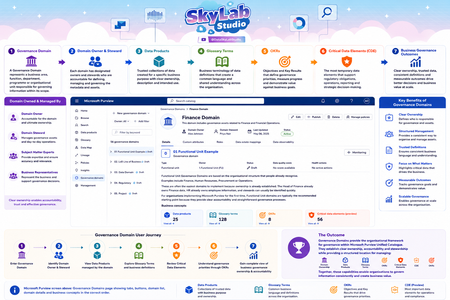
I've been using the attached artefacts for some time to help explain the knowledge exchange aspects of Microsoft Purview Unified Catalog, particularly how Governance Domains and Business Concepts work together to provide business context, ownership, stewardship and operational insights. They have been useful in workshops with data architects, governance professionals, product owners and business stakeholders to demonstrate how concepts fit together within a governance domain and contribute towards trusted information and better business outcomes. I'm interested in hearing from the wider Purview community: Do these artefacts accurately represent the intent and capabilities of Governance Domains within Microsoft Purview? Are there any concepts that you feel are missing, over-emphasised, or could be represented more clearly? How are others explaining Governance Domains and Business Concepts to non-technical stakeholders? Any feedback, suggestions, or alternative approaches would be greatly appreciated. I'm always looking to refine these materials and make them more useful for organisations adopting Purview Unified Catalog. #MicrosoftPurview #DataGovernance #DataManagement #Metadata #DataProducts #MicrosoftData #Purview #DataArchitecture #UnifiedCatalog
Confusion around Purview Definitions and Risk Scoring
In the early days of implementation and we've done our 'Quick setup' of Insider Risk Management which created our Adaptive Protection Policy for IRM, two IRM DLP policies (Endpoint & Teams/Exchange) and the Conditional Access policy. My question is around 'Triggering events', Indicators and Insider Risk Levels. To my understanding, a triggering event is the event that decides when the policy will start assigning risk scores to user activity which will then allow us to then give users risk levels. We have the option to either set this triggering event to either the DLP policies, or when a user performs an exfiltration activity/ sequence. The DLP policies only match activity when a user has a defined risk level and attempts to perform a specific activity i.e. sharing M365 with people outside the organisation. I'm not sure if I'm thinking about this backwards, but if I set my Adaptive protection policy to only start assigning risk scores to user activity when they match a DLP policy, how can they trigger a DLP policy if they wont be assigned a risk level until that scoring begins to happen? Should I be setting my triggering events to be "User performs an Exfiltration Activity" instead of "User Matches a DLP policy"?23Views0likes1CommentMicrosoft Defender false positive and WDSI submission details page bug
Hello, I am the developer and publisher of Pulse Launcher, a legitimate signed Windows application / Minecraft mod launcher. I already submitted this through Microsoft Security Intelligence and also opened a Microsoft Q&A thread, but I am posting here because the WDSI submission portal itself appears to be broken for these submissions. Related Microsoft Q&A thread: https://learn.microsoft.com/en-us/answers/questions/5929545/microsoft-defender-false-positive-and-wdsi-submiss There are two related issues: 1. Microsoft Defender cloud ML false positives keep appearing on public multi-engine scan results for the same signed application/product family. The Microsoft detection name changes across rescans and equivalent builds, including: - PUA:Win32/Puwaders.C!ml - Program:Win32/Wacapew.C!ml - Trojan:Win32/Wacatac.B!ml - Trojan:Win32/Wacatac.C!ml - Trojan:Win32/Sabsik.EN.A!ml 2. Microsoft Security Intelligence submissions are visible in Submission history and show status "In progress", but opening the submission details page returns: "The details for the submission were not found or the submission has expired." Affected submission IDs: - dd476efa-fc04-4f13-82cf-631bbfd145a6 - efc6514c-d700-4d6a-a7e2-67a9a83334a2 - ff8d04b7-c5fc-4a05-bd53-ee7ac5981284 File details: - File name: pulse_launcher.exe - SHA-256: def6059c07c3e1f4a8c5649a1bbf190d4f355ee8e8b88c55c5b404edee99ecc8 - Signer: FOP Haponiuk Mykola Viktorovych - Certificate: GlobalSign EV Code Signing certificate The executable is not VMProtect-packed or obfuscated. It is EV-signed. A previous Microsoft analyst response stated that the file did not meet Microsoft criteria for malware or PUA, but Microsoft cloud detections continue to appear. Could someone route this to Microsoft Defender Security Intelligence / malware analysis, or advise how to escalate WDSI submissions that exist in history but whose details endpoint returns "not found or expired"? Thank you.
PHS staged rollout works for existing users but not new synced users
We are troubleshooting an Entra ID PHS staged rollout issue with a federated domain using a third-party WS-Fed IdP. The intended behavior is that normal federated users redirect to the IdP, while users in the PHS staged rollout group receive the Microsoft/Entra password prompt instead. Existing users in the staged rollout group continue to work correctly. They enter their UPN and receive the Microsoft password prompt. One known-good test user is not provisioned in the third-party IdP and still signs in successfully through the Entra password prompt, so the working path does not require the user to exist in the IdP. The issue is only with newly created AD-synced users. Newly synced users in the same staged rollout group are still being routed to the federated IdP at HRD instead of receiving the Entra password prompt. We’ve verified the staged rollout policy and group membership from Graph, confirmed the affected users are properly AD-synced with clean immutableID/sourceAnchor, and confirmed PHS is working. Federation metadata and HRD policies also look clean. Seamless SSO/AZUREADSSOACC was checked and remediated, but the behavior did not change. For failed attempts, there is no Entra sign-in log entry, including tenant-wide interactive and non-interactive logs. However, the federated IdP logs show a WS-Fed inbound request from login.microsoftonline.com for the affected user. That makes it look like Entra HRD is routing the user to federation before sign-in logging or token issuance. The issue started around an Entra Connect AD connector/DC-path change. We have since reverted the connector to the previous known-good configuration. After reverting, we created a clean-room test user with the correct UPN set before first sync, confirmed sync/PHS/sourceAnchor, added the user directly to the staged rollout group, and waited 60+ minutes. The clean-room user still redirected to the federated IdP instead of getting the Entra password prompt. So the current behavior is that established staged-rollout users still get the Entra password prompt, but newly created synced staged-rollout users are sent to the federated IdP by HRD. Has anyone seen staged rollout get into this state, where existing users work but new synced users remain on the federated HRD path despite valid rollout policy, group membership, synced password hash, and clean immutableID/sourceAnchor? Is there any known backend cache/state reset or escalation path for HRD/staged rollout routing?Anthropic Claude Purview Data Connector showing all users as Guests..
It appears this connector is not mapping fields properly causing internal users to be mapped as "guests", and since prompts/data isn't maintained for guest users the connector is effectively not gathering anything but noise. Unlike the other data connectors, one cannot create field mappings. Also the app being named using the guid of Microsoft's own "dataassessments" service principal I don't think is intended either. Has anybody else experienced this? See below for an example.285Views1like7Comments
Permission required to see the Exposed Entities in Secure Score's MDI items
The documentation here suggests to see the full details of Microsoft Defender for Identity items in Secure Score, I would need the following permission: Security operations/Security data /Security data basics (Read) However, when even with those permissions, I don't have access to the Exposed Entities tab. What permission would I need to be able to have read access to those?1.2KViews0likes1CommentTwo sensitivity labels on PDF file
Hi everyone, First time poster here. We encountered an interesting issue yesterday where we had a user come to us with a PDF that had two sensitivity labels attached. In Purview activity explorer, we can see the file hit the DLP policy and the two labels, but when trying to replicate the issue cannot do it, or see how this has been done. Has anyone else encountered a similar issue? We were able to remove labels in our PDF editor but in Office suite once a label is applied, I could not see a way to remove it. We tried applying a label to a Doc file, converting to PDF and then seeing if it was there where it was being asked for another label but it was not, it just let us change the original. Many thanks in advance!531Views0likes9CommentsEndpoint DLP Device Onboarding - WorkspaceOne
Hi everyone, We have a customer who is using WorkspaceOne for managing the Endpoints. It is an Hybrid environment. We need some guidance and documentation(if any), to help onboard devices for Purview eDLP. The ruled-out option is Group Policy as some employees are working from home and some working from office. There are around 25k+ devices in the tenant that needs to be onboarded. The customer is not using Intune or SCCM. We are looking for best method/approach to onboard devices where the org is using WorkspaceOne.175Views0likes3CommentsPurview DLP policy for copilot 365 location - not able to add rule condition
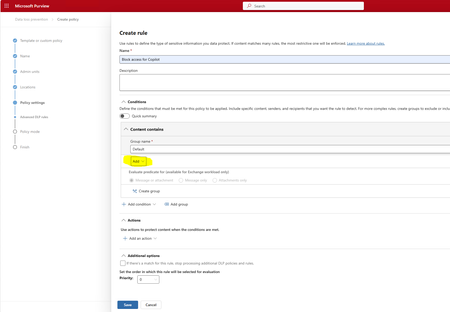
Hi. After choosing Copilot 365 location when creating new DLP policy, I am not able to choose anything when clicking Add under rule condition. Nothing happens when clicking Add. Am I doing anything wrong?283Views0likes6Comments

Events

As organizations scale, tenant sprawl becomes inevitable. Legacy test tenants, employee‑created environments, and forgotten tenants create blind spots for security and identity teams.
Get to know M...
Wednesday, Jul 01, 2026, 09:00 AM PDTOnline
0likes
72Attendees
0Comments
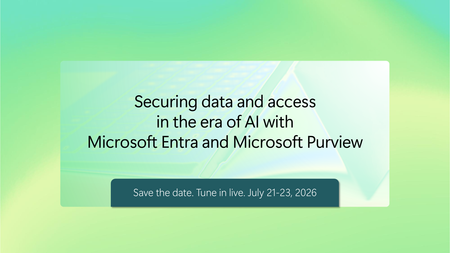
As organizations move from experimenting with AI to deploying it at scale, securing sensitive data, access, and AI usage has become mission critical. In this series, Microsoft experts will show ho...
Tuesday, Jul 21, 2026, 09:00 AM PDTOnline
0likes
7Attendees
0Comments