Recent Discussions

telemetryd_v2 High CPU in macOS
I've been seeing this process have consistently high CPU use. According to Activity Monitor, it's a child process of wdavdaemon_enterprise. I tried disabling realtime protection, but that did not decrease the CPU use. The other notable change that I can think of is that I downloaded the Chromium codebase yesterday and built it, so I'm wondering if that's causing the cloud submission process to go crazy. I looked at https://docs.microsoft.com/en-us/microsoft-365/security/defender-endpoint/mac-support-perf?view=o365-worldwide, but it only discusses realtime scanning. Can anyone provide insight on what this specific process is responsible for? Thanks.13KViews0likes7Comments
Defender for Business - No alert after process lock out ?
Hello all, A few days ago, I have setup Defender for business server on a Windows Server 2019. I can see that server in the Microsoft security portail devices list. I have also tested the "suspicious" powershell command provided by Microsoft and it went all good. Powershell blocked, alert escaladed as incident in the security portal, email received, ... But the next day, I tried to install a service on that server that got blocked by Virus & Thread Protection because it was attempting to modify a lot of files. That was a good point for Defender (it was not a real thread and was later added as exception). My worry is that it was never escaladed to the security portal, I didn't received a alert email, .. The system blocked that "thread" multiple times during my attempt to deploy it and no incident were throw. What could be wrong ? Thank you.85Views0likes3Comments
Using MDE (Passive Mode) with Palo Alto Cortex XDR to enable Defender for IoT (Enterprise IoT)
Hi everyone! I’m working with a customer that uses Palo Alto Cortex XDR as their primary EDR. We want to leverage Microsoft Defender for IoT specifically for Enterprise IoT (not OT/ICS). I have a few questions: MDE in Passive Mode as a sensor: Can Microsoft Defender for Endpoint (MDE) running in Passive mode act as a sensor to enable Enterprise IoT discovery/monitoring for Defender for IoT? Are there any feature limitations when MDE is not the primary EDR? Appliance sensor in Enterprise IT: If we cannot use the MDE agent, is it supported to deploy the Defender for IoT appliance sensor in an enterprise IT network (e.g., offices/campuses) to cover Enterprise IoT use cases? Coexistence / Complementary sensors: Is it possible (and recommended) to run the appliance sensor alongside MDE (sensor) to complement coverage/features? Any guidance on architecture, data overlap/deduplication, or licensing implications?145Views0likes1CommentMicrosoft Defender for Endpoint for Vulnerability Management and Reporting
Hi All, We’re currently using Rapid7 for vulnerability management and reporting, but we’re actively evaluating the possibility of moving to Microsoft Defender for Endpoint going forward. We’d like to better understand how to properly leverage Defender for Endpoint for vulnerability management and reporting. If this means using custom reports—such as building dashboards in Power BI—we’re definitely open to that approach. At a high level, we’re looking for guidance on best practices and the right direction to meet the following requirements: Ongoing vulnerability tracking and remediation Clearer reporting on vulnerability trends and areas needing improvement Breakdown of vulnerabilities by severity (Critical, High, Medium, Low), grouped by aging buckets (e.g., 30, 60, 90 days) Defender Secure Score reporting over time (30, 60, and 90-day views) Visibility into non-compliant devices in Intune, including devices in grace period and PCs that have checked in within the last 14 days Any recommendations, examples, or pointers to documentation or reporting approaches would be greatly appreciated. Thanks in advance, DilanSolved236Views1like3Comments
Whom to report when several days after a 'file submission' displayed status is 'In progress'...
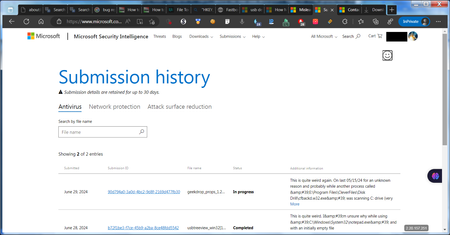
Hello all, could anyone be so kind to tell me whom should I report these issues to, when : - after several days (since submission took place on June 29, 2024) reported Status for same below mentioned 'Submission ID' is still displayed as 'In progress' ? - no details for an already Submitted 'File submission' are available (because after clicking on ' 90d794a0-3a0d-4bc2-9d8f-2169d477fb30' only this error message is shown 'The details for the submission were not found or the submission has expired. You can view recent items in your submission history.') ? P.S. If I'd rather (better) submit this post/question into another Discussion Space then please just let me know ASAP. Below you find a screenshot showing main issue I described. Please also note that I also already tried to report same main issue same day of submission and also today via same 'Provide feedback' smiley icon (also shown in screenshot below and evidenced in a squared box) but with no results so far. Thanks in advance for any update. Best Regards Rob931Views1like7Comments
Can't update Defender app on macOS
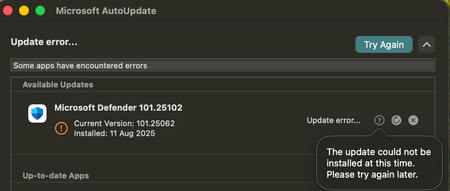
Hello, We started getting this situation where Defender for macOS can't be updated: Microsoft Defender 101.25072 Current Version: 101.25062 Installed: 2025-08-05 Update error: The update could not be installed at this time. Please try again later. Microsoft AutoUpdate is up to date. Operating System Version: 15.6.1 Device managed by Mosyle MDM. All of our active users have been updated to 15.6.1 (and this problem was observed on OS versions from 15.1 to 15.6.1) What could be causing this? And what can we do about it?Solved7.5KViews7likes9Comments
MS Defender setting
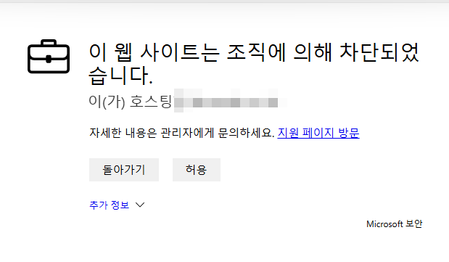
Hello, I have a question. I'm not an English-speaking country, so please understand any shortcomings. I'm trying to block or alert on specific URLs in Microsoft Defender > Settings > Endpoint > Rules > Indicators. I've completed the setup, but I'd like to customize the screen that appears on the webpage when an alert is triggered. Is there a way to do this? Thank you in advance for your help.161Views0likes2CommentsRecovering Quarantined File without Restoring
Hello Microsoft Community, I have been exploring the Defender for Endpoint API and noticed that it mentions the ability to fetch copies of files associated with alerts using a LiveResponse request using (GetFile). However, I've observed that for some alerts, Microsoft Defender quarantines the associated files. Is there a way to obtain a copy of a quarantined file or get the file itself without restoring it? Additionally, is there a way to determine if a file associated with an alert has been quarantined through the API, rather than manually logging into the Microsoft Defender for Endpoint portal? I understand there are two common methods for restoring a file from quarantine: through the Microsoft Defender for Endpoint portal or via the command line. Both methods are detailed here: https://learn.microsoft.com/en-us/defender-endpoint/respond-file-alerts#restore-file-from-quarantine. My concern is that restoring the file will cause Defender to quarantine it again, resulting in a new alert for the same file. In summary, is there a way to retrieve a copy of a quarantined file or the file itself without restoring it? And how can I know whether or not has been quarantined, by using the Microsoft Defender For Endpoint API or other Microsoft based API. Thank you!3.8KViews0likes7CommentsSave the date - January 26, 2026 - AMA: Secure your endpoints with policy and Microsoft Defender
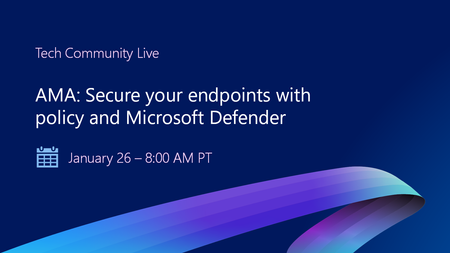
Save the date for January 26 at 8:00 AM PT! Have questions about using Microsoft Intune to enforce device compliance? Curious how to configure devices to help prevent security breaches and limit the impact of threats? Ask Microsoft Anything (AMA) about integrating Microsoft Defender for Endpoint with Microsoft Intune at Tech Community Live! Product teams will be answering your questions live and in chat. Get tips using policy to onboard devices, define risk level, block non-compliant devices from accessing corporate resources, and more. Go to aka.ms/AMA/SecureEndpoints to save the date and add this event to your calendar!253Views0likes0Comments
Alert Tuning (formerly Alert Suppression) Issues
Hello all! I am managing a Microsoft Defender instance and I have created a Custom Detection Rule. I want to tune this Alert so it auto-resolves in ALL scenarios (any host , any user). I have tried using Alert Tuning like so: I have selected ALL service sources , scope is All organization, condition is Alert:Custom and must match Alert Title which is the title of the generated alerts as taken from Advanced Hunting to make sure it is an exact match. I have tried using wildcards in Alert title, adding severity as another indicator, tried doing it directly from a triggered alert as well as from Alert Tuning from settings. Nothing has worked so far. Any input or insights would be greatly appreciated. Cheers!1.3KViews0likes6Comments- 114Views0likes2Comments
 22Views0likes0Comments
Latest Threat Intelligence (December 2025)
Microsoft Defender for IoT has released the December 2025 Threat Intelligence package. The package is available for download from the Microsoft Defender for IoT portal (click Updates, then Download file). Threat Intelligence updates reflect the combined impact of proprietary research and threat intelligence carried out by Microsoft security teams. Each package contains the latest CVEs (Common Vulnerabilities and Exposures), IOCs (Indicators of Compromise), and other indicators applicable to IoT/ICS/OT networks (published during the past month) researched and implemented by Microsoft Threat Intelligence Research - CPS. The CVE scores are aligned with the National Vulnerability Database (NVD). Starting with the August 2023 threat intelligence updates, CVSSv3 scores are shown if they are relevant; otherwise the CVSSv2 scores are shown. Guidance Customers are recommended to update their systems with the latest TI package in order to detect potential exposure risks and vulnerabilities in their networks and on their devices. Threat Intelligence packages are updated every month with the most up-to-date security information available, ensuring that Microsoft Defender for IoT can identify malicious actors and behaviors on devices. Update your system with the latest TI package The package is available for download from the Microsoft Defender for IoT portal (click Updates, then Download file), for more information, please review Update threat intelligence data | Microsoft Docs. MD5 Hash: 5c642a16bf56cb6d98ef8b12fdc89939 For cloud connected sensors, Microsoft Defender for IoT can automatically update new threat intelligence packages following their release, click here for more information.384Views1like0CommentsMS Defender 101.25102 update error
I have been trying to update MS Defender for several days now and without luck. I am on a iMac M3 with macOS 26.1. I tried removing and reinstalling the app, but it seems that the uninstall script does not remove the app at all. Yes, I did restart the machine. Does anyone have a solution?1.4KViews0likes2Comments
Correct firewall log names to be included in a Defender investigation package?
Hi - first time poster, I work in a SecOps team using Defender for Endpoint. I noticed that when we collect an investigation package from a device in Defender that the firewall logs aren't being found. The advice on Microsoft Learn articles seems to be contradictory as to what firewalls should be named as: https://learn.microsoft.com/en-us/defender-endpoint/respond-machine-alerts FirewallExecutionLog.txt and pfirewall.log The pfirewall.log file must exist in %windir%\system32\logfiles\firewall\pfirewall.log, so it's included in the investigation package. For more information on creating the firewall log file, see https://learn.microsoft.com/en-us/windows/security/operating-system-security/network-security/windows-firewall/configure-logging?tabs=intune. This section implies for the firewall log to be collected it has to be called "pfirewall.log" but on the linked page it is recommended to change the log file names: For each profile (Domain, Private, and Public) change the default log file name from %windir%\system32\logfiles\firewall\pfirewall.log to: %windir%\system32\logfiles\firewall\pfirewall_Domain.log %windir%\system32\logfiles\firewall\pfirewall_Private.log %windir%\system32\logfiles\firewall\pfirewall_Public.log We have tested the changed names and they are not found by the investigation package. Which one is recommended and is the logic used in the Defender investigation package correct?121Views0likes0CommentsLatest Threat Intelligence (November 2025)
Microsoft Defender for IoT has released the November 2025 Threat Intelligence package. The package is available for download from the Microsoft Defender for IoT portal (click Updates, then Download file). Threat Intelligence updates reflect the combined impact of proprietary research and threat intelligence carried out by Microsoft security teams. Each package contains the latest CVEs (Common Vulnerabilities and Exposures), IOCs (Indicators of Compromise), and other indicators applicable to IoT/ICS/OT networks (published during the past month) researched and implemented by Microsoft Threat Intelligence Research - CPS. The CVE scores are aligned with the National Vulnerability Database (NVD). Starting with the August 2023 threat intelligence updates, CVSSv3 scores are shown if they are relevant; otherwise the CVSSv2 scores are shown. Guidance Customers are recommended to update their systems with the latest TI package in order to detect potential exposure risks and vulnerabilities in their networks and on their devices. Threat Intelligence packages are updated every month with the most up-to-date security information available, ensuring that Microsoft Defender for IoT can identify malicious actors and behaviors on devices. Update your system with the latest TI package The package is available for download from the Microsoft Defender for IoT portal (click Updates, then Download file), for more information, please review Update threat intelligence data | Microsoft Docs. MD5 Hash: 0ed5b864101c471d987b332fc8619551 For cloud connected sensors, Microsoft Defender for IoT can automatically update new threat intelligence packages following their release, click here for more information.Latest Threat Intelligence (October 2025)
Microsoft Defender for IoT has released the October 2025 Threat Intelligence package. The package is available for download from the Microsoft Defender for IoT portal (click Updates, then Download file). Threat Intelligence updates reflect the combined impact of proprietary research and threat intelligence carried out by Microsoft security teams. Each package contains the latest CVEs (Common Vulnerabilities and Exposures), IOCs (Indicators of Compromise), and other indicators applicable to IoT/ICS/OT networks (published during the past month) researched and implemented by Microsoft Threat Intelligence Research - CPS. The CVE scores are aligned with the National Vulnerability Database (NVD). Starting with the August 2023 threat intelligence updates, CVSSv3 scores are shown if they are relevant; otherwise the CVSSv2 scores are shown. Guidance Customers are recommended to update their systems with the latest TI package in order to detect potential exposure risks and vulnerabilities in their networks and on their devices. Threat Intelligence packages are updated every month with the most up-to-date security information available, ensuring that Microsoft Defender for IoT can identify malicious actors and behaviors on devices. Update your system with the latest TI package The package is available for download from the Microsoft Defender for IoT portal (click Updates, then Download file), for more information, please review Update threat intelligence data | Microsoft Docs. MD5 Hash: 01757cbb8de8dfb10b140e0e6a1dfe41 For cloud connected sensors, Microsoft Defender for IoT can automatically update new threat intelligence packages following their release, click here for more information.Latest Threat Intelligence (August 2025)
Microsoft Defender for IoT has released the August 2025 Threat Intelligence package. The package is available for download from the Microsoft Defender for IoT portal (click Updates, then Download file). Threat Intelligence updates reflect the combined impact of proprietary research and threat intelligence carried out by Microsoft security teams. Each package contains the latest CVEs (Common Vulnerabilities and Exposures), IOCs (Indicators of Compromise), and other indicators applicable to IoT/ICS/OT networks (published during the past month) researched and implemented by Microsoft Threat Intelligence Research - CPS. The CVE scores are aligned with the National Vulnerability Database (NVD). Starting with the August 2023 threat intelligence updates, CVSSv3 scores are shown if they are relevant; otherwise the CVSSv2 scores are shown. Guidance Customers are recommended to update their systems with the latest TI package in order to detect potential exposure risks and vulnerabilities in their networks and on their devices. Threat Intelligence packages are updated every month with the most up-to-date security information available, ensuring that Microsoft Defender for IoT can identify malicious actors and behaviors on devices. Update your system with the latest TI package The package is available for download from the Microsoft Defender for IoT portal (click Updates, then Download file), for more information, please review Update threat intelligence data | Microsoft Docs. MD5 Hash: 6d6cf3931c4e7ad160a74d4fad19a89c For cloud connected sensors, Microsoft Defender for IoT can automatically update new threat intelligence packages following their release, click here for more information.Latest Threat Intelligence (July 2025)
Microsoft Defender for IoT has released the July 2025 Threat Intelligence package. The package is available for download from the Microsoft Defender for IoT portal (click Updates, then Download file). Threat Intelligence updates reflect the combined impact of proprietary research and threat intelligence carried out by Microsoft security teams. Each package contains the latest CVEs (Common Vulnerabilities and Exposures), IOCs (Indicators of Compromise), and other indicators applicable to IoT/ICS/OT networks (published during the past month) researched and implemented by Microsoft Threat Intelligence Research - CPS. The CVE scores are aligned with the National Vulnerability Database (NVD). Starting with the August 2023 threat intelligence updates, CVSSv3 scores are shown if they are relevant; otherwise the CVSSv2 scores are shown. Guidance Customers are recommended to update their systems with the latest TI package in order to detect potential exposure risks and vulnerabilities in their networks and on their devices. Threat Intelligence packages are updated every month with the most up-to-date security information available, ensuring that Microsoft Defender for IoT can identify malicious actors and behaviors on devices. Update your system with the latest TI package The package is available for download from the Microsoft Defender for IoT portal (click Updates, then Download file), for more information, please review Update threat intelligence data | Microsoft Docs. MD5 Hash: 8581e1e0d30133191885115d73b38cf9 For cloud connected sensors, Microsoft Defender for IoT can automatically update new threat intelligence packages following their release, click here for more information.



Events
Recent Blogs
- See exactly which security configurations are enforced on your device Security teams spend significant time defining policies for Microsoft Defender security settings. But when it comes to investig...Mar 09, 20261.7KViews1like0Comments
- Onboarding all devices in your estate is paramount for strong security posture. In fact, Microsoft Threat Intelligence research shows that in the majority of ransomware attacks, the spreader machine ...Mar 02, 20261.8KViews1like0Comments


Tags
No tags to show