Updated Dec 18, 2025
Version 3.0
LincolnDeMaris Microsoft
MicrosoftMicrosoftMicrosoft
It says this wan't going to be available in Teams:
"These improvements are coming to document libraries opened inside SharePoint sites. For now, document libraries opened inside Teams (in the channel files tab) or inside the OneDrive app will not be affected".
I assumed this also mean the new Forms feature, but apparently not.
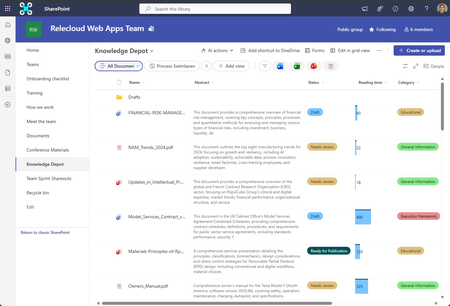
Teams in our tenant now have a "Forms" button in the "Share" tab, it's highlighted with "New", people have used this thinking it's Microsoft Forms, created a Form, added questions and are now raising call's as to why they now have extra columns against every document in their Team, and a "Some file are missing required metadata" warning, caused because they've made a question required.
This new Forms feature isn't appropriate for general Teams where people are not directly using SharePoint and so only use a single Document Library, it's also really confusing as it's called "Forms", so they think it's creating a Microsoft Form as in the Forms app.
Please can this button be removed from the Teams App, it looks to be designed for SharePoint rather than Teams so that's the interface where it should be.

I DO NOT BELIEVE THERE IS AN OUT-OF-BOX OPTION TO REMOVE THE "FORMS" BUTTON FROM TEAMS DOCUMENT LIBRARIES ("SHARED" TAB). THESE ARE SHAREPOINT LIBRARIES, EVEN IF ONLY ACCESSED VIA THE TEAMS CHANNEL. THE ISSUE YOU DESCRIBED SHOULD BE EASILY REVERSABLE AND AVOIDABLE. ADOPTING THIS FEAUTRE IS RELATIVELY SIMPLE, USER-FRIENDLY, AND INCREASES THE FUNCTIONALITY OF FILE LIBRARIES EXPONENTIALLY.
As far as I have been able to find you are correct, there is no method of removing the Forms button from the Teams app.
This can be reversed by deleting the Form and then the associated columns from the SharePoint document library, however this isn't the issue.
Microsoft have introduced a button to the Teams app that is for a SharePoint feature, in the vast majority of cases in our environment it is not appropriate to create a SharePoint Form in a Team due to the metadata column it creates in the DL, these will not be appropriate for many documents in a generally Team. People see a button called "Forms" and, understandably, click it expecting to create a Microsoft Form, as it's a Microsoft application they already use, they then are confused as to why they now see additional columns for all their files under the Shared tab, and why they now have warnings messages.
This causes support call's, and requires time to reverse what's been done.
There should a Team Policy setting to control the visibility of this Forms button in the Teams App, and/or to disable the feature if required.
It is confusing named the same as an existing service and so people think they are using that, it is not appropriate for general Teams especially if most people are only using Teams and not SharePoint.
The feature is useful for the specific scenario's it's created for, but it is not for the vast majority of our Teams and usage and is causing confusion and draining support time, there should be more options for controlling it's usage.