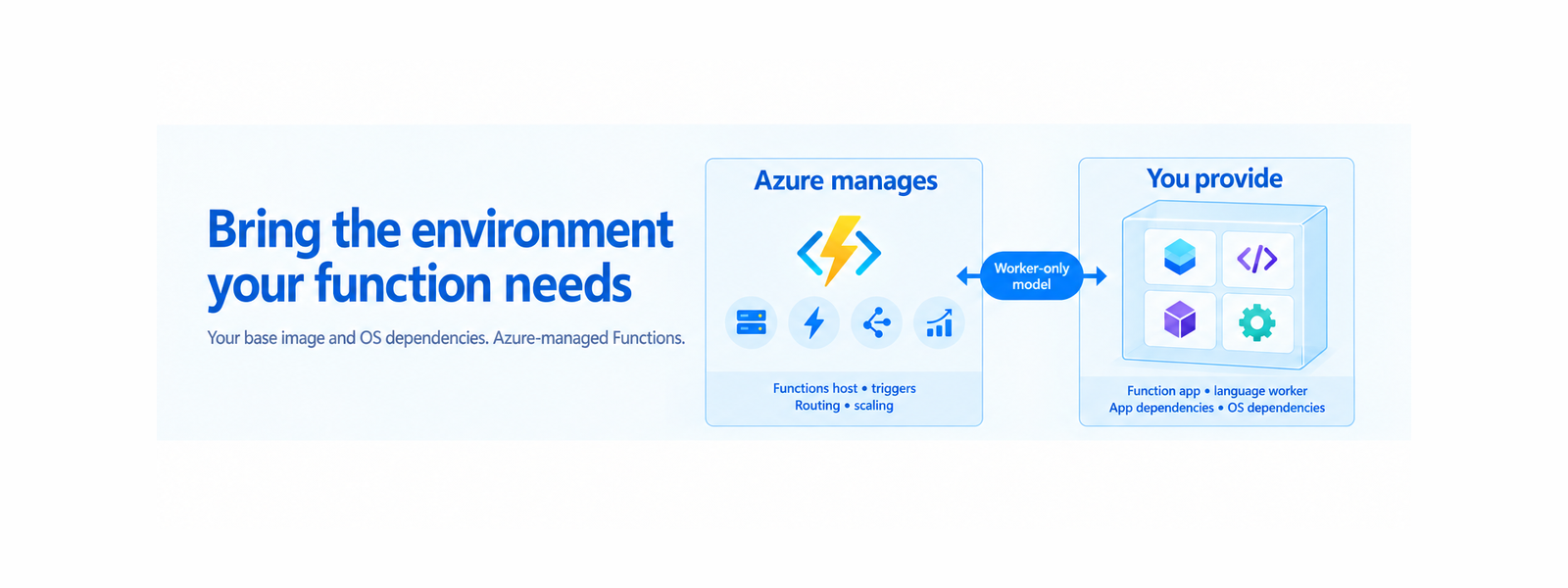
Azure Functions Flex Consumption now supports OS-level dependencies through containers in public preview. Package Chromium, native libraries, command-line tools, and other Linux dependencies with your function app while Azure continues to manage the Functions host, triggers, routing, and scaling.
Your function needs Chromium to generate a PDF. Or GnuPG to encrypt data. Or a native Linux library that isn’t available in the managed execution environment.
Until now, an OS-level dependency could require redesigning the application, moving part of the workload to another service, or selecting another hosting option. Today, we’re announcing the public preview of OS-level dependency support via containers on Azure Functions Flex Consumption.
With this capability, you can build a Linux container image containing your function application, one supported Functions language worker, application dependencies, and the OS-level software your workload needs. Azure continues to operate the Functions host, trigger integration, routing, and Flex Consumption scaling outside your image.
See it in action: Generate PDFs with .NET and Chromium
Consider a function that converts HTML into a PDF by using .NET, Puppeteer Sharp, and Chromium.
The application needs more than a NuGet package. Puppeteer Sharp needs a compatible browser and the native Linux libraries and fonts required by Chromium. These dependencies aren’t part of the standard managed execution environment.
With OS-level dependency support, the application can package those components in its worker image:
- The .NET isolated function application
- The .NET isolated Functions worker supplied through the application’s NuGet dependencies
- Puppeteer Sharp
- Chromium and its required Linux libraries
- Fonts and other assets used when rendering the document
After the image is deployed to Flex Consumption, an HTTP request invokes the function. Puppeteer Sharp launches the packaged Chromium browser, renders the supplied HTML, and returns the generated PDF.
HTML invoice to generated PDFYou can explore the complete implementation in the Azure Functions Flex Consumption .NET isolated container sample.
A worker-only container model
Flex Consumption uses a different container model from other hosting options where the complete Function App runtime is packaged in the customer image. Bring your preferred compatible Linux or language base image to Flex Consumption. As long as the final image satisfies the Flex worker-image contract, you control the base OS, language runtime, application dependencies, and OS-level packages, while Azure provides and maintains the Functions host.
Your Flex Consumption container image contains:
- Your function application
- One supported Functions language worker
- Language and application dependencies
- OS packages, native libraries, browsers, fonts, drivers, executables, and command-line tools required by the application
Azure provides and operates:
- The Azure Functions host and platform components
- Trigger integration
- Request and event routing
- Communication with the language worker
- Flex Consumption managed scaling
This worker-only boundary is important. The feature isn’t arbitrary web-container hosting, and you don’t package or operate the Functions host. You customize the environment in which your function code runs while retaining the Azure-managed Functions programming and scaling model.
For broader context on how Azure Functions separates the managed host from the compute that runs your application, see Separating Compute in Azure Functions: Building for scale, efficiency, and reliability.
What makes a Flex app registry-backed?
A registry-backed Flex app uses the same `Microsoft.Web/sites` resource as a code-package app. The deployment storage type identifies the deployment model:
- A code-package app uses `properties.functionAppConfig.deployment.storage.type` set to `BlobContainer`.
- A worker-image app uses the same property set to `Registry`.
For a registry-backed app, `deployment.storage.value` contains the fully qualified image reference, and `deployment.storage.authentication` tells Azure how to pull the image. Registry-backed apps omit `functionAppConfig.runtime` because the language runtime and Functions worker are supplied inside the image.
properties: {
  functionAppConfig: {
    deployment: {
      storage: {
        type: 'Registry'
        value: '<registry>/<repository>:<tag-or-digest>'
        authentication: {
          type: '<authentication-type>'
        }
      }
    }
  // No runtime property for a Registry-backed app.
  }
}
Other Function App configuration, including scale and concurrency settings, remains part of the resource and should be preserved when changing the deployment model. See the complete documentation for authentication options, Azure CLI commands, and the complete resource shape.
How it works
The end-to-end flow is straightforward:
-
Start with the sample Dockerfile for your supported Functions language.
- Add the OS packages and native dependencies required by your application.
-
Test the source application locally using the normal Functions development experience.
-
Build and scan the linux/amd64 image, then push it to a supported registry.
-
Configure the Flex Consumption app with the fully qualified image reference.
-
Deploy and validate the complete image integration in Azure, then monitor it through logs and Application Insights.
For deterministic deployments and rollback, use an immutable image digest for each release. When you need to update the language worker, runtime, base image, OS packages, or application dependencies, rebuild and test the image, push a new version, and update the function app to reference it.
Microsoft publishes supported worker artifacts or packages, depending on the language, along with sample Dockerfiles, but doesn’t provide a Flex Consumption base image. You select and maintain the Linux or language base image that meets your application and organizational requirements.
When should you use this feature?
Use OS-level dependency support when you want the Flex Consumption programming and scaling model but your function requires software that can’t be supplied through the language package manager alone.
Examples include:
- Browser automation with Chromium and Puppeteer
- PDF generation with Chromium and Puppeteer Sharp
- Data encryption and signing with GnuPG
- Image, audio, or video processing with native libraries
- Database drivers or vendor-provided native SDKs
- Custom fonts required for document generation
- Linux executables and command-line tools invoked by application code
This capability isn’t intended as a blanket replacement for other Azure Functions hosting options or general container platforms. Choose it when Flex Consumption fits your workload and OS-level dependencies are the missing requirement.
Public preview considerations
During the preview, keep these considerations in mind:
- The preview is currently available in several public regions and is rolling out to additional Azure regions over the next few weeks.
- Use only the documented Functions languages and supported language versions.
- Images must target Linux amd64.
- Durable Functions isn’t supported.
- The Azure Service Bus extension (trigger and output bindings) isn’t supported.
- Availability zone support isn’t available.
- The preview doesn’t currently provide a supported experience for running the Flex worker container locally. Continue to test the source application locally and validate the complete image integration in Azure.
- You are responsible for selecting, securing, scanning, patching, rebuilding, testing, and redeploying the base image, language worker, application dependencies, and OS-level dependencies in your image.
Preview capabilities and limitations can change. See the complete documentation for the current language versions, configuration procedures, registry authentication options, operational behavior, and known limitations.
Get started
Start with the sample for your preferred language:
Read Use OS-level dependencies via containers with Azure Functions Flex Consumption for the complete image contract and deployment guidance.
Try the preview with a workload that needs Chromium, GnuPG, a native library, a driver, a font, or another Linux dependency and share what this capability enables for your application!

 Microsoft