durable functions
34 TopicsEnable Dynamic Workflows in Azure Functions hosted skills
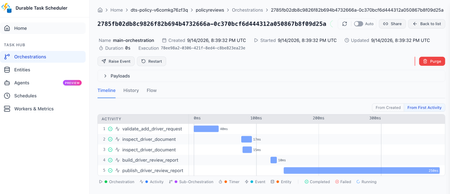
Azure Functions already gives you a familiar way to build event-driven apps. A queue message, HTTP request, timer, or event triggers the code that handles the work. Azure Functions hosted skills (formerly Serverless Agents) add AI reasoning to that model. A hosted skill can read a request, use the regular tools you give it to inspect context, and choose the next step, while your triggers, tools, and business logic stay in place. When the work needs to keep going Consider an insurance policy servicing request. A hosted skill can use its regular tools to understand the requested change, look up the policy, and inspect the submitted documents. If the information is ready and the request can finish now, the normal tool loop, where the model calls a tool, reads the result, and decides the next step, is a good fit. That changes when the work must continue after the initial request. An insurance policy servicing request may need to inspect several documents in parallel, wait for a configured delay before checking again for missing information, and build a review packet after the checks it depends on complete. In a normal tool loop, each result returns to the model before the skill can decide what happens next. The application must keep the job alive, save its progress, and deliver the final result. At that point, the work needs to keep running independently of the original interaction instead of relying on the model and application to coordinate every step. For a queue or other non-HTTP trigger, the final result also needs to be written or sent somewhere useful because there is no response channel. Introducing Dynamic Workflows Dynamic Workflows brings a programmatic tool-calling pattern to Azure Functions hosted skills. Instead of sending every tool result back to the model so it can decide the next call, the model creates a structured, validated workflow plan once. Durable Functions then executes the allowed workflow-safe tool calls, waits, and subagent tasks, passing intermediate results through the workflow instead of the model context. This can reduce model turns and token use for multi-step work while making the work durable. That separation addresses the limits of the normal tool loop: the workflow store keeps state and intermediate results out of the model's context, independent checks can run in parallel, and durable timers resume waits without holding a worker open. Because a Durable Functions orchestration handles execution, the work can continue after the original request or a Functions worker restart. To test the difference, we ran the same structured multi-step task with the regular tool loop and with Dynamic Workflows, using a Foundry gpt-5.4-mini deployment. We ran it with inputs for one service and then ten services. In the Dynamic Workflows version, the model made the plan once, while the runtime kept intermediate tool results in the workflow store instead of sending them back to the model after every tool call. Dynamic Workflows used 56% fewer total model tokens for the one-service run and 93% fewer for the ten-service run, while producing the same final reports. Results will vary by workload and model, and small jobs can have planning overhead. The savings are largest when intermediate tool results would otherwise return to the model after every tool call. How it works Enable workflows in the hosted skill's Markdown front matter. The runtime then adds the management tools: start_workflow, get_workflow_status, list_workflows, cancel_workflow, and terminate_workflow. You do not implement those tools. You choose the workflow-safe tools and subagents that a plan can use. At run time, the AI model uses the hosted skill's instructions to generate a structured plan, limited to the workflow-safe tools and subagents you explicitly allow. The hosted skill calls start_workflow with that plan; the runtime validates it, starts a Durable Functions orchestration, and returns a workflow ID right away. --- name: Add Driver Review description: Prepares an add-driver document review for an insurance representative. workflows: enabled: true trigger: type: queue_trigger args: queue_name: policy-service-requests connection: AzureWebJobsStorage --- Put workflow-safe handlers under tools/ and decorate them for use in a workflow. Each handler must run synchronously, accept one dict argument, return JSON-serializable data, and be idempotent. A worker failure can cause a handler to run more than once, which is why that last point matters. Ordinary tools retain their existing behavior unless you explicitly make them available to a workflow. workflow_tool( description=( "Inspect one document from an add-driver request. Args: " "{document: <document>, position: int}. Returns the document and evidence state." ) ) def inspect_driver_document(args: dict[str, Any]) -> dict[str, Any]: document = args["document"] evidence_state = { "received": "present", "missing": "missing", "expired": "needs_current_copy", }[document["status"]] return { "position": args["position"], "document_id": document["document_id"], "type": document["type"], "file_name": document["file_name"], "evidence_state": evidence_state, } Dynamic Workflows runs on Durable Functions. You can configure Durable Task Scheduler in host.json and use its dashboard to see per-instance task state, retry history, and controls for work that is still running. Durable timers let a workflow wait without keeping a worker busy, then resume the steps that are ready. The workflow stays visible and durable instead of depending on an open request or a best-effort background task. Get started Build your first Azure Functions hosted skill dynamic workflow with the quickstart, then use the overview and sample to go deeper: Follow the Dynamic Workflows quickstart. Read the Dynamic Workflows overview. Browse the insurance policy review sample for an end-to-end implementation.465Views0likes0CommentsHow to build long-running MCP tools on Azure Functions
Recently, a customer building servers with the Azure Functions MCP extension reached out and asked: How do I handle tools that take longer than the client is willing to wait? This becomes especially relevant when tool calls move beyond simple request/response into multi-step workflows and long-running operations. At the same time, MCP is evolving to address exactly this. The Tasks extension is introduced in the 2026-07-28 release candidate, defining a standard way to model long-running work. In this post, we’ll walk through how to build long-running MCP tools on Azure Functions using Durable Functions , a framework for authoring stateful, long-running workflows as ordinary code, with checkpointing, scaling, and recovery handled automatically. MCP tools today Today, MCP tools are fundamentally request/response: the client issues a tools/call the server returns a result This works well for fast operations, but breaks down when: workflows take minutes execution depends on multiple steps latency is unpredictable In practice, clients enforce their own tool-call timeouts. These aren't standardized by the MCP spec and vary per client, but they're often in the ~30–60 second range. If a tool exceeds that window: In practice, clients often enforce short timeouts. If a tool exceeds that window: the client times out the agent observes a failed call the underlying work may still be running So the core issue is that you have synchronous tool calls don’t naturally model long-running work. The MCP Tasks extension The Tasks extension to address this. With the extension, a server can respond to a tools/call with an asynchronous task handle instead of a final result, and the client drives the lifecycle from there: tasks/get: poll the task's status tasks/update: submit input back to the server if the task reaches input_required tasks/cancel: cancel an in-flight task A task carries a status ("working", "input_required", "completed", "failed", or "cancelled") and on completion, the final result. Task creation is server-directed: the client advertises support by including the extension in its per-request capabilities, and the server decides per request whether to return a task. A server won't return a task to a client that hasn't advertised support. It's important to note that Tasks rely on ecosystem support. Clients must advertise the extension, and MCP SDKs must implement the task lifecycle, before servers can use it. So while Tasks is now a defined extension, broad client and SDK support is still in progress. Implement long-runng tasks with Durable Functions today Until the Tasks extension is broadly supported across clients, we need a pattern that works with existing request/response clients and supports long-running execution. The following samples show how, using Durable Functions: Python NET The long-running work in this sample mines a short chain of blocks. Each block requires solving a computational puzzle where the system keeps trying different inputs until it finds one that produces a result matching a specific pattern (for example, starting with a certain number of zeros). Because this involves lots of trial and error, it naturally takes time, making it a good example of a long-running workflow. The server in the sample exposes two tools: start_mining Starts a Durable Functions orchestration to mine the blocks Waits briefly (within a configurable budget) Returns result inline if completed within budget OR returns workflow_id if still running get_mining_result Takes the workflow_id Returns the current state, e.g. "completed", "running", "failed", or "not_found" To ensure that the agent calls the tools in the right order, workflow_id is a required parameter of get_mining_result, so the agent can't poll without starting a mining run first. Also, the "running" response carries a poll_after_seconds and a next instruction, ensuring the agent to poll again if work is not done rather than give up or assume completion. Even so, the poll path still relies on the agent correctly remembering, and not hallucinating, the workflow_id it was handed. If it garbles or invents an id, the poll lands on the wrong instance or none at all (which is why get_mining_result returns "not_found" rather than guessing). What changes with the Tasks extension Once the Tasks extension is fully implemented across clients and SDKs, the model becomes simpler and more reliable: the server returns a Task handle, the client manages the polling and lifecyle calls, and the SDK tracks execution state. This removes a key limitation of today’s solution, which requires the agent to remember and correctly pass identifiers like workflow_id. Call to action Try out the sample and let us know whether it addresses your MCP needs around long-running or workflow type tools!762Views0likes0CommentsIntroducing On-demand Sandboxes for Azure Durable Task Scheduler (Private Preview)
Maybe it needs a native toolchain. Maybe it runs untrusted customer or LLM-generated code. Maybe it needs Python from a .NET orchestrator, or bursty compute that should scale to zero when the work is done. Today, we're thrilled to announce On-demand Sandboxes for Azure Durable Task Scheduler, now available in private preview. On-demand Sandboxes lets you move those individual workflow steps to managed, isolated compute while your orchestrator stays exactly where it is. Tell DTS which steps should run in isolation, provide a container image with the step code, and DTS handles provisioning, scaling, and teardown. No infrastructure to manage, no idle costs, no orchestrator changes. Sign up for On-demand Sandboxes Private Preview Today → Availability: On-demand Sandboxes targets the standalone Durable Task SDKs used outside the Azure Functions host — for apps running on Azure Container Apps, Azure Kubernetes Service, App Service, or anywhere else you self-host. The private preview supports the .NET and Python Durable Task SDKs, with additional language SDKs and Azure Functions support coming soon. What is Azure Durable Task Scheduler? The Durable Task Scheduler is a fully managed backend for durable execution on Azure. It can serve as the backend for a Durable Function App using the Durable Functions extension, or as the backend for an app leveraging the Durable Task SDKs in other compute environments, such as Azure Container Apps, Azure Kubernetes Service, or Azure App Service. For a deeper introduction, see the Durable Task Scheduler overview or the full Durable Task documentation. Why On-demand Sandboxes? Most activities belong in-process. They're fast, simple, and co-located with your orchestrator. But sometimes you hit a step that doesn't fit: it needs a native binary, a different language runtime, per-invocation isolation, or bursty compute you don't want to keep warm. On-demand Sandboxes gives you a way to handle those exceptions without spinning up dedicated infrastructure or managing scaling policies in Azure Kubernetes Service or Azure Container Apps. Activity-level granularity. Move individual steps to managed compute, not your whole app. Per-activity or per-invocation isolation. Each execution runs in a clean, microVM-backed sandbox. Ideal for untrusted code, customer plugins, or LLM-generated logic. Cross-runtime flexibility. Run a Python inference step from a .NET orchestrator. No compromise on either side. Scale-to-zero. Pay for CPU and memory per second of execution, not infrastructure that waits. No orchestrator changes. Your orchestration code and hosting model don't change at all. Here are a few scenarios where On-demand Sandboxes shines: Native toolchains. Package ffmpeg, LibreOffice, or Pandoc in a container without dragging them into your main app. CPU-heavy preprocessing. OCR, layout extraction, or image processing can scale independently of the rest of your workflow. Cross-runtime workflows. A .NET orchestrator dispatches a Python inference step. No compromises. Sandboxed code execution. Run customer plugins or LLM-generated code with a clean boundary on every invocation. Multi-tenant isolation. Tenant-specific steps get dedicated boundaries while everything else stays in-process. Bursty event-driven workloads. Steps that spike hard but rarely may not justify always-on infrastructure. Sub-second cold starts mean you get capacity when you need it without paying to keep it warm. How it works On-demand Sandboxes uses a two-part model: a worker profile in your orchestrator app that tells DTS which activities to offload, and a worker image that contains those activity implementations. Your orchestrator still calls activities the same way it always has; the decision to run one activity in a sandbox lives in the profile configuration. 1. Declare a sandbox worker profile In the app that hosts your orchestrator, define a sandbox worker profile. The profile gives DTS the container image, resource shape, concurrency setting, and activity names that should run in a sandbox: using Microsoft.DurableTask.Worker.AzureManaged.Sandbox; [SandboxWorkerProfile("code-executor")] internal sealed class CodeSandboxWorkerProfile : ISandboxWorkerProfile { public void Configure(SandboxOptions options) { options.ContainerImage = Environment.GetEnvironmentVariable("DTS_SANDBOX_IMAGE") ?? throw new InvalidOperationException("DTS_SANDBOX_IMAGE is required."); options.Cpu = "1000m"; options.Memory = "2048Mi"; options.MaxConcurrentActivities = 1; options.AddActivity(TaskNames.ExecuteCode); } } Then enable on-demand sandbox discovery when you configure the Durable Task worker in the main app: workerBuilder.AddTasks(tasks => tasks.AddAllGeneratedTasks()); workerBuilder.UseDurableTaskScheduler(options => { options.EndpointAddress = Environment.GetEnvironmentVariable("DTS_ENDPOINT"); options.TaskHubName = Environment.GetEnvironmentVariable("DTS_TASK_HUB"); options.Credential = credential; }); workerBuilder.EnableSandboxes(); Here's what the profile configuration does: SandboxWorkerProfile: a friendly profile id for this sandbox setup. It groups the activity, image, and resource settings for monitoring and reuse across deployments. ContainerImage: the container image (from your registry) that contains the activity implementations. Cpu / Memory: the resource shape for each worker instance. Sized per your activity's needs. MaxConcurrentActivities: how many activities a single worker instance can process concurrently. AddActivity: the specific activity to offload. Only activities added to a sandbox worker profile execute in DTS-managed isolated compute; everything else stays in-process. The orchestrator call site doesn't change: ExecuteCodeOutput execution = await context.CallActivityAsync<ExecuteCodeOutput>( TaskNames.ExecuteCode, new ExecuteCodeInput(pythonCode, input.CsvData)); ExecuteCode is not registered in the main app's in-process activity list. When the orchestrator calls it, DTS uses the codegen profile to route the work to the sandbox image. 2. Build the worker image The worker image is a container you own. In most apps, this worker lives in a separate project from the orchestrator host so it can have its own entry point, dependencies, and container image. It registers the activity implementations it can run and opts in to managed execution with UseSandboxWorker(): builder.Services.AddDurableTaskWorker(workerBuilder => { workerBuilder.AddTasks(tasks => { tasks.AddActivity<ExecuteCodeActivity>(); }); workerBuilder.UseSandboxWorker(); }); UseSandboxWorker() is the key line. It signals that this worker runs in DTS-managed compute. The sandbox worker does not need to configure the DTS endpoint, task hub, profile id, or credentials; DTS injects the runtime settings when it starts the container. The activity implementations themselves are standard Durable Task activities. There's nothing special about the activity code: it can call a runtime with different dependencies, such as Python and pandas, while running in an isolated container instead of in your main app's process. Package the image like any containerized service, including whatever runtimes and native tools the activity needs. Push it to your container registry (e.g., Azure Container Registry) and reference the image in the worker profile's ContainerImage option. View logs in the DTS dashboard Once your sandbox activities are running, you can view their execution logs directly in the Durable Task Scheduler dashboard. The dashboard shows real-time output from your managed workers, including stdout, stderr, and activity lifecycle events. This gives you full visibility into what's happening inside the sandbox without needing to configure external log sinks or set up your own observability pipeline. Demo Get started On-demand Sandboxes is in private preview. To get access, sign up here. We'll enable the feature on your scheduler and help you get your first sandbox activity running. Once you're in, the workflow is straightforward: declare a sandbox worker profile in your orchestrator app, build and push a worker image, and DTS takes care of the rest. Sign up for On-demand Sandboxes Private Preview Today → Documentation: Durable Task Scheduler overview Samples: Azure-Samples/Durable-Task-Scheduler Pricing: Azure Durable Task Scheduler pricing Questions, feedback, or ideas? Open an issue in the Durable-Task-Scheduler GitHub repo. We'd love to hear from you.718Views0likes0Comments
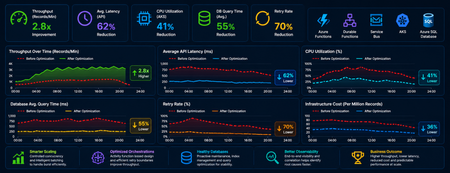
Performance Tuning and Scaling Optimization for Large-Scale Azure Workloads
Summary As cloud-native systems scale, performance challenges rarely stem from a single bottleneck. Instead, they emerge from the interaction between compute, orchestration, and data layers under load. This article captures a practical optimization journey of a high-volume Azure-based workload and highlights how controlled scaling, improved orchestration design, and proactive database maintenance can significantly outperform brute-force scaling. Introduction Distributed systems are often designed with the assumption that scaling out will solve performance issues. However, for orchestration-heavy and database-intensive workloads, this approach can introduce more problems than it solves. In this scenario, the system processed millions of transactional records through Azure Functions, Durable Functions, messaging pipelines, APIs, and SQL databases. As the workload grew, the platform began experiencing: CPU and memory spikes Slower SQL queries Service Bus throttling Increased retries and execution delays What stood out was that these issues were not due to insufficient resources, but due to inefficient execution patterns at scale. The optimization effort therefore focused on controlling how the system scaled and executed, rather than simply increasing capacity. Understanding Workload Behavior A critical early step was identifying the nature of the workload—specifically, whether it was CPU-heavy or data-heavy. Rethinking Scaling: More Is Not Always Better One of the most important lessons was that scaling out aggressively can degrade performance. As more function instances processed messages in parallel: Database calls increased sharply API traffic surged Lock contention intensified Retry rates increased This created a cascading effect where retries amplified load, further slowing down the system. To address this, scaling was intentionally controlled using: Concurrency limits on function execution Batch-based processing instead of full parallel fan-out Small delays to smooth traffic spikes Chunking of large datasets into manageable units This shift from maximum parallelism to controlled throughput significantly improved system stability. Compute Optimization: CPU and Memory After stabilizing scaling behavior, the next step was optimizing compute usage. CPU Optimization CPU spikes were largely caused by excessive parallel execution and orchestration overhead. Improvements included: Breaking large workloads into smaller units Reducing unnecessary fan-outs of processes Limiting concurrent executions This resulted in more predictable CPU usage and improved execution consistency. Memory Optimization Memory pressure was primarily driven by large payloads and batch processing. Optimizations focused on: Processing data in smaller chunks Avoiding large in-memory payloads and memory leaks Reducing orchestration state size These changes improved system reliability and reduced execution failures under load. Scaling Approaches: Practical Trade-Offs Both vertical and horizontal scaling were used, but with careful consideration. Scale Up (Vertical Scaling) Quick to implement No architectural changes required Useful for immediate stabilization However, it had cost and scalability limits. Scale Out (Horizontal Scaling) Better suited for long-term scalability Enables workload distribution But without control, it can: Increase database contention Amplify retries Introduce instability Key Insight The most effective approach was not choosing one over the other but combining both with strict control over concurrency and execution patterns. Durable Functions: Orchestration Optimization Durable Functions were central to the system, making orchestration design a key factor in performance. Challenges Observed The initial design relied heavily on nested sub-orchestrators, which introduced: High orchestration overhead Increased replay and persistence operations Slower execution at scale Key Improvements Refactoring unnecessary sub-orchestrators into Activity Functions simplified execution and improved throughput. The benefits included: Reduced orchestration latency Faster execution cycles Lower infrastructure cost Note: However, sub-orchestrators remain the right choice when the design requires composing multiple dependent steps, managing scoped retry/error logic, or isolating orchestration history. The decision should be driven by the complexity and reuse requirements of each workflow segment and not applied as a blanket rule. Improved Retry Strategy Retry behavior was also optimized by redefining execution boundaries. Previously: One activity processed multiple records A single failure triggered a retry of the entire batch After optimization: One activity handled one logical unit of work This enabled: Granular retries Better failure isolation Reduced duplicate processing Database Hygiene: A Critical Foundation The database emerged as a major bottleneck due to fragmentation and stale statistics caused by continuous high-volume operations. Issues Identified Fragmented indexes Inefficient query plans Increased query execution time Optimization Approach A proactive maintenance strategy was implemented using scheduled jobs to: Update statistics regularly Rebuild indexes Maintain query performance consistency Controlled Database Load For heavy long-running workloads in multi-tenant architecture, execution of DB intensive process was intentionally run in singleton fashion at a tenant level to reduce contention. This approach: Prevented concurrent heavy operations Improved overall system stability Delivered more predictable throughput Observability: Finding the Real Problem A major challenge during optimization was distinguishing between symptoms and root causes. For example: Slow APIs were often caused by database contention High retries were triggered by upstream throttling Orchestration delays originated from downstream dependencies To address this, end-to-end observability was established using: Application-level tracing Load testing correlations Cross-service telemetry analysis This enabled accurate root cause identification and prevented misdirected optimization efforts. Key Takeaways Some key principles emerged from this optimization journey: Scaling more does not always mean performing better Controlled parallelism is more effective than unrestricted concurrency Orchestration design directly impacts system performance Database maintenance must be proactive Retry strategies should align with logical units of work Observability is essential for correct diagnosis Conclusion Performance tuning in distributed systems is less about adding resources and more about using them efficiently. By focusing on controlled scaling, simplifying orchestration, maintaining database health, and improving observability, the system achieved higher throughput, lower cost, and significantly improved stability. These lessons are broadly applicable to any Azure-based system handling large-scale, orchestration-heavy workloads and can help teams design more predictable and resilient architectures.886Views5likes0CommentsAzure Functions Ignite 2025 Update
Azure Functions is redefining event-driven applications and high-scale APIs in 2025, accelerating innovation for developers building the next generation of intelligent, resilient, and scalable workloads. This year, our focus has been on empowering AI and agentic scenarios: remote MCP server hosting, bulletproofing agents with Durable Functions, and first-class support for critical technologies like OpenTelemetry, .NET 10 and Aspire. With major advances in serverless Flex Consumption, enhanced performance, security, and deployment fundamentals across Elastic Premium and Flex, Azure Functions is the platform of choice for building modern, enterprise-grade solutions. Remote MCP Model Context Protocol (MCP) has taken the world by storm, offering an agent a mechanism to discover and work deeply with the capabilities and context of tools. When you want to expose MCP/tools to your enterprise or the world securely, we recommend you think deeply about building remote MCP servers that are designed to run securely at scale. Azure Functions is uniquely optimized to run your MCP servers at scale, offering serverless and highly scalable features of Flex Consumption plan, plus two flexible programming model options discussed below. All come together using the hardened Functions service plus new authentication modes for Entra and OAuth using Built-in authentication. Remote MCP Triggers and Bindings Extension GA Back in April, we shared a new extension that allows you to author MCP servers using functions with the MCP tool trigger. That MCP extension is now generally available, with support for C#(.NET), Java, JavaScript (Node.js), Python, and Typescript (Node.js). The MCP tool trigger allows you to focus on what matters most: the logic of the tool you want to expose to agents. Functions will take care of all the protocol and server logistics, with the ability to scale out to support as many sessions as you want to throw at it. [Function(nameof(GetSnippet))] public object GetSnippet( [McpToolTrigger(GetSnippetToolName, GetSnippetToolDescription)] ToolInvocationContext context, [BlobInput(BlobPath)] string snippetContent ) { return snippetContent; } New: Self-hosted MCP Server (Preview) If you’ve built servers with official MCP SDKs and want to run them as remote cloud‑scale servers without re‑writing any code, this public preview is for you. You can now self‑host your MCP server on Azure Functions—keep your existing Python, TypeScript, .NET, or Java code and get rapid 0 to N scaling, built-in server authentication and authorization, consumption-based billing, and more from the underlying Azure Functions service. This feature complements the Azure Functions MCP extension for building MCP servers using the Functions programming model (triggers & bindings). Pick the path that fits your scenario—build with the extension or standard MCP SDKs. Either way you benefit from the same scalable, secure, and serverless platform. Use the official MCP SDKs: # PleaseChooseNewDisplayName.tool() async def get_alerts(state: str) -> str: """Get weather alerts for a US state. Args: state: Two-letter US state code (e.g. CA, NY) """ url = f"{NWS_API_BASE}/alerts/active/area/{state}" data = await make_nws_request(url) if not data or "features" not in data: return "Unable to fetch alerts or no alerts found." if not data["features"]: return "No active alerts for this state." alerts = [format_alert(feature) for feature in data["features"]] return "\n---\n".join(alerts) Use Azure Functions Flex Consumption Plan's serverless compute using Custom Handlers in host.json: { "version": "2.0", "configurationProfile": "mcp-custom-handler", "customHandler": { "description": { "defaultExecutablePath": "python", "arguments": ["weather.py"] }, "http": { "DefaultAuthorizationLevel": "anonymous" }, "port": "8000" } } Learn more about MCPTrigger and self-hosted MCP servers at https://aka.ms/remote-mcp Built-in MCP server authorization (Preview) The built-in authentication and authorization feature can now be used for MCP server authorization, using a new preview option. You can quickly define identity-based access control for your MCP servers with Microsoft Entra ID or other OpenID Connect providers. Learn more at https://aka.ms/functions-mcp-server-authorization. Better together with Foundry agents Microsoft Foundry is the starting point for building intelligent agents, and Azure Functions is the natural next step for extending those agents with remote MCP tools. Running your tools on Functions gives you clean separation of concerns, reuse across multiple agents, and strong security isolation. And with built-in authorization, Functions enables enterprise-ready authentication patterns, from calling downstream services with the agent’s identity to operating on behalf of end users with their delegated permissions. Build your first remote MCP server and connect it to your Foundry agent at https://aka.ms/foundry-functions-mcp-tutorial. Agents Microsoft Agent Framework 2.0 (Public Preview Refresh) We’re excited about the preview refresh 2.0 release of Microsoft Agent Framework that builds on battle hardened work from Semantic Kernel and AutoGen. Agent Framework is an outstanding solution for building multi-agent orchestrations that are both simple and powerful. Azure Functions is a strong fit to host Agent Framework with the service’s extreme scale, serverless billing, and enterprise grade features like VNET networking and built-in auth. Durable Task Extension for Microsoft Agent Framework (Preview) The durable task extension for Microsoft Agent Framework transforms how you build production-ready, resilient and scalable AI agents by bringing the proven durable execution (survives crashes and restarts) and distributed execution (runs across multiple instances) capabilities of Azure Durable Functions directly into the Microsoft Agent Framework. Combined with Azure Functions for hosting and event-driven execution, you can now deploy stateful, resilient AI agents that automatically handle session management, failure recovery, and scaling, freeing you to focus entirely on your agent logic. Key features of the durable task extension include: Serverless Hosting: Deploy agents on Azure Functions with auto-scaling from thousands of instances to zero, while retaining full control in a serverless architecture. Automatic Session Management: Agents maintain persistent sessions with full conversation context that survives process crashes, restarts, and distributed execution across instances Deterministic Multi-Agent Orchestrations: Coordinate specialized durable agents with predictable, repeatable, code-driven execution patterns Human-in-the-Loop with Serverless Cost Savings: Pause for human input without consuming compute resources or incurring costs Built-in Observability with Durable Task Scheduler: Deep visibility into agent operations and orchestrations through the Durable Task Scheduler UI dashboard Create a durable agent: endpoint = os.getenv("AZURE_OPENAI_ENDPOINT") deployment_name = os.getenv("AZURE_OPENAI_DEPLOYMENT_NAME", "gpt-4o-mini") # Create an AI agent following the standard Microsoft Agent Framework pattern agent = AzureOpenAIChatClient( endpoint=endpoint, deployment_name=deployment_name, credential=AzureCliCredential() ).create_agent( instructions="""You are a professional content writer who creates engaging, well-structured documents for any given topic. When given a topic, you will: 1. Research the topic using the web search tool 2. Generate an outline for the document 3. Write a compelling document with proper formatting 4. Include relevant examples and citations""", name="DocumentPublisher", tools=[ AIFunctionFactory.Create(search_web), AIFunctionFactory.Create(generate_outline) ] ) # Configure the function app to host the agent with durable session management app = AgentFunctionApp(agents=[agent]) app.run() Durable Task Scheduler dashboard for agent and agent workflow observability and debugging For more information on the durable task extension for Agent Framework, see the announcement: https://aka.ms/durable-extension-for-af-blog. Flex Consumption Updates As you know, Flex Consumption means serverless without compromise. It combines elastic scale and pay‑for‑what‑you‑use pricing with the controls you expect: per‑instance concurrency, longer executions, VNet/private networking, and Always Ready instances to minimize cold starts. Since launching GA at Ignite 2024 last year, Flex Consumption has had tremendous growth with over 1.5 billion function executions per day and nearly 40 thousand apps. Here’s what’s new for Ignite 2025: 512 MB instance size (GA). Right‑size lighter workloads, scale farther within default quota. Availability Zones (GA). Distribute instances across zones. Rolling updates (Public Preview). Unlock zero-downtime deployments of code or config by setting a single configuration. See below for more information. Even more improvements including: new diagnostic settingsto route logs/metrics, use Key Vault App Config references, new regions, and Custom Handler support. To get started, review Flex Consumption samples, or dive into the documentation to see how Flex can support your workloads. Migrating to Azure Functions Flex Consumption Migrating to Flex Consumption is simple with our step-by-step guides and agentic tools. Move your Azure Functions apps or AWS Lambda workloads, update your code and configuration, and take advantage of new automation tools. With Linux Consumption retiring, now is the time to switch. For more information, see: Migrate Consumption plan apps to the Flex Consumption plan Migrate AWS Lambda workloads to Azure Functions Durable Functions Durable Functions introduces powerful new features to help you build resilient, production-ready workflows: Distributed Tracing: lets you track requests across components and systems, giving you deep visibility into orchestration and activities with support for App Insights and OpenTelemetry. Extended Sessions support in .NET isolated: improves performance by caching orchestrations in memory, ideal for fast sequential activities and large fan-out/fan-in patterns. Orchestration versioning (public preview): enables zero-downtime deployments and backward compatibility, so you can safely roll out changes without disrupting in-flight workflows Durable Task Scheduler Updates Durable Task Scheduler Dedicated SKU (GA): Now generally available, the Dedicated SKU offers advanced orchestration for complex workflows and intelligent apps. It provides predictable pricing for steady workloads, automatic checkpointing, state protection, and advanced monitoring for resilient, reliable execution. Durable Task Scheduler Consumption SKU (Public Preview): The new Consumption SKU brings serverless, pay-as-you-go orchestration to dynamic and variable workloads. It delivers the same orchestration capabilities with flexible billing, making it easy to scale intelligent applications as needed. For more information see: https://aka.ms/dts-ga-blog OpenTelemetry support in GA Azure Functions OpenTelemetry is now generally available, bringing unified, production-ready observability to serverless applications. Developers can now export logs, traces, and metrics using open standards—enabling consistent monitoring and troubleshooting across every workload. Key capabilities include: Unified observability: Standardize logs, traces, and metrics across all your serverless workloads for consistent monitoring and troubleshooting. Vendor-neutral telemetry: Integrate seamlessly with Azure Monitor or any OpenTelemetry-compliant backend, ensuring flexibility and choice. Broad language support: Works with .NET (isolated), Java, JavaScript, Python, PowerShell, and TypeScript. Start using OpenTelemetry in Azure Functions today to unlock standards-based observability for your apps. For step-by-step guidance on enabling OpenTelemetry and configuring exporters for your preferred backend, see the documentation. Deployment with Rolling Updates (Preview) Achieving zero-downtime deployments has never been easier. The Flex Consumption plan now offers rolling updates as a site update strategy. Set a single property, and all future code deployments and configuration changes will be released with zero-downtime. Instead of restarting all instances at once, the platform now drains existing instances in batches while scaling out the latest version to match real-time demand. This ensures uninterrupted in-flight executions and resilient throughput across your HTTP, non-HTTP, and Durable workloads – even during intensive scale-out scenarios. Rolling updates are now in public preview. Learn more at https://aka.ms/functions/rolling-updates. Secure Identity and Networking Everywhere By Design Security and trust are paramount. Azure Functions incorporates proven best practices by design, with full support for managed identity—eliminating secrets and simplifying secure authentication and authorization. Flex Consumption and other plans offer enterprise-grade networking features like VNETs, private endpoints, and NAT gateways for deep protection. The Azure Portal streamlines secure function creation, and updated scenarios and samples showcase these identity and networking capabilities in action. Built-in authentication (discussed above) enables inbound client traffic to use identity as well. Check out our updated Functions Scenarios page with quickstarts or our secure samples gallery to see these identity and networking best practices in action. .NET 10 Azure Functions now supports .NET 10, bringing in a great suite of new features and performance benefits for your code. .NET 10 is supported on the isolated worker model, and it’s available for all plan types except Linux Consumption. As a reminder, support ends for the legacy in-process model on November 10, 2026, and the in-process model is not being updated with .NET 10. To stay supported and take advantage of the latest features, migrate to the isolated worker model. Aspire Aspire is an opinionated stack that simplifies development of distributed applications in the cloud. The Azure Functions integration for Aspire enables you to develop, debug, and orchestrate an Azure Functions .NET project as part of an Aspire solution. Aspire publish directly deploys to your functions to Azure Functions on Azure Container Apps. Aspire 13 includes an updated preview version of the Functions integration that acts as a release candidate with go-live support. The package will be moved to GA quality with Aspire 13.1. Java 25, Node.js 24 Azure Functions now supports Java 25 and Node.js 24 in preview. You can now develop functions using these versions locally and deploy them to Azure Functions plans. Learn how to upgrade your apps to these versions here In Summary Ready to build what’s next? Update your Azure Functions Core Tools today and explore the latest samples and quickstarts to unlock new capabilities for your scenarios. The guided quickstarts run and deploy in under 5 minutes, and incorporate best practices—from architecture to security to deployment. We’ve made it easier than ever to scaffold, deploy, and scale real-world solutions with confidence. The future of intelligent, scalable, and secure applications starts now—jump in and see what you can create!4.3KViews1like2CommentsMCP Apps on Azure Functions: Quick Start with TypeScript
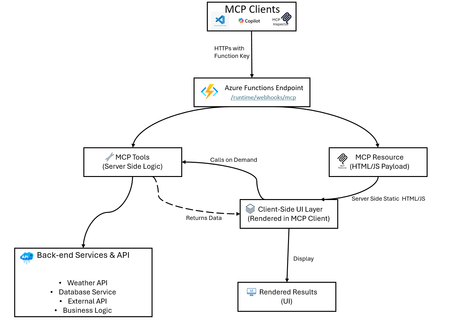
Azure Functions makes hosting MCP apps simple: build locally, create a secure endpoint, and deploy fast with Azure Developer CLI (azd). This guide shows you how using a weather app example. What Are MCP Apps? MCP Apps let MCP servers return interactive HTML interfaces such as data visualizations, forms, dashboards that render directly inside MCP-compatible hosts (Visual Studio Code Copilot, Claude, ChatGPT, etc.). Learn more about MCP Apps in the official documentation. Having an interactive UI removes many restrictions that plain texts have, such as if your scenario has: Interactive Data: Replacing lists with clickable maps or charts for deep exploration. Complex Setup: Use one-page forms instead of long, back-and-forth questioning. Rich Media: Embed native viewers to pan, zoom, or rotate 3D models and documents. Live Updates: Maintain real-time dashboards that refresh without new prompts. Workflow Management: Handle multi-step tasks like approvals with navigation buttons and persistent state. MCP App Hosting as a Feature Azure Functions provides an easy abstraction to help you build MCP servers without having to learn the nitty-gritty of the MCP protocol. When hosting your MCP App on Functions, you get: MCP tools (server logic): Handle client requests, call backend services, return structured data - Azure Functions manages the MCP protocol details for you MCP resources (UI payloads such as app widgets): Serve interactive HTML, JSON documents, or formatted content - just focus on your UI logic Secure HTTPS access: Built-in authentication using Azure Functions keys, plus built-in MCP authentication with OAuth support for enterprise-grade security Easy deployment with Bicep and azd: Infrastructure as Code for reliable deployments Local development: Test and debug locally before deploying Auto-scaling: Azure Functions handles scaling, retries, and monitoring automatically The weather app in this repo is an example of this feature, not the only use case. Architecture Overview Example: The classic Weather App The sample implementation includes: A GetWeather MCP tool that fetches weather by location (calls Open-Meteo geocoding and forecast APIs) A Weather Widget MCP resource that serves interactive HTML/JS code (runs in the client; fetches data via GetWeather tool) A TypeScript service layer that abstracts API calls and data transformation (runs on the server) Bidirectional communication: client-side UI calls server-side tools, receives data, renders locally Local and remote testing flow for MCP clients (via MCP Inspector, VS Code, or custom clients) How UI Rendering Works in MCP Apps In the Weather App example: Azure Functions serves getWeatherWidget as a resource → returns weather-app.ts compiled to HTML/JS Client renders the Weather Widget UI User interacts with the widget or requests are made internally The widget calls the getWeather tool → server processes and returns weather data The widget renders the weather data on the client side This architecture keeps the UI responsive locally while using server-side logic and data on demand. Quick Start Checkout repository: https://github.com/Azure-Samples/remote-mcp-functions-typescript Run locally: npm install npm run build func start Local endpoint: http://0.0.0.0:7071/runtime/webhooks/mcp Deploy to Azure: azd provision azd deploy Remote endpoint: https://.azurewebsites.net/runtime/webhooks/mcp TypeScript MCP Tools Snippet (Get Weather service) In Azure Functions, you define MCP tools using app.mcpTool(). The toolName and description tell clients what this tool does, toolProperties defines the input arguments (like location as a string), and handler points to your function that processes the request. app.mcpTool("getWeather", { toolName: "GetWeather", description: "Returns current weather for a location via Open-Meteo.", toolProperties: { location: arg.string().describe("City name to check weather for") }, handler: getWeather, }); Resource Trigger Snippet (Weather App Hook) MCP resources are defined using app.mcpResource(). The uri is how clients reference this resource, resourceName and description provide metadata, mimeType tells clients what type of content to expect, and handler is your function that returns the actual content (like HTML for a widget). app.mcpResource("getWeatherWidget", { uri: "ui://weather/index.html", resourceName: "Weather Widget", description: "Interactive weather display for MCP Apps", mimeType: "text/html;profile=mcp-app", handler: getWeatherWidget, }); Sample repos and references Complete sample repository with TypeScript implementation: https://github.com/Azure-Samples/remote-mcp-functions-typescript Official MCP extension documentation: https://learn.microsoft.com/azure/azure-functions/functions-bindings-mcp?pivots=programming-language-typescript Java sample: https://github.com/Azure-Samples/remote-mcp-functions-java .NET sample: https://github.com/Azure-Samples/remote-mcp-functions-dotnet Python sample: https://github.com/Azure-Samples/remote-mcp-functions-python MCP Inspector: https://github.com/modelcontextprotocol/inspector Final Takeaway MCP Apps are just MCP servers but they represent a paradigm shift by transforming the AI from a text-based chatbot into a functional interface. Instead of forcing users to navigate complex tasks through back-and-forth conversations, these apps embed interactive UIs and tools directly into the chat, significantly improving the user experience and the usefulness of MCP servers. Azure Functions allows developers to quickly build and host an MCP app by providing an easy abstraction and deployment experience. The platform also provides built-in features to secure and scale your MCP apps, plus a serverless pricing model so you can just focus on the business logic.515Views1like0CommentsThe Durable Task Scheduler Consumption SKU is now Generally Available
Today, we're excited to announce that the Durable Task Scheduler Consumption SKU has reached General Availability. Developers can now run durable workflows and agents on Azure with pay-per-use pricing, no storage to manage, no capacity to plan, and no idle costs. Just create a scheduler, connect your app, and start orchestrating. Whether you're coordinating AI agent workflows, processing event-driven pipelines, or running background jobs, the Consumption SKU is ready to go. GET STARTED WITH THE DURABLE TASK SCHEDULER CONSUMPTION SKU Since launching the Consumption SKU in public preview last November, we've seen incredible adoption and have incorporated feedback from developers around the world to ensure the GA release is truly production ready. “The Durable Task Scheduler has become a foundational piece of what we call ‘workflows’. It gives us the reliability guarantees we need for processing financial documents and sensitive workflows, while keeping the programming model straightforward. The combination of durable execution, external event correlation, deterministic idempotency, and the local emulator experience has made it a natural fit for our event-driven architecture. We have been delighted with the consumption SKUs cost model for our lower environments.”– Emily Lewis, CarMax What is the Durable Task Scheduler? If you're new to the Durable Task Scheduler, we recommend checking out our previous blog posts for a detailed background: Announcing Limited Early Access of the Durable Task Scheduler Announcing Workflow in Azure Container Apps with the Durable Task Scheduler Announcing Dedicated SKU GA & Consumption SKU Public Preview In brief, the Durable Task Scheduler is a fully managed orchestration backend for durable execution on Azure, meaning your workflows and agent sessions can reliably resume and run to completion, even through process failures, restarts, and scaling events. Whether you’re running workflows or orchestrating durable agents, it handles task scheduling, state persistence, fault tolerance, and built-in monitoring, freeing developers from the operational overhead of managing their own execution engines and storage backends. The Durable Task Scheduler works across Azure compute environments: Azure Functions: Using the Durable Functions extension across all Function App SKUs, including Flex Consumption. Azure Container Apps: Using the Durable Functions or Durable Task SDKs with built-in workflow support and auto-scaling. Any compute: Azure Kubernetes Service, Azure App Service, or any environment where you can run the Durable Task SDKs (.NET, Python, Java, JavaScript). Why choose the Consumption SKU? With the Consumption SKU you’re charged only for actions dispatched, with no minimum commitments or idle costs. There’s no capacity to size or throughput to reserve. Create a scheduler, connect your app, and you’re running. The Consumption SKU is a natural fit for workloads with unpredictable or bursty usage patterns: AI agent orchestration: Multi-step agent workflows that call LLMs, retrieve data, and take actions. Users trigger these on demand, so volume is spiky and pay-per-use avoids idle costs between bursts. Event-driven pipelines: Processing events from queues, webhooks, or streams with reliable orchestration and automatic checkpointing, where volumes spike and dip unpredictably. API-triggered workflows: User signups, form submissions, payment flows, and other request-driven processing where volume varies throughout the day. Distributed transactions: Retries and compensation logic across microservices with durable sagas that survive failures and restarts. What's included in the Consumption SKU at GA The Consumption SKU has been hardened based on feedback and real-world usage during the public preview. Here's what's included at GA: Performance Up to 500 actions per second: Sufficient throughput for a wide range of workloads, with the option to move to the Dedicated SKU for higher-scale scenarios. Up to 30 days of data retention: View and manage orchestration history, debug failures, and audit execution data for up to 30 days. Built-in monitoring dashboard Filter orchestrations by status, drill into execution history, view visual Gantt and sequence charts, and manage orchestrations (pause, resume, terminate, or raise events), all from the dashboard, secured with Role-Based Access Control (RBAC). Identity-based security The Consumption SKU uses Entra ID for authentication and RBAC for authorization. No SAS tokens or access keys to manage, just assign the appropriate role and connect. Get started with the Durable Task Scheduler today The Consumption SKU is available now Generally Available. Provision a scheduler in the Azure portal, connect your app, and start orchestrating. You only pay for what you use. Documentation Getting started Samples Pricing Consumption SKU docs We'd love to hear your feedback. Reach out to us by filing an issue on our GitHub repository956Views0likes0Comments
The Swarm Diaries: What Happens When You Let AI Agents Loose on a Codebase
The Idea Single-agent coding assistants are impressive, but they have a fundamental bottleneck: they think serially. Ask one to build a full CLI app with a database layer, a command parser, pretty output, and tests, and it’ll grind through each piece one by one. Industry benchmarks bear this out: AIMultiple’s 2026 agentic coding benchmark measured Claude Code CLI completing full-stack tasks in ~12 minutes on average, with other CLI agents ranging from 3 to 14 minutes depending on the tool. A three-week real-world test by Render.com found single-agent coding workflows taking 10–30 minutes for multi-file feature work. But these subtasks don’t depend on each other. A storage agent doesn’t need to wait for the CLI agent. A test writer doesn’t need to watch the renderer work. What if they all ran at the same time? The hypothesis was straightforward: a swarm of specialized agents should beat a single generalist on at least two of three pillars — speed, quality, or cost. The architecture looked clean on a whiteboard: The reality was messier. But first, let me explain the machinery that makes this possible. How It’s Wired: Brains and Hands The system runs on a brains-and-hands split. The brain is an Azure Durable Task Scheduler (DTS) orchestration — a deterministic workflow that decomposes the goal into a task DAG, fans agents out in parallel, merges their branches, and runs quality gates. If the worker crashes mid-run, DTS replays from the last checkpoint. No work lost. Simple LLM calls — the planner that decomposes the goal, the judge that scores the output — run as lightweight DTS activities. One call, no tools, cheap. The hands are Microsoft Agent Framework (MAF) agents, each running in its own Docker container. One sandbox per agent, each with its own git clone, filesystem, and toolset. When an agent’s LLM decides to edit a file or run a build, the call routes through middleware to that agent’s isolated container. No two agents ever touch the same workspace. These complex agents — coders, researchers, the integrator — run as DTS durable entities with full agentic loops and turn-level checkpointing. The split matters because LLM reasoning and code execution have completely different reliability profiles. The brain checkpoints and replays deterministically. The hands are ephemeral — if a container dies, spin up a new one and replay the agent’s last turn. This separation is what lets you run five agents in parallel without them stepping on each other’s git branches, build artifacts, or file handles. It’s also what made every bug I was about to encounter debuggable. When something broke, I always knew which side broke — the orchestration logic, or the agent behavior. That distinction saved me more hours than any other design decision. The First Run Produced Nothing After hours of vibe-coding the foundation — Pydantic models, skill prompts, a prompt builder, a context store, sixteen architectural decisions documented in ADRs — I wired up the seven-phase orchestration and hit go. All five agents returned empty responses. Every single one. The logs showed agents “running” but producing zero output. I stared at the code for an embarrassingly long time before I found it. The planner returned task IDs as integers — 1, 2, 3 . The sandbox provisioner stored them as string keys — "1", "2", "3" . When the orchestrator did sandbox_map.get(1) , it got None . No sandbox meant no middleware. The agents were literally talking to thin air — making LLM calls with no tools attached, like a carpenter showing up to a job site with no hammer. The fix was one line. The lesson was bigger: LLMs don’t respect type contracts. They’ll return an integer when you expect a string, a list when you expect a dict, and a confident hallucination when they have nothing to say. Every boundary between AI-generated data and deterministic systems needs defensive normalization. This would not be the last time I learned that lesson. The Seven-Minute Merge Once agents actually ran and produced code, a new problem emerged. I watched the logs on a run that took twenty-one minutes total. Four agents finished their work in about twelve minutes. The remaining seven minutes were the LLM integrator merging four branches — eight to thirty tool calls per merge, using the premium model, to do what git merge --no-edit does in five seconds. I was paying for a premium LLM to run git diff , read both sides of every file, and write a merged version. For branches that merged cleanly. With zero conflicts. The fix was obvious in retrospect: try git merge first. If it succeeds — great, five seconds, done. Only call the LLM integrator when there are actual conflicts to resolve. Merge time dropped from seven minutes to under thirty seconds. I felt a little silly for not doing this from the start. When Agents Build Different Apps The merge speedup felt like a win until I looked at what was actually being merged. The storage agent had built a JSON-file backend. The CLI agent had written its commands against SQLite. Both modules were well-written. They compiled individually. Together, nothing worked — the CLI tried to import a Storage class that didn’t exist in the JSON backend. This was the moment I realized the agents weren’t really a team. They were strangers who happened to be assigned to the same project, each interpreting the goal in their own way. The fix was the single most impactful change in the entire project: contract-first planning. Instead of just decomposing the goal into tasks, the planner now generates API contracts — function signatures, class shapes, data model definitions — and injects them into every agent’s prompt. “Here’s what the Storage class looks like. Here’s what Task looks like. Build against these interfaces.” Before contracts, three of six branches conflicted and the quality score was 28. After contracts, zero of four branches conflicted and the score hit 68. It turns out the plan isn’t just a plan. In a multi-agent system, the plan is the product. A brilliant plan with mediocre agents produces working code. A vague plan with brilliant agents produces beautiful components that don’t fit together. The Agent Who Lied PR #4 came back with what looked like a solid result. The test writer reported three test files with detailed coverage summaries. The JSON output was meticulous — file names, function names, which modules each test covered. Then I checked tool_call_count: 0 . The test writer hadn’t written a single file. It hadn’t even opened a file. It received zero tools — because the skill loader normalized test_writer to underscores while the tool registry used test-writer with hyphens. The lookup failed silently. The agent got no tools, couldn’t do any work, and did what LLMs do when they can’t fulfill a request but feel pressure to answer: it made something up. Confidently. This happened in three of our first four evaluation runs. I called them “phantom agents” — they showed up to work, clocked in, filed a report, and went home without lifting a finger. The fix had two parts. First, obviously, fix the hyphen/underscore normalization. Second, and more importantly: add a zero-tool-call guard. If an agent that should be writing files reports success with zero tool calls, don’t believe it. Nudge it and retry. The deeper lesson stuck with me: agents will never tell you they failed. They’ll report success with elaborate detail. You have to verify what they actually did, not what they said they did. The Integrator Who Took Shortcuts Even with contracts preventing mismatched architectures, merge conflicts still happened when multiple agents touched the same files. The LLM integrator’s job was to resolve these conflicts intelligently, preserving logic from both sides. Instead, facing a gnarly conflict in models.py , it ran: git restore --source=HEAD -- models.py One command. Silently destroyed one agent’s entire implementation — the Task class, the constants, the schema version — gone. The integrator committed the lobotomized file and reported “merge resolved successfully.” The downstream damage was immediate. storage.py imported symbols that no longer existed. The judge scored 43 out of 100. The fixer agent had to spend five minutes reconstructing the data model from scratch. But that wasn’t even the worst shortcut. On other runs, the integrator replaced conflicting code with: def add_task(desc, priority=0): pass # TODO: implement storage layer When an LLM is asked to resolve a hard conflict, it’ll sometimes pick the easiest valid output — delete everything and write a placeholder. Technically valid Python. Functionally a disaster. Fixing this required explicit prompt guardrails: Never run git restore --source=HEAD Never replace implementations with pass # TODO placeholders When two implementations conflict, keep the more complete one After resolving each file, read it back and verify the expected symbols still exist The lesson: LLMs optimize for the path of least resistance. Under pressure, “valid” and “useful” diverge sharply. Demolishing the House for a Leaky Faucet When the judge scored a run below 70, the original retry strategy was: start over. Re-plan. Re-provision five sandboxes. Re-run all agents. Re-merge. Re-judge. Seven minutes and a non-trivial cloud bill, all because one agent missed an import statement. This was absurd. Most failures weren’t catastrophic — they were close. A missing model field. A broken import. An unhandled error case. The code was 90% right. Starting from scratch was like tearing down a house because the bathroom faucet leaks. So I built the fixer agent: a premium-tier model that receives the judge’s specific complaints and makes surgical edits directly on the integrator’s branch. No new sandboxes, no new branches, no merge step. The first time it ran, the score jumped from 43 to 89.5. Three minutes instead of seven. And it solved the problem that actually existed, rather than hoping a second roll of the dice would land better. Of course, the fixer’s first implementation had its own bug — it ran in a new sandbox, created a new branch, and occasionally conflicted with the code it was trying to fix. The fix to the fixer: just edit in place on the integrator’s existing sandbox. No branch, no merge, no drama. How Others Parallelize (and Why We Went Distributed) Most multi-agent coding frameworks today parallelize by spawning agents as local processes on a single developer machine. Depending on the framework, there’s typically a lead agent or orchestrator that breaks the task down into subtasks, spins up new agents to handle each piece, and combines their work when they finish — often through parallel TMux sessions or subprocess pools sharing a local filesystem. It’s simple, it’s fast to set up, and for many tasks it works. But local parallelization hits a ceiling. All agents share one machine’s CPU, memory, and disk I/O. Five agents each running npm install or cargo build compete for the same 32 GB of RAM. There’s no true filesystem isolation — two agents can clobber the same file if the orchestrator doesn’t carefully sequence writes. Recovery from a crash means restarting the entire local process tree. And scaling from 3 agents to 10 means buying a bigger machine. Our swarm takes a different approach: fully distributed execution. Each agent runs in its own Docker container with its own filesystem, git clone, and compute allocation — provisioned on AKS, ACA, or any container host. Four agents get four independent resource pools. If one container dies, DTS replays that agent from its last checkpoint in a fresh container without affecting the others. Git branch-per-agent isolation means zero filesystem conflicts by design. The trade-off is overhead: container provisioning, network latency, and the merge step add wall-clock time that a local TMux setup avoids. On a small two-agent task, local parallelization on a fast laptop probably wins. But for tasks with 4+ agents doing real work — cloning repos, installing dependencies, running builds and tests — independent resource pools and crash isolation matter. Our benchmarks on a 4-agent helpdesk system showed the swarm completing in ~8 minutes with zero resource contention, producing 1,029 lines across 14 files with 4 clean branch merges. The Scorecard After all of this, did the swarm actually beat a single agent? I ran head-to-head benchmarks: same prompt, same model (GPT-5-nano), solo agent vs. swarm, scored by a Sonnet 4.6 judge on a four-criterion rubric. Two tasks — a simple URL shortener (Render.com’s benchmark prompt) and a complex helpdesk ticket system. All runs are public — you can review every line of generated code: Task Solo Agent PR Swarm PR URL Shortener PR #1 PR #2 Helpdesk System PR #3 PR #4 URL Shortener (Simple) Helpdesk System (Complex) Quality (rubric, /5) Solo 1.9 → Swarm 2.5 (+32%) Solo 2.3 → Swarm 2.95 (+28%) Speed Solo 2.5 min → Swarm 5.5 min (2.2×) Solo 1.75 min → Swarm ~8 min (~4.5×) Tokens 7.7K → 30K (3.9×) 11K → 39K (3.4×) The pattern held across both tasks: +28–32% quality improvement, at the cost of 2–4× more time and ~3.5× more tokens. On the complex task, the quality gains broadened — the swarm produced better code organization (3/5 vs 2/5), actually wrote tests (code:test ratio 0 → 0.15), and generated 5× more files with cleaner decomposition. On the simple task, the gap came entirely from security practices: environment variables, parameterized queries, and proper .gitignore rules that the solo agent skipped entirely. Industry benchmarks from AIMultiple and Render.com show single CLI agents averaging 10–15 minutes on comparable full-stack tasks. Our swarm runs in 5–12 minutes depending on parallelizability — but the real win is quality, not speed. Specialized agents with a narrow, well-defined scope tend to be more thorough: the solo agent skipped tests and security practices entirely, while the swarm's dedicated agents actually addressed them. Two out of three pillars — with a caveat the size of your task. On small, tightly-coupled problems, just use one good agent. On larger, parallelizable work with three or more independent modules? The swarm earns its keep. What I Actually Learned The Rules That Stuck Contract-first planning. Define interfaces before writing implementations. The plan isn’t just a guide — it’s the product. Deterministic before LLM. Try git merge before calling the LLM integrator. Run ruff check before asking an agent to debug. Use code when you can; use AI when you must. Validate actions, not claims. An agent that reports “merge resolved successfully” may have deleted everything. Check tool call counts. Read the actual diff. Trust nothing. Cheap recovery over expensive retries. A fixer agent that patches one file beats re-running five agents from scratch. The cost of failure should be proportional to the failure. Not every problem needs a swarm. If the task fits in one agent’s context window, adding four more just adds overhead. The sweet spot is 3+ genuinely independent modules. The Bigger Picture The biggest surprise? Building a multi-agent AI system is more about software engineering than AI engineering. The hard problems weren’t prompt design or model selection — they were contracts between components, isolation of concerns, idempotent operations, observability, and recovery strategies. Principles that have been around since the 1970s. The agents themselves are almost interchangeable. Swap GPT for Claude, change the temperature, fine-tune the system prompt — it barely matters if your orchestration is broken. What matters is how you decompose work, how you share context, how you merge results, and how you recover from failure. Get the engineering right, and the AI just works. Get it wrong, and no model on earth will save you. By the Numbers The codebase is ~7,400 lines of Python across 230 tests and 141 commits. Over 10+ evaluation runs, the swarm processed a combined ~200K+ tokens, merged 20+ branches, and resolved conflicts ranging from trivial (package.json version bumps) to gnarly (overlapping data models). It’s built on Azure Durable Task Scheduler, Microsoft Agent Framework, and containerized sandboxes that run anywhere Docker does — AKS, ACA, or a plain docker run on your laptop. And somewhere in those 141 commits is a one-line fix for an integer-vs-string bug that took me an embarrassingly long time to find. References Azure Durable Task Scheduler — Deterministic workflow orchestration with replay, checkpointing, and fan-out/fan-in patterns. Microsoft Agent Framework (MAF) — Python agent framework for tool-calling, middleware, and structured output. Azure Kubernetes Service (AKS) — Managed Kubernetes for running containerized agent workloads at scale. Azure Container Apps (ACA) — Serverless container platform for simpler deployments. Azure OpenAI Service — Hosts the GPT models used by planner, coder, and judge agents. Built with Azure DTS, Microsoft Agent Framework, and containerized sandboxes (Docker, AKS, ACA — your choice). And a lot of grep through log files.2.4KViews6likes0CommentsRethinking Background Workloads with Azure Functions on Azure Container Apps
Objective Azure Container Apps provides a flexible platform for running background workloads, supporting multiple execution models to address different workload needs. Two commonly used models are: Azure Functions on Azure Container Apps - overview of Azure functions Azure Container Apps Jobs – overview of Container App Jobs Both are first‑class capabilities on the same platform and are designed for different types of background processing. This blog explores Use Cases where Azure Functions on Azure Container Apps are best suited Use Cases where Container App Jobs provide advantages Use Cases where Azure Functions on Azure Container Apps Are suited Azure Functions on Azure Container Apps are particularly well suited for event‑driven and workflow‑oriented background workloads, where work is initiated by external signals and coordination is a core concern. The following use cases illustrate scenarios where the Functions programming model aligns naturally with the workload, allowing teams to focus on business logic while the platform handles triggering, scaling, and coordination. Event‑Driven Data Ingestion Pipelines For ingestion pipelines where data arrives asynchronously and unpredictably. Example: A retail company processes inventory updates from hundreds of suppliers. Files land in Blob Storage overnight, varying widely in size and arrival time. In this scenario: Each file is processed independently as it arrives Execution is driven by actual data arrival, not schedules Parallelism and retries are handled by the platform .blob_trigger(arg_name="blob", path="inventory-uploads/{name}", connection="StorageConnection") async def process_inventory(blob: func.InputStream): data = blob.read() # Transform and load to database await transform_and_load(data, blob.name) Multi‑Step, Event‑Driven Processing Workflows Functions works well for workloads that involve multiple dependent steps, where each step can fail independently and must be retried or resumed safely. Example: An order processing workflow that includes validation, inventory checks, payment capture, and fulfilment notifications. Using Durable Functions: Workflow state persisted automatically Each step can be retried independently Execution resumes from the point of failure rather than restarting Durable Functions on Container Apps solves this declaratively: .orchestration_trigger(context_name="context") def order_workflow(context: df.DurableOrchestrationContext): order = context.get_input() # Each step is independently retryable with built-in checkpointing validated = yield context.call_activity("validate_order", order) inventory = yield context.call_activity("check_inventory", validated) payment = yield context.call_activity("capture_payment", inventory) yield context.call_activity("notify_fulfillment", payment) return {"status": "completed", "order_id": order["id"]} Scheduled, Recurring Background Tasks For time‑based background work that runs on a predictable cadence and is closely tied to application logic. Example: Daily financial summaries, weekly aggregations, or month‑end reconciliation reports. Timer‑triggered Functions allow: Schedules to be defined in code Logic to be versioned alongside application code Execution to run in the same Container Apps environment as other services .timer_trigger(schedule="0 0 6 * * *", arg_name="timer") async def daily_financial_summary(timer: func.TimerRequest): if timer.past_due: logging.warning("Timer is running late!") await generate_summary(date.today() - timedelta(days=1)) await send_to_stakeholders() Long‑Running, Parallelizable Workloads Scenarios which require long‑running workloads to be decomposed into smaller units of work and coordinated as a workflow. Example: A large data migration processing millions of records. With Durable Functions: Work is split into independent batches Batches execute in parallel across multiple instances Progress is checkpointed automatically Failures are isolated to individual batches .orchestration_trigger(context_name="context") def migration_orchestrator(context: df.DurableOrchestrationContext): batches = yield context.call_activity("get_migration_batches") # Process all batches in parallel across multiple instances tasks = [context.call_activity("migrate_batch", b) for b in batches] results = yield context.task_all(tasks) yield context.call_activity("generate_report", results) Use Cases where Container App Jobs are a Best Fit Azure Container Apps Jobs are well suited for workloads that require explicit execution control or full ownership of the runtime and lifecycle. Common examples include: Batch Processing Using Existing Container Images Teams often have existing containerized batch workloads such as data processors, ETL tools, or analytics jobs that are already packaged and validated. When refactoring these workloads into a Functions programming model is not desirable, Container Apps Jobs allow them to run unchanged while integrating into the Container Apps environment. Large-Scale Data Migrations and One-Time Operations Jobs are a natural fit for one‑time or infrequently run migrations, such as schema upgrades, backfills, or bulk data transformations. These workloads are typically: Explicitly triggered Closely monitored Designed to run to completion under controlled conditions The ability to manage execution, retries, and shutdown behavior directly is often important in these scenarios. Custom Runtime or Specialized Dependency Workloads Some workloads rely on: Specialized runtimes Native system libraries Third‑party tools or binaries When these requirements fall outside the supported Functions runtimes, Container Apps Jobs provide the flexibility to define the runtime environment exactly as needed. Externally Orchestrated or Manually Triggered Workloads In some architectures, execution is coordinated by an external system such as: A CI/CD pipeline An operations workflow A custom scheduler or control plane Container Apps Jobs integrate well into these models, where execution is initiated explicitly rather than driven by platform‑managed triggers. Long-Running, Single-Instance Processing For workloads that are intentionally designed to run as a single execution unit without fan‑out, trigger‑based scaling, or workflow orchestration Jobs provide a straightforward execution model. This includes tasks where parallelism, retries, and state handling are implemented directly within the application. Making the Choice Consideration Azure Functions on Azure Container Apps Azure Container Apps Jobs Trigger model Event‑driven (files, messages, timers, HTTP, events) Explicit execution (manual, scheduled, or externally triggered) Scaling behavior Automatic scaling based on trigger volume / queue depth Fixed or explicitly defined parallelism Programming model Functions programming model with triggers, bindings, Durable Functions General container execution model State management Built‑in state, retries, and checkpointing via Durable Functions Custom state management required Workflow orchestration Native support using Durable Functions Must be implemented manually Boilerplate required Minimal (no polling, retry, or coordination code) Higher (polling, retries, lifecycle handling) Runtime flexibility Limited to supported Functions runtimes Full control over runtime and dependencies Getting Started on Functions on Azure Container Apps If you’re already running on Container Apps, adding Functions is straightforward: Your Functions run alongside your existing apps, sharing the same networking, observability, and scaling infrastructure. Check out the documentation for details - Getting Started on Functions on Azure Container Apps # Create a Functions app in your existing Container Apps environment az functionapp create \ --name my-batch-processor \ --storage-account mystorageaccount \ --environment my-container-apps-env \ --workload-profile-name "Consumption" \ --runtime python \ --functions-version 4 Getting Started on Container App Jobs on Azure Container Apps If you already have an Azure Container Apps environment, you can create a job using the Azure CLI. Checkout the documentation for details - Jobs in Azure Container Apps az containerapp job create \ --name my-job \ --resource-group my-resource-group \ --environment my-container-apps-env \ --trigger-type Manual \ --image mcr.microsoft.com/k8se/quickstart-jobs:latest \ --cpu 0.25 \ --memory 0.5Gi Quick Links Azure Functions on Azure Container Apps overview Create your Azure Functions app through custom containers on Azure Container Apps Run event-driven and batch workloads with Azure Functions on Azure Container Apps1.4KViews0likes0Comments