yammer
60 Topics
View Event Participants
As our organization is evaluating Viva Engage as a platform for internal communication, employee engagement, training, and knowledge sharing, event management capabilities are important to us. May I know if the following features already exist, if not can Ms team consider devloping? Allow community administrators and event organizers to view the attendee or participation list for an event. Provide visibility into who has joined or attended a community event. Introduce a clear and prominent "Join Event" button for participants. Enable seamless integration with Outlook Calendar and Microsoft Teams meetings, allowing employees to add events directly to their calendars. Provide registration, attendance tracking, and post-event participation reports for organizers. Allow attendance data to be exported for training records and engagement analysis.30Views0likes0Comments
"View all communities" button does not show all communities
If you're in Viva Engage, and you go to "Communities," and you click "View all communities" to see all the communities, it doesn't show you all of the communities - it shows you the recommended communities. If you want to see all of them all at once, you have to click the arrow next to "Recommended" and select "Alphabetical" or "Community size." Is there any way to make the default view "Alphabetical"? Most users will a) expect a view all communities option to show all communities, b) not think to use a drop-down filter and choose 'alphabetical' or 'size' as options to show 'missing' communities. This is a direct consequence of the behaviour of the button not matching the button labelling and as a result this is impacting the visibility and discovery of communities in our network.234Views1like1Comment
Viva Engage Notifications
We would like to understand whether Viva Engage supports any of the following capabilities: Automatically enabling email notifications for new members when they join a community. Configuring community members to receive notifications by default and requiring them to opt out rather than opt in. Applying a tenant-wide or community-level policy that enables email notifications for all members of selected communities. Configuring notification settings through Microsoft 365 admin settings, Viva Engage admin settings, PowerShell, Microsoft Graph, or any other administrative mechanism. Identifying whether this functionality is on the Microsoft roadmap if it is not currently available. Our company is currently test piloting Viva Engage with a few different departments, but they are noticing that member engagement is not very high. We are looking for ways to get members more engaged in the product. Thanks, Greg296Views0likes1CommentIssue with notifications in external network
I am having problems with seeing notifications from external network (Microsoft's network to be exact). I can see the notification count all right: However upon clicking the bell, I get this error 90% of the time: What is really weird, is that every now & then it works just fine - it might take 10 times trying the bell icon, or 50, but those notifications will at some point be shown to me all right. I seem to be in tiny minority of people having this issue. Does anyone have any guidance or troubleshooting approach? Is this a setting in my home tenant, or Microsoft tenant? Account permissions? Does a log or telemetry exist anywhere where I could start asking the right questions how to resolve this. If anyone has any insight, that would be greatly appreciated Thanks, MaciejSolved226Views0likes1CommentUnable to tag distribution lists (DLs) in Viva engage posts
Dear All, It would be helpful to have a feature in Viva Engage posts that allows us to tag DLs when needed. While planning a post, I noticed that cross functional teams are not part of the community for specific reasons, which I understand. Instead of reposting in their community, it would be useful if we could tag DLs so the original message reaches everyone intended.203Views0likes1CommentDisable Sharing Outside of Private Group
I work in a large organization, and we have many private groups to avoid employees getting tired of seeing posts that are not relevant to them. However, it is difficult to tell whether a group is private or not, so users often end up sharing posts from private groups. Is there a way to disable the sharing option in our group? And could you please make it easier to see when a post is in a private group?Solved309Views0likes2Comments
Security Settings not available
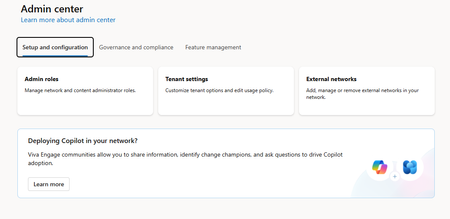
I am following https://learn.microsoft.com/en-us/viva/engage/manage-engage-licenses-microsoft-365 to remove users from the access to VE by removing Microsoft licenses and changing a setting in VE to block users without the Viva Engage Core license. I am a global M365 admin. In the article the VE Network Admin Center is the one I've seen and used before (I assume from the old Yammer Network). However, when I try to access the admin center I get a view (like the picture below) that does not include a Security Settings Page, which based on the article is where I need to turn on the setting in VE to block users without the license. How do I get back to the old VE admin page or get to a place where I can access the security settings for my VE Environment?181Views0likes0CommentsTrimming Viva Engage default “All Company” community membership
Hey Question/problem statement: I’m looking in if there is a possibility of trimming the Viva Engage default “All Company” community membership list/count? Background: We have a lot of “external/contractors” that are fully O365 E3 licensed, and it also semes disable user if still with in the count (this is just a speculation), that we wish to remove from the membership list/count. My thoughts: Is the trimming the membership count just removing the Viva Engage Core (but all so removing the “external/contractors” access, which is fine) Or is it at all possible to trim the member list?Solved1.6KViews0likes4Comments