windows11
66 Topics
Can you recover deleted files after emptying the recycle bin?
I recently encountered a problem where I accidentally emptied my Recycle Bin on my Windows 11 PC, and lost several important files that I hadn't intended to delete. I understand that once the Recycle Bin is emptied, the files aren't easily recoverable, but I’m hoping there might still be a way to get them back. Has anyone else experienced this issue and successfully recover deleted files after emptying the recycle bin? I’ve read that it might be possible to recover deleted files using specialized data recovery software. If anyone has recommendations for reliable tools or methods that can help retrieve files after they’ve been permanently deleted, I would greatly appreciate your advice.Solved88KViews1like14CommentsI want to be able to group app icons on Start menu - Windows 11
for example I want to put PWAs icons in one group, put Photo related app/software icons in another group and so on. Ideally I want to do this by dragging an icon on start menu and dropping it on another icon to form a group - Windows 11 insider Upvote in feedback hub: https://aka.ms/AAdps2r28KViews27likes22CommentsWindows 11: Turn the "Show more options" context menu into a slide down menu
Turn the "Show more options" context menu into a slide down menu and show those extra options in modern style Change the Windows 11 context menu so that when user clicks/taps on "show more options", the context menu expands and the rest of the options become visible in the same modern style with a sliding down animation, possibility with the ability for user to scroll up/down through the options (with mouse wheel or touch). Upvote this feedback in feedback hub: https://aka.ms/AAd53qz17KViews5likes4CommentsAdd Cryptocurrency Watchlist Widget to Windows 11 Widgets, more useful than stock market watchlist
I need a Windows 11 Widget that tracks and shows prices for Cryptocurrencies, not the regular stock markets. if you're interested, please upvote this in feedback hub: https://aka.ms/AAddmqf11KViews1like0CommentsWindows 11: Remove search bar from Start menu
Remove search bar from Start menu, the search icon and all of its feature are already available next to start button There is no need to show search bar at the top of Start menu, keep it simple. the search functionality and icon is there right next to the start menu, with all of its features, don't need to duplicate it on start menu. keep start menu simple. Upvote this feedback in feedback hub: https://aka.ms/AAd5e145.1KViews1like1CommentInstall Issue - Windows 11 Insider Preview 10.0.26120.2705 (ge_release_upr)
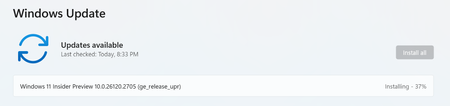
I joined windows insider, and before I start I wanted to note originally only wanted to be in the beta, not the DEV or CANARY builds as I am a beginner. However, at this moment in time, the DEV build downloaded and this build is trying to install, I have clicked download/install multiple times and it takes forever, (I know it takes time but normally is much faster on my device) but when it finally hits 100%, it requests the restart for the update process, whenever my system is rebooted windows update says "Attention Needed" and the install failed. Yet-- when I go to update history this is what shows: Here is what my insider page looks like currently for note: So I am confused and frankly would either like to get this update install gone, or just the beta. Any assistance would be very much appreciated, especially since I am a newbie.3.9KViews0likes3Comments