windows server
2296 Topics
SMB over QUIC stops working when enable Cert based Access Control
Trying to test out SMB over QUIC so can eliminate need for vpn. When setting "Set-SmbServerCertificateMapping -RequireClientAuthentication $true" (enabling Access Control) client can no longer connect. "System error 67 has occurred. The network name cannot be found." which seems like a generic error. It works without Access Control enabled. I have: Created a GoDaddy public cert for the Windows 2025 server, and installed it on the Windows 2025 server, used Powershell to make SMB Server Certificate mapping. Used Intune Cloud PKI to create SCEP profile with Client Authentication EKU and pushed it out to test client. (This is also first time using Cloud PKI) Exported Intune Cloud PKI root and issuer CA certs and installed on the Windows 2025 server to Trusted Root and Intermediary Cert Authorities Grant-SmbClientAccessToServer with the Intune PKI issuer certificate. The client is a Entra Only Windows 11 pc. I've read the Access Control doc many times. Added/removed/re-added config over 5x. Obviously I'm missing something but I cannot figure out what. Is Goddady Cert not correct? Intune Cloud PKI cert not correct? something else? I've looked at it ad nauseum in packet capture, but since tls 1.3, handshake is mostly encrypted. I've scoured Event Viewer, but nothing stood out. Any help greatly appreciated.78Views0likes2Comments
Kerberos Event ID 4771 (0x18) occurring for all domain users despite successful manual logons
Hello, At one of our clients, we are experiencing repeated Kerberos Pre-Authentication Failed - Event ID 4771, with Failure Code 0x18, on the primary Domain Controller. The issue affects all domain users. All users are able to log in manually without any issues using their credentials. However, Event ID 4771 failures continue to be generated in the background, including outside normal working hours. From the Event ID 4771 entries, we can see authentication attempts originating from different internal systems, including user workstations, the secondary Domain Controller, and the proxy server. As part of the troubleshooting, we performed the following command for one of the affected users in order to clear the Kerberos ticket cache: klist purge The cache was cleared successfully, but after monitoring the environment again, Event ID 4771 continued to be generated and the issue remained unchanged. We would appreciate your assistance in identifying the root cause of these repeated Kerberos pre-authentication failures and advising us on the recommended next troubleshooting steps. Thank you.46Views0likes1CommentWindows Server 2022 Datacenter Azure Edition: unable create a ODBC source
I need create a ODBC datasource on the server for a IIS web site. Using the ODBC Data Sources (64-bit) don't have any error but DSN is not create. If I use powershell the same problem (and no error): Thanks for any help205Views1like1Comment
Strict users to use specific software windows server 2022
I have MT5 installed on (C:\Program Files\MetaTrader 5) there are the meta trader 5 terminal64.exe and MetaEditor64.exe applications, mt5 data folder as follow C:\Users\Administrator\AppData\Roaming\MetaQuotes\Terminal\ MT4 on (C:\Program Files (x86)\MetaTrader 4) there are applications terminal.exe and metaeditor.exe and data folder as follow C:\Users\Administrator\AppData\Roaming\MetaQuotes\Terminal\ I use windows server 2022 and I want to create user accounts each account have access only to MT4 or MT5 and the meta editor and data folder only and each user can use the software MT4 or MT5 based on assigned group, users can use the same software at the same time in their own accounts I need 2 windows powershell scripts 1-create 2 user groups for MT4 and MT5 with the access restrcicted to all windows software and features execpt the MT4 or MT5 and the meta editor, and the data folder and desktop showing these icons/shortcuts and webview2 runtime to installed be allowed because it is needed by meta trader ( user cannot see windows bar cannot use any windows software, and the most important that the MT4 or MT5 software to be always running and start always after windows reboot/restart not when user log on, these software run trading algoeithms and must be working around the clock even if the user is not logged in 2- interactive script that use to create the users70Views1like0Comments
Update Daylight saving time on Windows server client from domain controller
Hello, The September 2026 cumulative update includes the Morocco Daylight Saving Time update. We are planning to update our domain controllers to apply the new DST schedule. Is there any option for domain-joined Windows Servers to update their Daylight Saving Time configuration from the domain controller without installing the September 2026 cumulative update on each server ? Or does the update need to be installed on every Windows Server individually ?Solved179Views0likes2CommentsHyper-V replication
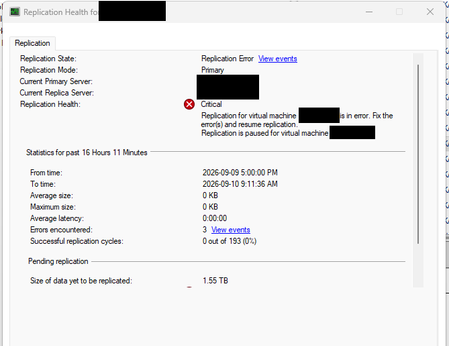
I have two Hyper-V failover clusters (primary and secondary) with replication enabled. I got a server replication error: But recently, the only way to fix it has been to remove the replication and enable it again. Is there another way to fix the Hyper-V replication?Solved144Views0likes2CommentsHow are you managing Group Policy changes after AGPM end of support?
Hi, I’m interested in how organizations are handling Group Policy change management now that AGPM is no longer supported. In environments where GPOs are still heavily used, what are you relying on today for version history, change tracking, rollback and approvals? Are you continuing with AGPM, moving to products such as GPOADmin or Cayosoft, or mainly using native GPMC backups and PowerShell? I’m also interested in whether there is still a gap around having a clear web-based view of GPO history and changes, especially being able to understand exactly what changed and which users or computers may be affected before a change is applied. I’d be interested to hear how this is handled in real production environments and what parts of the process are still manual or difficult.214Views0likes2CommentsAssign IP Address for Windows Server 2025 VM on Hyper-V
I have built my first Windows Server 2025 VM on HyperV and trying to assign an IP address. I want the VM's to be like an actual server so I Created an external vswitch. The HyperV server IP is 172.16.1.41 with a physical gateway of 172.16.1.5. I have tried to assign the new VM with 172.16.1.42/255.255.255.0 and the Gateway is 172.16.1.5 also. However, I cannot get a positive ping. Do I need another VSWITCH configured or what am I missing?333Views0likes5CommentsWindows Server 2022 Hyper-V : vmconnect introuvable pour accéder à la console VM (Server Core)
Contexte Windows Server 2022 [Standard/Datacenter — à préciser], rôle Hyper-V installé. J'ai créé une VM invitée Linux nommée « Wazuh » (installation d'une plateforme SIEM), elle démarre correctement. ce serveur est une VM imbriquée dans un autre hyperviseur type VMware Workstation. je suis en simple groupe de travail (workgroup). Ce que je constate PS C:\Users\Administrator> Start-VM -Name 'Wazuh' PS C:\Users\Administrator> vmconnect localhost Wazuh vmconnect : The term 'vmconnect' is not recognized as the name of a cmdlet, function, script file, or operable program. Check the spelling of the name, or if a path was included, verify that the path is correct and try again. At line:1 char:1 + vmconnect localhost Wazuh + ~~~~~~~~~ + CategoryInfo : ObjectNotFound: (vmconnect:String) [], CommandNotFoundException + FullyQualifiedErrorId : CommandNotFoundException PS C:\Users\Administrator> Get-VM -Name 'Wazuh' | Select-Object State, Status State Status ----- ------ Running Operating normally PS C:\Users\Administrator> vmconnect localhost Wazuh vmconnect : The term 'vmconnect' is not recognized as the name of a cmdlet, function, script file, or operable program... La VM est bien « Running / Operating normally » selon Get-VM, donc le souci n'est pas la VM elle-même mais l'accès à sa console. Ce que j'ai déjà essayé Get-WindowsFeature *Hyper-V* → [colle ici la sortie exacte que tu as obtenue] Install-WindowsFeature -Name RSAT-Hyper-V-Tools -IncludeAllSubFeature → toujours pas de vmconnect.exe fonctionnel après coup Je soupçonne que ce serveur est installé en mode Server Core (pas d'interface graphique locale), et j'ai lu que la conversion Core → Desktop Experience n'est plus possible après coup depuis Server 2016. Ma question pour la communauté Est-il vraiment impossible d'obtenir une console graphique locale (vmconnect / Hyper-V Manager) sur un Server Core, même une fois les outils de gestion Hyper-V installés ? Quelle est la méthode la plus fiable pour accéder à la console d'une VM Hyper-V hébergée sur un Server Core, en environnement non-domaine (workgroup) : Windows Admin Center, Hyper-V Manager distant (config WinRM/TrustedHosts), ou faut-il simplement réinstaller en Desktop Experience ? Si quelqu'un a déjà mis en place Windows Admin Center ou du Hyper-V Manager distant sur un lab en groupe de travail (sans AD), un retour d'expérience serait très utile. Merci d'avance !273Views0likes1Comment