windows server 2022
33 Topics
CfExecute(TRANSFER_PLACEHOLDERS) returns E_INVALIDARG inside an FSLogix profile container
We develop a Cloud Files sync provider. When the sync root lives in a user profile that FSLogix redirects to a per-user VHDX container, some FETCH_PLACEHOLDERS callbacks cannot be answered: every CfExecute(CF_OPERATION_TYPE_TRANSFER_PLACEHOLDERS) for them fails with E_INVALIDARG (0x80070057), including the error completion. The request stays pending until the platform cancels it after about 60 s, and the application that triggered it (File Explorer, Office and Edge background processes, line-of-business apps) hangs for that time. The callback is raised by a name lookup of a non-existent child (`CreateFileW` / `GetFileAttributesExW` on `<dir>\missing.txt`) inside a placeholder directory with on-demand population enabled, and nobody has had that directory open for about one to two minutes. The same callback raised by a directory enumeration is answered fine every time. A lookup on a directory opened a few seconds earlier is fine too. A standalone PowerShell script (own throwaway sync root, no third-party software) reproduces it on a clean Windows Server 2022 (20348.5761, October 2026 CU) with FSLogix 26.08 (3.26.826.17182) for a user with a profile container. The same script on the same server, ten minutes later, as a local user in the "FSLogix Profile Exclude List": all answers accepted. Also reproduced on Windows Server 2022 20348.3328 and 20348.5622 and on Windows Server 2025 26100.1742 with profile containers; not reproducible on the same builds without FSLogix, with a sync root on a plain VHDX volume or a mount point, or on Windows 11. The OS patch level and the FSLogix release did not make a difference in our tests. Waiting, an attributes-only open of the directory, or omitting the correlation vector, request key and sync status from CF_OPERATION_INFO do not help. If the provider opens the directory with FILE_LIST_DIRECTORY (and may close it again) before answering, or after the rejection and then resends the byte-identical answer, CfExecute returns S_OK. CfUpdatePlaceholder(DISABLE_ON_DEMAND_POPULATION) on the directory has the same effect. We ship the directory open as a workaround. Is this a known issue for a Cloud Files sync root inside an FSLogix-redirected profile? Script and both logs (reproduced / not reproduced, same server): https://gist.github.com/pdupont1/85cc0b4a708a784db03087bdcdbe74c8 Full write-up with the environment matrix and all tested variants on https://learn.microsoft.com/en-us/answers/questions/6039901/cfexecute-transfer-placeholders-returns-e-invalida83Views0likes1Comment
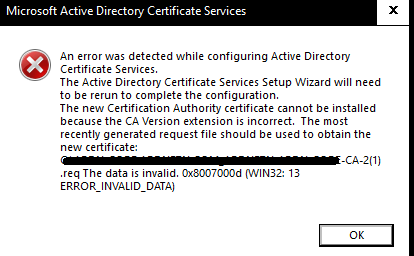
Two-tier AD Certificate Services error importing cert into SubCA
Hello, I'm new here, but excited about being able to hob nob with all you in furthering our IT goals. I'm setting up my root and Subordinate CA and I'm importing my rootCA issued, subCA certificate into the subCA. I get I get the same error when the subCA automatically exports its cert req to the root Ca and when I do it manually. I also get this error whether i'm using X.509 or p7b files. what's unusual about this error is that it seems to be referencing a .req file with a '(1)' added to the end of the title. Original .req did not have the '(1)'. any assistance I can get from the community would be appreciated.466Views0likes2CommentsComo hacer el Donwgrade de Windows Server 2022 Standard a Windows Server 2019 Standard, es posible??
Tengo que adquirir 3 licencias para 3 servidores dell nuevos comprados con un distribuidor, pero no encuentro localmente licencias de Windows Server 2019, unicamente Windows Server 2022, y para la aplicacion que se desea correr unicamente puedo usar 2019. Se puede hacer el Downgrade de esta version? y alguien sabe cual es el proceso???.....5KViews0likes5CommentsInstall RD Web Client on Windows Server 2022 – Complete Setup Guide
To access Remote Desktop only via the browser, install the Web Client package --- Step 1: Export the Self-Signed Certificate * Open **Run** → type `certlm.msc` * Navigate to **Personal** → **Certificates** * Select the certificate created for the **RD Connection Broker** * Export the certificate (e.g., to `C:\temp\abcde.cer`) --- Step 2: Install and Publish Web Client Package Open Windows PowerShell 5.1 and run: powershell Install-Module PowerShellGet -Force Install-Module RDWebClientManagement Import-Module RDWebClientManagement # Clean up any stale IIS locks Reset-IISServerManager -Confirm:$false Remove-Module IISAdministration -ErrorAction SilentlyContinue Import-Module RDWebClientManagement # Install the Web Client Install-RDWebClientPackage # Import the exported certificate Import-RDWebClientBrokerCert "C:\temp\abcde.cer" # Publish the Web Client for production Publish-RDWebClientPackage -Type Production -Latest --- Step 3: Access the Web Client Visit: https://<your-serverFQDN>/RDWeb/webclient/index.html If the page does not appear: Restart the **Default Web Site** in **IIS Manager**. Ensure the **webclient** folder is present under the IIS site directory. Check if the correct certificate is applied under **Bindings** in IIS. If want Beginning from Remote access deployment- use this link - Remote Access via HTTPS RDP Web Client on Windows Server 2022 - Installation Issue Solved . | Microsoft Community Hub3.3KViews0likes0Comments
Windows Server Catalog Changes to Support New Windows Server 2022 Network Additional Qualifications
Windows Server Catalog changes to ensure that customers who rely on the Windows Server logo will be able to identify network components that will work best with Azure Stack HCI, using an updated set of Additional Qualifiers (AQ’s) that are now being displayed in the Catalog.9.9KViews4likes0CommentsServer Manager problem: Online - Data retrieval failures occurred
Hello, I'm using Windows Server 2022 and I have this problem: data retrieval on Server Manager. Is there a fix for this issue? Obs: - this is a test lab - all servers are domain members - I'm connecting on all servers with the domain Administrator account. - tested with both Firewall on and off - do NOT recommend this workaround: delete/rename the registry keys HKEY_LOCAL_MACHINE\SOFTWARE\Microsoft\Windows\CurrentVersion\WINEVT\Channels\xxx Thank you.Solved234KViews3likes92Comments
Windows Server 2022 and FSLogix profile roaming problems
Hello! Recently I've been tasked with enabling profile roaming between two Windows Server 2022 hosts, which are added to the same collection. Both of them are hosting internal developed app. After enabling fslogix on one of them, I've encountered some errors, users getting blocked from logging in. Those are the errors users are getting when trying to log in into the host that uses FSlogix: 1) Failed to acquire mutex for user: EXAMPLE-USER 2) Failed to acquired cleanup session registry lock for user EXAMPLE-USER (SID=S-1-5-21-1715567821-2139871995-725345543-32785) (Elapsed time: 60000) (The wait operation timed out.) User is from different domain that has Forest trust type set to Transitive. We have multiple domains accessing this VM and users from all of them are having the same problems when fslogix enabled on it. User has access to both VM and Azure Storage Account File share when profiles are being saved (both SMB and on Azure portal access) FSLogix policy is set like this: Policy Setting Comment Delete local profile when FSLogix Profile should apply Enabled Policy Enabled Enabled Policy Setting Comment Set Outlook cached mode on successful container attach Disabled Size in MBs Enabled Size in MBs 10000 Policy Setting Comment VHD location Enabled VHD location \\<example>.file.core.windows.net\profiles FSLogix/Profile Containers/Advancedhide Policy Setting Comment Keep local folder after user logs out Disabled Locked VHD retry count Enabled Locked VHD retry count 3 Policy Setting Comment Locked VHD retry interval Enabled Locked VHD retry interval 5 Policy Setting Comment Prevent login with failure Enabled Policy Setting Comment Prevent login with temporary profile Enabled Policy Setting Comment Redirect temporary file folders to local computer Enabled Redirect TEMP, TMP and INetCache to local drive Policy Setting Comment Remove Orphaned OST Files On Logoff Enabled FSLogix/Profile Containers/Container and Directory Naminghide Policy Setting Comment Swap directory name components Enabled Policy Setting Comment Virtual disk type Enabled VHDX Any ideas how to solve it or what might have caused it?4.7KViews1like2Comments
Windows Server 2022 Hyper-V Cluster Network issues
Hi, I need help with Hyper-v Windows Server 2022. Recently Spinned up a new Cluster on Win 2022 and I am facing Network challenges with the VMs not seeing the Network. But only the ones deployed without Desktop Experience GUI. Every time I try to assign a static IP it gives me the Error below: Setting NIC to static IP… Failed to release DHCP lease. Result code: 83 Method name: ReleaseDHCPLease Attempted the workaround from this post: https://blog.cslim.nl/index.php/blog/sysadminning/17-windows-server/49-windows-server-core-failed-to-release-dhcp-lease But the issue still persist. I need Help913Views0likes1Comment
Can DHCP Server detect client windows version?
I have a DHCP server and several clients, some running Windows 10 and some Windows 7. I want the DHCP server to be able to identify the Windows version of the clients using the vendor class and assign the settings I've specified accordingly. Also, I don't want to configure anything on the clients; I want the DHCP server to be able to detect the Windows version by itself. Is there a way to do this?923Views0likes3Comments