windows server 2016
67 Topics
Physical Windows 2016 server crashed after patching
After Patching a physical Windows 2016 server, reboot and stuck at loading screen with error "Fatal Error C0000034 Applying Update Operation". I following many suggestions online, but nothing seems to be working. Now the server is looping and stuck at same screen but without error code anymore. I also tried to do an upgrade to Windows server 2019, but it won't allow me to do upgrade from iLO mount ISO, need to be able to boot into Windows to do upgrade. Any suggestions? I tried to find Microsoft support number to call for help but can't find any. Anyone know what is going on with the server? or how to fix it?201Views0likes0Comments
Problem with in-place upgrade of windows server 2016 to 2022
Hello, I am having issues while trying to upgrade the servers. We have two Windows Server 2016 Domain Controllers. AD, DNS, NPAS roles are installed on the DCs. I have built a new 2022 Server. I was trying to upgrade the schema by running ADprep /forestprep and ADprep /domainprep on Primary DC that holds the schema master role. I am constantly getting this error. I have tried everything and checked all the permissions. Here is the output of my ADprep execution: PS D:\support\adprep> .\adprep.exe /forestprep ADPREP WARNING: Before running adprep, all Windows Active Directory Domain Controllers in the forest must run Windows Server 2003 or later. You are about to upgrade the schema for the Active Directory forest named 'amii.ca', using the Active Directory domain controller (schema master) 'AVMVPRDMFT ADS01.amii.ca'. This operation cannot be reversed after it completes. [User Action] If all domain controllers in the forest run Windows Server 2003 or later and you want to upgrade the schema, confirm by typing 'C' and then press ENTER to co ntinue. Otherwise, type any other key and press ENTER to quit. C Current Schema Version is 87 Upgrading schema to version 88 Verifying file signature Connecting to "AVMVPRDMFTADS01.amii.ca" Logging in as current user using SSPI Importing directory from file "D:\support\adprep\sch88.ldf" Loading entries... Add error on entry starting on line 26: Insufficient Rights The server side error is: 0x2098 Insufficient access rights to perform the operation. The extended server error is: 00002098: SecErr: DSID-031514A0, problem 4003 (INSUFF_ACCESS_RIGHTS), data 0 2 entries modified successfully. An error has occurred in the program ERROR: Import from file D:\support\adprep\sch88.ldf failed. Error file is saved in C:\Windows\debug\adprep\logs\20240416200415\ldif.err.88. If the error is "Insufficient Rights" (Ldap error code 50), please make sure the specified user has rights to read/write objects in the schema and configurat ion containers, or log off and log in as an user with these rights and rerun forestprep. In most cases, being a member of both Schema Admins and Enterprise A dmins is sufficient to run forestprep. Adprep was unable to upgrade the schema on the schema master. [Status/Consequence] The schema will not be restored to its original state. [User Action] Check the Ldif.err log file in the C:\Windows\debug\adprep\logs\20240416200415 directory for detailed information. Adprep was unable to update forest information. [Status/Consequence] Adprep requires access to existing forest-wide information from the schema master in order to complete this operation. [User Action] Check the log file, ADPrep.log, in the C:\Windows\debug\adprep\logs\20240416200415 directory for more information. Please advise. Thank you2.9KViews0likes1Comment
Running Linux Based Containers on Windows Server 2016
Hey Everyone, I want to run linux based docker container on Windows Server 2016 using docker compose, I have tried using following VM Images from Azure, 1. Hyper - V Server 2016 2. Mirantis Container Runtime for Windows Server 2016 I have tried most of the available methods available on Internet, attaching some links below. Looking for someone who has previously setup and run linux based docker containers in Windows Server 2016. Help is higly appreciated. References: 1. https://stackoverflow.com/questions/64877173/how-to-run-docker-linux-containers-on-windows-server-2016-build-143931.9KViews0likes1CommentKB4580346 download - Windows Server 2016 no feature installation possible 0x80073701
When I try to install a new feature one of our Windows Server 2016 I get the following error in cbs.log: Failed to pin deployment while resolving Update: Package_7513_for_ KB4580346 I resolved a simmilar issues on other systems with installing again the failing KB again. But for that I need the update KB4580346. Microsoft removed it from the Windows Update Catalog: https://support.microsoft.com/en-us/topic/october-13-2020-kb4580346-os-build-14393-3986-expired-176a05e8-d169-7c97-4e1a-a8b61f9cc969 here the way I used succesful for the other systems: https://community.spiceworks.com/how_to/173479-resolve-0x80073701-error_sxs_assembly_missing Is there any way to download the KB4580346 for Windows Server 2016?533Views0likes0Comments
How do I boot from usb drive on windows server 2016 on the no desktop version?
I need help. How can I get the installation screen on my laptop with this version of windows server 2016? How can I get the file explorer on this version of windows server 2016? How am I going to boot from usb drive? Pls help me Microsoft!850Views0likes0Comments
Windows Servers Uptime Report using PowerShell
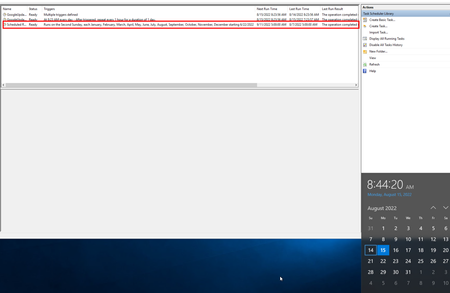
Hi Folks, A customer has mix of Windows servers (2012, 2016, 2019) on-premises environment. Customer needs to generate a report via PowerShell about the availability of servers. During my search I found a script on this link and its modified version is attached. Please note, this script reads windows events and based on that produces result. There is a problem where I need help, this script doesn't run against list of servers via a CSV file or a text file and we suspect it is not producing correct result. Can somebody please review this script and help us with the right syntax or what is missing here? Thanks in advance.1.7KViews0likes1CommentScheduled reboot that should run every second Sunday, doesn't seem to run on the correct dates/days
As far as I know the second Sunday in August is the 14th. The job seems to have run on the 7th. Next job is scheduled to run on the 11th of September, which seems to be correct according to the "Run on the Second Sunday" trigger I've setup. Is there any good explanation why the job ran on the 7th instead of the 14th of August?711Views0likes0CommentsMicrosoft Windows Server 2016 License tracker
I have a client who currently has 50 Windows 2016 datacenter virtual machines and 10 SQL 2017 installations licenced under the Service Provider Licence Agreement, each of which has a Per Core licence (SPLA). The virtual machines run on five hosts, each of which has two physical CPUs and 18 cores per socket for the virtual machines. The question now is, does Windows come with a tool that I can use to track the licence utilisation (core-based licensing)? Since I am required to provide this to my SPLA team on a monthly basis, I believe that automating this process is preferable to doing it manually.872Views0likes1Comment
Windows Server 2016 is extremely slow on VMWare 16, am I missing drivers?
Hey guys, I installed Windows Server 2016 on VMWare 16 on two separate computers, and they were both slow beyond belief. I allocated 150 GB of hard drive, 8 GB DDR4 ram, and 8 cores (3.4 GHz) to the server, and it was unusable. Even on the login page, it would take 10-15 seconds for what I type to show up. I am wondering if I have to install specific drivers on VMWare 16 before I can use Windows Server 2016.8.5KViews0likes6Comments