windows server 2012 r2
56 TopicsIncorrect free space on NTFS (reserved clusters)
I have a very unusual issue on my Server 2012 R2. When formatting a partition as NTFS a large part of the space is reserved (~500Mb) For example, when formatting a 1Gb partition, I only have about half of it free. This happens even when creating a new NTFS partition on a new disk, that is, it is not a case of CHKDSK I created a 1Gb test partition and the command "FSUTIL FSINFO NTFSINFO X:" returns: total reserved clusters: 128,239 (500.9 mb) I can't understand why 500.9Mb are reserved. On another machine, doing the same, you have 14.5Mb reserved, that is, the 1Gb partition has almost 100% free space. I can't understand the reason for this behavior, I don't know if this is an error or if it is caused by some feature of Windows Server 2012 R2. Thanks a lot for any help.670Views0likes0Comments
Public link image not shown after docx to pdf conversion on windows server 2012 r2
Hello people, We have third party tooling installed on our windows server which converts a docx file to pdf. The docx file contains a link/public url image, but the converter is not able to download the image from the internet and place it in the pdf. Does somebody know of a security/firewall setting in Windows Server 2012 r2 which is blocking this process? Looking forward to your reactions. Kind regards, TijsSolved1KViews0likes1CommentSMTP Server
In my organization we have a SMTP Server that relays messages from printers and applications (about 160 accounts) on Windows Server 2012 R2. What we need is to migrate the configuration to Windows Server 2019, I could not find the procedure or recommendations to perform the migration process or upgrade inplace. Someone could give me some light on how I could take this configuration to WS2019 without affecting production or generate a downtime.6.6KViews0likes4Comments
Server manager missing
Hello, I'm coming to ask for your help today, because I have a problem with my windows server 2012 R2. I installed the trial version, and then I used DISM to change the version and switch to Standard. I activated it with a key, except that I only have the dashboard application installed, and not the server manager, which allows for example to install new features, or simply better manage the server. Do you have a solution? Thank you in advance.Solved14KViews0likes3Commentsgmsa account - running windows tasks.
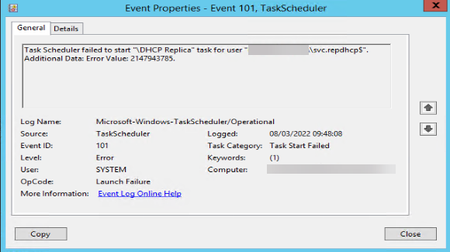
I created a gmsa account, installed it on the server to run the scheduled task on windows. Enter the gmsa account as domain administrator and dhcp administrator, since the script that the task will execute is a task of the dhcp server. Enter the gmsa account in Log on as a batch job. Even so, the error occurs when executing the task in the task scheduler.10KViews0likes8Comments
Windows Server Standard 2012 R2 virtualized on VMware vSphere Essential Plus Kit.
Hi There I have couple of doubts for which need your expert advice have approx 25 guest VMs of Windows 2012R2 virtualized on vSphere Essential Plus across 3 physical hosts. My servers are getting retired and quickly need replacement. From a licensing prespective can I move the same guest VMs and the licenses to the new server and if so how-please share the necessary steps and dependency if any. Also 2012 R2 will be supported till what time.3.7KViews0likes3CommentsWindows Server 2022 features comparisons
Hi, After Windows Server 2019 release, Microsoft released Windows Server 2019 features comparison. Pls find the attachment. I am searching same comparisons for Windows Server 2022. Please share. We’ll be thankful for members. With Regards NndnG2.7KViews0likes0CommentsWindows Server 2022 as Domain and DHCP Server
Hi, Windows Server 2022 announced. There are many IT Executives or Organizations who use Windows Server only for DNS Server, DHCP Server, managing network resources and implementing group policies. For this purpose, if we compare Windows Server 2012R2, Windows Server 2016, Windows Server 2019 and Windows Server 2022; can we find any differences? Moreover, for those executives or organizations, does it matter Windows Server 2022 announced? Please let us know differences in Windows Server from above perspectives. With Regards NndnG3KViews1like1Comment
FSR to DFRS migration sort of broke the GPOs
So, I'm not a guru here, more of a tinkerer. I'm learning on a home lab which has a Win2k12r2 and a Win2k16 server. I ran through the process of transitioning from FSR to DFSR using the "Quick" option outlined here: https://techcommunity.microsoft.com/t5/storage-at-microsoft/streamlined-migration-of-frs-to-dfsr-sysvol/ba-p/425405 I was able to complete every step successfully. I thought everything worked just fine. Unfortunately, it did not. While the Sysvol share is visible under SYSVOL_DFSR, it's not populated with anything. Furthermore, there is no NETLOGON directory. I see my GPOs under the GPM console, but when I go to edit them, I get an error that says "Failed to open the Group Policy Object. You might not have the appropriate rights." The error then says the following under the details "The system cannot find the path specified." I am however, able to create a new policy. Does someone mind helping me our here? I don't know if the DFSR removes the need for a NETLOGON, which is why that folder doesn't exist. I also don't know why nothing seems to have been copied over from SYSVOL to SYSVOL_DFSR. Since the procedure deleted the SYSVOL folder, I can't check to compare the permissions, but from what I can tell, the permissions on SYSVOL_DFSR are there, so I'm going to assume that they're the right permissions?1.2KViews1like0Comments
TLS for Windows Standards-Based Storage Management (SMI-S) and System Center Virtual Machine Manager (VMM)
First published on TECHNET on Oct 14, 2016 In a previous blog post, I discussed setting up the Windows Standards-Based Storage Management Service (referred to below as Storage Service) on Windows Server 2012 R2.4.9KViews1like0Comments