windows 11
173 Topics
File History problems after installing KB5124008, KB5126052,KB5126146, KB5122878, and KB890830
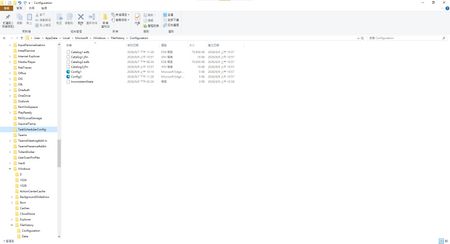
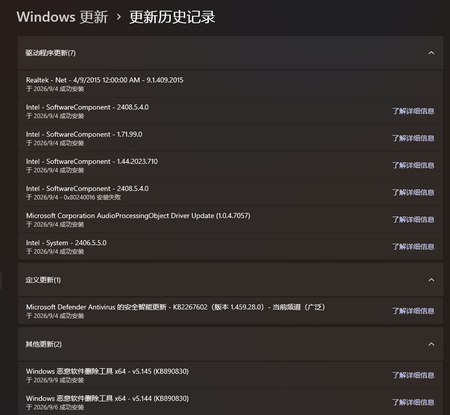
This morning, I ran Windows Update on two Windows 10/11 computers, but the file history feature stopped working completely after the update. Previously, after updating KB5120249 and KB5101684, files could still be backed up to the D: drive normally. The "Last Backup" time in "File History" is not updating correctly. Newly created or saved Word documents, pictures, videos, etc., still show "No previous version available" in "Content → Previous Versions". No folders were corrected; their dates are automatically updated. After running Windows Update again today, the file history feature stopped working on both computers. The File History panel pops up but cannot be used, prompting for a hard drive connection. (The hard drive is connected and I've confirmed it can read and write.) resulting in an "InconsistentState" entry in C:\Users\User\AppData\Local\Microsoft\Windows\FileHistory\Configuration. I'm very angry. If Microsoft doesn't address this, I'll keep complaining. If anyone else has encountered the same situation, please leave a comment below. You can also check Microsoft Q&A or the Microsoft Community Hub. The five updates installed are: September 8, 2026—KB5122878 (OS Builds 19045.7725 and 19044.7725) September 8, 2026-KB5126146 Cumulative Update for .NET Framework 3.5, 4.8 and 4.8.1 for Windows 10 Version 22H2 2026-09 Security Update (KB5124008) (26200.9445) 2026-09 .NET Framework Security Update (KB5126052) Windows Malicious Software Removal Tool x64 - v5.145 (KB890830) Deleting the %LocalAppData%\Microsoft\Windows\FileHistory folder also failed. Furthermore, "File History" itself is not listed in Microsoft's "Deprecated Features List." While other backup features suggest that Microsoft has no plans to discontinue it. Microsoft is going to pretend it doesn't exist. These worked normally before the update but stopped working afterward. This is to inform other users experiencing the same problem.5.6KViews5likes40Comments
Repeated prompt "Some information has changed" when reconnecting to mobile hotspot
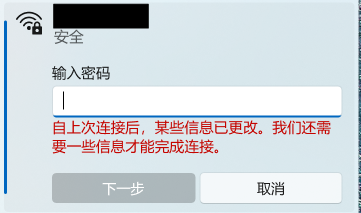
Problem Description When attempting to reconnect Windows 11 to a personal mobile hotspot, the connection frequently fails to connect automatically. Instead, Windows displays the following prompt: "Some information has changed since the last time you connected. We need additional information to complete the connection." (自上次连接后,某些信息已更改。我们还需要一些信息才能完成连接。) The system forces re-entering the Wi-Fi security key every time, even though the SSID, password, and security type on the phone have not changed. Steps to Reproduce Turn on the personal mobile hotspot on the smartphone (WPA3-Personal). Connect the Windows PC to the hotspot, check "Connect", and verify successful connection. Disconnect or disable the mobile hotspot. Turn on the hotspot again later and try to reconnect from Windows. Windows fails the handshake and displays the "information has changed" prompt requiring manual password entry. Observations & Potential Causes Forgetting the network via `Settings > Network & internet > Wi-Fi > Manage known networks` temporarily resolves the issue for one session, but it recurs on subsequent reconnections. Device & OS Environment OS Version: Windows 11 Insider Preview (Build 26340.9577) Network Adapter: [Intel Wi-Fi 6E AX210 160MHz] Hotspot Device: Android 16 Smartphone Hotspot WPA3-Personal 5GHz134Views0likes3Comments
Windows 11 Insider 26220.9587 keeps reinstalling
Hi, I need some help with Windows 11 Insider Beta. I'm currently on Windows 11 Home Insider Preview build 26220.9587. The build installed successfully, but Windows Update keeps offering the same 26220.9587 feature update again and later attempts fail with error 0x80246019. I also have the “Evaluation copy” watermark even though Windows is permanently activated. I have enabled the option to unenroll my device from Insider builds. My goal is to return to stable Windows 11 without resetting the PC, deleting my applications/files, or doing a clean installation. What is the safest supported way to do this?32Views0likes0Comments
Why Metro design should make a grand return
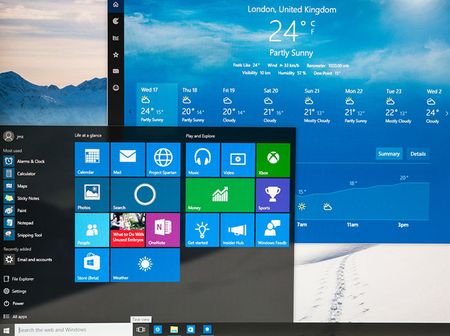
Metro UI wasn’t just a design language. It was a declaration. It respected motion, space, clarity, and user autonomy. It gave us live tiles that pulsed with relevance, panoramic pivots that guided flow, semantic zoom that revealed structure, and full-screen hubs that anchored experience. It was unapologetically modern, minimal, and meaningful. Then came the drift. Fluent UI buried Metro under acrylic, chrome, and overlays. It softened the edges, blurred the motion, and diluted the clarity. What was once a bold interface became ornamental. Metro was never about decoration—it was about discipline. Im still using Metro UI in my projects, not because I need too, because i like how it looks, but you created fluent design, that ruined it all. Microsoft, you knew Metro was good. You launched it with pride. You made it the face of Windows Phone, Zune, Xbox, and Windows 8. You called it “authentically digital.” You were right. So stop burying it. Stop apologizing for it. Stop pretending Fluent is a replacement. It’s not. Bring back Metro UI: As a first-class design option With full support for live tiles, semantic zoom, and panoramic navigation Without overlays, blur, or ornamental drift Not as nostalgia. As correction. Metro was clarity. Metro was discipline. Metro was good. Let it speak again.1.8KViews3likes8CommentsWin 10/11 file history is malfunctioning after an update why has not Microsoft fixed this issue yet?
Hello, I would like to ask whether other Windows 10/11 users have experienced the same File History problem. I also hope the Microsoft technical team can seriously investigate this issue. My laptop is running Windows 11 25H2. Before installing KB5101684, File History had always worked normally. In Control Panel → All Control Panel Items → File History, the backup time would update normally whenever files were backed up to my D: drive. Around July 28–29, 2026, at approximately 10:00 AM, before KB5101684 was installed, File History was still working normally. I want to make this very clear: I did not manually change my File History settings, delete Event Viewer entries, or modify or delete relevant registry settings. The problem started after KB5101684 was installed. I have already confirmed the following: File History is still enabled. The D: drive is working normally and can be accessed without any problems. After selecting Control Panel → All Control Panel Items → File History → Run now, files are indeed written to: D:\FileHistory\user\LAPTOP-GJTRIQFJ\Data\C\Users\user However, the "Last backup" time displayed by File History does not update correctly. Even after modifying a document, confirming that it was successfully saved, and then clicking Run now, the latest backup time and file versions do not update as expected. Under File Properties → Previous Versions, it still says: "There are no previous versions available." I also noticed that every time a backup runs, folders such as Desktop and Favorites under the FileHistory folder on the D: drive continue to have their modification dates changed, even when their contents have not actually been modified. What makes this even more concerning is that my Windows 10 22H2 desktop computer also started experiencing File History synchronization problems after installing KB5120249. In other words: Windows 11 25H2 → KB5101684 → File History problem Windows 10 22H2 → KB5120249 → File History problem This makes me seriously concerned that these problems may be related to a recent Windows Update change or regression affecting File History. To be honest, I am extremely frustrated with Microsoft. The problem is not simply that Windows has a bug. Any large operating system can have bugs. The real problem is that users have reported the issue, provided detailed testing results, identified the Windows versions and specific KB updates involved, provided the actual File History paths, and spent considerable time troubleshooting, yet it is already August and there still does not appear to be a clear official confirmation from Microsoft regarding whether these issues are related to KB5101684 or KB5120249. Users should not have to repeatedly troubleshoot the same problem without receiving a clear explanation or effective solution. I would like the Microsoft technical team to seriously investigate the following: Could KB5101684 be causing File History backup timestamps or version information to behave incorrectly on Windows 11 25H2? Could KB5120249 be causing similar File History problems on Windows 10 22H2? Why are files actually being written to the FileHistory directory while the "Last backup" time does not update correctly? Why does "Previous Versions" continue to report that no previous versions are available? Why do folders such as Desktop and Favorites have their modification dates changed during backup even when their contents have not been modified? Could this be a File History regression introduced by a recent Windows Update? Please do not simply ask users to repeatedly reset File History, reselect the backup drive, or recreate the File History configuration without investigating the underlying cause. Microsoft needs to determine what is actually happening. I would also like to ask other Windows 10/11 users who have experienced similar File History problems to leave a comment with the following information: Windows version KB update number Date when the problem started Whether the backup location is a local drive or network drive Whether the "Last backup" time is incorrect Whether "Previous Versions" is unavailable Whether files are still being written to the FileHistory folder Please also consider sharing this post or bringing it to the attention of other Windows users and the Microsoft technical team. The more independent cases Microsoft can compare, the easier it should be to determine whether this is a common problem. I am not asking Microsoft to guarantee that Windows will never have bugs. I am asking Microsoft to properly investigate problems that users have clearly reported, provide an explanation, and deliver an actual fix when appropriate. This issue has now continued into August, and I am extremely disappointed with the way the File History problem has been handled so far. Microsoft, please do not ignore this issue. Please investigate it seriously and provide users with a clear response and an actual solution. Thank you.1.9KViews3likes10CommentsWindows 11 Insider Beta version add smarter instant captions and fixes an issue with file history
After I updated KB5124008 recently, file history was disabled, and many users reported being affected. Some netizens said they had spoken with others and confirmed that other users had encountered similar issues, but they had not yet confirmed that KB5124008 was the root cause. https://learn.microsoft.com/zh-tw/windows-insider/release-notes/experimental/preview-build-26340-9502 https://learn.microsoft.com/zh-tw/windows-insider/release-notes/beta/preview-build-26220-9492 Microsoft released version 26340.9502/26220.9492. These two URLs contain fixes for the issue where backups using [File History] unexpectedly fail and display the error message "No available disk drive found". So happy What is Windows 11 Insider Beta? When will all these features be released to everyone?156Views0likes0CommentsNo matter what I try, Windows Update always says that my PC is up to date.
After installing Windows 11 Insider Experimental (Future Platforms) Preview Build 29639.1000.rs using an ISO, I registered for the Windows Insider Program and signed in with my Insider account. I also submitted a bug report. Later, after an engineer informed me that the bug had been fixed, I tried to check for updates so that I could receive the build containing the fix. However, Windows Update consistently reported that my device was up to date, regardless of how many times I checked for updates. I later learned that Build 29667.1000 appeared to have been released, but my system still did not receive the update. My Windows Insider settings also appear to be unavailable or unselectable. Could this be related to why my device is not receiving newer Insider builds? If I want to receive the update containing the mouse cursor flickering fix and upgrade to Build 29667.1000, what should I do? Is there a way to restore or reconfigure my Windows Insider settings so that my device can receive the appropriate Insider builds through Windows Update? And my Windows Insider settings also seem to be unavailable / unselectable. Could this be related to why I am unable to receive updates? If I want to receive the update that contains the mouse cursor flickering fix and upgrade to Build 29667.1000, what should I do?212Views0likes1Comment
Windows 11 Insider Build 26220.9223 fails with 0xC1900101
Hi, I am using Windows 11 Insider Preview and I cannot install Feature Update 26220.9223. The update downloads and starts installing. After the PC restarts, the installation fails and Windows rolls back to the previous build. Windows Update then shows the same update with a Retry option. Error code: 0xC1900101 Failed date: 23-08-2026 I have already restarted the PC and reset Windows Update components. The Windows Update and BITS services are running normally. Could anyone help me identify what is causing this error? Is there a known issue with build 26220.9223, or could a driver be causing the installation to roll back? Thank you.468Views0likes4Comments
A Vision for Windows 12: Familiar Power Meets Modern Innovation
Dear Microsoft Windows Development Team and Community Hub, With the inevitable speculation around Windows 12, I wanted to share a comprehensive vision for the next iteration of Windows. The goal is to blend the best elements of past versions with modern needs, creating a truly powerful and personalizable operating system. Here’s what many users like myself are hoping to see: 1. A Revitalized Start Menu & Screen Fresh, Resizable Layout: A clearly divided Start Menu with dedicated zones: Account Area (top-left), Shortcut Area (far left for common folders), List Area (pinned, most-used, and suggested apps), and a Pinned Tiles Area (right side, four-column layout). It should be resizable by dragging its edges. Full-Screen Start Screen Option: A return of the full-screen Start that combines the easy-to-browse list from Windows 7 with the dynamic Windows 8.1-style Live Tiles, supporting both horizontal and vertical arrangements. Enhanced Tile Flexibility: Tiles in five sizes (small, medium, long, wide, large, tall) with smooth resizing animations. New customization options should include colorful, gradient, light, dark, transparent, and semi-transparent tones. Migration Friendly: When upgrading from Windows 7, 8.1, 10, or 11, all pinned apps and websites should automatically migrate. Copilot Integration: A dedicated, prominent Copilot Tile to highlight the AI assistant's role, perhaps with a new rainbow effect for visual flair. 2. A More Functional Taskbar & Search Comprehensive Taskbar: Featuring the Cortana icon, mobile devices, Start, Search, Task View, Chat, applications, and the system tray. Prominent Search Box: The search box should be more prominent, changing from a circle to a rectangular shape, serving as a stronger entry point. Flexible Search Menu: The search interface should be highly adjustable and consistent with the new Start menu's style. 3. Personalized User Experience Lock Screen Customization: Options for left or center-aligned date and time. New photo effects that highlight the main subject, allowing it to overlay the time. Windows Hello: Facial recognition that works while wearing a mask. Enhanced Widgets: Desktop Pinning: Widgets should be pinnable anywhere on the desktop, not just in a sidebar. Full-Screen Widgets Board: A full-screen mode with a widget panel on the left and news/feeds on the right, supporting up to six columns. New Widgets: Introduction of a 'Calendar', 'People', 'Microsoft Edge', 'Cortana Suggestions', and a dedicated 'Microsoft Store' widget. 4. Peak Productivity & Multitasking Task View & Virtual Desktops: A return to the mature Windows 10 experience, allowing windows to be dragged directly to other desktops in Task View. Timeline Returns: The Timeline feature should come back, including cross-device history. Classic Alt+Tab: The Windows 10 Alt+Tab window switcher experience should be restored. Supercharged Snap Assist: Enhanced Snap Layouts supporting up to 8 segments for large screens, with specific, intelligent layouts for ultrawide (21:9, 32:9) monitors. 5. Application & Ecosystem Evolution App Updates: New versions of Mail, Calendar, and People. The new Outlook app should fully support popular third-party email services like QQ, 163, and 126. A New Cortana: Multilingual support with the return of consumer skills (music control, smart home, third-party skills). It could be offered in two visual forms and power the 'Cortana Suggestions' widget. Screenshot Tool Upgrade: Should support full-screen recording. Media Player: The return of an appearance selector and support for live tiles. Microsoft Store Revamp: UWP Return: High-quality UWP and classic Metro apps should return to the store, with PWAs transitioning to UWP. Gaming Expansion: Addition of dedicated PlayStation and Nintendo Switch apps, including a Nintendo game section. 6. Visual & Nostalgic Enhancements Refined Aesthetics: Improved window transparency with a new glass effect, rounded rectangle system avatars, and a new top bar (weather, system tray, time). Dynamic wallpaper effects would be a welcome addition. Keep the Win11 Sound: The Windows 11 startup sound is great and should be retained. The "Bold Strategy" – Legacy Feature Return: To satisfy power users and nostalgia, consider the large-scale return of beloved features like MSN apps, Windows 7 Desktop Gadgets, Windows Media Center, Groove Music, HomeGroup, a significantly enhanced Tablet Mode, and Windows Ink Workspace. 7. Hardware, Compatibility & Core System Broad Controller Support: Native compatibility with DualShock 4/5, Joy-Con, and others. Android Subsystem (WSA) Return: WSA should return with a focus on fixing previous pain points, especially full-screen landscape app support. Separated Notification Center: The Notification Center and Calendar quick actions should be separated for a cleaner interface. "Next-Gen PC" Promise: Windows 12 should deliver on larger storage, longer battery life, more power, and enhanced security/stability. Enhanced Backup & Transfer: Windows Backup should expand to more regions and add support for backing up personal files and apps to external drives, including migration from old PCs or to new hard drives. 8. Core Versioning & Hardware Requirements A Fresh Start: Version 26H1, with an internal OS version reset to 12.0.0.0. Tiered Editions: Windows 12e (for education, 2GB RAM), Windows 12 (mainstream, 4GB RAM, removing strict TPM restrictions), and Windows 12 Ultra (flagship, 8GB RAM, unlocking all AI and performance features). Extensive Free Upgrade Path: A critical strategy, offering free upgrades from Windows 11 (including SE), Windows 10 (including S), Windows 8/8.1 (including RT), and Windows 7. Doubled Support Lifecycle: Home/Pro/Workstation: 24 months → 48 months. Enterprise/Education/IoT: 36 months → 72 months. In summary, we envision a Windows 12 that isn't afraid to learn from its rich history while pushing forward with modern innovation. It should be a system that respects user choice, empowers productivity, and welcomes everyone from legacy users to those with the latest hardware. If you like this vision and want to support it, you can upvote it here: https://aka.ms/AAylqhw Thank you for considering this feedback. Sincerely, A Passionate Windows User11KViews1like10Comments