windows 10 esu
2 Topics
ESU enrollment fails with "Oops, something went wrong."
Windows 10 Home 22H2 (Build 19045.6456), permanently activated. ESU enrollment fails with "Oops, something went wrong." Troubleshooting completed: DISM /RestoreHealth SFC /scannow (found and repaired corrupt files) Removed old Microsoft accounts Re-registered account components Windows 10 repair install (keep files and apps) Installed all available updates Microsoft account sign-in works SMS verification works No Work or School account connected Windows Backup now opens correctly, but ESU enrollment still fails. Has anyone had Microsoft investigate an account/device-side ESU enrollment issue? UPDATE: i found the fix. switched to a local windows adminstrator account then back. i'll leave this here for others to find.60Views0likes2Comments
Can't Remove Microsoft Account After Windows 10 ESU Enrollment
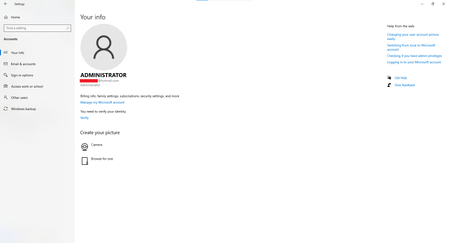
Hi, I enrolled my Windows 10 PC in the Extended Security Updates (ESU) program using my Microsoft account so I could continue receiving security updates after Windows 10 reached end of support. The update installed successfully, but now I can't remove my Microsoft account from Windows. Here's my situation: I sign in with a local Administrator account, not a Microsoft account. netplwiz confirms my account is local. However, Settings → Accounts → Your info shows my Microsoft email address. Under Settings → Accounts → Email & accounts, my Microsoft account appears under Accounts used by other apps with "All apps can sign me in." There is no Remove, Disconnect, or Sign out option. I've already tried: Removing all Microsoft-related entries from Credential Manager. Restarting the PC. Removing the device from my Microsoft account online. None of these removed the account from Windows. Is this expected behavior after enrolling in Windows 10 ESU? Is there any supported way to disconnect the Microsoft account? Thanks in advance.556Views0likes4Comments