win10
26 Topics
How to add watermark to PDF for free?
What’s a straightforward way to add a text watermark to a PDF, such as “Draft” or “For review”? I’d like to apply it across the document without placing it on each page manually. Can I change the size, position, and transparency so the watermark is visible but doesn’t make the text difficult to read? It would also be useful to use a logo as an image watermark and leave certain pages, such as the cover, unmarked. Is there a way to do this for free, either online or with a desktop app? I’m open to other options if needed. Thanks for any advice.97Views0likes8Comments
How to print PDF file?
Hi, everyone. What’s the easiest way to print a PDF file from a computer? Can I print directly from a browser, or is it better to open the file in a PDF reader? I’d like the text and images to stay clear, with nothing cut off around the edges. I’m also unsure when to choose “Actual size” or “Fit to page.” How do I decide which setting to use if the PDF page size is different from the paper in the printer? For longer documents, is there an option to print two PDF pages on one sheet to save paper? I’d appreciate some guidance on the settings to check before printing. Thanks.85Views0likes6CommentsHow to read Word documents aloud on iPhone for free?
Is there a free way to read a Word document aloud on an iPhone? Can Microsoft Word or the iPhone’s accessibility features do this? I’d also appreciate recommendations that support background listening or saving the narration as an audio file.117Views0likes6Comments
How to draw on a PDF on Windows and save the changes?
I need to mark up a PDF with freehand notes, circles, arrows, and a few simple shapes without changing the original text. When I open the file in a browser on my Windows laptop, the pencil or drawing tool is not always easy to find, and I’m unsure whether the annotations will remain after I save and reopen the PDF. Is there a free way to draw on a PDF on Windows with a mouse or stylus, adjust the pen color and thickness, erase unwanted marks, and save the annotations? Can this be done reliably in Microsoft Edge or Chrome, or would a dedicated desktop application be more suitable? I’d be interested to know which approach works best for this kind of everyday markup. Thanks in advance.606Views0likes7Comments
Windows 10 wymusza sterownik
Jestem posiadaczem karty sieciowej TP-Link Archer T4U Plus V1.0. pobrałem do niej dedykowane sterowniki. Karta na tych sterownikach chodzi o wiele lepiej. Zasięg jest maksymalny i prędkość kilka razy większa niż z tymi windowsowymi. Jednak bardzo często urządzenie wyłącza się i windows wymusza mi na nim swoje sterowniki od realteka. Paskudnie one chodzą i na nich urządzenie wyłącza się i rozłącza z siecią częściej. Nie wiem już co mam zrobić by nie nadpisywalo tych sterowników. Konwencjonalne opcje mam już za sobą i nawet zmieniałem ustawienia grupy względem windows update próbujac zatrzymanie pobierania wszelkich sterowników. Nic nie działa Ticket: 7102053157104Views0likes0CommentsKB5078885 msu package is a like a service pack
KB5078885 msu package is a like a service pack ? or it's necessary to install other package for clean new installation offline (i use the last iso 22h2 provided by microsoft with kb5033372 from 12 december 2023). win 10 doesn't want the package msu at the last time (KB5078885 installed and reboot and at the end, it's uninstalled). do you have a fix or an explanation ? thanks.472Views0likes4CommentsHow can I extract text from an image on my computer?
Hi everyone, I have some images that contain important text, and I plan to extract the text into an editable format (like Word or plain text). I know this is usually done with OCR, but I'm not sure which tool or method is the most reliable for everyday use. I prefer something easy to use on Windows to met me extract text from image. Has anyone here tried different apps or methods for converting images to text? Are there any good built-in options, or do I need third-party software?24KViews0likes11Comments
Check (and modify) network drive mappings as an admin for other users
It does not appear that admins can check/modify a user's network drive mappings (e.g. from `\\server\shares` to a drive letter) via powershell? The various `Smb-` commands seem to be per user, and as far as I can tell, there is no way to run a powershell command as a different user without using their credentials (which seems to be poor security hygiene to ask users for their passwords), even if you are an admin. Am I missing something, or is this not possible? In case it helps clarify things, what I am asking about is the Windows equivalent to `sudo -u some_user some_command`.1.3KViews0likes5Commentssolucion imposible
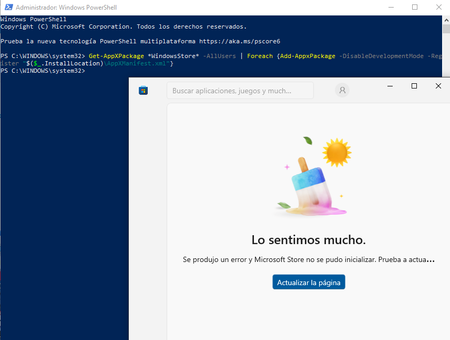
spanish version....... teniendo problemas con la aplicacion de microsoft store al iniciar la aplicacion de un momento a otro salto con un mensaje en pantalla "lo sentimos mucho se produjo un error y microsoft store no se pudo inicializar. prueba a actualizar o vuelve mas tarde" he intentado realizar distintos metodos para solucionar el problema como realizar reinstalacion con la opcion de actualizar este pc del programa media creator tool para instalar windows 10 y aun el problema persiste, he realizado un intento por la powershell con el siguiente comando Get-AppXPackage *WindowsStore* -AllUsers | Foreach {Add-AppxPackage -DisableDevelopmentMode -Register "$($_.InstallLocation)\AppXManifest.xml"} descrito en varias respuesta para casos similares dispuestos en el foro de la comunidad de microsoft respuesta proporcionada por el usuario KapilArya en el hub "https://techcommunity.microsoft.com/discussions/windowsinsiderprogram/microsoft-store-wont-launch/1513414" tambien junto a un agente de soporte se intento realizar una solucion con la creacion de un usuario nuevo para solventar y no funciono tambien se realizo el diagnostico para la instalacion de windows 11 pero mi equipo no cuenta con las caracteristicas minimas para que este sea instalado y aun asi sigo sin poder solucionar el problema y no me gustaria realizar la reinstalacion de windows 10 por medio externos (USB) por que asi perderia demasiada informacion sobre las aplicaciones y datos que tengo de varios años de recoleccion y me gustaria saber si puedo hacer algo mas para poder solucionar este problema sin perder datos me dustaria obtener ayuda lo mas pronto posible gracias por brindarme su atencion y ayuda para resolver este caso adjunto evidencias sobre problema y metodos realizados. english version...... Having problems with the Microsoft Store app. When I launch it, it suddenly pops up with a message on the screen: "We're very sorry, an error occurred and the Microsoft Store could not be initialized. Please try updating or come back later." I've tried various methods to solve the problem, such as reinstalling with the "Update this PC" option in the Media Creator Tool to install Windows 10, and the problem still persists. I tried using PowerShell with the following command: Get-AppXPackage *WindowsStore* -AllUsers | Foreach {Add-AppxPackage -DisableDevelopmentMode -Register "$($_.InstallLocation)\AppXManifest.xml"} Described in several answers for similar cases posted on the Microsoft community forum. Answer provided by user KapilArya on the hub "https://techcommunity.microsoft.com/discussions/windowsinsiderprogram/microsoft-store-wont-launch/1513414" Also, together with a support agent, a solution was attempted by creating a new user to solve the problem, but it didn't work. A diagnosis was also performed for the installation of Windows 11, but my computer doesn't have the minimum specifications for it to be installed. And even so, I still can't solve the problem and I wouldn't like to reinstall Windows 10 using external media (USB) because I would lose too much information about the applications and data that I have from several years of experience. I'm collecting and would like to know if I can do anything else to resolve this issue without losing data. I would like to get help as soon as possible. Thank you for your attention and help in resolving this issue. I attach evidence of the problem and the methods used.419Views0likes2Comments