wifi
6 Topics
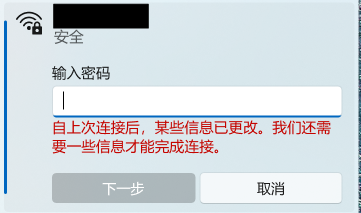
Repeated prompt "Some information has changed" when reconnecting to mobile hotspot
Problem Description When attempting to reconnect Windows 11 to a personal mobile hotspot, the connection frequently fails to connect automatically. Instead, Windows displays the following prompt: "Some information has changed since the last time you connected. We need additional information to complete the connection." (自上次连接后,某些信息已更改。我们还需要一些信息才能完成连接。) The system forces re-entering the Wi-Fi security key every time, even though the SSID, password, and security type on the phone have not changed. Steps to Reproduce Turn on the personal mobile hotspot on the smartphone (WPA3-Personal). Connect the Windows PC to the hotspot, check "Connect", and verify successful connection. Disconnect or disable the mobile hotspot. Turn on the hotspot again later and try to reconnect from Windows. Windows fails the handshake and displays the "information has changed" prompt requiring manual password entry. Observations & Potential Causes Forgetting the network via `Settings > Network & internet > Wi-Fi > Manage known networks` temporarily resolves the issue for one session, but it recurs on subsequent reconnections. Device & OS Environment OS Version: Windows 11 Insider Preview (Build 26340.9577) Network Adapter: [Intel Wi-Fi 6E AX210 160MHz] Hotspot Device: Android 16 Smartphone Hotspot WPA3-Personal 5GHz163Views0likes3Comments
KB5077241 broke wifi (Windows on Arm)
Installed the KB5077241 yesterday on my Lenovo Yoga Slim 7x running Windows On Arm (Qualcomm Snapdragon X elite). Windows 11 25H2 Pro. After the install and reboot wifi no longer works. Device manager shows the wifi card as working. But the wifi button in task bar is gone. There is nowhere to choose show networks etc. Uninstalled the update and everything works again635Views0likes4Comments
WiFi in Win11 issues in .3915
So i'm going crazy here and don't know where to go next, to Microsoft support or my internet provider... I've happily had Hyper-V on my Windows 11 Insider and some VMs i use for delivering trainings. Few days ago i noticed i no longer can connect to the internet on the VMs. Existing VMs, new VMs, VMs with past snapshots applied, etc.... no internet on the VMs, period. I tried creating new switches several times and nothing helps. However, although i don't need internet to deliver the trainings, when doing so at the university, i always use my host/laptop's internal card with a SIM in it and have no issues whatsoever with the internet in VMs. The SIM i have is from the same provider as my home cable is from. I just turned off my WiFi and connected the cellular network. Boom! VMs instantly have internet access. Turning on WiFi -> no internet again. So at this point i'm kind of stuck and not sure where to go for help. Obviously there is nothing wrong with my Windows OS in general, but there is an issue with the WiFi. On the host, i have no issues with the WiFi, internet is fine and working properly. I'm shutting down my laptop every night, so "restarting" did not fix it. Should i try resetting my router or go to Microsoft Windows support first? I think going to the internet provider has no benefit now, as they will blame the OS. Any thoughts?539Views0likes3Comments
Slow Wi-Fi Speeds on Laptop with (Dev Channel 24H2)
I’m currently on the Dev Channel, Windows 24H2, and experiencing an issue with my laptop's Wi-Fi performance. While my laptop connects well to all other Wi-Fi networks, it struggles with the Wi-Fi extender in my room. On other devices like my phone and another laptop, the extender provides speeds of 80 to 100 Mbps, but on my laptop, the speed drops to just 5 to 6 Mbps. I’ve tried basic troubleshooting steps like restarting, reconnecting, and checking drivers, but the issue persists. Any insights or suggestions would be greatly appreciated!Solved651Views0likes2Comments