web apps
82 Topics
Azure AppService Linux container fails to serve files from mounted file storage
A perfectly working setup suddenly started failing after redeploying the Azure resources involved: Storage account with multiple file shares Azure AppService on a Linux ServicePlan, hosting a Linux Docker container Azure AppService, configured with Path Mappings to the various file shares on the storage account After reprovisioning the resources (end of June 2021), we found out Apache (inside container) wasn't able to serve files from the mounted storage anymore: it returned a HTTP status 502. It was still able to persist files to these same mounted file shares (excluding hypotheses that our mounted drives were somehow unreachable). When accessing the container inside the AppService over SSH, basic curl commands to these same files returned "Received HTTP/0.9 when not allowed" We escalated this issue to MS support. The issue got fixed by applying a work-around: we had to identify an empty ResourceGroup. That way MS could make sure internally that our AppService/ServicePlan deployment eventually landed on the proper hosting resources, resulting in proper behavior. If we redeploy our resources as-is, without notice to MS support, we inevitably are confronted with the unwanted behavior. We've been asking MS Support for a ETA on a structural fix ever since (last 3 months), but never got commitment from their end. We continue to be amazed that a fairly trivial scenario, as this one, seemingly doesn't get any more priority. No doubt lots of other customers are impacted in the same way as we are. Anybody experienced any similar behavior?1.7KViews7likes0CommentsIntroducing Microsoft Playwright Testing private preview
Explore Microsoft Playwright Testing, a new service built for running Playwright tests easily at scale. Playwright is a fast-growing, open-source framework that enables reliable end-to-end testing and automation for modern web apps. Microsoft Playwright Testing uses the cloud to enable you to run Playwright tests with much higher parallelization across different operating system-browser combinations simultaneously. This means getting tests done faster, which can help speed up delivery of features without sacrificing quality. The service is currently in private preview and needs your feedback to help shape this service! To get started, join the waitlist. And check out the full blog post for more information. How do you think Microsoft Playwright can help you with in your app development?1.7KViews4likes3CommentsProtecting your Identities from attacks like consent phishing
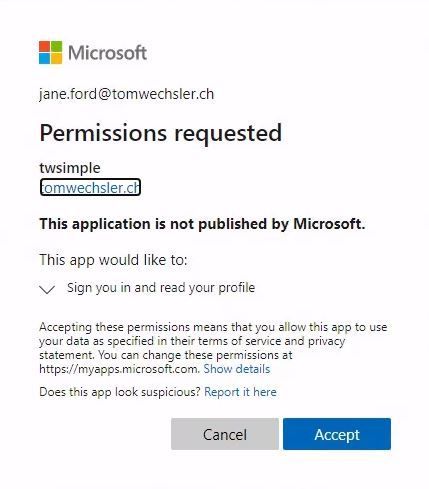
Hi Cloud Friends, Today, developers build apps by integrating user and enterprise data from cloud platforms to enhance and personalize experiences. These cloud platforms are rich in data, but in turn have attracted malicious actors who attempt to gain unauthorized access to that data. One such attack is consent phishing, in which attackers trick users into granting a malicious app access to sensitive data or other resources. Instead of trying to steal the user's password, an attacker asks for permission for an app controlled by the attacker to access valuable data. These apps are often named to mimic legit apps, such as “0365 Access” or “Newsletter App”. Here is one way to counteract these attacks. 1. Restricting users from registering new apps to Azure AD: 2. Preventing the users for giving consents to apps: When you make these settings you need to know that as an administrator you will have to make the apps available to the users. So this means that you as an administrator will have more work. As an administrator for the respective app (enterprise application), you should configure the consent for the necessary permissions on behalf of the user. But really do not flip the "big switch" that all users can give consent of permissions for ALL apps. Enormously important is also the training for the users. In many cases, such apps are not described correctly, or the spelling is wrong. Training your users regularly is another way to counter these attacks. I hope this article was useful. Best regards, Tom Wechsler5.5KViews2likes2Comments
Using Claude Opus 4.6 in Github Copilot
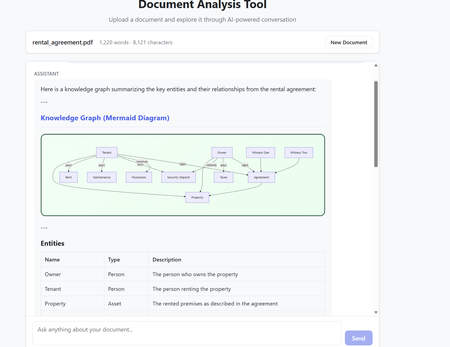
The model selection in Github Copilot got richer with the addition of Claude Opus 4.6. The Model capability along with the addition of agents makes it a powerful combination to build complex code which requires many hours or days. Claude Opus 4.6 is better in coding skills as compared to the previous models. It also plans more carefully, performs more reliably in larger codebases, and has better code review as well as debugging skills to catch its own mistakes. In my current experiment, I used it multiple times to review its own code and while it took time (understandably) to get familiar with the code base. After that initial effort on the evaluation, the suggestions for fixes/improvements were on dot and often even better than a human reviewer (me in this case). Opus 4.6 also can run agentic tasks for longer. Following the release of the model, Anthropic published a paper on using Opus 4.6 to build C Compiler with a team of parallel Claudes. The compiler was built by 16 agents from scratch to get a Rust-based C compiler which was capable of compiling the Linux kernel. This is an interesting paper (shared in resources). Using Claude Opus 4.6 in Agentic Mode In less than an hour, I built a document analyzer to analyse the content, extract insights, build knowledge graphs and summarize elements. The code was built using Claude Opus 4.6 alongwith Claude Agents in Visual Studio Code. The initial prompt built the code and in the next hour after a few more interactions - unit tests were added and the UI worked as expected specifically for rendering the graphs. In the second phase, I converted the capabilities into Agents with tools and skills making the codebase Agentic. All this was done in Visual Studio using Github Copilot. Adding the complexity of Agentic execution was staggered across phases but the coding agent may well have built it right in the first instance with detailed specifications and instructions. The Agent could also fix UI requirements and problems in graph rendering from the snapshot shared in the chat window. That along with the logging was sufficient to quickly get to an application which worked as expected. The final graph rendering used mermaid diagrams in javascript while the backend was in python. Knowledge Graph rendering using mermaid What are Agents? Agents perform complete coding tasks end-to-end. They understand your project, make changes across multiple files, run commands, and adapt based on the results. An agent runs in the local, background, cloud, or third-party mode. An agent takes a high-level task and it breaks the task down into steps. It executes those steps with tools and self-corrects on errors. Multiple agent sessions can run in parallel, each focused on a different task. On creating a new agent session, the previous session remains active and can be accessed between tasks via the agent sessions list. The Chat window in Visual Studio Code allows for changing the model and also the Agent Mode. The Agent mode can be local for Local Agents or run in the background or on Cloud. Additionally, Third Party Agents are also available for coding. In the snapshot below, the Claude Agent (Third Party Agent) is used. In this project Azure GPT 4.1 was used in the code to perform the document analysis but this can be changed to any model of choice. I also used the ‘Ask before edits” mode to track the command runs. Alternatively, the other option was to let the Agent run autonomously. Visual Studio Code - Models and Agent Mode The local Agentic mode was also a good option and I used it a few times specifically as it is not constrained by network connectivity. But when the local compute does not suffice, the cloud mode is the next best option. Background agents are CLI-based agents, such as Copilot CLI running in the background on your local machine. They operate autonomously in the editor and Background agents use Git worktrees to work in an isolated environment from your main workspace to prevent conflicts with your active work. How to get the model? The model is accessible to GitHub Copilot Pro/Pro+, business, and enterprise users. Opus 4.6 operates more reliably in large codebases, offering improved code review and debugging skills. The Fast mode for Claude Opus 4.6, rolled out in research preview, provides a high-speed option with output token delivery speeds up to 2.5 times faster while maintaining comparable capabilities to Opus 4.6. Resources https://www.anthropic.com/news/claude-opus-4-6 https://www.anthropic.com/engineering/building-c-compiler https://github.blog/changelog/2026-02-05-claude-opus-4-6-is-now-generally-available-for-github-copilot https://code.visualstudio.com/docs/copilot/agents/overview5.3KViews1like2Comments
Azure App Service Flask Deployment issues with Error "didn't respond to HTTP pings on port: 8000"
Hello Everyone, I am Deploying the Flask Web app with Immersive Reader and I am trying deploying it by a ZIP file, tried with visual studio code too by the steps mentioned over the link below: https://learn.microsoft.com/en-us/azure/app-service/quickstart-python?tabs=flask%2Cwindows%2Cazure-cli%2Czip-deploy%2Cdeploy-instructions-azportal%2Cterminal-bash%2Cdeploy-instructions-zip-azcli So, I have gone through each step mentioned there and applied it and showing me the below result. I have gone through diagnostic resources. But didn't find any solution for the following error in logs.385Views1like1CommentAZURE KEY VAULT:SECURING YOUR DIGITAL ASSETS
Unveiling the Power of Azure Key Vault with PIN Authentication Intro What is Azure Key Vault ? Azure Key Vault is a cloud service for securely storing and accessing secrets. A secret is anything that you want to tightly control access to, such as API keys, passwords, certificates, or cryptographic keys. Key Vault service supports two types of containers: vaults and managed hardware security module(HSM) pools. Vaults support storing software and HSM-backed keys, secrets, and certificates. Managed HSM pools only support HSM-backed keys. Azure Key Vault enables Microsoft Azure applications and users to store and use several types of secret/key data: keys, secrets, and certificates. Keys, secrets, and certificates are collectively referred to as “objects”. Workshop What better than a little hands on to understand the how to ? For example how are we getting our secrets ? How do we manage Key Vault ? Let’s build our workshop as traditional Azure Enthusiasts and share our experience throughout this post ! We need: Azure Subscription VSCode or any IDE of our choice Patience Our approach is simple yet it grasps the usage and power of Azure Key Vault. We are going to create an Azure Key Vault instance, and store specific key value pairs. These are smart crafted even the name plays its role since we can integrate our SDK in every aspect of the Key Vault objects. The pairs are named after a user PIN number and are stored as a single value. For example we are going to create: secret-1234 , value= user1:p@ssw0rd1 secret-4567, value= user2:p@ssw0rd2 secret-1212, value= user3:p@ssw0rd3 Can you see the dynamics? We have a PIN system where we store PIN numbers so the user won’t have to remember or even know Username & Password ! Impressive right ? Our Web App is simple, yet it is verifying via a form the correct PIN and also allows the specific user to login and proceed ! Let’s see that in action ! Let’s create a Resource Group and an Azure Key Vault instance: # Get Subscription ID and add to variable sub_id= $(az account show --query id) # Create a resource group az group create --name rg-mygroup --location northeurope # Generate a random name for the Key Vault key_vault_name=$(cat /dev/urandom | tr -dc 'a-z0-9' | fold -w 5 | head -n 1) key_vault_name="kv$key_vault_name" # Create Key Vault with RBAC for Authorization az keyvault create --name $key_vault_name --resource-group rg-keypin --location northeurope --sku standard --enabled-for-deployment true --enabled-for-template-deployment true --enabled-for-disk-encryption true --enable-rbac-authorization true # Add the Key Vault Administrator to you az role assignment create --role "Key Vault Administrator" --assignee $(az ad signed-in-user show --query id --output tsv) --scope /subscriptions/$sub_id/resourceGroups/rg-mygroup/providers/Microsoft.KeyVault/vaults/$key_vault_name Adding the Key Vault Administrator role to yourself (or a Role that allows you to edit secrets) enables us to add our secret pairs now, we have already added the secret-1234 for reference: Before we move let’s grab the Vault Uri. Go to overview and see the URI on the right or run: az keyvault show --name $key_vault_name --query properties.vaultUri Our example is using VSCode but if you are comfortable with other IDEs or Visual Studio you can just get the code ! So we start as follows: Edit the files accordingly: from flask import Flask, render_template, request, redirect, url_for, flash from azure.identity import DefaultAzureCredential from azure.keyvault.secrets import SecretClient import os app = Flask(__name__) app.secret_key = 'edF32ert44rfgSAv2' # Change to a strong secret key # Azure Key Vault setup key_vault_name = os.environ["KEY_VAULT_NAME"] kv_uri = f"https://{key_vault_name}.vault.azure.net" credential = DefaultAzureCredential() client = SecretClient(vault_url=kv_uri, credential=credential) @app.route('/', methods=['GET', 'POST']) def index(): if request.method == 'POST': pin = request.form['pin'] secret_name = f"secret-{pin}" try: retrieved_secret = client.get_secret(secret_name) # Assuming the secret value is in 'username:password' format username, password = retrieved_secret.value.split(':') # Redirect to success page or pass username/password to the template return render_template('success.html', username=username, password=password) except Exception as e: # Handle error (e.g., secret not found) flash('Invalid PIN or secret not found.') return redirect(url_for('index')) return render_template('index.html') @app.route('/success') def success(): return render_template('success.html') if __name__ == '__main__': app.run(debug=True) Time to build our Web App. From VSCode or from Azure Portal create a new Web App and a new Service Plan ( S1 is fine) for Python 3.10. Activate the System assigned Managed Identity and add the Key Vault Secrets User role to the Managed Identity. az webapp identity assign -n WEBAPPNAME-g rg-mygroup //Get the principalId from Output az role assignment create --role "Key Vault Secrets User" --assignee PRINCIPALID --scope /subscriptions/$sub_id/resourceGroups/rg-mygroup/providers/Microsoft.KeyVault/vaults/$key_vault_name Remember to add a Configuration Setting for the KEY_VAULT_NAME in the Web App also. From VSCode deploy to Azure Web Apps or run the relevant Az Cli command: az webapp up --name <web_app_name> --sku <app_service_plan_sku> --runtime "PYTHON|<python_version>" Allow some time to build, and browse the Web App. We are presented with the Welcome Page: Now once we enter the correct PIN we are logged in with the matching username and password ! Closing We have seen a small fraction of the amazing features of Azure Key Vault, a pretty cool feature where we are using PIN to Authenticate and Key Vault securely holds all of our Credentials. We can take this much further with more details, and also secure the whole Architecture with VNET Integration and Private Endpoints, as well as Front Door ! Our project stands as a testament to how cloud services like Azure Key Vault can be seamlessly integrated into web applications to implement secure authentication mechanisms. The resulting application is a fine example of combining modern web development practices with the powerful security features offered by Azure, achieving a highly functional and secure user authentication system based solely on PINs. This approach not only simplifies the user experience but also maintains a high standard of security, demonstrating the effectiveness of Azure Key Vault in contemporary web application development.594Views1like0CommentsA look into Socket.IO
There is a new preview feature, Socket.IO, a cloud-based solution for real-time messaging. This feature streamlines the solution by managing the deployment and coordination of Socket.IO instances. Providing my view over this feature here. Socket.IO is an open-source library that provides real-time communication between clients and a server. With this fully managed solution, the responsibility of setting up and hosting Socket.IO instances is with the Azure Web PubSub service. This simplifies the architecture and improves scalability and availability. Socket.IO was introduced in 2010. It’s a JavaScript library that enables real-time bidirectional communication between a server and multiple clients. Socket.IO is compatible with both Node.js on the server-side and various web browsers on the client-side. It’s used in scenarios like chat and messaging applications, collaboration tools, real-time dashboards, and multiplayer games. Socket.IO can be used in below use cases: Real-time Communication: applications requiring instant data updates. Identity Management: limiting the number of active browser tabs. Robotics: control mobile robots. Multi-player Mobile Games: synchronizing players actions in real time. Collaborative Apps: tracking of work items real-time. Code Streaming Apps: stream coding activities to an audience. Socket.IO and SignalR are technologies that support low-latency, event-driven communication for web apps. Using one over the other depends on factors such as technology stack, performance requirements, required features, support, and maintenance requirements. From an Architecture perspective following are some points that can be useful while selecting this service as part of the solution. Socket.IO uses a secure WebSocket connection for data transmission. As deployment of Socket.IO are managed by Azure, the service is highly available and reliable. Risk of downtime is reduced. Due to handling stateful connections by the service the performance of application is improved by reducing messaging latency. Simplifies the architecture of application and reduces the operational overhead as there a less components to manage As its a managed service, infrastructure costs are reduced and by improving performance and reducing latency, costs associated with data transmission is reduced.671Views1like0CommentsIt's time to 🍂 #FallForIntelligentApps 🍂
Today, we kick off the Fall season with content and activities to skill you up on all things Intelligent Apps or AI Apps on Azure with content, events, and community interactions. It is time to combine the power of AI, cloud-native application development, and, cloud-scale data to create highly differentiated digital experiences by building and modernizing intelligent applications with Azure for your users. Check out the blog below for some learning resources: https://techcommunity.microsoft.com/t5/apps-on-azure-blog/it-s-time-to-fallforintelligentapps/ba-p/3931266 What new skills or technologies are you focused on learning this fall?576Views1like0CommentsAzure App Service Limits blog series - performance issue tips/tricks?
Have you checked out the recent series of blogs about Azure App Service Limits? Azure App Service Limit (1) - Remote Storage (Windows) Azure App Service Limit (2) - Temp File Usage (Windows) Azure App Service Limit (3) - Connection Limit (TCP Connection, SNAT and TLS Version) Azure App Service Limit (4) - CPU (Windows) Azure App Service Limit (5) - Memory (Windows) What's your favorite tip or trick for resolving performance issues within Azure App Services?578Views1like0CommentsWith custom security attributes and conditional access, enforce MFA for web apps!
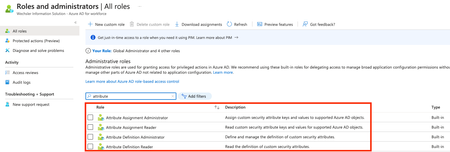
Dear Microsoft Azure Friends, The use of multifactor authentication (MFA) has become indispensable in today's world. With the help of conditional policies (CA), we can set up MFA in a very targeted manner. But what about when a new web app is set up and deployed? Does it now need a new CA every time? In this article I will show you the custom security attributes with an example where exactly this scenario is addressed. But what exactly are custom security attributes? From Microsoft Documenation: "Custom security attributes in Azure Active Directory (Azure AD) are business-specific attributes (key- value pairs) that you can define and assign to Azure AD objects. These attributes can be used to store information, categorize objects, or enforce fine-grained access control over specific Azure resources." What are custom security attributes in Azure AD? (Preview) https://learn.microsoft.com/en-us/azure/active-directory/fundamentals/custom-security-attributes-overview However, before you can work with or create custom security attributes, you need the necessary permissions. You can find all the necessary information in the above mentioned article. At this point it is worth mentioning that not even a "Global Admin" by default has the right to create the attributes. The ingenious thing is that the roles are divided. One person can create the attributes, another person does the assignment. Now we navigate to Azure Active Directory to the custom security attributes. Here you can create an attribute set and specify the key values. Then, in Enterprise Applications, find your app and assign the custom security attributes. Now we can create the conditional access policy. After you have selected the name, you can now select for whom the policy should apply. I have used a group named "Bitcoin" for this example. This group includes the Tina Muff. Now comes the exciting part. In "Cloud apps or actions", we do not select a specific app in "include" but use the filter function. This function is on the preview and first you need to set the switch to configured. After that you can select your custom security attributes. At this point, use exactly the same key value pair that you selected for your enterprise app. Next, you can define how the access should take place at "Access controls". I have selected that access is allowed but only with multifactor authentication. Now when Tina Muff calls the WebApp, she will be prompted to apply MFA (this account is a test account, so the MFA setup has not been done). Sorry it's in german ;-). So what's the point of all this effort? If you now continue to set up and provide WebApps in the future. You simply have to assign your custom security attributes to the WebApp again with the corresponding key value pair, and you already have to work with MFA when you call the app because the CA is already present. I realize that this was not necessarily spectacular. It was simply important for me to share my experience with you. Nevertheless, I hope that this article was helpful. Thank you for taking the time to read the article. Best regards, Tom Wechsler P.S. All scripts (#PowerShell, Azure CLI, #Terraform, #ARM) that I use can be found on github! https://github.com/tomwechsler7.9KViews1like0Comments