web apps
461 TopicsIntroducing a Guided Copilot Experience for Building Azure Apps in VS Code
Today we're previewing a new way to build cloud apps with GitHub Copilot in VS Code: a guided Copilot experience that takes you from idea to a deployed Azure app through a structured, predictable workflow instead of a free-form chat session that may or may not land where you need it to. The problem: Copilot is powerful, but unpredictable Ask Copilot to "build me a Node.js API on Azure Functions with a Postgres database" today, and you might get a working project, or you might not. Sometimes Copilot scaffolds the app but skips infrastructure. Sometimes it generates a deployment script that fails halfway through. Sometimes it forgets what you were building three prompts later. The underlying model is capable. The problem is the shape of the experience: an open-ended chat with no checkpoints, no guardrails, and no consistent path from "I have an idea" to "it's running in Azure." How it works The guided Copilot experience adds to that open-ended flow with three clear, explicit stages: 1. Project scaffolding: Describe your app in plain language. Copilot proposes an architecture and asks for anything that is missing (e.g., language, app type, Azure services) through simple forms and pickers, not more back-and-forth chat. You review and approve the plan before any code is written. 2. Local development: Your project is scaffolded then Copilot checks for the runtimes, emulators, and tools you'll need and helps you install what's missing, so the project runs locally from the very first launch. Debug configurations are wired up automatically, so you can test and iterate on your app before it ever touches Azure. 3. Deployment: Copilot shows the tools that will be used for deployment along with a summary of all resources that will be created and a cost estimate so you can be confident in what you're getting. Infrastructure files are created for your app to ensure a consistent and reproducible deployment environment for testing and staging before going to production. Deployment runs through the same reliable tooling used across Azure (az and azd), so if something goes wrong, you get a clear explanation and a concrete next step instead of a wall of CLI output. Once your app is live, the guided experience doesn't disappear, Copilot retains context about your project's architecture, so coming back later to add a service or make a change picks up right where you left off. 🎉 What this means for how you work Determinism over guesswork. The same input reliably produces the same kind of outcome, so no more wondering which "mode" Copilot is going to be in. First try success. Projects are built to run and deploy on the first attempt, not after several rounds of manual repair. Structure over chat walls. Decisions that matter such as architecture choices, missing configuration, and deployment targets are surfaced through real UI, so you're not parsing paragraphs of text to figure out what Copilot needs from you. Stay in VS Code. The entire journey, from planning through deployment, happens without leaving your editor. What's in the initial preview The first version focuses on JavaScript and TypeScript projects, including web apps, Azure Functions, Container Apps, and Static Web Apps, with support for PostgreSQL, Azure Storage, Azure Key Vault, and Azure OpenAI. .NET and Python support are on the roadmap for a future release. Nothing about your existing Copilot workflows changes, the guided experience is an additional, opinionated path alongside the free form chat you already know, for when you want a reliable, structured way to go from zero to deployed. What's next This is an early look at a broader shift in how we think about AI-assisted development on Azure: less "ask and hope," more structured collaboration with clear checkpoints and real UI where it counts. We're continuing to expand language support, refine the deployment experience, and incorporate feedback from developers using it in the wild. Install the Azure Tools extension pack and open an empty folder to try the guided Copilot experience and let us know what you think. File issues or share feedback on the GitHub repo.1.4KViews2likes1CommentIntroducing Azure Container Apps Sandboxes: Secure Infrastructure for Agentic Workloads
Today we are announcing the public preview of Azure Container Apps Sandboxes - a new first-class resource type that gives you fast, secure, ephemeral compute environments with built-in suspend and resume. This is the underlying infrastructure on which products like Cloud sandboxes in GitHub Copilot, Foundry Hosted Agents, and Azure Container Apps Express are built, you now have the opportunity to build your solutions leveraging this infrastructure. Azure Container Apps Sandboxes unlocks two massive opportunities. For platform developers and ISVs, sandboxes give you the same isolated compute fabric that powers many Microsoft products. You get the building blocks to create your own multi-tenant platform on proven, enterprise-scale infrastructure. For AI agents, sandboxes become a self-configurable tool that lets agents extend their own capabilities on the fly. An agent can spin up a fresh sandbox in milliseconds and use it to execute untrusted code, compile source, test HTTP requests against a live app, launch a browser session, or tackle whatever needs a quick and scalable infrastructure. On one side it empowers humans to build platforms, on the other it empowers agents to build their own capabilities. Both get enterprise-grade isolation, instant startup, and snapshot-based persistence out of the box. We'll walk through the resource model, sandbox lifecycle, the features that set Sandboxes apart - like snapshots, lifecycle policies, network egress controls, volumes, and managed identities - and show you how to get started with the portal and CLI. What Are Container Apps Sandboxes? Container Apps Sandboxes are secure, isolated compute environments that start in sub-second time, scale to thousands, and cost nothing when idle. Each sandbox runs in its own hardware-isolated microVM boundary - fully separated from the host, the platform, and every other sandbox. You bring your own Open Container Initiative (OCI) image, and Sandboxes handle the rest: provisioning from prewarmed pools, strong multi-tenant isolation, and snapshot-based suspend/resume that preserves full memory and disk state across sessions. There are many ways Sandboxes can help you build your next project - here are a few: Your own build & test systems - wire a Sandbox into your CI/CD flow to run builds while your laptop stays cool. Agents that can run anything safely - an agent spawns a sandbox, executes work inside it, and returns the output with no agent host privileges required. Agent swarms - decompose a research question, spawn N sandbox workers in parallel (each pinned to its own image and egress policy), and synthesize the result. Early access customers are already unlocking significant benefits by leveraging Azure Container Apps Sandboxes. "With Azure Container Apps sandboxes, SitecoreAI can safely enable agents to take real action. The combination of multi-tenant isolation, rapid scale-out, and full automation allows Sitecore to run long-lived, autonomous agents that securely execute code, manage workflows, and interact with enterprise systems within secure, governed environments. With this foundation, we can build agents that do real work: assembling content, personalizing experiences, and optimizing campaigns in production. Agents that operate continuously, learn from results, and improve over time, so our customers get better outcomes without giving up control." - Mo Cherif, VP of AI and Innovation, Sitecore "We got early access to Azure Container Apps Sandboxes, and got the first prototype integrated with Atlas AI in hours, and it's already shaping a new Atlas AI capability that we plan to launch in preview in Q3. It gives every Atlas AI agent a safe, sandboxed workspace (file system, terminal, code execution) on a customer's live data in Cognite Data Fusion. The value: Industrial process, reliability, and production engineers spend days and weeks on questions like "which wells are underperforming and why?" These questions are tractable but expensive, so they are asked rarely and decisions are made on gut feel. With this, an agent pulls the data, runs the analysis, cross-references maintenance and inspection records, and returns a cited draft in minutes. Sandboxes make it practical: Aligned feature set, per-customer isolation, pause/resume across multi-day investigations, scale-to-zero economics." - Kelvin Sundli, Product manager, Atlas AI, Cognite Resource Model: Sandbox Groups and Sandboxes The top-level ARM resource is Microsoft.App/SandboxGroups. A Sandbox Group is the management boundary for a collection of sandboxes that share configuration - think of it like a Container Apps Environment, but purpose-built for sandboxes. When you create a Sandbox Group, you specify: Subscription, Resource Group, and Region Sandbox defaults (optional): default CPU, memory, disk, max sandbox count, and default idle timeout Networking: optionally deploy into a custom VNet with a dedicated subnet for private networking Identity: System or user assigned Entra identity. Individual sandboxes are created within a Sandbox Group. Each sandbox has its own source (disk image or snapshot), resource tier, lifecycle policy, network egress policy, environment variables, ports, volumes, and connections. Sandbox Lifecycle Sandboxes have a well-defined lifecycle with the following states: State Description Creating Provisioning the sandbox from a disk image or snapshot Running Actively executing - backed by a live microVM Idle System-suspended after inactivity; can auto-resume on the next request Suspended Full state (memory + disk) preserved as a snapshot; no compute costs Resuming Restoring from a suspended or idle state - sub-second for most workloads Stopped User-initiated stop; can be resumed Stopping Graceful shutdown in progress Deleting Teardown in progress The key insight here is the distinction between Idle and Suspended. When a sandbox goes idle (e.g., no traffic for a configured timeout), the system can automatically suspend it and capture a snapshot. When a new request arrives, the sandbox resumes transparently. This gives you scale-to-zero economics with stateful compute - something that wasn't possible before without significant custom engineering. Disk Images: Bring Your Own Container Sandboxes boot from Disk Images - Open Container Initiative (OCI) images converted into an optimized root filesystem format. You point to any OCI image (public or private registry), and the platform builds a bootable disk image from it. You can start with public, pre-built images maintained by the platform (for example, Ubuntu base images), or bring your own private images. For private registries, you can authenticate with username/token or use a user-assigned managed identity for Azure Container Registry (ACR) – integrated with Azure as you expect. Snapshots: Full-State Persistence Snapshots capture the complete state of a running sandbox - memory, disk, and all running processes. When you resume a sandbox from a snapshot, every process, open file handle, and in-memory data structure is restored exactly as it was. A snapshot captures the full state of a running sandbox: memory pages, disk, processes. Two ways to make one - automatically on suspend, or manually on demand. Three things they're great for: Checkpointing mid-task so a long-running agent can resume exactly where it left off Cloning an environment that's already warm - dependencies installed, caches populated, services running Shipping a "ready-to-go" state that resumes in sub-second instead of cold-booting Snapshots are free during the preview, after which they will be stored as Azure Blob Storage at standard rates. Each snapshot records the source sandbox, resource allocation (CPU, memory, disk), and container metadata - so what you get back is exactly what you snapshotted. Resource Tiers Every sandbox is assigned to a resource tier that determines its CPU, memory, and disk allocation: Tier CPU Memory Disk XS 0.25 vCPU 0.5 GiB 5 GiB S 0.5 vCPU 1 GiB 10 GiB M (default) 1vCPU 2 GiB 20 GiB L 2 vCPU 4 GiB 40 GiB XL 4 vCPU 8 GiB 80 GiB When creating a sandbox from a snapshot, the resource tier is inherited from the snapshot and cannot be changed - this ensures the restored environment has the exact resources it was running with when the snapshot was taken. Lifecycle Policies: Auto-Suspend and Auto-Delete Every sandbox can be configured with lifecycle policies that automate state transitions and cleanup: Auto-Suspend Idle timeout: How long a sandbox can sit idle before being suspended (configurable: 1m, 2m, 5m, 10m, 30m, 60m) Suspend mode: Disk + Memory (default): Full snapshot including memory state - resume picks up exactly where you left off, with all processes and in-memory data intact. Disk: Only the disk is preserved; the VM restarts fresh on resume. Useful when you only need file persistence, not process continuity. Auto-Delete Automatically delete sandboxes after a configurable number of days of inactivity Prevents accumulation of abandoned sandboxes that consume snapshot storage These lifecycle policies are what make Sandboxes economically viable at scale. A platform serving thousands of tenants can configure aggressive idle timeouts (say, 60 seconds) with Memory suspend mode, and each tenant's sandbox disappears from the billing meter almost immediately - but resumes in sub-second time the moment they return. Network Egress Policy For scenarios involving untrusted code - AI agents executing LLM-generated scripts, multi-tenant SaaS with user-submitted workloads - controlling outbound network access is critical. Sandboxes provide a per-sandbox Network Egress Policy: Default action: Allow or Deny all outbound traffic Host rules: Domain-pattern rules (e.g., *.github.com → Allow) to permit specific destinations Custom CIDR rules: Network-level rules for IP ranges (e.g., 10.0.0.0/8 → Deny) Skip egress proxy: Option to bypass the egress proxy entirely when custom VNet routing handles policy enforcement This means you can run a sandbox in a deny-by-default posture and allowlist only the specific endpoints it needs (your API server, a package registry, etc.) - without setting up NSGs or firewall appliances. Managed Volumes: Persistent and Shared Storage Sandboxes support two types of mountable volumes, both managed by Microsoft: Volume Type Backed By Best For Managed Azure Blob Azure Blob Storage Shared data across sandboxes, file uploads/downloads, persistent artifacts Managed Data Disk Azure Disk Storage High-performance storage for databases, build caches, large working sets - only available to one sandbox at a time Blob volumes come with a built-in file explorer in the portal - you can browse, upload, download, create folders, and drag-and-drop files directly. Data Disk volumes provide dedicated block storage with configurable sizes. Secrets and Identity Secrets Sandbox Groups support key-value secrets scoped to the group. Secrets can be created, edited, and referenced by sandboxes within the group. These secrets can be used in egress policies to modify requests with transform or header-injection rules, without exposing the secrets to code running inside the sandbox. Managed Identity Sandbox Groups support both system-assigned and user-assigned managed identities, with full RBAC role assignment management. This means your sandboxes can authenticate to Azure services (Key Vault, Storage, Cosmos DB, etc.) without managing credentials - the same identity model you use everywhere else in Azure. MCP Connectors and Triggers ACA Sandboxes now supports managed connectors through the Model Context Protocol (MCP), giving sandboxes access to external APIs - including Microsoft 365, Salesforce, ServiceNow, GitHub, and 1,400+ other systems - without managing credentials directly. Attach a Connector Gateway to your sandbox group, and every sandbox in the group can call external APIs through a standardized MCP interface at runtime. Pair connectors with triggers to build event-driven automation: route an Outlook email to a sandbox that triages it with an AI agent, or react to a SharePoint file upload by extracting and processing the document all without writing glue code. Triggers can fire a shell command inside a sandbox or invoke an HTTP endpoint the sandbox exposes, so your automation shapes fit naturally around your workload. The integration is built on the new Connector Namespace service (az connector-namespace), the same runtime behind Logic Apps and Power Platform connectors, now available as a programmable layer for sandboxes. See the end-to-end samples for runnable azd up-deployable examples covering email triage and document automation scenarios. The Portal Experience Azure Container Apps Sandboxes are only available in the new Azure Container Apps portal that provides a rich, IDE-like experience for working with sandboxes. Creating a Sandbox The portal offers multiple creation paths: Standard Sandbox - full configuration control over source, resources, lifecycle, networking, and volumes GitHub Copilot Sandbox - preset, Copilot CLI ready to go, GitHub credentials can be wired through the Access Token before the sandbox is created Claude Sandbox - Claude CLI pre-installed, ready for agentic coding inside the sandbox Using Coding Agents (Copilot CLI / Claude Code) If you live inside Copilot CLI or Claude Code, you don't need to learn a new CLI. Install the azure-sandbox skill once and your agent picks up the right skills: # GitHub Copilot CLI # Add as a plugin marketplace /plugin marketplace add microsoft/azure-container-apps # Install all skills /plugin install sandboxes@Azure-Container-Apps # Claude Code claude plugin add microsoft/azure-container-apps The skill runs prerequisite checks silently (az --version, az account show, node --version, aca --version), prompts only if something's missing, and maps natural-language asks to the right aca commands. Bundled runbooks cover Copilot CLI BYOK (bring your own Azure OpenAI key), the deploy-a-web-app walkthrough, and shell setup. Sandbox Detail Page Once your sandbox is running, the detail page gives you immediate access to the sandbox terminal and additional details, such as - Network Audit - real-time egress traffic log showing allowed and denied requests Monitor - live CPU, memory, disk, and network utilization charts Connectors - attached connections with an "Add" action Volumes - mounted volumes with an "Add" action Log Stream - streaming container logs Processes - running process list inside the sandbox Files - file explorer to browse the sandbox filesystem The toolbar actions let you manage the state of the sandbox - Resume or Stop. In the Ellipsis menu (⁝) you can find additional settings to manage network Egress Policy and ingress (Add port), take a Snapshot of the sandbox, Commit (save disk state as a new disk image), set Lifecycle Policy or permanently Delete the sandbox. Finally, you can see additional Details in a side panel. Getting Started with the CLI and Python SDK All sandbox and sandbox-group operations go through the aca CLI. There are no az containerapp sandbox commands, - az is only used for az login, az account show, and resource-group management. Install (CLI) # Mac, Linux curl -fsSL https://aka.ms/aca-cli-install | sh # Windows irm https://aka.ms/aca-cli-install-ps | iex Run aca --help to get started. Install (Python SDK) pip install azure-containerapps-sandbox For more details, quick start and examples on ACA CLI and Python SDK, please go to https://sandboxes.azure.com Evolution from Dynamic Sessions If you've used Azure Container Apps Dynamic Sessions, Sandboxes are the next evolution of that capability. Everything Sessions can do, Sandboxes can do - and significantly more: Capability Dynamic Sessions Sandboxes Sub-second startup ✓ ✓ Strong isolation ✓ ✓ Custom container images ✓ ✓ Custom VNet integration ✓ (Partial) ✓ Suspend/resume with Memory and Disk snapshots - ✓ Lifecycle policies (auto-suspend, auto-delete) - ✓ Network egress policy (per-sandbox) - ✓ Persistent managed volumes (Blob, Data Disk) - ✓ Managed identity (system + user-assigned) - ✓ Secrets management - ✓ Configurable resource tiers - ✓ Direct access to sandbox in Portal experience - ✓ We will continue to support Dynamic Sessions, but all new investment goes into Sandboxes. If you're building new workloads on isolated ephemeral compute, start with Sandboxes. How It All Fits Together ACA Sandboxes is a platform primitive. It's the foundation on which multiple Microsoft products are already built - including ACA Express, Cloud sandboxes in GitHub Copilot, and Foundry Hosted Agents. When you build on Sandboxes, you're building on the same infrastructure that powers Microsoft's own portfolio. This is the evolution of what we shared with Project Legion in 2024. Legion described the internal infrastructure; Sandboxes exposes it as a customer-facing primitive that you can use directly. What's Next • Deeper Azure integrations - first-class connectivity with Azure networking, identity, storage, and AI services • Enhanced SDK and CLI - richer programmatic experiences for managing sandboxes at scale • More Microsoft services built on Sandboxes - this is just the beginning Get Started Today • Portal: https://sandboxes.azure.com/ • Documentation: Azure Container Apps Sandboxes • Pricing: Azure Container Apps Pricing (per-second vCPU/memory billing, scale-to-zero, snapshots at Blob Storage rates) We'd love to hear your feedback. You can ask questions, or file issues on the Azure Container Apps GitHub (prefix with [Sandbox] for Sandboxes-specific issues).9.4KViews3likes1CommentBring Azure SRE Agent into your developer workflow with the new canvas
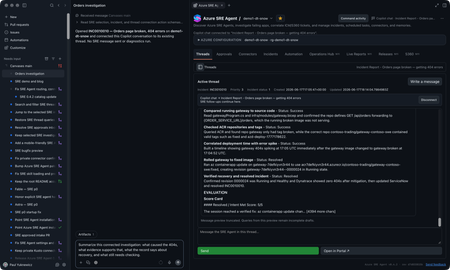
You’re on call. A customer-reported incident lands, Azure SRE Agent picks it up from your incident management system, investigates, and gives you a starting diagnosis. If you’re like me, you want to check that diagnosis yourself, and you want to do it where you already work: in GitHub Copilot, with your code, your tools, and your own access to the data. The new Azure SRE Agent canvas puts the investigation right next to your Copilot chat. A canvas is an interactive panel beside the conversation, with context and actions you and Copilot can both use. You get SRE Agent’s findings plus everything SRE doesn’t have: your code, your private data sources, and what you know about the app. In the GitHub Copilot App, sessions are on the left, Copilot chat is in the middle, and the SRE canvas is on the right. You can use the same canvas in Copilot CLI sessions that support canvases. I now have SRE's findings alongside my own context in Copilot chat. I can keep digging here and decide what to send back to SRE, and when. Let me show you the inner loop with an incident from September 22. It’s a Contoso demo, but it’s modeled on a real one we hit in production. Gateway health looked available while orders and payments failed. I'll use SRE's diagnosis as a starting point, check the historical telemetry with my own authorized access, and work out what the evidence does and doesn't establish. I’ll share findings with the team, and anything worth keeping goes back to SRE Agent. Start with the incident With the plugin enabled, I prompt Copilot to open Azure SRE Agent and choose my saved demo1-dt-snow favorite. I can also discover agents in a subscription I choose or connect through a caller-authorized external URL. For this investigation, I open INC0922001, "Trading order and payment requests failing while gateway health remains available," and choose Connect this thread. Selecting a row lets me browse; connecting makes it the investigation for this conversation. The September incident as recorded in SRE Agent. Then I ask: Summarize this connected September 22 investigation. Separate the reported diagnosis from observed evidence. Give the incident time window, and list what still needs independent verification. The SRE record reports a stopped PostgreSQL database. It says the gateway passed its health check, but Orders and payments requests failed after about 15 seconds. That's useful context, but a passing health check doesn't mean orders and payments are working. I want to check the logs for myself. SRE’s diagnosis and suggested recovery. Suggested isn’t the same as confirmed, which is where I start digging. Get the historical window right The first query assumption I check is the date. This incident needs September 22, 17:30 to 19:45 UTC, not the last 24 hours. I use the Log Analytics workspace behind the demo and ask: Reconstruct the failure check for this historical window. Show the complete query and target before running it. Then break down the request routes and status codes. The reconstructed query and its saved result give me something concrete to inspect. This is my own reconstruction, not a replay of SRE’s query, so the counts differ a little from SRE’s snapshot. The query runbook includes the complete KQL, working Log Analytics API route, and scope for review. The result contains 120 gateway Orders 500 records, 115 gateway payments 502 records, corresponding backend failures, and 119 database connection timeouts. These are telemetry records, not distinct customer requests: the gateway and backend can record the same call. Exporter authentication errors and later route 404s are separate signatures, not more examples of the same database failure. Inspect the requests, dependencies, and exceptions Grouped counts tell me where to look. To understand the failure, I want to look at some of the actual log entries from that time window, not just the totals: Show the Orders requests, downstream dependencies, and database timeouts for this window. Where operation IDs are populated, follow the same operation. Tell me what is correlated and what is only nearby in time. The saved exception signature says the connection to the database endpoint timed out. That supports a connectivity problem; it doesn't independently prove the database was stopped. To connect a particular exception to a particular request, I need matching trace identifiers, not just nearby timestamps. The raw-record and correlation queries are the next checks, with their own execution approval. Widen my check beyond Orders An Orders-focused query is a useful starting point, not an impact assessment. I ask: Keep the same source and time window, but remove the Orders operation and dependency-target restrictions. What else has 5xx failures or the same database-connectivity signature? Keep unrelated errors separate. The saved broader result already includes payments, which SRE also identified. My goal is to verify that scope independently and see whether the wider query adds anything. I won't turn two affected paths into an all-services outage. This data also has blank application-role names, so I use the recorded operations and dependency targets rather than invent an application-name filter. Test the competing explanation A gateway deployment or connection setting could also cause trouble. I want to compare that explanation with the database diagnosis: Preview the historical deployment and configuration records needed for this window, plus independent database state or availability evidence. Do not use today's settings or health as proof of September 22. If the records aren't available, leave the check open. The first SRE record reports the database as stopped, but its Activity Log check found no stop event and may not have covered the right scope. Independent incident-window records would help distinguish stopped state from configuration or network problems. Current settings can't establish historical state, and missing or expired change history can't rule out a deployment. For now, the logs support connectivity trouble. Historical database state and the competing configuration explanation still need checking. The first record also doesn't confirm completed recovery; a later recurrence doesn’t tell us what happened on September 22.. Bring in evidence SRE may not have, or go where it cannot The logs got me to a connectivity problem. The next question is capacity: was something starved? That evidence lives in a Kusto cluster SRE Agent can’t reach, but I can. Private Connectors let me use my own authorized access from inside the same investigation. Copilot-private connections are separate from the SRE Agent connectors. Teams is ready for the update. For a performance or capacity question, I can choose an authorized connection, review the source and complete query, and approve its time range and filters before execution. Then I can compare the relevant measurements and units. This is an extension of the investigation. Granting capacity is a separate action with its own approval. I can do it from here, but it’s my call, not the agent’s. The connection stays private to Copilot. Connecting an SRE investigation doesn't give the agent my datasource permissions. If I want SRE to use a finding, I separately preview and approve the evidence to share. For checks I run locally, I use my identity and network access; a cloud-backed connector uses its provider's network path. Review the updated team message The team update should carry the refined root-cause analysis, including its limits: SRE's reported diagnosis, the independently observed failures, the scope, and the checks still open. Next prompt: Draft a September 22 update to send to the team in Teams. Include the reported diagnosis, observed Orders and payments failures, connectivity evidence, competing explanations, and remaining checks. Include the investigation link. Show me the exact message and destination before sending. That gives the team a useful starting point for the next check, with a link back to the investigation. Continue in the terminal I can carry the same investigation into a canvas-capable Copilot CLI session. I connect INC0922001 explicitly in that conversation; the App's connection doesn't carry over. Connect to INC0922001 from September 22. Give me a TL;DR that separates the reported diagnosis, independently checked evidence, and remaining questions. The terminal is another place where I like to work, and I still want to follow the same evidence and use my own context and tools. The SRE canvas provides tools to Copilot CLI too. The IDE and terminal guide covers a separate connection through the Azure MCP Server. So who stopped the database? We did, for the demo. The real production incident that inspired this was resource exhaustion, which is less satisfying, because every engineer wants it to be the database. It’s better when you can prove it. Try the canvas for your next investigation The useful loop isn't just reading an incident summary from an agent. It's taking SRE's starting diagnosis into Copilot, inspecting the evidence, testing alternatives, and bringing in authorized data from my own tools. Sometimes that confirms SRE Agent got it right. Sometimes it doesn’t. Either way, what I learn goes back into the agent’s memory so the next incident starts smarter. In this one, I learned we’re not resilient enough to this kind of failure yet, and we have hardening work to do. Install from Customize > Plugins > Awesome Copilot > Azure SRE Agent, start a new session, and ask: Open Azure SRE Agent canvas. Watch the demo video, bring an existing investigation, and tell us what you think. The canvas guide has setup details. Also see the October SRE Agent update and explore the other Azure canvases.1.2KViews1like2CommentsAnnouncing the Public Preview of the New App Service Quota Self-Service Experience
Update 10/30/2025: The App Service Quota Self-Service experience is back online after a short period where we were incorporating your feedback and making needed updates. As this is public preview, availability and features are subject to change as we receive and incorporate feedback. What’s New? The updated experience introduces a dedicated App Service Quota blade in the Azure portal, offering a streamlined and intuitive interface to: View current usage and limits across the various SKUs Set custom quotas tailored to your App Service plan needs This new experience empowers developers and IT admins to proactively manage resources, avoid service disruptions, and optimize performance. Quick Reference - Start here! Leverage the new self-service experience to increase your quota automatically. If your deployment requires quota for ten or more subscriptions, then file a support ticket with problem type Quota following the instructions at the bottom of this post. If any subscription included in your request requires zone redundancy (note that most Isolated v2 deployments require ZR), then file a support ticket with problem type Quota following the instructions at the bottom of this post. Self-service Quota Requests For non-zone-redundant needs, quota alone is sufficient to enable App Service deployment or scale-out. Follow the provided steps to place your request. 1. Navigate to the Quotas resource provider in the Azure portal 2. Select App Service (Public Preview) Navigating the primary interface: Each App Service VM size is represented as a separate SKU. If the intention is to be able to scale up or down within a specific offering (e.g., Premium v3), then equivalent number of VMs need to be requested for each applicable size of that offering (e.g., request 5 instances for both P1v3 and P3v3). As with other quotas, you can filter by region, subscription, provider, or usage. Note that your portal will now show "App Service (Public Preview)" for the Provider name. You can also group the results by usage, quota (App Service VM type), or location (region). Current usage is represented as App Service VMs. This allows you to quickly identify which SKUs are nearing their quota limits. Adjustments can be made inline: no need to visit another page. This is covered in detail in the next section. Total Regional VMs: There is a SKU in each region called Total Regional VMs. This SKU summarizes your usage and available quota across all individual SKUs in that region. There are three key points about using Total Regional VMs. You should never request Total Regional VMs quota directly - it will automatically increase in response to your request for individual SKU quota. If you are unable to deploy a given SKU, then you must request more quota for that SKU to unblock deployment. For your deployment to succeed, you must have sufficient quota in the individual SKU as well as Total Regional VMs. If either usage is at its respective limit, then you will be unable to deploy and must request more of that individual SKU's quota to proceed. In some regions, Total Regional VMs appears as "0 of 0" usage and limit and no individual SKU quotas are shown. This is an indication that you should not interact with the portal to resolve any quota-related issues in this region. Instead, you should try the deployment and observe any error messages that arise. If any error messages indicate more quota is needed, then this must be requested by filing a support ticket with problem type Quota following the instructions at the bottom of this post so that App Service can identify and fix any potential quota issues. In most cases, this will not be necessary, and your deployment will work without requesting quota wherever "0 of 0" is shown for Total Regional VMs and no individual SKU quotas are visible. See the example below: 3. Request quota adjustments Clicking the pen icon opens a flyout window to capture the quota request: The quota type (App Service SKU) is already populated, along with current usage. Note that your request is not incremental: you must specify the new limit that you wish to see reflected in the portal. For example, to request two additional instances of P1v2 VMs, you would file the request like this: Click submit to send the request for automatic processing. How quota approvals work: Immediately upon submitting a quota request, you will see a processing dialog like the one shown: If the quota request can be automatically fulfilled, then no support request is needed. You should receive this confirmation within a few minutes of submission: If the request cannot be automatically fulfilled, then you will be given the option to file a support request with the same information. In the example below, the requested new limit exceeds what can be automatically granted for the region: 4. If applicable, create support ticket If automatic quota fulfillment fails, and it recommend you Create a support request, then follow the steps given in the at the end of this post. Known issues The self-service quota request experience for App Service is in public preview. Here are some caveats worth mentioning while the team finalizes the release for general availability: Closing the quota request flyout window will stop meaningful notifications for that request. You can still view the outcome of your quota requests by checking actual quota, but if you want to rely on notifications for alerts, then we recommend leaving the quota request window open for the few minutes that it is processing. Some SKUs are not yet represented in the quota dashboard. These will be added later in the public preview. The Activity Log does not currently provide a meaningful summary of previous quota requests and their outcomes. This will also be addressed during the public preview. As noted in the walkthrough, the new experience does not enable zone-redundant deployments. Quota is an inherently regional construct, and zone-redundant enablement requires a separate step that can only be taken in response to a support ticket being filed. Quota API documentation is being drafted to enable bulk non-zone redundant quota requests without requiring you to file a support ticket. Create a support request Important: Most App Service quota requests can be completed through the self-service experience without creating a support request. If you're prompted to create one, select Severity B or Severity C. Requests submitted at these severity levels will enter the automated quota-processing workflow. Severity A requests are not currently eligible for this automation, and selecting a higher severity does not typically expedite a quota increase request. While we are continuously improving the system to automatically process quota requests, there are certain scenarios you might need to create a support request: Automatic fulfillment request failed on quota blade. Deployment requires zone-redundancy You want to make bulk request for ten or more subscriptions When creating a support request, select your Issue type as “Service and subscription limits (quotas)” and Quota type as “Function or Web App (Windows and Linux)”. Select Next. You can then fill in your quota requirements by clicking on “Enter details”. There are 4 mandatory fields you must provide in your request: Region – Quota limits are based on region. If you are facing quota limits in one region, you can always try deployment in a geographically paired region. For example, West US 2 and West Central US are paired regions. East Asia (Hong Kong) and Southeast Asia (Singapore) are also paired regions. See Azure cross-region replication pairings for all geographies for more information. Deployment type – This is another important criterion when submitting quota request. If you are not sure which deployment type your App Service Plan is using, you can check it here on the portal: App >> App Service Plan >> Zone redundant >> Enabled\Disabled. App Service plan – Each SKU in your subscription and the region selected above, will have its own limit. Choose the SKU based on your deployment requirement. You will be able to see the current usage and the limit on that SKU. New limit – You must submit the new limit that you want for the SKU selected above. Do not add the increment value. The new limit must be higher than the existing limit. If you choose to create a support ticket, then you will interact with the capacity management team for that region. This is a 24x7 service, so requests may be created at any time. Once you have filed the support request, you can track its status via the Help + support dashboard. Note for Logic Apps You can now self-serve your Logic App quota requirements using the same App Services quotas blade. You must choose one of the Logic App SKUs (WS1, WS2, WS3) when making the request, and it will be processed in the same way App Services requests are processed. We want your feedback! If you notice any aspect of the experience that does not work as expected, or you have feedback on how to make it better, please use the comments below to share your thoughts!23KViews4likes36Comments
Azure SignalR vs Web PubSub for a real-time live score website – which one fits better?
Hi everyone, I'm building a live football score website from scratch as a personal project, mostly using AI-assisted coding. The core requirement is pushing score updates, match events (goals, cards, substitutions) and minute changes to visitors in real time without them refreshing the page. I'm considering Azure for the real-time layer and I'm trying to decide between Azure SignalR Service and Azure Web PubSub. Traffic will be uneven: quiet most of the week, then spikes of concurrent users during big matches. A few questions: 1. Which service handles sudden traffic spikes more cost-effectively? 2. Is Web PubSub simpler if my backend isn't ASP.NET? 3. Would polling an external score API every few seconds and broadcasting changes be a reasonable architecture, or is there a better pattern? Any experience or advice would be appreciated. Thanks!89Views0likes1CommentRun an Ollaya decision model on Azure Container Apps
Many AI calls are not really conversations. A support message needs an intent. A workflow needs a route. A policy check needs a yes or no. An agent needs to select its next action from a known list. These are bounded decisions, but they are often sent to a general-purpose LLM. The LLM reads the request, generates an answer token by token, and then the application validates and parses the response. That is useful when the task needs reasoning or language generation. It is more machinery than necessary when the only valid answer is one of 60 labels. On September 15, 2026, TypeSafe released Jev, its first public System One Model, in early access. Jev has helped bring attention to models built specifically for decisions: structured state goes in, and typed choices with probabilities come out. Ollaya approaches the same problem from a self-hosted direction. It is a model runtime that can serve open decision models, including the winnow:e4b model used here. Jev and Ollaya are not connected products. Jev is a hosted model from TypeSafe; Ollaya provides a way to run decision models in infrastructure you control. They are related by the kind of work they target. What decision models are good at A decision model scores predefined options rather than generating open-ended text: Decision model Traditional LLM Selects from allowed choices Generates text Returns a probability for each decision Usually returns one generated answer Has a bounded, typed output Needs schema constraints and validation Supports confidence thresholds Often needs a separate confidence strategy Fits classification, routing, scoring, policy, and prioritization Fits generation, summarization, coding, and open-ended reasoning That narrower interface creates several practical benefits: Predictable outputs: the application receives an allowed value rather than text that must be repaired or parsed. Lower decision latency: there is no autoregressive output sequence to generate. Token savings: a decision can be returned without generating output tokens. Useful uncertainty: calibrated probabilities let the application act, reject, or escalate. Smaller infrastructure: a specialized model can fit on hardware that would be modest for a general LLM. Decision models are not replacements for every LLM call. They make sense when the possible outcomes are known before the request arrives. An LLM remains the better tool when the output itself is language, code, or open-ended reasoning. Why Azure Container Apps serverless GPU Azure Container Apps serverless GPUs make self-hosted inference feel much closer to consuming a managed API. You bring the container and model; Azure manages the underlying GPU infrastructure. The Consumption GPU profile provides: NVIDIA T4 or A100 GPUs without managing GPU nodes or a Kubernetes cluster. Automatic scaling with the option to scale to zero. Per-second GPU billing while replicas are running. Container Apps networking, identity, ingress, logging, and revision management. A private inference path where the model and request data stay inside your Azure environment. That last point matters for data-sensitive decisions. In the Ollaya-only configuration, text is sent to an internal Ollaya endpoint rather than an external model API. The model, API, persistent cache, and operational controls remain in the application's Azure environment. Serverless does not remove the need to think about cold starts. A model still needs to be loaded into VRAM. For low or sporadic traffic, scaling to zero can avoid idle GPU cost. For latency-sensitive traffic, a warm minimum replica avoids making a user wait for the model to load. Azure Files can retain the model layers across revisions so a new deployment does not download the full model again. The T4 is also an important part of this experiment. It is not the largest GPU available, but the goal is not to run the largest model. The goal is to match the hardware to a model designed for the task. A focused decision model on a T4 can compete with a hosted API when the workload is a bounded classification rather than text generation. The experiment I deployed winnow:e4b through Ollaya on an Azure Container Apps Consumption-GPU-NC8as-T4 workload profile. An authenticated API exposed the classifier while Ollaya remained on internal-only ingress. A second path sent the same requests to GPT-5.4 Nano through Azure OpenAI using managed identity. The evaluation used the complete 2,974-record test partition from Amazon MASSIVE 1.1. It contains 18 scenarios and 60 intents. Both providers received the same records, labels, and descriptions. The benchmark measured latency at concurrency 1 and throughput at concurrency 8. Providers and modes ran sequentially so one measurement did not load the service used by another. This was not a direct benchmark of Jev; it tested the same decision-model pattern with an open model that could run inside the Azure environment. What the results showed The benchmark ran on September 30, 2026. Provider Successful Intent accuracy Macro-F1 p50 p95 Winnow on T4 2,974 / 2,974 75.59% 76.40% 946 ms 960 ms GPT-5.4 Nano 2,974 / 2,974 79.12% 78.07% 1,369 ms 2,489 ms Nano led intent accuracy by 3.53 percentage points. Winnow was 30.9% faster at p50 and 61.4% faster at p95. This is the useful T4 result: a smaller GPU running the right specialized model matched and beat the hosted endpoint on response latency, though not on accuracy. At concurrency 8, Nano delivered 1.367 requests per second compared with Winnow's 1.120. Nano also had 25 requests fail after eight retries because the deployment exceeded its token-rate limit. Winnow completed all 2,974 requests, but its single loaded runner serialized work and increased queue time. The token comparison shows what the decision-only path removes: Provider, both benchmark passes Input tokens Cached input tokens Output tokens Winnow on T4 9,252,872 0 0 GPT-5.4 Nano 8,501,200 7,564,800 122,759 Winnow returned every decision without generating output tokens. Nano generated 122,759 output tokens across the latency and throughput passes. The rows do not represent equivalent billing models: Winnow consumes self-hosted GPU time, while Nano is metered by hosted token usage. The comparison isolates the generated tokens that a bounded decision did not need. Winnow also returned calibrated probabilities. At a 0.90 threshold, it accepted 53.73% of the records and was correct on 94.43% of those accepted decisions. An application could handle that high-confidence group locally and send only the uncertain remainder to an LLM or human reviewer. In brief A decision model is useful when software needs a bounded answer rather than generated language. In this experiment, Winnow on a serverless T4 traded some accuracy for lower latency, zero generated output tokens, private inference, and an explicit confidence signal. The practical design is often a combination: use the decision model for fast, high-confidence choices and reserve LLM calls for uncertain or open-ended work. Try it with the template The Azure Developer CLI template packages the Container Apps environment, T4 workload profile, authenticated API, internal Ollaya service, persistent model cache, GPU readiness checks, and benchmark. It supports two deployment modes: Mode What it deploys ollaya-only Private Winnow inference on a serverless T4 plus the authenticated API full The Ollaya deployment, GPT-5.4 Nano, and the comparison benchmark Read the deployment guide Inspect every benchmark prediction and retry Review the shared MASSIVE taxonomy710Views0likes0CommentsAzure App Service is now a trigger destination for Azure Managed Connectors
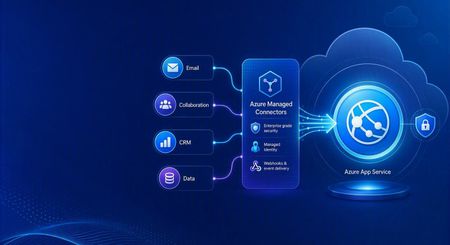
Azure Managed Connectors, currently in public preview, now lets you choose Azure App Service as a trigger destination. Connector events can be delivered directly to applications running on App Service, including ASP.NET Core, Java, Node.js, and Python applications. This is a new capability in the Managed Connectors public preview. It is not the announcement of a separate App Service preview. What's new When you create a trigger in the Managed Connectors portal, App Service now appears as a first-class destination alongside Azure Functions and the generic HTTP endpoint option. After selecting an existing App Service app, you configure: The application route that receives the event. New triggers default to POST /api/webhook , and the route can be edited. The Connector Namespace managed identity used to authenticate the callback. The Microsoft Entra audience expected by the receiving application. Managed Connectors then records the selected App Service resource, route, managed identity, and audience as part of the trigger configuration. You no longer need to select the generic HTTP destination and manually assemble the App Service callback URL. What are managed connectors? Managed connectors provide a consistent way for applications to integrate with services such as Office 365, SharePoint, Teams, Dataverse, and Salesforce. A Connector Namespace manages connections and connector operations so developers do not need to build a separate OAuth flow and service-specific client for every integration. Managed connectors support both directions: Triggers deliver events to your application, such as a new Outlook email or a file added to SharePoint. Actions let your application call operations such as posting a Teams message, flagging an email, or creating a list item. The App Service destination makes the trigger side a first-class option for existing web applications and APIs. How it works In the Managed Connectors portal, create a trigger and select App Service as its destination. Select the web app, callback route, Connector Namespace managed identity, and Microsoft Entra audience. When the source event occurs, Managed Connectors requests a token using the selected managed identity and sends the event to the App Service route. App Service built-in authentication validates the token before the request reaches application code. The application processes the event and can use Managed Connectors actions to continue the workflow. The callback is an ordinary authenticated HTTP request, so the application can use its normal framework, routing, dependency injection, logging, monitoring, and deployment practices. Configure receiving-app authentication The App Service destination configures the Managed Connectors side of the callback. The receiving application must still be configured to trust it. The reference sample uses App Service built-in authentication, also known as Easy Auth, with: A Microsoft Entra application that identifies the receiving application and its audience. A secretless federated credential configuration. The Connector Namespace managed identity pinned as an allowed principal. Authentication required for requests reaching the application. This configuration rejects unauthenticated requests and allows callbacks carrying the expected managed-identity token. The Managed Connectors trigger wizard does not currently create or update the App Service authentication configuration automatically. Try the end-to-end sample The Managed Connectors on Azure App Service email-triage sample demonstrates a complete workflow: An Office 365 Outlook trigger delivers a new email to an ASP.NET Core application on App Service. App Service built-in authentication validates the managed-identity callback. The application classifies the message and enriches the sender through the Office 365 Users connector. Important mail produces a Microsoft Teams triage card. The application flags the source email in Outlook. The repository includes the application, Bicep infrastructure, App Service authentication configuration, Connector Namespace connections, and an Azure Developer CLI deployment flow. We validated the complete workflow end to end: the authenticated callback reached POST /api/webhook , the application processed the event, a Teams card was posted, and the source Outlook message was flagged. Current limitations The capability is configured through the Managed Connectors portal, not the App Service portal. The wizard configures the Managed Connectors trigger but does not configure App Service built-in authentication on the selected web app. The current sample authentication setup requires a Microsoft Entra application, audience configuration, federated credential, and allowed-principal configuration. Depending on the application's Easy Auth configuration, authentication can apply to the whole application rather than only the connector callback route. The reference sample validates one push-trigger scenario; it is not a compatibility statement for every connector and operation. What's next The first-class App Service destination removes the generic callback URL step and provides an App Service-aware trigger experience in Azure Managed Connectors. We are also exploring ways to simplify receiving-side authentication so applications can establish connector-scoped trust without manually assembling the App Service authentication configuration. Try the reference sample and share feedback on the connectors and App Service scenarios you want to use.528Views0likes0Comments
Container on App Service keeps getting stopped and terminated
I've got a .Net app running in a Docker container that I'm trying to run on a Linux App Service but as per the (sanitised) log output below from the Platform log stream, it's getting terminated only 4 seconds after it started. Where can I get information on why this is happening? Starting container: a0e3af0a_myapp-dev-as. Starting watchers and probes. Starting metrics collection. Container is running. Container start method finished after 1990 ms. Container is terminating. Grace period: 0 seconds. Stop and delete container. Retry count = 0 Timestamps removed as the forum doesn't seem to like log output?Solved1KViews0likes3CommentsAnnouncing Azure Web PubSub chat in public preview
Chat is becoming a standard interaction model across customer support, collaboration, gaming, marketplaces, healthcare, financial services, and AI-powered applications. But building a production-ready chat system involves much more than opening a WebSocket connection. Teams also need to manage rooms and membership, deliver and order messages, retain conversation history, recover from connection interruptions, and enforce permissions. Today, we are excited to announce that Azure Web PubSub chat is available in public preview. Azure Web PubSub chat is a managed capability built on Azure Web PubSub. It provides chat-focused client and server APIs so developers can work directly with familiar concepts such as rooms, messages, members, users, and roles, while Azure manages the underlying real-time messaging infrastructure. Focus on the chat experience, not the messaging plumbing Azure Web PubSub already helps developers build large-scale, real-time applications. The new chat capability adds a higher-level abstraction for applications whose primary interaction model is conversation. Instead of defining custom events, message schemas, membership logic, persistence workflows, and reconnect behavior, developers can use built-in chat operations to: Create one-to-one or group rooms. Add and remove room members. Send ordered messages in real time. Retrieve persistent room message history. Apply built-in or custom roles and permissions. Reconnect clients and recover messages after temporary connection loss. These capabilities run on Azure Web PubSub infrastructure and inherit its automatic scaling, geo-replication, security, and compliance foundations. Chat-native APIs for clients and servers Azure Web PubSub chat provides two complementary ways to build. The JavaScript client SDK, available through the `@azure/web-pubsub-chat-client` npm package, connects applications to a chat hub. Clients can create rooms, exchange messages, load history, manage members, and subscribe to chat events. The Chat REST API supports trusted server-side and administrative workflows, including managing rooms, users, members, messages, roles, and permissions. This separation lets client applications deliver responsive real-time experiences while backend services retain control over identity, moderation, governance, and business rules. For example, after connecting a `ChatClient`, creating a room and sending a message takes only a few calls: const room = await client.createRoom("Project Falcon", ["bob", "carol"]); client.on("message", ({ message }) => { console.log(`${message.createdBy}: ${message.content.text}`); }); await client.sendToRoom(room.roomId, "Welcome to the project room!"); Applications can also read message history through an asynchronous iterator, making it straightforward to implement initial conversation loading or incremental history as a user scrolls. Keep chat data in your Azure Storage account Persistent chat data remains in an Azure Storage account selected by the application owner. Azure Web PubSub chat uses the Web PubSub resource's managed identity to access that storage, avoiding storage connection strings or keys in the chat configuration. The stored data includes: Messages and conversation history Rooms and room membership Users Roles and permissions Your data stays in your storage account, and the service keeps no separate copy. This model gives organizations direct ownership of their persisted chat data while the managed service handles real-time delivery and chat operations. Built-in access control with room-level flexibility Chat applications often need different privileges for participants, moderators, room owners, support agents, or automated services. Azure Web PubSub chat includes a role and permission model for these scenarios. Built-in room roles distinguish between members and operators. Both can send messages, read history, and invite members by default, while operators can also remove users. Developers can define custom user or room roles when an application needs a different permission set. Role administration is performed through the Chat REST API, keeping permission management in trusted server-side code. Reliable conversations across connections and devices Users expect chat to continue working when a laptop changes networks, a mobile connection briefly drops, or the same account is open in multiple browser tabs or devices. Azure Web PubSub chat runs on Azure Web PubSub's reliable WebSocket connection. The client reconnects and recovers automatically after an interruption, while the service fans messages out to a user's active connections. Persistent history also allows users to load earlier messages after reconnecting or joining a room later. Choose the right Web PubSub capability The new chat capability complements the existing standard Web PubSub hub. Use a chat hub when the application is centered on conversations and benefits from built-in rooms, membership, history, roles, and chat-focused APIs. Use a standard hub when the application needs full control over its protocol or supports a different real-time workload, such as telemetry, device signaling, multiplayer state, notifications, or live dashboards. Both options use Azure Web PubSub, allowing teams to select the abstraction that best fits each real-time scenario. Get started To try Azure Web PubSub chat: Create or open an Azure Web PubSub resource. Link an Azure Storage account under Persistent Storages. Add a Chat Hub and associate it with that storage. Generate a client access URL for testing. Install the JavaScript client SDK: npm install azure/web-pubsub-chat-client Connect a client, create a room, and send your first message. The portal-generated client URL is intended for experimentation. In production, issue client access URLs from an authenticated backend and derive the chat user ID from the signed-in application identity. Managed identity and Microsoft Entra ID can be used for keyless server authentication. Azure Web PubSub chat is available now in public preview. Start with the Azure Web PubSub chat overview, follow the quickstart, or explore the client SDK and REST API. We look forward to seeing the customer conversations, collaboration experiences, and AI-powered applications you build with it.544Views0likes0Comments