wac
40 Topics
Cannot Connect to VMs in Windows Admin Center
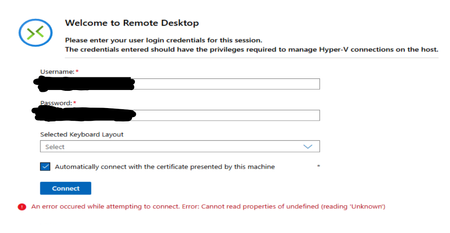
Hi all, I have 1 Server Cluster made up of 3 Server 2022 Hosts on which there is a large number of VMs running on Hyper-V. The typical process for accessing the VMs has been through Windows Admin Center, which is hosted on one of the VMs in the cluster. Around 1 week ago, it was no longer possible to connect to the VMs through Windows Admin Center as an infinite loading screen was presented. Sometimes, the following error shows up in VMConnect: The cluster and servers are still connected to WAC and all the VMs that are expected are present on WAC. Since then, the following things have been attempted: - Restart all servers - Rebuild WAC on Current VM - Build WAC on Fresh VM with the same and different network configuration, using current (2606) and previous (2511) versions of WAC - Build WAC on one of the hosts All these attempts result in the same error as seen before. Has anyone experienced this issue before? Or does anyone have any advice? Thank you in advance!Solved1.3KViews2likes13Comments
WAC vMode fails validating SMB
Hi Reviewing vMode and try add a Hyper-V 2025 (non hyperconverged) cluster with a FC SAN. Fails on Validating "SMB port accessibility". Have gone through firewall settings and opened all neccesary ports that i can find mentioned. Even tried without FW turned off without any success so hit the wall now. WAC vMode is installed on a vm running Win2025std and in same domain as the cluster (and hosts) i try to add. Probably some obvious thing i have missed so any suggestions?223Views0likes1Comment
No way to import shared connections WAC 2.6.4
hello, reaching out to to see if I am missing anything with the import-wacconnections change in the powershell module. Previous versions i had everything scripted and running smoothly where I could scrape AD for servers and tags and then import as shared connections for other engineers to use. Now, despite being a gateway admin, if I try and import a CSV via the windows admin center gui, I get an error that only personal connections can be imported. if I use powershell, despite providing the generated access token, I get a 403 error. my issued PKI certificate is good, I am a gateway and server admin, I even corrected the errors in the powershell module regarding $credential vs $credentials that copilot spotted Any advice or pointers to push forward?297Views3likes1Comment
Using Active Directory Extension on Member Server
Hello WAC fellows, Is it possible to use the Active Directory extension on Member Server (with RSAT-AD-Tools installed) instead of connecting directly to a Domain Controller? I'd like to let users do certain tasks using an AD-Frontend of WAC, but I don't want to give them any kind of permission on the Domain Controllers. Ideally they would connectto a Management-Server using WAC and edit the AD using the AD-Extension. Any ideas?1.6KViews1like2CommentsWAC Extension VM Conversion: Pre-checks failed: PowerCLI is not installed
Hi, i have Windows Administration Center Version 2410 Build 2.4.2.1, i try to migrate VMware VMs to Hyper-V using WAC Extension VM Conversion and when i start sync i get this error: Pre-checks failed: PowerCLI is not installed. Please install PowerCLI and try again.. Check the logs for details. (1%) but PowerCLI is already installed with offline installation procedure because no internet connexion available in my environment, i can import vmware.powercli module in powershel but same error in WAC Than you for your help327Views0likes0Comments
How to connect from windows admin center to client using winrm with port 2828
Hi all, Due to security issues I need to configure the default port of winrm on windows from 5985 to 2828 and 2829 with https. I want to configure to connect from windows admin center to client which is windows server with winrm port 2828, what should i do. Thanks all!170Views0likes0CommentsFailover Cluster Validation Stuck
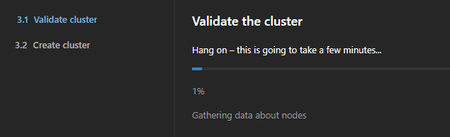
Hello everyone, I'm having the following problem when creating a 2-node HA cluster (Server 2025) using the Windows Admin Center (Gateway). Up to the point "Validate Cluster" everything worked fine. Unfortunately, the process gets stuck at "1% Gathering data about nodes". However, I can confirm that the cluster report was successfully created on the first node without any errors. Has anyone else seen something similar and, ideally, have a solution for me? I checked the following: Permissions such as CredSSP, Remote Powershell and WinRM are correctly implemented on the WAC gateway and nodes. Manually execute the PowerShell command successfully: Test-Cluster -Node $ServerList -Include "Storage Spaces Direct", "Inventory", "System Configuration"487Views0likes0CommentsWindows Admin Center needs a Group Policy Extension for GPMC
That's one of the important things that is missing in WAC 1907. even if not as part of the main features, make it available as an extension to optionally install it whoever needs it. Then, Microsoft can expect people to move from RSAT to the new WAC.16KViews6likes4Comments
Windows Admin Center: Revert "Use WinRM over HTTPS only" setting
We just upgraded our Windows Admin Center install and I accidentally checked the "Use WinRM over HTTPS only" setting during the update / prior to configuring our hosts for that feature. We want to use this, but need more time to troubleshoot roll-out. Is there a line command or anything that will allow me to undo that setting? I know if I run setup again I can (for example) change SSL thumbprint, but that setting to "Use WinRM over HTTPS only" is not available in setup again for toggling. Thanks!Solved49KViews3likes9Comments