vs code
158 TopicsBeyond One-Size-Fits-All: Decision Routing for GitHub Copilot in CLI & VS Code
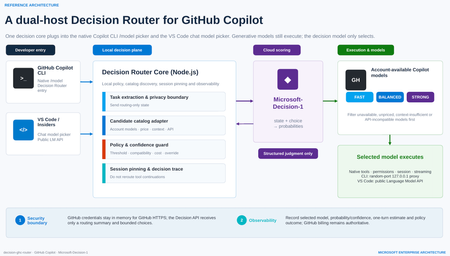
As developer tools move into the age of agentic AI, it is easy to fall into a familiar habit: when a task matters, choose the strongest—and usually most expensive—model available. Real software work is more varied than that. Explaining a function, editing a README, adding a boundary test, debugging a cross-module race condition and reviewing authentication logic demand very different levels of reasoning, context, tool use and reliability. A fixed model for every turn either wastes latency and budget or leaves difficult tasks underpowered. That is the motivation behind decision-ghc-router: GitHub Copilot continues to execute, while a Decision Router selects a sufficiently reliable and economically sensible model at the start of each new user turn. (The design also draws on gargpratyush/jev-router, especially its per-turn routing, native CLI preservation and model pinning across tool continuations.) The goal is not to build another agent outside Copilot or replace the native developer experience with a custom chat UI. GitHub Copilot CLI and the VS Code GitHub Copilot extension should keep their existing authentication, model catalog, tools, permissions, sessions and streaming behavior. The router adds one short, explicit decision step—and then gets out of the way. 1. Start with the distinction: a Decision Model is not a Model Router Before discussing implementation, two frequently conflated concepts need to be separated. A Decision Model makes bounded, structured judgments A Decision Model is not prompted with “write an article.” It receives: a current state, expressed as text or JSON; one or more bounded questions; explicit options or grading criteria. It returns typed results and probabilities that software can act on immediately, rather than free-form prose. For example: noul: Does this tool call touch production data? Return a probability between 0 and 1. choice: Should this task use the Fast, Balanced or Strong tier? Return the selected option and a probability for every option. score: How risky is this code change? Return an ordered score and its probability distribution. A Decision Model is therefore a fast, calibratable judgment primitive. Its uses extend beyond model selection to classification, ranking, prioritization, validation, agent control, safety screening and AI judging. A Model Router turns judgment into execution A Model Router is a system pattern, not a single model. A production-ready router must typically: discover models actually available to the signed-in account; reject candidates that are unavailable, unpriced, context-insufficient or API-incompatible; build a minimal routing state; invoke a scorer—which might be rules, a benchmark table, an LLM classifier or a Decision Model; apply confidence, cost, latency, safety and organizational policy; select a concrete model and start native execution; pin that model across tool continuations; emit decisions, estimates and failures for audit and tuning. In short: The Decision Model judges what is most suitable. The Model Router makes that judgment usable, compliant, executable, observable and recoverable. A Decision Router does not replace the larger routing system. It gives that system a specialized, fast and threshold-friendly scoring engine. Decision Model versus Model Router Dimension Decision Model Model Router Nature Specialized model capability Application or platform architecture pattern Input State, bounded questions, options or grading criteria User task, account catalog, prices, context limits and policy Output Typed answer and probabilities Concrete model, execution path, policy outcome and telemetry Content generation Does not produce free-form content Usually dispatches a generative model Account entitlement Not responsible Responsible API compatibility Not responsible Responsible Failure handling Provides uncertainty Must define fallback or stop behavior Broader use Classification, scoring, routing and validation Multi-model orchestration, cost governance and runtime control 2. Microsoft-Decision-1: why it fits developer-tool routing Microsoft introduced Microsoft-Decision-1 in October 2026 as a specialized model for fast decision scoring, available through Microsoft Foundry. Unlike a generative LLM, it does not produce an essay or a written chain of reasoning. It makes a focused judgment about text or JSON and returns typed numerical decisions. Microsoft describes the model as a post-trained Qwen3.5-9B designed for single-pass scoring over fixed options. It reports the highest accuracy in a 36-benchmark comparison spanning nearly 150,000 questions kept blind from training, P50 latency roughly 35 times faster than GPT-6 Sol, and an average 1.3% decision-flip rate across eight perturbation types. At launch, Microsoft listed input at US$0.042 per million tokens with no output-token charge; pricing is dynamic, so a deployment should use the current Microsoft Foundry listing. Those are Microsoft-published benchmark results, not a substitute for evaluation on a team’s own development workload. Microsoft-Decision-1 exposes three question types that map naturally to an AI control plane: noul for binary gates such as “May this command run automatically?” choice for bounded routing such as “Which model tier should handle this turn?” score for ordered grading such as “How severe is the change risk?” Why not use a small LLM classifier? That is a valid architecture. Many model routers ask a lightweight LLM to emit easy, medium or hard. GitHub Agentic Workflows’ experimental model routing also classifies a task before ranking allowed model-and-effort combinations through precompiled routing tables. A dedicated Decision Model, however, offers four useful properties for developer tools: Bounded output. A router needs a label and probabilities, not persuasive prose. Predictable latency. Agent workflows amplify the cost of every sequential control-plane call. Policy-ready confidence. If the top probability is below 0.65, a local policy can avoid downgrading, keep the current model or request manual selection. Composable governance. One structured request can score model tier, operational risk and the need for human review. A conceptual choice request for Copilot routing The following is simplified pseudodata—not repository source—and omits deployment and authentication details: { "state": { "task": "Fix intermittent failures in the authentication integration tests", "estimatedContextTokens": 18000, "toolUseExpected": true, "workspaceScope": "multi-file", "latencyPreference": "balanced" }, "questions": { "model_tier": { "type": "choice", "instructions": "Choose the least expensive tier likely to complete the task reliably in one pass.", "criteria": { "fast": "Simple explanation, formatting, lookup, or small deterministic edit", "balanced": "Normal coding, tests, debugging, or limited multi-file work", "strong": "Ambiguous architecture, security, difficult debugging, or broad multi-file reasoning" } } } } The response identifies a tier and assigns a probability to every tier. The router then maps the abstract choice to a concrete model that is truly available to the current GitHub account. That separation matters: a Decision Model should not assume that a user owns or can access a particular model. The account catalog is the source of truth. 3. The decision-ghc-router scenario and reference architecture The architecture has two hosts but one consistent decision model. 3.1 GitHub Copilot CLI: put the router in native /model In the public predecessor implementation, a user-level extension adds a router entry to GitHub Copilot CLI’s native /model menu. The user can select the router or choose a concrete model directly: Select Decision Router: route every new user turn. Select a concrete model: bypass routing and return to native fixed-model behavior. Continue a tool call: keep the model chosen for that turn; do not classify again. Explicitly request a model: the explicit request should win. The CLI path uses a random-port 127.0.0.1 proxy to expose the router as a temporary provider while preserving Copilot authentication, sessions, tools, permissions and streaming. GitHub credentials should remain in memory and be used only for HTTPS requests to GitHub. The local proxy uses separate random credentials; GitHub credentials must not be written to logs or sent to the Decision API. This is the design principle I care about most: The router changes which model is selected, not how Copilot works. 3.2 VS Code and VS Code Insiders: enter the Chat Model Picker The editor integration is a separate extension. It registers decision-router in VS Code Chat’s model picker and uses the public Language Model API to discover Copilot models available to the account signed into that editor. The privacy boundary is intentional: The Decision Model receives an unambiguously extracted task or a routing-only summary entered by the user. If the task cannot be reliably isolated from editor context, the extension should not automatically upload attachments, source files or the full conversation. The selected Copilot model still receives the full conversation, tool definitions and workspace context. VS Code invokes native tools, while tool-call IDs maintain model consistency. The short version is: minimize data for decision; maximize context for execution. 3.3 The seven-step loop for each new user turn Receive the task through native Copilot CLI or VS Code Chat. Discover candidates from account models, prices, context capabilities and API compatibility. Build routing state with the minimum sufficient task summary and bounded choices. Call Microsoft-Decision-1 and receive choice probabilities. Apply local policy for confidence, cost, compatibility and manual overrides. Execute natively with the selected model, existing tools, permissions, session and streaming. Pin and trace the model for tool continuations while recording the decision and estimate. 3.4 Why not reroute every tool continuation? Imagine a model runs tests, reads the failure output and then edits code. If the router chooses a new model after every tool result: prompt-cache benefits may disappear, increasing total cost; the new model may interpret earlier tool calls differently; the debugging chain becomes harder to reproduce and audit. I therefore retain one of jev-router’s strongest ideas: make one decision at the start of a new user turn, then pin that model for the resulting tool chain. Main conversations and sub-agents should be pinned independently. 4. Main technologies and frameworks Based on mechanisms verifiable in the public predecessor and the Microsoft-Decision-1 evolution described here, the project separates into the following layers. Node.js and ESM modules The core router uses Node.js and .mjs modules to handle: CLI startup and argument forwarding; model catalog and price adaptation; the local HTTP proxy; configuration and environment variables; Decision API calls; policy, errors and telemetry. The public predecessor requires Node.js 22.16 or later and uses Microsoft’s npm package source for relevant dependencies. GitHub Copilot CLI extension interfaces The CLI integration relies on experimental extension interfaces to register the router as a native model entry. It explicitly enables the provider-endpoint interface and obtains the model catalog, runtime inference endpoint and authentication from the active session. Three rules are essential: Do not modify the user’s global default model. Do not automatically grant shell or other tool permissions. If initialization fails, report a clear error instead of pretending routing succeeded. Local loopback proxy The loopback proxy is the adapter that preserves the native CLI: listen only on 127.0.0.1; use a random port and random local credentials; map the router’s selection to a real Copilot execution model; preserve streaming, tool calls, sessions and permission prompts; never create a second hidden agent loop. VS Code Extension API The editor extension discovers current candidates through: vscode.lm.selectChatModels({ vendor: "copilot" }) and is packaged as a VSIX. The CLI and editor are independent hosts and may use different GitHub accounts with different entitlements. Candidate discovery must therefore be host-specific, session-specific and dynamic—not a hardcoded list of model IDs. Microsoft Foundry and the Decision API Microsoft-Decision-1 can be deployed in Microsoft Foundry through GlobalStandard or, in selected regions, DataZoneStandard. Authentication can use Microsoft Entra ID (recommended) or an API key. In this architecture, the Decision API only scores choices: Input: minimal task state, bounded candidates and explicit criteria. Output: selected option, option probabilities and usage. Not its responsibility: GitHub credentials, developer tools, full workspace access or code execution. That separation makes the decision plane and execution plane independently governable. Model catalog, pricing and capability adapters The public predecessor discovers models from the signed-in account instead of hardcoding them. Before scoring, a router should exclude: auto, hidden, disabled or unconfigured entries; models without usable price information; candidates with insufficient input context; models incompatible with the host’s wire API; models restricted by administrator policy. Cost estimation supports ranking and user feedback; it is not a final bill. Promotions, cache discounts, hidden context, retries and later tool rounds all affect the result. GitHub Billing remains authoritative. 5. What I borrow from jev-router—and what changes The value of gargpratyush/jev-router is not merely “use a small model for easy tasks.” It embeds routing into familiar CLIs without taking away their native behavior. The ideas I retain include: one routing decision per new user turn; a router sentinel in the native model picker; concrete-model selection pauses routing; abstract Fast, Balanced, Strong and Long tiers map to host-specific models; tool continuations keep the tier selected at the start of the turn; explicit model requests win; low confidence should not trigger an aggressive downgrade; large conversations must account for cache and migration cost; explanation data should show why a tier was selected. The decision-ghc-router evolution replaces the external JEV/System One scorer with Microsoft-Decision-1 and emphasizes five changes: Probability is a first-class signal. Policy can threshold the decision instead of accepting a label blindly. Bounded choices come from the real catalog. Decision-1 only chooses among already eligible candidates. Local policy owns the final answer. Organizational rules, compatibility and manual overrides remain deterministic. The Decision Model is reusable. A single structured call can also score operational risk and the need for human review. Local and cloud responsibilities are explicit. Cloud scoring is isolated from credentials and execution. 6. Representative use cases A. Fast explanation and small edits “Explain this regular expression,” “turn this note into a table,” or “add a null-value test to an existing function.” The router can often select the Fast tier. The objective is not the weakest model; it is the least expensive model likely to complete the task reliably in one pass. B. Normal development and debugging “Fix the failing test,” “refactor this module without changing its API,” or “use the stack trace to locate the bug.” These tasks require code reading, tool use and moderate reasoning, so they often land in Balanced. C. Security, architecture and broad multi-file reasoning “Review this OAuth callback for state confusion,” “design cross-region failover,” or “find a race condition across services.” The router should choose Strong even when it costs more. Routing optimization means “economical subject to reliable completion,” not “always cheaper.” D. Long context and large repositories If a candidate cannot hold the estimated input, it must be removed before scoring. For an already large conversation, the router should also avoid downgrading when lost cache work or context migration would cost more than the model-price saving. E. Organizational policy and risk gates The same Decision API request can include additional noul or score questions: Does the task involve production data? Is the proposed command destructive? What is the security risk level of the change? Should execution be handed to a human reviewer? At that point the router grows from a cost optimizer into a lightweight control plane for agents. 7. Policies I would keep for production Filter deterministically before scoring Entitlement, API compatibility, context limits and administrator restrictions are facts. The Decision Model should not be asked to guess them. Do not automatically downgrade on low confidence When the top probability falls below a calibrated threshold, the router can: keep the current model; cap automatic movement at Balanced; request manual selection; send high-risk tasks to Strong or human review. The threshold must be calibrated on labeled tasks from the target environment, not copied from an example. Explicit intent beats automatic routing If the user says “use the Strong model” or selects a concrete entry in the picker, the router should step aside immediately. Never substitute silently Missing credentials, Decision API timeouts, unknown pricing and insufficient context should produce an explicit state. Whether to fail open, fail closed or keep the current model must be an intentional host or organizational policy. Record decisions without logging every prompt by default Useful telemetry includes: anonymized session and turn IDs; candidates and exclusion reasons; selected tier, probabilities and policy overrides; estimated input/output and one-turn cost; completion, retry and manual-reselection outcomes. Full prompts, source code and tool results should be excluded by default or governed by explicit retention and data-handling policy. Evaluate the router on task success, not the cheapest request Better metrics include: first-pass completion rate; total time to completion; total cost including retries and tool rounds; manual model-change rate; low-confidence and misrouting rates; safety and policy violations. 8. Why this matters beyond one repository From a developer-advocacy perspective, the Decision Router is not simply a token-saving utility. It illustrates a clearer division of responsibilities in agent engineering: Generative models understand, reason, write code and call tools. Decision Models make fast, structured and probabilistic judgments. Routers and policy engines place those judgments inside real account, budget, compatibility and governance constraints. Developer-tool hosts retain identity, permission, context and execution control. Future AI developer tools will not be tied to one “default large model.” They will manage a portfolio of models with different speed, cost, context and capability profiles. The differentiator will no longer be merely which model a product connects to, but: Can it select the right model at the right moment, in an explainable and governable way, without breaking the developer experience? That is why I am adding a Decision Router to GitHub Copilot CLI and the VS Code GitHub Copilot extension. GitHub Copilot keeps executing. Microsoft-Decision-1 makes the fast judgment. The local router turns that judgment into a usable engineering decision. References decision-ghc-router jev-ghc-router gargpratyush/jev-router Microsoft-Decision-1: Our model for fast decision-making Deploy and use Microsoft-Decision-1 in Microsoft Foundry GitHub Agentic Workflows — Model Routing GitHub Copilot model billing and pricing892Views0likes0CommentsSQL developer tools at SQL Modernization Day
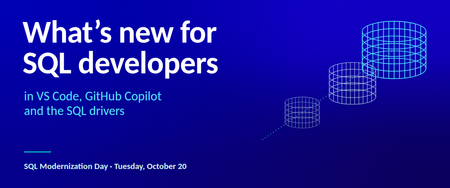
SQL developers can now do most of their database work without leaving VS Code. The MSSQL extension ships updates every month, GitHub Copilot understands your schema, and the Microsoft SQL drivers keep pace with SQL Server 2025. And new Microsoft SQL skills, now in public preview, let your coding agent assess and migrate SQL Server to Azure SQL. Here's what's new across the toolchain, and where to see it in action at SQL Modernization Day on October 20. What's new in the MSSQL extension for VS Code The MSSQL extension connects to SQL Server, Azure SQL and SQL database in Fabric from the editor you already use. It now covers far more than connecting and running queries. Versions 1.40 and 1.41 added the following. Generally available Database management. Backup and restore, plus dialogs to create, rename and drop databases. View and edit data directly in the table view. DACPAC and BACPAC extract, deploy, import and export for moving databases between environments. Fabric integration to browse workspaces and provision SQL databases in Fabric. SQL database projects with a publish dialog and code analysis. Azure Data Studio migration toolkit that brings over your connections, settings and key bindings. Public preview Query Profiler for real-time activity monitoring with Extended Events. Flat file import to turn a CSV or TXT file into a new table. Database object search across tables, views, stored procedures and more, with scripting options. SQL Notebooks that mix SQL and Python kernels in one notebook. Schema Designer and data API design with GitHub Copilot, plus an application quickstart. Need a local database? The extension can spin up a SQL Server 2025 container in a few clicks. It checks prerequisites, sets up the container and adds the connection to Object Explorer for you. Build with GitHub Copilot and your schema GitHub Copilot is built into the MSSQL extension. In agent mode it reads your actual tables, columns and relationships, along with your workspace and open files. It uses the same connection and permissions as the extension, and it asks you to approve tool actions before they run. Here's some of what you can hand off: Chat with the mssql participant for SQL guidance, or let agent mode connect, list servers and run queries. Generate tables and relationships, then review them as a diff before anything reaches the database. Write T-SQL or ORM queries from plain language, and get explanations of stored procedures, views and complex joins. Generate realistic test data from your current schema. Configure Data API builder in natural language to expose tables as REST, GraphQL or MCP endpoints. Try it: from idea to an AI-ready app The library app sample walks through a full build in three steps: Spin it up. Create a local SQL Server 2025 container from the extension and seed the database. Wire it up. Have Copilot turn hardcoded app data into new tables and relationships, generate test data, and stand up a read-only REST API with Data API builder. Light it up. Add a native VECTOR column, generate embeddings, and use VECTOR_DISTANCE for semantic search behind a RAG chatbot. The repo includes a PRD and GitHub Copilot custom instructions, so Copilot follows your naming conventions and targets SQL Server without repeating yourself in every prompt. Coming next: Azure SQL Developer runs the Azure SQL Database engine locally for development, so you can build in your inner loop and deploy to Azure with no code changes. It's in gated preview, and you can sign up at aka.ms/azuresql-developer. Assess and migrate with Microsoft SQL skills Microsoft SQL skills, now in public preview, bring SQL Server migration expertise to the coding agent you already use. Skills are packaged instructions and scripts that an agent loads when a task calls for them. You ask for an assessment or a migration in plain language, and the agent picks the right skill for each step. The skills live in one central library, so they work the same way in GitHub Copilot, VS Code, Claude and Cursor. They cover the whole journey: Assess readiness, blockers and dependencies. Recommend a target, SKU and cost. Plan prerequisites and remediation. Migrate with BACPAC, or with Log Replay Service (LRS) and managed identity. Validate with post-move checks and guided fixes. You stay in control the whole way. The agent asks before it runs commands, and you approve its recommendation before anything moves. An assessment you can act on The assessment skills look at your estate through four lenses and turn discovery data into an Azure SQL recommendation you can defend. Lens Question What it checks Compatibility Can the workload move? Feature support, breaking changes, blockers and the remediation path Assessability Is there enough evidence? Inventory coverage, assessment status, data freshness and confidence gaps Sizing What capacity does it need? CPU, memory, I/O and storage demand, mapped to a compute tier with headroom Pricing What will it cost? SKU and service tier, region, licensing including Azure Hybrid Benefit, and a monthly estimate Here's how that plays out. Ask GitHub Copilot in VS Code to assess a SQL Server 2016 instance for Azure SQL Database Hyperscale. The agent checks that the Azure CLI and its data migration extension are installed, runs the assessment and reports readiness database by database. A database that uses Service Broker gets flagged, since Azure SQL Database doesn't support it, along with the fix. You also get an HTML report that compares Hyperscale, Azure SQL Managed Instance and SQL Server on Azure VMs, with a monthly cost estimate and a SKU recommendation for each database. A migration that picks up where it left off Next, ask the agent to migrate one of those databases. It confirms SqlPackage is installed, checks that the source is online and builds a migration plan. The plan names the source and target servers and the method, an offline BACPAC export and import. It creates a new database and never overwrites an existing one, and the source isn't modified. If the export fails, the agent saves a checkpoint and diagnostics. Once you fix the source, it retries only the failed step instead of starting over, then validates the result. Explore the skills at aka.ms/microsoftsql-skills. For the full set of migration tools, including Azure Migrate, Azure Database Migration Service and migration through Azure Arc, see the database migration guide. Microsoft SQL skills are in public preview. Preview features are provided without a service level agreement and aren't recommended for production workloads. Put your database under source control with SQL projects SDK-style SQL projects (Microsoft.Build.Sql) treat your database like any other codebase. A build produces a .dacpac you can deploy to new or existing databases across SQL Server, Azure SQL and SQL database in Fabric. You can work with SQL projects in VS Code, SSMS and Visual Studio. Cross-platform builds with plain dotnet build. Every .sql file in the folder is included by default. Code analysis on build with 14 default rules. Add custom rule sets as package references, and promote any rule to a build error. Package references for shared objects and cross-database references, so objects that rarely change don't slow down every build. Extract an existing database into a SQL project with SqlPackage, installed as a dotnet tool. Schema compare across databases, SQL projects and .dacpac files. A typical pipeline looks like this: A developer proposes a change in a pull request. CI builds the project and runs code analysis. The team approves and merges to main. The pipeline calculates a deployment plan against staging or production. Someone reviews the plan as a script or deploy report and approves the release. GitHub environments and Azure DevOps approvals handle that last gate. SQL projects also help as AI agents write more of your code. Every database change lands as a reviewable diff, and changes from several agents or teammates merge like any other code. Get started at aka.ms/sqlprojects or work through the SQL DevOps workshop. What's new in the Microsoft SQL drivers The Microsoft SQL drivers all shipped new releases, including several of the fixes the community asked for most. Driver Release Highlights Microsoft.Data.SqlClient (.NET) 7.0 The core package drops its Azure dependencies. Entra auth moves to Microsoft.Data.SqlClient.Extensions.Azure with no code changes. New pluggable SSPI auth, .NET 10 support, and ActiveDirectoryPassword marked obsolete. JDBC 13.4 FLOAT16 vector support for embeddings, a new performance logger, Java 25 LTS and SQL Server 2025 support. mssql-python 1.4 A public bulk copy API with a Rust-powered core, spatial types, and type hints for mypy and Pyright. mssql-django 1.7 Django 6.0 and Python 3.14, composite primary keys, SQL Server 2025, and ODBC Driver 18 as the default. PHP (sqlsrv, pdo_sqlsrv) 5.13 PHP 8.4 and 8.5, SQL Server 2025, newer Linux and macOS platforms, and a fix for a Fabric connectivity crash. New to the Python driver? Start with the mssql-python quickstart. See it live at SQL Modernization Day Amit Khandelwal's session, Migrate to Azure SQL. Then Build Something New., puts these tools together at 10:00 AM PT on Tuesday, October 20. He covers the path off on-premises SQL Server, then builds on Azure SQL Database with VS Code, GitHub Copilot, the latest drivers and the SQL MCP Server. Expect demos of the developer workflow, not only the migration. SQL Modernization Day is a free livestream on Microsoft Reactor with eight sessions from the Microsoft SQL team. Register at aka.ms/SQLModernizationDay2026.Explore the latest in MCP: All recordings from MCP Live!
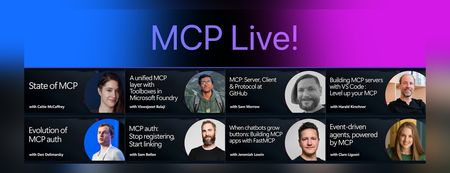
We recently hosted MCP Live!, a free half-day event featuring the people building the Model Context Protocol and putting it into practice. The Model Context Protocol (MCP) is the open standard for connecting AI models to tools and data. MCP servers let agents work with external data sources and capabilities across clients such as VS Code, GitHub Copilot, Claude, and other AI applications. Across the event, speakers explored: The state of MCP, the latest specification updates, and the protocol roadmap MCP server and client development at GitHub and in Visual Studio Code Enterprise-ready tools, authentication, governance, and security Interactive MCP Apps built with FastMCP Event-driven agents powered by MCP triggers and events Watch the complete MCP Live playlist, or browse the individual session recordings below along with links to related documentation, code, and resources. State of MCP 📺 Watch YouTube recording Join Caitie McCaffrey for a look at the state of the Model Context Protocol and the major changes introduced in the latest 2026-07-28 MCP specification release. Learn about the protocol's updated roadmap and emerging protocol priorities, including Agentic Messaging Primitives, and how they enable new patterns for agent-to-agent communication. Get a preview of where the protocol is headed and what these changes mean for developers building the next generation of AI agents. View the slides Follow Caitie on: LinkedIn | X MCP specification 2026-07-28 release MCP conformance tests MCP Server Cards working group A unified MCP layer with Toolboxes in Microsoft Foundry 📺 Watch YouTube recording Viswajeeet Balaji shows how Toolboxes in Microsoft Foundry make MCP enterprise-ready. It supports runtime tool search, MCP skill extensions, and the latest MCP 07-28 specification—while letting teams bring OpenAPI tools and A2A agents, expose them through MCP, and reuse the same unified configuration across agents. A centralized governance layer adds consistent authentication and guardrails without requiring every agent to rebuild its integrations. View the slides Follow Viswajeeet on: LinkedIn Documentation: Toolboxes in Microsoft Foundry Blog post: Building agents that act on your behalf with Toolboxes MCP: Server, Client & Protocol at GitHub 📺 Watch YouTube recording Sam Morrow is a co-creator of GitHub's MCP, an MCP Spec Maintainer, and Copilot client developer. Find out the latest MCP features his team is shipping on both the server and client side, as well as the parts of the spec that he's most excited about. Learn about some of the recent challenges, future plans, and insights from working across the MCP stack, and get a sneak peek at what's coming next. GitHub MCP Server Follow Sam on: LinkedIn | X Building MCP servers with VS Code — Level up your MCP 📺 Watch YouTube recording Harald Kirschner shows how MCP servers have evolved beyond local tool calls into richer, production-ready agent capabilities. Through a live VS Code demo, he builds an agentic achievement tracker that uses tools, elicitation, progress notifications, an interactive MCP App, stateless HTTP, and Agent Plugins—showing how to design, debug, and distribute modern MCP integrations. View the slides Follow Harald on: LinkedIn | X Documentation: MCP servers in VS Code Official MCP Registry MCP Registry repository Evolution of MCP auth 📺 Watch YouTube recording Den Delimarsky, Lead Maintainer of MCP and Member of Technical Staff at Anthropic, discusses how MCP authorization reached its current state: the original OAuth profile, protected resource metadata, the shift in client registration with servers, and enterprise-managed authorization. He also covers what the maintainers are working on next, including agent identity. View the slides Follow Den on: LinkedIn MCP auth: Stop registering, Start linking 📺 Watch YouTube recording Sam Bellen explains how Dynamic Client Registration made every MCP client mint a fresh client_id with every server it met, a per-server credential tax that quietly breaks down once clients start connecting to servers opportunistically. He shows how Client ID Metadata Documents flip the model: your client_id becomes a URL the server fetches on demand, giving you one durable identity that works everywhere, with a live demo of the flow end to end. View the slides Follow Sam on: LinkedIn DCR vs. CIMD demo with xmcp and Auth0 When chatbots grow buttons: Building MCP apps with FastMCP 📺 Watch YouTube recording Chat is great, but sometimes the answer is a button, a chart, or a form. MCP Apps let servers render interactive interfaces directly inside AI clients. Jeremiah Lowin, creator of FastMCP, shows how to build them in Python with FastMCP and Prefab, from simple components to dynamically generated interfaces. Follow Jeremiah on: LinkedIn FastMCP FastMCP authentication Event-driven agents, powered by MCP 📺 Watch YouTube recording Clare Liguori discusses the MCP Triggers & Events experimental extension, which lets agents poll MCP servers for events and get webhook triggers. She explores the new agent architectures the extension enables and presents a live demo. View the slides Follow Clare on: LinkedIn | X MCP Triggers & Events Working Group MCP events serverless earthquake agent demoIntroducing Inside Microsoft Foundry: Quickstart 🎬
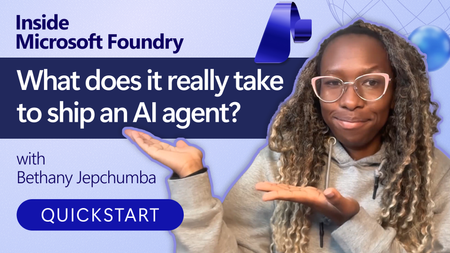
Discover Inside Microsoft Foundry: Quickstart, a new video series for developers building AI agents. Starting with "What does it really take to ship an AI agent?", the series explores real-world challenges such as model selection, grounding agents in data, evaluation, deployment, observability, and governance. Follow along as we show how the Microsoft Foundry ecosystem helps developers move from prototype to production, with new episodes released in the coming weeks.🚀 Foundry Toolkit for VS Code — August 2026 Update
This is the August round-up for the Foundry Toolkit for VS Code. Four releases shipped this month: 1.6.7, 1.6.8, 1.6.9, and 1.6.10. August was about turning agent development into a workflow you can follow end to end — start from the right path, connect reusable tools and other agents, run with real user isolation, and inspect exactly where the time and tokens went. Have feedback or hit a bug? File an issue on GitHub — the roadmap moves on what you tell us. Highlights Prompt Agent toolboxes — attach a centrally managed toolbox, inspect its tools and skills, manage versions and approval policies, and configure nested tools without leaving Agent Builder. 1.6.10 Agent-to-Agent connections (preview) — connect an Agent2Agent (A2A)-compatible agent from a configured connection, the Foundry account catalog, or a custom HTTPS endpoint. 1.6.10 Agent Inspector Overview — read a latency waterfall and an ordered timeline of model, reasoning, and tool activity for all runs or one selected run. 1.6.9 User-scoped Hosted Agent sessions — set a user identity so Responses conversations and session files stay isolated per user. 1.6.8 A clearer Create Agent start — choose Microsoft Agent Framework, Copilot SDK, LangGraph, Copilot-assisted coding, Agent Builder, or the full sample catalog from one redesigned page. 1.6.9 🤖 Create Agents — start on the right path, then stay in context Starting an agent shouldn't begin with choosing the wrong abstraction. The redesigned Create Agent page gives you direct routes to Microsoft Agent Framework, Copilot SDK, and LangGraph samples, Copilot-assisted coding, Agent Builder, and the complete sample catalog. You decide whether you want code, a guided build, or a prompt agent first — not after scaffolding the wrong project. 1.6.9 Hosted Agent setup is also less brittle. You can choose Skip for now during model setup even when existing deployments fail to load, then wire the model connection later. Administrator-connected Foundry models now appear alongside regular deployments in playgrounds and Hosted Agent creation, so the models your organization already configured are available where you build. 1.6.8 1.6.9 Once an agent is running, identity matters. The Hosted Agent Playground can now set a user identity for Responses conversations, keeping conversation state and session files isolated for each user instead of blending everyone into one test session. And when somebody sends you a Microsoft Foundry portal link, deep links can open that named Hosted Agent's Details or Optimization page directly in VS Code — not the portal home, not a search screen. 1.6.8 1.6.10 🔧 Toolboxes and A2A — connect capabilities once, reuse them An agent with five tools can become five separate configurations, five approval stories, and five places to make the same update. Toolbox changes that shape: it packages centrally managed tools behind one Model Context Protocol (MCP)-compatible endpoint, with shared versioning and policy controls. In August, Prompt Agents gained toolbox workflows inside Agent Builder. Open Add tools to browse toolboxes, or use Add to Prompt Agent from the Toolbox resource list. The attached toolbox appears as a collapsible card where you can inspect tools and skills, switch versions, configure approval policies and nested tools, replace or remove the toolbox, or opt out. You manage the collection — not a loose pile of one-off connections. 1.6.10 Agent-to-agent composition arrives in the same flow. Agent-to-Agent connections (preview) let you add an A2A-compatible agent from an existing connection, the Foundry account catalog, or a custom HTTPS endpoint. Attach it directly to a Prompt Agent or put it inside a toolbox for reuse across agents and runtimes. Your pipeline can now be agent → toolbox → specialist agent — with the connection managed as a real resource instead of buried in prompt text. 1.6.10 🔍 Agent Inspector — see the run, not just the answer A final answer can look right while the run behind it is slow, expensive, or calling the wrong tool. Agent Inspector now gives you the sequence and the evidence. The new default Overview tab shows every run or one selected run through two synchronized views: a latency waterfall and an ordered timeline of model, reasoning, and tool activity. Response footers add the model, duration, total tokens, and timestamp; hover over the token total to split input from output. Raw reasoning and reasoning summaries appear in separate collapsible sections when the agent provides them. 1.6.9 Tool inspection goes deeper in 1.6.10. Calls are grouped by response run, with status, call ID, arguments, and results, and each Responses event can show when it reached Agent Inspector. The Overview waterfall and timeline now scroll independently, while long streaming responses and Details views update more smoothly. You can move from "the tool failed" to the exact call and payload without reconstructing the run from chat bubbles. 1.6.10 The conversation itself is easier to drive: press Up or Down to recall and edit earlier requests without losing your unsent draft, or choose Clear Chat to reset the conversation plus Events and Details state. Pending MCP approvals and OAuth consent requests stay pinned above the input, with bulk actions and expandable details, until every decision is resolved. 1.6.7 1.6.9 🎯 Models and resources — faster to open, steadier when you return Resource pages should remember your work, not reset it. Models and Tools now load the selected tab first and show core rows before fetching the extra details. When you return to Agents, Models, Tools, Knowledge, or Evaluations, the toolkit preserves rows, search, filters, and pagination while refreshing the active view in the background. A manual refresh still gets the latest service state when you ask for it. 1.6.7 The sidebar does less work too. Collapsed My Resources sections load only when you open them, while Search and Recent Agents remain available. Evaluations, Routines, Tools, Skills, and Toolboxes now share consistent loading feedback, and a direct link to Tools or Skills opens the requested tab without loading Toolboxes first. The result isn't a new destination — it's less waiting on the way there. 1.6.7 1.6.8 Model deployment guidance got one sharp fix as well: quota errors now open the token quota page for your current Foundry project, so the recovery path lands on the project that actually needs capacity. 1.6.10 💻 Activity protocol agents — debugging that matches the agent Activity Protocol agents target Microsoft 365 channels, so local debugging should speak the same language. Newly scaffolded Python projects now open Microsoft 365 Agents Playground inside VS Code for local debugging. You stay in the editor and test the activity-shaped conversation before deployment instead of forcing it through an incompatible playground. 1.6.7 Copilot-assisted creation also follows the current Hosted Agent path: current Foundry project and model setup, a managed Python environment, workspace-root debugging, and the latest local run and deployment flow. When you reuse the selected Foundry project, Copilot no longer asks you to choose its Azure location again. 1.6.10 🪲 Fixes and polish Agent Inspector — streamed response and reasoning text stays complete; response text, reasoning, tool calls, and permission decisions keep their original order; replacement turns reject obsolete stream events; and unmatched tool calls or results no longer appear in Details. 1.6.9 1.6.10 Approvals and consent — human-in-the-loop pauses no longer duplicate tool or approval cards, Clear Chat remains available while a turn waits, and continuation responses retain pending approvals until every request is resolved. 1.6.8 1.6.9 Activity Protocol deployment — Azure Bot settings are validated before submission, compatible Bots are reused, identity and application ID conflicts get recovery guidance, and successful deployments no longer open an unsupported Agent Playground. 1.6.7 1.6.8 Agent Builder and MCP OAuth — reopening a Foundry Prompt Agent preserves its selected version and tool configuration, while authorization callbacks complete only the matching connection request. 1.6.8 Accessibility — screen readers announce Model Catalog actions, collapsible Agent Builder and Model Preference controls, and project and model fields with their labels and state; prompt placeholders also meet minimum contrast requirements. 1.6.10 ⚠️ Breaking change and migration GitHub Models has been removed from the Model Catalog, playground, model comparison, Agent Builder, and evaluations following the service's retirement. If a saved workflow or evaluation references GitHub Models, open it and select another available model before running it again. 1.6.7 🚀 Get it and tell us what to build next August connected the whole agent loop: choose the right starting point, reuse governed tools, compose agents through A2A, isolate real users, and inspect the run down to timing, tokens, arguments, and results. Install or update from the Visual Studio Code Marketplace. Read the docs — Foundry Toolkit for Visual Studio Code and the Microsoft Foundry documentation. Explore samples in the Microsoft Foundry samples repository. Browse the full changelog in WHATS_NEW.md. File issues and feature requests at github.com/microsoft/foundry-toolkit/issues. Join the Microsoft Foundry community on Discord. Try a toolbox with your next Prompt Agent, open the run in Agent Inspector, and tell us where the workflow still slows you down. Happy building. 🚀Join us for our MCP Live! — A free livestream covering all things MCP
The Model Context Protocol (MCP) is the open standard for connecting AI models to tools and data. It was first introduced to the world by Anthropic in November 2024, and is now the most widely adopted standard in the world of Generative AI. You can now use MCP servers to connect agents to your data sources across multiple clients: VS Code, Claude Desktop, Codex, Copilot App, Goose, and many more. Plus, MCP is the most common way to build your own agents that connect to internal enterprise tools, like when using Microsoft agent-framework or Langchain. To celebrate the success of MCP and its rich ecosystem, we are hosting MCP Live! on September 9th, from 9AM to 1PM PT. We'll hear both from the teams at Microsoft that are implementing MCP, but also from core MCP maintainers and the global community of MCP developers. Register here: https://aka.ms/MCPLive/99/b Here's our current planned agenda: Time Topic Speakers 9 AM PT Welcome to MCP Live! Liam Hampton and Pamela Fox (Microsoft/GitHub), MCP advocates 9:05 AM State of MCP Caitie McCaffrey (Microsoft), MCP core maintainer 9:40 AM MCP: Server, Client & Protocol at GitHub Sam Morrow (GitHub), GitHub MCP server maintainer 10:05 AM A unified MCP layer with Toolboxes in Microsoft Foundry Viswajeeet Balaji (Microsoft), Principal Software Engineer 10:30 AM Building MCP servers in VS Code Harald Kirschner (Microsoft), VS Code Principal PM 11:15 AM MCP Authorization: DCR, EMA, and more! Den Delimarsky (Anthropic), Sam Bellen (Okta) 12:05 AM Building MCP apps with FastMCP Jeremiah Lowin (Prefect), FastMCP maintainer 12:30 AM MCP Tasks, Events, Triggers Clare Liguori (Amazon), MCP core maintainer 12:45 AM Event-driven agents, powered by MCP Liam Hampton and Pamela Fox (Microsoft/GitHub), MCP advocates We're very excited to bring together so many folks working on both the MCP specification and on production MCP servers, so we can all learn about the latest MCP features and best practices together. Learn more MCP Brand new to MCP? We still want you to join! If you want, you can learn MCP fundamentals from our free resources: MCP-for-beginners : A step-by-step written tutorial covering all the MCP features Python + MCP series : Recordings of a 3-part livestream series focusing on building MCP servers with Python Meet the MCP community Want to meet the MCP community in person? We're also planning several IRL events: San Francisco (14 Sep 2026) Bengaluru (26 Sep 2026) Hope to see you in the live chat on September 9th!1.3KViews0likes0CommentsDistributing Agents to Microsoft Teams and Microsoft 365 Copilot Part 4/5
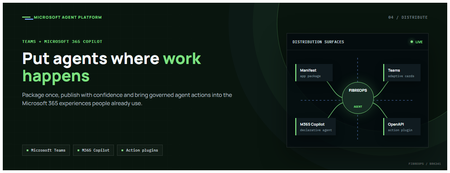
This is the fourth post in our series on the Microsoft agent platform. We cover the Distribute in M365 pillar — publishing your agents to Microsoft Teams and Microsoft 365 Copilot so they reach users where they already work. All examples reference the FibreOps repository, demonstrated at Microsoft Build BRK241. The Distribution Story Building a great agent is only half the challenge. The other half is getting it into the hands of users without asking them to learn a new tool, visit a new URL, or change their workflow. Microsoft 365 Copilot and Microsoft Teams are where enterprise users already spend their day, making them the natural distribution surface for agents. With the GA release, publishing an agent to Teams and M365 Copilot is a single command. No separate app registration portal, no manual manifest assembly, no multi-step approval workflow for development and testing. Publishing to Microsoft 365 Copilot (GA) FibreOps ships as a declarative agent + action plugin ready for sideload. A single CLI command produces the complete package: python -m fibreops.demo publish-m365 --out dist/m365 # Output: # ✓ wrote dist/m365/declarativeAgent.json # ✓ wrote dist/m365/fibreops-action.json # ✓ wrote dist/m365/manifest.json # ✓ wrote dist/m365/color.png (192x192) # ✓ wrote dist/m365/outline.png ( 32x32) # ✓ wrote dist/m365/fibreops-copilot.zip What Gets Generated File Purpose declarativeAgent.json Defines the agent's persona, capabilities, and conversation starters for M365 Copilot fibreops-action.json Action plugin that proxies tool calls to the deployed FastAPI backend via OpenAPI manifest.json Teams app manifest with publisher metadata, permissions, and capabilities color.png / outline.png App icons for Teams and M365 surfaces fibreops-copilot.zip Ready-to-upload package for Teams Admin Center Configuration Set the base URL to your deployed FastAPI app before publishing — the action plugin uses this to resolve the OpenAPI runtime: # Set the public HTTPS hostname of the deployed FastAPI app $env:M365_ACTION_BASE_URL = "https://fibreops-demo.azurewebsites.net" # Optional: customise publisher metadata $env:M365_PUBLISHER_NAME = "Contoso Network Operations" $env:M365_PUBLISHER_WEBSITE = "https://contoso.com/noc" # Generate the package python -m fibreops.demo publish-m365 --out dist/m365 Environment Variable Purpose M365_ACTION_BASE_URL Public HTTPS root for the FastAPI /openapi.json (e.g., Container Apps FQDN) M365_APP_ID Override the generated Teams app GUID (default: deterministic per repo) M365_PUBLISHER_NAME Publisher name shown in M365 Admin Center M365_PUBLISHER_WEBSITE Publisher website link Uploading the Package Upload the generated fibreops-copilot.zip through either path: Teams Admin Center → Manage apps → Upload new app M365 Admin Center → Integrated apps → Upload custom apps Once uploaded, the declarative agent: Inherits the publisher metadata you configured Advertises conversation starters from the FibreOps deck (e.g., "What is the current outage status?", "Dispatch an engineer to FN-LDN-001") Proxies tool calls to the deployed FastAPI app via the action plugin Appears in Microsoft 365 Copilot as a specialised agent users can invoke How Declarative Agents Work A declarative agent in Microsoft 365 Copilot is defined by metadata rather than code running in the M365 surface. The intelligence lives in your backend — Copilot handles the conversational UX, tool orchestration schema, and user authentication. The flow: User invokes the agent in Microsoft 365 Copilot or Teams Copilot renders conversation starters and accepts natural language input When the agent needs to act, Copilot calls the action plugin (your OpenAPI endpoint) Your FastAPI backend processes the request using the full agent pipeline Results return to the user in the Copilot/Teams UX This architecture means your agent logic stays in one place — the backend. The M365 surface is purely a distribution and interaction layer. Action Plugins and OpenAPI The action plugin ( fibreops-action.json ) references your FastAPI app's /openapi.json endpoint. FibreOps exposes a JSON API that the action plugin can call: /api/runs — List and query agent runs /api/optimiser — Get optimizer scores and suggestions /sdk/chat — Natural language interaction with the agent system /healthz — Liveness probe Because FastAPI auto-generates OpenAPI schemas from your typed Python endpoints, the action plugin gets accurate parameter descriptions, response schemas, and error codes without any manual specification work. Publishing as Autopilots (Public Preview) Autopilots take distribution one step further — agents that operate autonomously without requiring a user to initiate each interaction. An Autopilot can: React to events (e.g., a critical telemetry signal) without human initiation Take actions within defined guardrails Notify users only when human intervention is needed Operate continuously across Microsoft 365 surfaces For FibreOps, an Autopilot would monitor the Event Hub stream continuously and only surface to the NOC team when an incident exceeds automated resolution capability — a fully autonomous operations agent. Teams Adaptive Cards FibreOps posts rich Adaptive Card notifications to Microsoft Teams throughout the agent pipeline. This is separate from the declarative agent — it is a push notification channel for real-time operational awareness. # The NetOps agent posts an outage notice via Incoming Webhook def post_outage_notice(incident_id, node_id, severity, summary, engineer=None): card = { "type": "AdaptiveCard", "body": [ {"type": "TextBlock", "text": f"🚨 Outage: {node_id}", "weight": "Bolder", "size": "Large"}, {"type": "FactSet", "facts": [ {"title": "Severity", "value": severity.upper()}, {"title": "Incident", "value": incident_id}, {"title": "Summary", "value": summary}, ]}, ], "actions": [ {"type": "Action.OpenUrl", "title": "View in NOC Console", "url": f"{base_url}/runs/{incident_id}"} ] } # POST to Teams webhook or append to outbox for offline mode ... If TEAMS_WEBHOOK_URL is not configured, cards are appended to state/teams_outbox.jsonl for review in the NOC console's Teams panel. End-to-End: From Code to Copilot Here is the complete flow from development to distribution: Build — Develop agents with Microsoft Agent Framework, test locally with python -m fibreops.demo --backend local Publish agents — python -m fibreops.demo publish creates hosted Prompt Agents in Foundry Deploy infrastructure — azd up provisions App Service, ACR, Event Hub, Key Vault, and Application Insights Deploy hosted agent — azd env set FIBREOPS_DEPLOY_HOSTED true && azd up Generate M365 package — python -m fibreops.demo publish-m365 --out dist/m365 Upload to Teams — Upload fibreops-copilot.zip via Teams Admin Center Users interact — The agent is now available in Microsoft 365 Copilot and Teams Security Considerations Managed Identity — The deployed app uses system-assigned managed identity for all Azure service access. No secrets in code. Least privilege — Each role grant is scoped to the minimum required (Event Hubs Data Owner, Key Vault Secrets User, AcrPull, Azure AI Developer). Authentication — The M365 Copilot surface handles user authentication; your backend receives authenticated requests. Guardrails — Autopilots operate within defined boundaries; human-in-the-loop escalation is built into the Routine and agent decision logic. Key Takeaways Publishing to Teams and M365 Copilot is GA — a single command generates the complete package. Declarative agents separate distribution (M365) from intelligence (your backend). Action plugins leverage your existing FastAPI OpenAPI schema — no manual specification needed. Autopilots (Public Preview) enable fully autonomous operation within guardrails. Adaptive Cards provide real-time push notifications alongside the conversational agent surface. The same backend serves the NOC console, the Copilot SDK, and the M365 declarative agent. Next Steps Explore the FibreOps repository — try python -m fibreops.demo publish-m365 Microsoft 365 Copilot extensibility documentation Next in this series: Voice Live and Observability for Production Agent SystemsAzure HorizonDB: Enterprise-Ready Postgres, Engineered for the AI Era
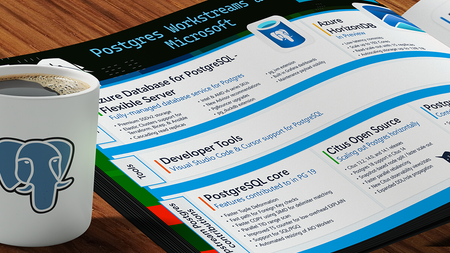
Affan Dar, Vice President of Engineering, PostgreSQL at Microsoft Charles Feddersen, Partner Director of Program Management, PostgreSQL at Microsoft Today at Microsoft Build, we’re pleased to announce the public preview of Azure HorizonDB, a new enterprise-ready Postgres-compatible database service designed to meet the needs of modern AI applications, alongside a set of enhancements to our PostgreSQL tooling in Visual Studio Code to further streamline the developer experience. Postgres is rapidly solidifying its role as a foundational layer in modern data architectures, with accelerating adoption across industries. For developers, it has become the preferred platform for new application development, driven by its extensible architecture, mature extension ecosystem, and adherence to open standards and APIs. At the same time, enterprises are choosing Postgres to re-platform and modernize existing systems, taking advantage of its ability to support a broad range of operational workloads while enabling advanced capabilities such as vector-based data access all within a single, interoperable platform. A Postgres Platform Grounded in Security, Resilience, Scale, and Performance Azure HorizonDB is purpose-built to meet these demands, combining the flexibility developers expect from Postgres with the operational rigor enterprises require. It extends the core Postgres engine with cloud-native capabilities such as integrated identity, fine-grained network and security controls, and seamless lifecycle management, while preserving full compatibility with the open ecosystem of extensions and tools. At the same time, HorizonDB introduces advanced, natively integrated capabilities like vector data support and AI model management, enabling new classes of intelligent applications without sacrificing transactional integrity or developer productivity. These capabilities are backed by a platform designed for enterprise performance and scale. HorizonDB supports databases up to 128 TB, scales out with up to 15 read replicas for high-throughput workloads, and delivers sub-millisecond commit latency across availability zones for low-latency transactions and high availability. This combination is critical for modern applications that require consistent performance under load, including high-concurrency transactional systems, real-time AI-driven interactions, and globally distributed services. The result is a unified platform that scales from the first line of code to globally distributed, mission-critical systems. Enterprise adoption ultimately depends on trust in the platform itself. Azure HorizonDB delivers this with native integration into Microsoft Entra ID for centralized identity and access control, private endpoints for network isolation, and built-in encryption to protect data at rest and in transit. These capabilities are essential for meeting compliance requirements and enabling organizations to run mission-critical workloads with confidence, without added complexity. This foundation is critical for any application, but it becomes indispensable for AI, where secure access to data and controlled model interaction underpin every intelligent experience. Building on this, HorizonDB introduces a set of integrated AI capabilities designed to bring intelligence directly into the database. Run Fast, Memory-Efficient Vector Search with DiskANN HorizonDB brings high-performance vector search directly into Postgres through DiskANN with spherical quantization. This enables efficient, low-latency similarity search at scale while significantly reducing memory and storage overhead. Spherical quantization works by normalizing vectors and encoding them into compact representations that preserve angular distance, allowing the system to compare vectors efficiently with minimal loss in accuracy. The result is the ability to index and query large embedding datasets within the transactional engine itself, making vector search a first-class capability rather than an external dependency. "HorizonDB is compelling because it brings a PostgreSQL-compatible foundation, AI-native capabilities and enterprise-grade controls closer to the operational data layer." Jennings Balavari, Founder, Opsen AI Build Smarter Apps with Hybrid Search in Postgres HorizonDB supports hybrid search by combining vector similarity through pgvector with full-text search enabled via the pg_textsearch extension, allowing applications to match both semantic meaning and precise keyword relevance in a single query. This enables more accurate, context-aware results, such as blending intent-driven retrieval with exact term matching for search, recommendations, or RAG scenarios. By unifying these capabilities within Postgres, HorizonDB improves result quality while simplifying application design without the need for external search systems. Operationalize AI with Built-In AI Model Management Working with vectors requires models to generate, interpret, and evolve embeddings, making model lifecycle a core part of the application stack. HorizonDB introduces integrated AI model management to simplify how models are registered, versioned, and governed alongside data, including built-in support for generative GPT models and ranking models. For example, GPT models can be used to generate summaries, responses, or structured outputs directly from application data, while ranking models enable relevance scoring for search results or recommendations over vector results. By managing these models alongside the data they operate on, HorizonDB ensures consistency, traceability, and control, creating a unified environment where models and data evolve together. “As we build a multi-tenant, AI-driven commerce platform, HorizonDB has been particularly compelling in two areas: scale and how close AI capabilities are to the data itself. Running vector search, filtering, and model-driven workflows directly inside the database removes a lot of the complexity we’d normally manage across separate services." James Frawley, CIAO, ReFiBuy Bring AI into SQL with AI Functions With models managed in place, AI Functions provide a direct way to invoke them from within SQL and application logic. These functions are implemented through the azure_ai extension, which brings model invocation directly into the Postgres engine. This allows developers to embed inference into queries and transactions, eliminating the need for external orchestration. By bringing model execution closer to the data, AI Functions reduce latency, simplify application design, and make intelligent behavior a natural extension of existing Postgres workloads. "What stood out with HorizonDB is that it aligns closely with how we already think about the problem. Instead of stitching together multiple components, it brings transactional data, vector search, and AI capabilities into a single platform, which simplifies the architecture without forcing a complete rethink." Mohsin Shafqat, Director Software Engineering for Nasdaq Boardvantage®, Nasdaq Run Reliable, Event-Driven Workflows with AI Pipelines Finally, AI Pipelines operationalize these capabilities through reliable, event-driven workflows for model execution and data processing. Pipelines execute on data changes, enabling real-time asynchronous reactions without external orchestration and ensuring consistent, repeatable behavior as data evolves. Combined with model management and AI Functions, they turn embedded intelligence into something that can be run, scaled, and trusted in production, while inheriting the database’s high availability and failover characteristics for resilience. Pipelines can also be visualized and observed in real time through the Visual Studio Code extension for PostgreSQL, giving developers and operators immediate visibility into execution flow, state, and outcomes Modern Unified Experience for Data, AI, and Operations in VS Code As intelligence becomes a core part of the data platform, the developer and operator experience becomes equally critical. HorizonDB extends seamlessly into Visual Studio Code with enhanced PostgreSQL tooling that works across any Postgres deployment, not just HorizonDB. Features like AI-assisted query plans and integrated monitoring enable faster debugging and optimization, helping teams understand both database performance and AI-driven behaviors. At the same time, for Azure-based deployments, the experience is deeply integrated with platform capabilities, enabling management of networking configuration, server parameters, and server logs directly from the development environment, streamlining operations across application and infrastructure layers. Azure HorizonDB brings together enterprise-grade security, deep Postgres compatibility, and a modern AI-native data platform, all engineered for developers. It scales efficiently across workloads, from transactional systems to intelligent applications, while delivering a world-class, Azure-integrated experience in Visual Studio Code for both developers and operators. Ready to get started with Azure HorizonDB? Azure HorizonDB is now available in public preview in Australia East, Central US, Sweden Central, West US 2, and West US 3 regions. Additionally, East US, Canada Central, Indonesia Central, Italy North, Japan East, Korea Central, and Poland Central will be available in the coming weeks. You can get started today by creating a new HorizonDB instance using the Azure portal, API’s, or the Visual Studio Code extension for PostgreSQL to begin exploring these capabilities firsthand. To learn more, dive deeper into our documentation and sign-up today to try AI model management in a limited preview.Building Autonomous Agents with Microsoft Agent Framework and GitHub Copilot SDK Part 2/5
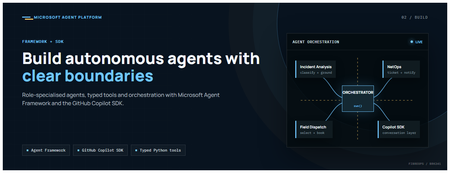
This is the second post in our series on the Microsoft agent platform. Here we dive deep into building autonomous agents, the development experience, the Microsoft Agent Framework, tool design patterns, and how the GitHub Copilot SDK brings conversational AI to your agent system. All examples reference the FibreOps repository, an autonomous fibre outage response system demonstrated at Microsoft Build BRK241. The Microsoft Agent Framework The Microsoft Agent Framework (now GA) provides a unified programming model for building agents. It supports multiple backends through a single .run() contract: Hosted — FoundryAgent connected to a Prompt Agent published to Microsoft Foundry Agent Service. Foundry — Agent + FoundryChatClient with the definition resolved locally (ideal for prompt iteration). Local — Deterministic LocalAgent for offline development and testing. This design means your orchestration code never changes regardless of where the agent runs. The factory pattern in FibreOps selects the backend at startup: # src/fibreops/agents/factory.py — simplified from agent_framework_foundry import FoundryAgent from agent_framework import Agent, FoundryChatClient def build_agent(role: str, backend: str, config: Config): if backend == "hosted": return FoundryAgent(agent_id=config.foundry_agents[role]) elif backend == "foundry": return Agent( instructions=get_instructions(role), chat_client=FoundryChatClient(endpoint=config.endpoint), tools=get_tools(role), ) else: return LocalAgent(role=role) Set FIBREOPS_AGENT_BACKEND to override the backend, or leave it as auto for intelligent detection. Designing Role-Specialised Agents FibreOps demonstrates a key pattern: role specialisation. Rather than one monolithic agent, the system uses three focused agents, each with a clear responsibility boundary: Agent Role Tools Available IncidentAnalysisAgent Classify severity, find root cause, retrieve SOP Knowledge (SOPs + topology), Web IQ, Work IQ NetOpsCoordinatorAgent File D365 incident, post Teams notice Ticketing, Teams, Memory FieldDispatchAgent Select engineer, book resource, update team Dispatch, Teams, Voice Why Role Specialisation? Focused system prompts — Each agent has a tightly scoped instruction set, reducing hallucination and improving reliability. Independent evaluation — You can score each agent separately against role-specific criteria. Parallel development — Teams can iterate on agents independently. Selective upgrade — Swap one agent's model or implementation without touching others. Tool Design: Typed Python Functions Tools in the Microsoft Agent Framework are typed Python functions that the runtime supplies to the hosted agent definition. FibreOps demonstrates several tool categories: Knowledge Tools # src/fibreops/tools/knowledge.py — simplified def sop_lookup(node_id: str, signal_type: str) -> dict: """Retrieve the Standard Operating Procedure for a given signal type. Args: node_id: The fibre node identifier (e.g., FN-LDN-001) signal_type: The type of signal (loss_of_light, high_ber, signal_degradation) Returns: SOP with steps, escalation path, and estimated resolution time. """ # Load from local markdown SOPs or Foundry IQ ... def web_iq_search(query: str, *, limit: int = 5) -> list[dict]: """Search public web for context relevant to the incident. Grounding against roadworks, weather, power outages, splice guidance. Falls back to deterministic fixtures when endpoint is unset. """ ... def work_iq_search(query: str, *, limit: int = 5) -> list[dict]: """Search enterprise knowledge for context relevant to the incident. Site surveys, SLA tiers, competency matrix, MTTR trends. """ ... Integration Tools # src/fibreops/tools/teams.py — simplified def post_outage_notice( incident_id: str, node_id: str, severity: str, summary: str, engineer: str | None = None, ) -> dict: """Post an Adaptive Card outage notice to the configured Teams channel. If TEAMS_WEBHOOK_URL is not set, appends to state/teams_outbox.jsonl for offline review. """ card = build_adaptive_card(incident_id, node_id, severity, summary, engineer) if config.teams_webhook_url: requests.post(config.teams_webhook_url, json=card) else: append_to_outbox(card) return {"status": "posted", "incident_id": incident_id} Design Principles for Agent Tools Typed parameters with docstrings — The runtime uses type hints and docstrings to generate the tool schema for the LLM. Graceful degradation — Every tool works offline by falling back to local fixtures or file-based state. Idempotent where possible — Tools that create resources return existing records if called with the same parameters. Observable — Every tool invocation emits an OpenTelemetry span for tracing and debugging. The Orchestrator Pattern The orchestrator drives signals through the agent pipeline. It is deliberately simple — a linear flow with error handling: # src/fibreops/orchestrator.py — simplified async def handle_signal(signal: TelemetrySignal) -> RunResult: """Process a telemetry signal through the agent pipeline.""" # Stage 1: Incident Analysis analysis = await incident_agent.run( f"Analyse this signal: {signal.model_dump_json()}" ) # Stage 2: NetOps Coordination coordination = await netops_agent.run( f"Coordinate response for: {analysis.summary}" ) # Stage 3: Field Dispatch dispatch = await dispatch_agent.run( f"Dispatch engineer for incident: {coordination.incident_id}" ) return RunResult( signal=signal, analysis=analysis, coordination=coordination, dispatch=dispatch, ) The orchestrator honours the same contract regardless of backend — hosted , foundry , or local — because all backends implement await agent.run(prompt) . GitHub Copilot SDK Integration (GA) The GitHub Copilot SDK enables conversational interaction with your agent system. FibreOps implements FibreOpsCopilotClient with the same interface as github/copilot-sdk : # src/fibreops/sdk/__init__.py — simplified from fibreops.sdk.client import FibreOpsCopilotClient client = FibreOpsCopilotClient() session = client.create_session() # Query agent status response = session.send_and_wait("status") print(response.text) # Human-readable summary print(response.data) # Structured JSON # Inject a telemetry signal via conversation response = session.send_and_wait(json.dumps({ "signal_id": "sig-demo", "node_id": "FN-LDN-001", "signal_type": "loss_of_light", "severity": "critical" })) The adapter routes prompts by shape: JSON signal-shaped dicts — Forwarded to the orchestrator for processing. Free-form text — Answered by a deterministic responder ( help , status , nodes , engineers , optimiser , dispatch ). Drive it from the terminal: python -m fibreops.demo chat "help" python -m fibreops.demo chat "status" python -m fibreops.demo chat '{"signal_id":"sig-demo","node_id":"FN-LDN-001","signal_type":"loss_of_light","severity":"critical"}' Or hit the embedded HTTP endpoint when the NOC console is running: Invoke-RestMethod -Method Post http://127.0.0.1:8800/sdk/chat -Body '{"prompt":"status"}' -ContentType application/json Development Workflow with Foundry Toolkit for VS Code The Foundry Toolkit for VS Code provides an integrated development experience: Author prompts — Edit system instructions with live preview and token counting. Test locally — Run against the foundry backend with FoundryChatClient pointing at your development model. Iterate fast — The foundry backend resolves definitions locally, so prompt changes take effect immediately without republishing. Publish when ready — python -m fibreops.demo publish creates hosted Prompt Agents in Foundry. Multi-Model Support The Microsoft Agent Framework supports multiple models. FibreOps defaults to gpt-4.1-mini (the model available in most demo Foundry accounts), but any chat-completions deployment works: # .env AZURE_AI_MODEL_DEPLOYMENT=gpt-4.1-mini # or gpt-4o-mini, gpt-4o, gpt-4.1 The framework also supports Claude Code connectors and Magentic-One for multi-agent collaboration scenarios. Testing Strategy FibreOps demonstrates a layered testing approach: Unit tests — Test tools in isolation with mocked dependencies. Local backend tests — Run the full pipeline with LocalAgent for deterministic assertions. Integration tests — Run against real Foundry agents with pytest -q . Rubric evaluation — The optimizer scores every run against defined criteria. # Run the test suite .\.venv\Scripts\python.exe -m pytest -q Key Takeaways The Microsoft Agent Framework provides a unified .run() contract across hosted, foundry, and local backends. Role specialisation keeps agents focused, testable, and independently evolvable. Tools are typed Python functions with docstrings — the runtime generates schemas automatically. The GitHub Copilot SDK (GA) enables conversational interaction with any agent system. Graceful degradation means the entire system works offline for development. The factory pattern lets you switch backends without changing orchestration code. Next Steps Clone the FibreOps repository and run python -m fibreops.demo --signals 3 Microsoft Agent Framework documentation Next in this series: Running Hosted Agents in Microsoft Foundry Agent Service