viva suite
59 TopicsViva Goals is now generally available!
Today we are excited to announce the general availability of Microsoft Viva Goals. Since our initial announcement and private preview launch in May 2022, we have taken feedback from hundreds of Viva customers across the enterprise and global partners to ensure the best product experience. Thank you to every person who participated in this process. We love hearing feedback like this from Neudesic: "OKRs and Viva Goals offer Neudesic an opportunity to work directly with executives on the things that matter most to their business, helping them get from strategy to execution. From here, we gain valuable insight into the broader needs of our customer’s business and can work with them to drive better business outcomes using this newly found visibility, alignment, and level of trust created at senior levels.” —Kevin Corr, National Director Business Advisory Services at Neudesic Here you can watch Viva Goals CVP Vetri Vellore give an overview of Viva Goals: If you’re an existing Viva suite customer, you have access to Viva Goals today. If you’re not a Viva suite customer yet, learn more about Viva Goals and the entire Viva suite. What is Viva Goals? Microsoft Viva Goals is a goal-setting and management solution that aligns teams to your organization’s strategic priorities, driving results and a thriving business. We help business leaders build higher performing teams, HR leaders improve employee experience, and employees feel a sense of purpose and belonging at work. But how? Creating clarity: With one centralized source of truth for goal setting, monitoring progress, and assessing success across your organization, you create clarity for your team, connect daily work to outcomes and align at all levels Focusing teams on impact, not output: Shift focus from effort and activity to impact and outcomes, share progress across your organization with customizable dashboards that turn data into insights, and stay agile at scale Bringing goals into the flow of everyday work: Keep goals top-of-mind by bringing data and actions into the spaces your team is already using, like Microsoft Teams, ADO, and the most popular data and project management tools. Today, Viva Goals supports the OKR (Objectives and Key Results) goal-setting framework, popularized at Google, Intel, and other Fortune 500 companies for alignment it naturally creates between the work teams are doing and an organization’s top business priorities. Because Viva Goals is a part of Microsoft Viva, it integrates into the employee experience, empowering people and teams to be their best from anywhere with both a seamless Teams integration and web app. Viva Goals also supports integration with tools you use today, so you can stay connected to progress without adding another layer of work for your team. Scroll down for a list of all the integrations we offer today. Viva Goals Access and Licensing Now, you can start using the full set of features in Viva Goals with the purchase of one of the following SKUs: Microsoft Viva Goals SKU Microsoft Viva SKU Viva Goals is available as an application in Microsoft Teams and as a web application. The Viva Goals web application has no prerequisites; customers can purchase and use Viva Goals with the web application without any other Microsoft product or subscription. A Microsoft Teams product license is a prerequisite to use the Viva Goals application in Teams. Teams can be licensed with Microsoft 365 F1, F3, E3, A3, E5, A5; Office 365 F3, E1, A1, E3, A3, E5, A5; Microsoft 365 Business Basic, Business Standard, Business Premium; or Microsoft SharePoint K, Plan 1, or Plan 2 license. For pricing details, a comprehensive list of what’s included in your existing subscription, and what’s unlocked with Viva Goals SKU or Viva suite SKU purchase, go to Microsoft Viva Goals. see this page. For details on how to start rolling out Viva Goals in your tenant, go to our docs page for step-by-step configuration and admin guidance. You can also get started today with a Viva Goals trial. Ask your Microsoft account representative or sign up yourself. Viva Goals Capabilities Now let’s look at some of the features that bring your organization's OKRs into the flow of work with Viva Goals. We will continue to add more exciting capabilities to this list in the future. Make sure to watch the Viva Goals session at Ignite for a product overview and complete feature breakdown. Define success by creating OKRs from scratch or using built-in templates Whether you’re an old hand at OKRs or are using OKRs for the first time, we have features that make OKRs accessible. Align at all levels of the organization with OKR approval workflows, Organizational, Team, and Individual goal pages, and Chart View. Understand your team’s goals in the context of goals up, down, and across your organization. Connect work to outcomes with Projects and Tasks aligned to OKRs Ensure every employee understands how the work they do every day contributes to moving the needle for your organization. Focus discussions, provide context and simplify reporting with custom dashboards and OKRs that dynamically update. Customizable dashboard and automations help leaders keep goals top-of-mind at town halls and team meetings and offer insight into real-time progress towards your goals. Share progress and insights across your organization with shareable links to dashboards Progress shouldn’t exist in a silo. With shareable links, you can keep every employee engaged in team goal setting and progress. Viva Goals app in Teams Is your organization beginning to use Viva Goals? Search for “Viva Goals” in the Teams app menu, pin to your nav rail, and start exploring today. Stay in the flow of work with the Viva Goals app in Azure Dev Ops Viva Goals layers into the systems of work your team is already using, like Azure Dev Ops—keeping business goals front and center in the place where work is happening. Communicate, collaborate and check-in on goals with the message extension in Teams chat. Build a culture of conversation around goals with the Teams messaging extension. Integrations Available Now I’m pleased to share that the following integrations are live today: Amazon Redshift Asana Azure DevOps BigQuery Box Domo Excel Online Favro GitHub GitLab HubSpot Jira Looker Mode monday.com MS SQL MySQL PostgreSQL Salesforce Smartsheet Snowflake Tableau Trello Zendesk Note that all third-party integrations require a separate subscription with that 3rd party. The Next Generation of Goal-Setting for Businesses Right now, leaders, managers, and all employees are rethinking the how, what, where, when, and why of work. Employees are looking for a culture they care about, and a sense of purpose and meaning at work. They want to know that they’re part of something bigger and see how what they come to work to do every day ladders up to bigger goals and organizational mission. And as hybrid work continues to become more normalized—only 50% of businesses are planning to go back to fully in-person work in the coming year, according to the 2022 Work Trends Index—we need to figure out how to both meet these increasingly important employee needs of purpose and meaning at work all while delivering business results. We hope you’ll join us on this journey to help organizations and employees focus, align, and achieve their fullest potential. For more information on the road to Viva Goals and best practices in the product, check out the Intrazone podcast we just recorded here: To stay up to date on the latest with Viva Goals, see details on features & licensing, and get started with a trial, visit https://www.microsoft.com/en-us/microsoft-viva/goals. Where You Can Learn More About Viva Goals Microsoft Viva Goals Microsoft Viva Goals bring purpose and alignment to the employee experience Microsoft's Vetri Vellore on helping employees see their impact Focus and Alignment: How Microsoft uses OKRs to achieve business goals Why hybrid work makes OKRs more essential than ever eBook: Engage Your Employees to Achieve Powerful Business Outcomes About the Microsoft Viva suite Microsoft Viva How to enable a digital employee experience with Microsoft Viva 50KViews6likes9Comments
Announcing new Microsoft Viva IT Admin features
With our new Microsoft Viva admin experience, IT admins will be able to initiate configuration, deployment, and license management for all generally available Viva applications from a central location in the Microsoft 365 Admin Center.9.3KViews5likes0CommentsMicrosoft Copilot Academy now available to all Microsoft 365 users
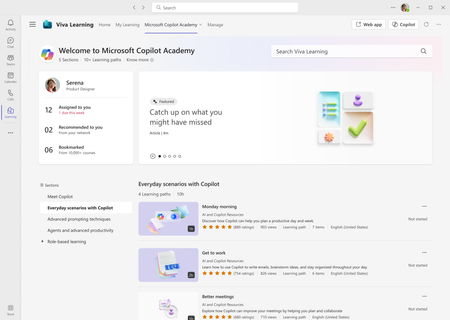
We are pleased to announce that all Microsoft 365 users can now access Microsoft Copilot Academy to improve their AI and Copilot skills. This academy – curated by Microsoft experts – provides a comprehensive, structured learning experience designed to help users master the use of Copilot through hands-on learning activities and experiences. Click here to learn more about what Copilot Academy includes. Last year, we announced the academy was available to all Microsoft 365 Copilot users. We have now lifted the Copilot license requirement, giving immediate access to any user with a Microsoft 365 license. No additional registration or administrative action is required to start using Copilot Academy. Please see appendix 1 for an updated table that lists the licenses that grant access to Copilot Academy. Use Copilot Academy to train users before assigning Copilot licenses The new licensing structure for Copilot Academy unlocks a new scenario for administrators – ensuring users commit to Copilot training through the academy before receiving a Copilot license. Administrators can now use Copilot Academy as a tool to teach users how to leverage Copilot before a license has been assigned. This allows users to see the value of Copilot and learn how it can maximize their productivity throughout the workday. Upskilling before receiving a license encourages faster time-to-value with Copilot and helps identify workstreams where Copilot will have the greatest impact. View of Microsoft Copilot Academy. The academy is accessed through the Academies tab on the menu bar. Microsoft 365 users can access the Copilot Academy by navigating to the Academies tab in Viva Learning and selecting Microsoft Copilot Academy or accessing the academy link directly at https://aka.ms/copilotacademy. Additionally, the AI & Copilot Resources provider options help users easily browse or filter Copilot Academy content. Users can browse Copilot Academy materials on the Viva Learning homepage or filter searches with the Provider filter option. Admin experience All learning administrators can configure the visibility of Microsoft Copilot Academy – this includes Knowledge Admins, Knowledge Managers, and users with administrator access provided by feature access management. The tenant-wide default for Copilot Academy access is set to everyone but can be changed to Microsoft 365 Copilot Licensed Users – restricting the academy to only those with the Copilot license. Administrators can control the content provider that powers Copilot Academy through a dedicated provider called AI & Copilot Resources, accessible in the Admin tab in Viva Learning under Manage Providers. This will now appear alongside other default learning providers like Microsoft Learn, Microsoft 365 Training, and LinkedIn Learning. The AI & Copilot Resources provider can be added or deleted in the Manage Providers tab, and provider permissions can be managed in the Manage Permissions tab under the Admin menu. Additionally, the AI & Copilot Resources provider can be disabled, which will disable all learning paths within Copilot Academy. For an in-depth feature breakdown, click here to review the complete documentation on Microsoft Learn. Administrators can manage permissions for the– AI & Copilot Resources content provider powering the Microsoft Copilot Academy. Looking ahead Upcoming functionality the team is currently working on to enhance the Microsoft Copilot Academy includes: Support for custom group access to Copilot Academy – this would enable administrators to provide access to the academy through security groups Notification settings – administrators will have the option to configure (and disable if desired) the default monthly notifications. Appendix 1: Users with any of the licenses below can now access Copilot Academy Microsoft 365 A3 for faculty Office 365 A1 for faculty Microsoft 365 A5 for faculty Office 365 A3 for faculty Microsoft 365 Business Basic Office 365 A5 for faculty Microsoft 365 Business Premium Office 365 E1 Microsoft 365 Business Standard Office 365 E3 Microsoft 365 E3 Office 365 E5 Microsoft 365 E5 Office 365 F2 Microsoft 365 F1 Office 365 F3 Microsoft 365 F3 Microsoft Viva Suite for faculty Microsoft Viva Suite Microsoft Viva Suite with Glint for faculty Microsoft Viva Suite with Glint Microsoft 365 Copilot Microsoft Viva Learning8KViews1like3Comments