viva engage
72 TopicsHow deep do you want to go? Microsoft Copilot, Cowork, and Viva Engage in action
There’s so much beneath the surface in Engage, including insights into: How employees are feeling The questions they keep asking Feedback that can sharpen your next message Knowledge worth sharing more widely New Copilot in Engage and Copilot Cowork experiences help communicators, community managers, and leaders bring more of it into view, connect these insights with the work they’re already doing, then make better decisions from what they learn. Join our webinar: Go Deeper with Engage with Copilot and Cowork December 3, 2026, 9:00 AM PT See Copilot in Engage, Cowork, and Community Agent in action through live demos of real scenarios. You’ll also learn how to get set up with the Engage plugin and ready-made skills so you can try it yourself right away. What’s new Enhanced Copilot in Engage Coming soon, the enhanced Copilot in Engage can analyze conversations, connect Engage insights with your wider Microsoft 365 work, and creating outputs such as community health reports, posting plans, and presentations. Engage plugin for Copilot Cowork Rolling out now, the Engage plugin brings community knowledge, conversations, and actions into Copilot Cowork. Cowork can combine Engage content with your meetings, chats, emails, and files to complete multistep tasks on your behalf, like posting to Engage and sending emails. Use Viva Engage in Microsoft 365 Copilot Cowork Use plugins with Copilot Cowork Ready-made skills for common jobs To get you started, we’ve built skills that help community managers and corporate communicators complete repeatable work faster. Choose a workflow from the Community Pack or Comms Pack, such as reviewing how a message landed, preparing a leader briefing, or drafting a community roundup, and prompt Cowork to begin. Get the skills and learn how to add them to Cowork New capabilities for Community Agent Community Agent is an AI agent available in public preview for Viva Engage communities that helps admins and experts keep up with colleagues' questions. Recent updates to Community Agent bring more knowledge sources, clearer answers, and easier draft review and activity tracking. Read the full roundup of Community Agent improvements Note: the Microsoft Copilot, Cowork, and Community Agent experiences described in his blog require a Microsoft 365 Copilot license. Go deeper: three everyday scenarios The possibilities for going deeper with Copilot, Cowork, and Engage are endless. The following examples show how you can get deeper levels of help with your work, from exploring information to bringing together context and carrying out a task. How did your leader’s message land? Deep: Review an announcement’s post analytics, including sentiment and themes from comments. Gather the questions and reactions from the comments that should shape your follow-up. Deeper: Ask Copilot in Engage to identify themes and unresolved questions and turn the findings into a presentation. Deepest: Have Cowork prepare a repeatable leader-ready briefing that brings together post metrics, comment themes, and recommended next steps. Review it before by sending to your leader by email. Try it in Cowork: Get the /how-did-it-land skill for Cowork. Prompt: /how-did-it-land, how did the post by [leader] about [topic] land? When you’re happy with the report, ask for an overview email you can send to the leader. Is your community getting the answers it needs? Deep: Review community analytics, including sentiment and themes. browse discussions and find questions that need an answer. Deeper: Ask Copilot in Engage to summarize recurring questions and suggest useful follow-up content. Could an FAQ or pinned “Start here” post help? Deepest: Let Community Agent help handle questions using community conversations and configured knowledge sources. It drafts answers for review or posts automatically according to community settings. Us the /community-report and /questions-needing-help skill to ask Cowork to give you a readout on how your community is doing and where to focus attention. Ask for an interactive dashboard to share. Try it with the Community Agent and Cowork: Add the Community Agent to the community and provide it with relevant knowledge sources from SharePoint and public websites. Get the /community-report and /questions-needing-help skills for Cowork. Prompt: /community-report give me a readout on [community name]. /questions-needing-help Include a view of questions that haven’t been answered or need additional help. Make it an interactive dashboard I can share. How do you turn a busy week into a great update? Deep: Gather meeting notes, chats, and files, then write an Engage update. Deeper: Ask Copilot in Engage to turn that context into a draft for your audience, informed by your work and writing style. Deepest: Ask Cowork to gather the context, prepare the post, and publish through the Engage plugin after you approve it. Try it in Cowork: Prompt: Use my meetings, chats, and files about [project] from the last week to draft an update for the [community name]. Explain the latest status, celebrate successes, highlight what we are learning, outline next steps, and invite questions. Thank contributors. Show me the draft and publish to Engage only after I approve. Provide feedback on the message, then approve. Cowork will post to Engage on your behalf. Engage skills for Cowork We're introducing 17 skills for community managers and corporate communicators to use with the Engage plugin in Microsoft Copilot Cowork. Start with the result you need: use /how-did-it-land to review available post metrics, recurring questions, and feedback, with a suggested next step. Try /leader-briefing to turn selected conversations into a concise private brief, or /community-roundup to draft a summary of useful conversations on a chosen topic. How skills work The Engage plugin lets Copilot Cowork find and read conversations in Engage. Once you add the plugin, you can bring those conversations into the work you do in Cowork. A skill is a set of instructions for a specific job. You choose the skill and provide the community and/and topic; Cowork follows the instructions and uses the plugin to get the information it needs. Download the skills Add the Engage plugin for Cowork. Download the pack of skills, then extract the files Open Copilot Cowork. Select Customize. Select the Add menu, then Upload and choose a skill to add. Try the skill. Start a new Cowork conversation. Type / to choose an installed skill, or simply prompt in plain language. For example, "how did [leader name] message about [topic] land?" Do you have feedback on these skills or an idea for a skill you'd like us to create? Share your feedback in a short survey. For more setup details, see Customize Copilot Cowork and Use plugins with Copilot Cowork. Choose your skills Comms Pack Use these skills to prepare communications, understand the response, and organize follow-up work. Skill What it helps you do /how-did-it-land See how an Engage post was received: its first-week numbers against your recent posts, the main themes and open questions, and one next step. /network-themes See the main topics people have discussed across Engage in the last 28 days, with example conversations. /metrics-tracker Put first-week reach, reactions and comments for the Engage posts you choose into a new or existing Excel tracker. /ama-question-tracker Build an Excel tracker of AMA questions grouped by theme, or safely update one this skill created. /leader-briefing Turn selected Engage conversations into a short private brief for a leader, with a suggested next move for each. /leader-reply-radar Find up to 5 conversations where a reply or thank-you would help, with draft wording to paste. /pre-flight-check Check a draft against its sources and get a go / no-go, each error with evidence, and the smallest fixes. /event-close-out Sort an event's questions into answered, partly answered and open, and draft follow-up text for the event owners. /question-forecaster Prepare likely questions and a draft FAQ from approved facts, flagging answers that still need a decision. /leader-moment-composer Turn a brief into draft of a leader post with two alternative openings and notes on where each claim comes from. /recommended-leaders Review Engage's recommended-leader suggestions and visible setup, and prepare an admin checklist. /what-to-feature Get 2-5 recent conversations worth featuring or pinning, each with a reason. You decide and take the action. Community Pack These workflows focus on understanding a community, helping members find useful information, and handling membership tasks. Skill What it helps you do /community-review Explains what your community contributes, how people participate, who helps keep it active, and where you could focus next. /community-roundup Turns useful updates, answers, resources and event takeaways into a catch-up post for members who missed the conversations. /contributor-recognition Helps you decide whom to recognize and why, based on helpful answers, useful resources and constructive contributions. /questions-needing-help Finds question posts that still need a specific answer or follow-up after reviewing the replies. Separately identifies existing answers worth reviewing for verification. /community-membership-summary Shows who is represented in your community through breakdowns by job title, community role and recorded office location, where available.82Views2likes0CommentsCommunity Agent just got better: Here's what's new
Community Agent is an AI agent for Viva Engage communities that helps admins and experts keep up with colleagues' questions. Since public preview began, communities have used it to support AI adoption, help colleagues with everyday technology questions and extend support outside a team's usual working hours. We've continued improving the experience with more knowledge sources, clearer answers and easier ways to review drafts and understand the agent's activity.362Views0likes0CommentsNew publishing updates help Engage posts land the way you intend
Engage is introducing a series of publishing improvements designed to help communicators, leaders, and employees publish with greater confidence. New capabilities make it easier to preview posts before publishing, identify file permission issues before readers encounter them, and track announcement delivery after publication.1.2KViews5likes1CommentWhat’s new and next in Engage: June 2026
Stay up to date with the latest innovations coming to Viva Engage in June 2026. This update highlights new capabilities designed to enhance community engagement, streamline leadership communication, and empower employees to connect, share, and collaborate more effectively across your organization.3.5KViews6likes2CommentsAn Update to Viva Engage Email Delivery
Good communication is not just about sending more messages. It is about using the right channel for the right person at the right moment. The best notification system is not the one that tries every possible route. It is the one that knows which routes are real. For many information workers, email is still part of the communications mix. For other employees, especially frontline or mobile-first workers, Teams, mobile, and in-product experiences may be the more reliable path into Engage. Until now, Engage could still attempt to send email notifications to users who did not have a supported mailbox or routable email destination. Those attempts could create retries and extra processing across email systems, even though the recipient could not receive the message by email. Going forward, before attempting to send an email notification, Engage will check whether the recipient has a supported, routable email destination. If they do, email notifications continue as expected. If they do not, Engage will suppress the email notification instead of sending it into a channel that cannot receive it. The goal is simple: send email when email is available and avoid unnecessary delivery attempts when it is not. This update closes that loop. It helps reduce unnecessary email traffic while preserving the Engage experiences employees already use. Please see Message ID MC1309743 for earlier communications on this update. When will this happen General Availability, Worldwide: Rollout will begin by mid-October 2026 and is expected to be completed by the end of December 2026. The change will be enabled automatically, and organizations may begin observing the updated behavior at different points during the rollout period. How this affects Engage email notifications Before sending an Engage email notification, the service will check whether the recipient has a supported email destination available through Microsoft 365 services. If a supported email destination is available, Engage will continue processing eligible email notifications. If no supported email destination is available, Engage will suppress the email notification rather than attempting delivery. This change applies to all Engage-generated email notifications for users without a supported, routable email destination. Depending on the user's notification preferences and eligibility, this may include: Community activity notifications. Community announcements. Post and reply notifications. Storyline notifications. Digest emails. Other supported Engage notification emails. Existing email notification preferences will continue to apply for users with supported email destinations. This change adds an email eligibility check before an email notification proceeds to delivery. Supported mailbox scenarios Scenario What happens What stays true User has a supported mailbox or routable email destination Eligible Engage email notifications continue to be processed for delivery. This includes active Exchange Online mailboxes and other supported, routable email destinations. Existing notification preferences continue to apply. User does not have a supported email destination Engage suppresses the email notification instead of attempting to send it. Users can continue accessing Engage through supported non-email experiences. Users on frontline licenses Users without a supported email destination will no longer receive Engage email notifications. Users with a supported destination will continue receiving eligible notifications. Access to Engage remains unchanged. Other supported notification channels, including Teams, remain available. License type alone does not determine email delivery. Users in hybrid Exchange environments Users with supported on-premises Exchange mailboxes, hybrid or remote mailbox configurations, or other supported routable destinations will continue receiving eligible email notifications. Supported hybrid configurations remain eligible for email delivery. Test, staging, automation, or service accounts Email notifications are suppressed for accounts without a supported email destination, reducing unnecessary delivery attempts. Account access to Engage remains unchanged. Accounts with supported email destinations continue receiving eligible notifications. How to prepare Most organizations do not need to take action. Organizations with users who do not have active mailboxes or supported email destinations may observe: Fewer Engage email delivery attempts. Fewer retries for notifications that cannot be delivered. Reduced unnecessary email traffic. Reduced processing across organizational email systems and gateways. No change for users with supported email destinations. Admins may want to review the following: Review mailbox provisioning - Identify users who are expected to receive Engage email notifications and confirm that they have a supported, routable email destination. Do not rely only on license assignment - An Engage license does not necessarily indicate whether a user can receive email. Users with the same license may have different Exchange or mailbox configurations. If email delivery is required for a user, verify the user's actual mailbox and email configuration. No action needed for users with supported mailboxes - If users already have supported, routable email destinations, there is no action required. Eligible Engage email notifications will continue to be delivered as they are today. FAQ Will this remove anyone's access to Viva Engage? No. This update only affects Engage email delivery. It does not change access to Viva Engage through the web, mobile app, or Microsoft Teams. Will Teams notifications still work? Yes. Notifications delivered through Microsoft Teams are not changed by this update. Will users with valid mailboxes still receive email notifications? Yes. If a user has a supported, routable email destination, eligible Engage email notifications continue to be processed as they are today. Does license type determine whether email is sent? No. This change is based on whether a supported email destination is available for the recipient. Users with similar licenses can have different mailbox configurations. Do admins need to configure anything? Most organizations do not need to take action. Admins may want to review users who are expected to receive Engage email notifications and confirm their mailbox configuration.411Views0likes0CommentsRecording Available: Starting Point - First 30 days with Viva Engage
If your organization already works in Microsoft Teams, Viva Engage can feel like one more place to post. Engage gives leaders, communicators, community managers, and employees a place for conversations that need broader visibility, participation, and reuse across the organization. That is the focus of Starting Point: First 30 Days with Viva Engage, a practical webinar for customers who are new to Engage or bringing Engage communities into the flow of work in Teams. TLDR... Teams and Engage do different jobs. Teams is where known groups coordinate work. Engage is where broader communities connect, ask questions, learn, and build knowledge over time. Leaders create early momentum. A leader post, a clear question, visible replies, and a close-the-loop follow-up can make Engage feel active from the start. Communities need purpose before scale. Start with a few places people can understand, not a long list of spaces they have to decode. Roles work differently in Engage. Leaders, delegates, corporate communicators, community admins, and community experts shape reach, moderation, trust, and reusable knowledge. The first 30 days are about habits. Teach people when to use Engage, why to come back, and what happens when they participate. Need some more details? Check out the Communities in Microsoft Teams playbook – Microsoft Adoption! Slides at attached at the bottom of this blog! What if we already use Teams? Teams helps people work with the people they already know. Engage helps people discover leaders, experts, communities, and conversations across the organization. That difference matters when a message or conversation needs to live beyond a chat, meeting, or project channel. A Teams chat can move fast, but it is easy for context to disappear. A meeting can create alignment, but the discussion often ends when the call ends. A channel can organize a workstream, but it may not be the best home for broad employee participation or long-running community knowledge. Engage fills a different gap: visible conversation at organizational scale. In the webinar, we will talk through when to use: Use this When the goal is Teams chat or channel Coordinate work with a known group Teams meeting Align people live and make decisions together Viva Engage community Build participation, Q&A, knowledge sharing, culture, support, or adoption around a shared purpose Leader storyline Help a leader or expert communicate personally and invite visible dialogue Outlook Send targeted, formal, or confidential messages What is different about an Engage community? An Engage community is not just a bigger Teams channel. A channel organizes work. A community builds participation around a purpose. That purpose might be employee Q&A, Copilot adoption, a frontline community, a leadership conversation, an employee resource group, or a support space where answers should be easy to find later. The best starting point is not, "How many communities can we launch?" It is, "Which few communities will help employees know where to go, what to ask, and why to return?" For the first 30 days, start small: Define your company-wide or All Company space. Identify a few official communities with clear owners. Seed useful conversations before inviting everyone in. Make it obvious what belongs in Engage versus Teams or Outlook. Review what people respond to, then adjust. How should leaders show up? Leader involvement is one of the fastest ways to make Engage feel useful, but leaders do not need a full communications campaign to begin. A simple 30-day pattern works: Week Leader action Week 1 Post a welcome message that explains why Engage matters and what employees can expect Week 2 Ask one specific question and respond to comments Week 3 Host an AMA, office hours thread, or lightweight discussion Week 4 Close the loop by sharing what they heard and what happens next This is where Engage is different from email. Leaders get reach, because the message can travel beyond a distribution list. They get dialogue, because employees can react, comment, and learn from each other. They get insight, because analytics and responses show what landed and where follow-up is needed. Trust is the outcome. Reach, dialogue, and insight are the operating model. Which Engage roles should we understand first? If you are coming from Teams, Engage roles may look unfamiliar because they do more than manage access. In Teams, owners and members usually define who can enter and manage a workspace. In Engage, roles also shape communication, leadership presence, moderation, community health, and trusted knowledge. Role Why it matters Leader Communicates visibly, invites dialogue, and uses insight to understand what landed Delegate or delegate manager Helps leaders stay present without making every post a burden Corporate communicator Plans announcements, campaigns, targeting, and measurement across audiences Community admin Manages purpose, membership, settings, moderation, and engagement rhythm Community expert Helps mark useful answers and make knowledge easier to trust and reuse The webinar will not turn this into an admin deep dive. We will focus on what each role helps customers do differently in Engage. We have lots of resources for admins to dive in deep about roles and how to set them up. First 30-day launch path... The first 30 days are not about launching everything. They are about teaching the right habits. The goal is not a perfect launch. The goal is a launch people can understand, join, and return to. We will walk through a practical launch path: Timing Focus Week 1 Set ownership, choose starter communities, clarify guardrails, and prepare leaders Week 2 Launch with a leader post, useful prompts, seeded questions, and clear participation guidance Week 3 Create momentum through Q&A, polls, recognition, AMAs, and featured answers Week 4 Review analytics, identify what worked, close the loop, and choose the next community or campaign Learn more before or after the webinar Use these Microsoft resources to go deeper: Introducing Microsoft Viva Engage Viva Engage help and learning Viva Engage adoption center Viva Engage admin center overview Get started with Microsoft 365 Copilot in Viva Engage Communities in Microsoft Teams playbook Join the customer community! Bring a real launch question, a community you are thinking about creating, or a leadership scenario you want to get right. We will help you connect what you already know to what makes employee conversations and communities work. The best Engage launch is not the one with the most communities. It is the one where people know where to go, why to participate, and what happens next. FAQ Should every Teams channel become an Engage community? No. Create an Engage community when the conversation needs broader participation, discovery, or long-term knowledge value. Keep project coordination and team-specific work in Teams. What should we launch first in Viva Engage? Start with a clear company-wide space, a few official communities with named owners, and one practical use case that gives employees a reason to participate. How often do leaders need to post? Leaders do not need to post constantly. A useful first-month pattern is one welcome post, one specific question, one visible discussion or AMA, and one close-the-loop follow-up. What should we measure after the first month? Look at reach, reactions, comments, unanswered questions, active communities, leader engagement, and the themes people raise. The point is to learn what employees respond to and what you should adjust next.618Views0likes1CommentFrom Leadership Engagement, Town Halls to Communities: Put Viva Engage to Work at Comms Camp
The best way to learn Viva Engage is not by watching someone else publish another perfectly prepared demo post. It is by starting with a real communications challenge. Maybe you are planning a leadership campaign and want employees to do more than simply read an update. Perhaps you are trying to build a community with a clear purpose, improve an AMA, make a town hall part of an ongoing conversation, or understand what employee questions are telling you. Bring that challenge to Comms Camp, a free, hands-on workshop coming to: Seattle, Washington Sydney and Melbourne, Australia Houston, Texas Mexico City, Mexico More locations in the new year! Comms Camp is designed for corporate communications teams and the IT, adoption, employee experience, and community partners who support them. Participants will use Viva Engage, Microsoft 365 Copilot, and practical agent patterns to turn real communications scenarios into reusable plans and workflows. Start with the outcome, not the feature Viva Engage can support leader visibility, employee conversation, community building, campaigns, events, and knowledge sharing. But successful communications programs rarely begin with a list of product features. They begin with questions: Who needs to understand or do something differently? What does meaningful participation look like? Which leader, community, or conversation can create trust? What should happen after employees respond? Which signals will tell us whether the communication worked? Where can AI help without replacing the communicator’s judgment? At Comms Camp, you will start with those questions and use Viva Engage as part of a practical communications plan. What you will work through The workshop takes participants through a complete communications scenario, from the original ask to activation and measurement. Choose your challenge and bring a scenario or select a sample. Define your audience, intended outcome, risks, and the action you want employees to take. Design the Viva Engage activation Determine how Viva Engage, Copilot and other Microsoft products can support the communication. Depending on your scenario, that could include: A leader or executive communication A community activation A campaign moment An AMA or event An employee prompt designed to encourage useful participation A follow-up plan that keeps the conversation moving Turn conversations into signals Publishing is not the finish line. Employee questions, comments, reactions, and event inputs can provide important context about what people understand, what remains unclear, and what should happen next. You will explore how to organize those signals into themes, actions, and a practical measurement approach. Share what you built Participants will share their developing playbooks, learn from one another, and get feedback they can apply when they return to their organizations. Explore Copilot and agent workflows Identify where AI could save time or improve consistency across planning, drafting, summarizing, and follow-up. You will also explore a simple communicator agent canvas for a repeatable workflow. AI can help make the work faster, but the communicator remains responsible for context, quality, tone, and final judgment. Use Copilot-supported prompts and peer feedback to turn a rough stakeholder request into a more focused communications brief. What you will take home Comms Camp is designed to create reusable outputs, not just inspiration. Depending on your chosen scenario, you can leave with: A strategic communications brief A Viva Engage activation plan Copilot prompts and workflows A leader communication, event, AMA, campaign, or community plan A communicator agent canvas A signal and measurement plan A reusable communications playbook You will also leave with ideas from other communicators who are navigating many of the same challenges, including channel complexity, leader visibility, responsible AI adoption, employee participation, and demonstrating impact. Who should attend? Comms Camp is intended for: Corporate and employee communications professionals Leader and executive communications teams Viva Engage community managers Change and adoption professionals Employee experience leaders IT partners supporting communications and communities Organizations may send multiple participants, and communications and technology partners are encouraged to attend together. Participants should have access to Microsoft 365 and Viva Engage. Microsoft 365 Copilot access is recommended. Register for Comms Camp The workshop is free, and registration is required. Explore the Comms Camp experience: https://adoption.microsoft.com/comms-camp Seattle/Redmond, Washington October 12–13, 2026 Register: https://aka.ms/CommsCamp/Joinus Melbourne, Australia October 20, 2026 Register: https://aka.ms/CommsCamp/Mel Sydney, Australia October 21, 2026 Register: https://aka.ms/CommsCamp/Syn Houston, Texas December 8, 2026 Register: https://aka.ms/CommsCamp/Houston Mexico City, Mexico December 10, 2026 Register: https://aka.ms/CommsCamp/MexCity Comms Camp is planned as a multi-city experience. Visit the Comms Camp site to learn when more locations are announced. Tell us where you want us to bring camp next! Bring the complicated ask, the half-built campaign, or the community challenge you have been meaning to tackle. We will help you turn it into something you can use. Learn. Share. Build.556Views1like0CommentsRelevance is the new reach: modern leadership communications in Viva Engage
Leadership communication has never been more important... Or more complex. Leaders want to communicate clearly and consistently, but every message comes with a risk. Broadcast it broadly, and employees tune out. Narrow it manually, and someone important gets left out. This isn’t a leadership or strategy gap. It’s a tooling gap. Most platforms still force you to choose between reach and relevance. But research from Viva Engage UX Researcher Paula Wellings, shared during Viva Engage Masterclass Season Two: Session 3 – Campaigns & Storytelling, confirms what corporate communicators have long suspected: Employees don't ignore leadership communication because they're disengaged. They ignore it because it doesn't apply to them. When messages aren't tied to an employee's role, location, or reporting chain, they're not just ignored. They create active disengagement and information anxiety. That's why precision targeting is no longer optional. It's a prerequisite for engagement. That insight is exactly why Viva Engage is investing in a next generation of capabilities designed specifically for leadership communication through Storyline. How Storyline targeting changes the game By enabling Leaders, and their Delegates, to define audiences directly at publish time using existing organizational attributes like reporting chain, department, or role, Storyline announcements make it easier to confidently notify the right audience without relying on static distribution lists or organization‑wide alerts. This allows leadership teams to move from volume‑based communication to relevance‑based reach — ensuring that the most important updates are delivered with precision, not noise. Storyline announcements = Precision, not volume Real‑world example: targeted HR updates without the overhead Scenario: HR needs to share a benefits update that applies only to employees in the United States. Before Build and maintain a US-only distribution list Or send org-wide and create confusion for EMEA/APAC teams Rely on email, with no visibility into reach or engagement With Storyline announcements: Select Country = United States at publish time 2,400 relevant employees notified automatically, with optional notification channel delivery customization (Engage, e-mail, Teams) Engagement tracked through analytics No list management required Targeting isn’t just about who sees a message, it’s also about how they’re notified and whether that audience can be reused. With Storyline Announcements, leaders and their delegates can customize notification channels and save audiences for reuse, making repeat communications faster and more consistent over time. And soon with smart notifications for Storylines, Engage will send alerts to an employee’s preferred delivery channel first, helping reduce duplicate notifications across Teams, email, and Engage. Why use Storyline announcements (instead of sending another email)? Storyline gives Leaders a direct, measurable channel for communicating with their audiences, while still supporting dialogue and participation. Unlike email broadcasts, Storyline posts: Appear across Teams, Outlook, mobile, and desktop Support engagement and feedback Can be measured using audience analytics Allow Delegates to manage communications on behalf of the Leader Leaders’ Storyline posts can complement community‑based communications, and the same principle applies more broadly across corporate communications: the best tool depends on both the audience and the level of amplification a message needs. Cascading messages with added relevance Reinforcing organizational priorities Sharing context and perspective Building leadership visibility and authenticity This makes Storyline an ideal channel for business updates, organizational changes, initiative rollouts, policy notifications, campaign reinforcement, event reminders, or action‑oriented leadership messages - all delivered to the people who actually need them. To explore these upcoming Storyline announcement targeting capabilities, sign up for the public preview and read more about Storyline announcements. Another way to increase reach without extra noise Featured conversations offer another way to increase reach without adding noise. For posts in public communities, communicators can now choose whether to feature a conversation to everyone in the network or to community members only. That makes featuring a useful option when the goal is to increase visibility without defaulting to a broad notification for every message. Featured conversations and storyline announcements are separate capabilities in Viva Engage, but they reflect the same principle: giving communicators more control over how broadly a message is amplified. Storyline announcements remain the right fit for targeted leader communications, while featured conversations give corporate communicators another way to match reach to relevance in community-based campaigns and updates. Learn more about featuring a conversation in Viva Engage. How analytics help communicators measure leader reach Analytics in Viva Engage help communicators understand whether a message reached the right audience and resonated once it got there. Understand a post’s reach across audiences and platforms Measure reactions, replies, and shares to understand engagement Extract important themes and sentiment from comments Now, the Frequent contributors leaderboard view in network analytics can help communicators understand which leaders’ posts are catching employee attention and compare engagement trends across leaders and top creators. Note: Storyline announcements, targeting, frequent contributors, and related capabilities described in this blog post are available with a Premium Viva Engage license (for example, Viva Employee Communications & Communities or Viva Suite).707Views0likes0CommentsIntroducing agents in Viva Engage communities: Your AI-powered community expert
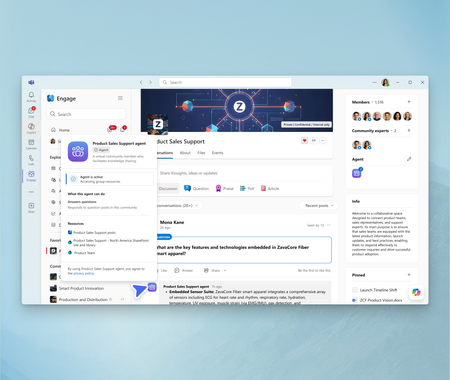
Launching in Public Preview today, Microsoft 365 Copilot can give every Engage community its own agent, grounded in the conversations and content that matter most to your community. It’s designed to provide time-savings, facilitate trusted knowledge sharing, and make expertise readily available in organizations so that communities can thrive with less effort. Read on to discover how an AI-powered community expert can foster community engagement and growth.8.5KViews3likes17Comments