visual studio
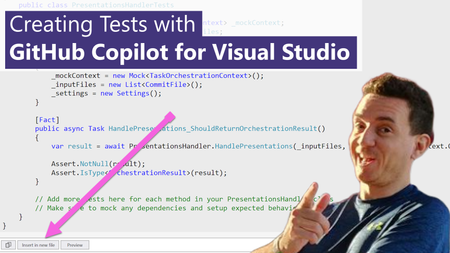
32 TopicsCreating Tests with GitHub Copilot for Visual Studio
One of the recurring jokes in our industry is that developers are not very good at two things when coding: Documenting code, and creating unit tests. These are two areas where GitHub Copilot can help! Let's see how in the new short video that I just published.Referencing a file in GitHub Copilot for Visual Studio
A project never consists of one single file. In fact, most applications have multiple code files, as well as additional configuration files, test files, data and other helpers. In the new video we just posted, Gwyn "GPS" Peña-Siguenza shows how Copilot uses the "#" shortcut to add one or more files to the context.GitHub Copilot Global Bootcamp
GitHub Copilot Bootcamp is a series of four live classes designed to teach you tips and best practices for using GitHub Copilot. Discover how to create quick solutions, automate repetitive tasks, and collaborate effectively on projects. REGISTER NOW! Why participate? GitHub Copilot is not just a code suggestion tool, but a programming partner that understands your needs and accelerates your work. By participating in the bootcamp, you will have the opportunity to: Master the creation of effective prompts. Learn to develop web applications using AI. Discover how to automate tests and generate documentation. Explore collaboration practices and automated deployment. Learn in your local language We will also have editions in other languages besides English: Spanish: https://aka.ms/GitHubCopilotBootcampLATAM Brazilian Portuguese: https://aka.ms/GitHubCopilotBootcampBrasil Chinese: https://aka.ms/GitHubCopilotBootcampChina Agenda The English sessions are scheduled for 12pm PST, 3pm ET, 2pm CT, and 1pm MT. 📅 February 4, 2025 Prompt Engineering with GitHub Copilot Learn how GitHub Copilot works and master responsible AI to boost your productivity. 📅 February 6, 2025 Building an AI Web Application with Python and Flask Create amazing projects with AI integration and explore using GitHub Copilot to simplify tasks. 📅 February 11, 2025 Productivity with GitHub Copilot: Docs and Unit Tests Automate documentation and efficiently develop tests by applying concepts directly to real-world projects. 📅 February 13, 2025 Collaboration and Deploy with GitHub Copilot Learn to create GitHub Actions, manage pull requests, and use GitHub Copilot for Azure for deployment. Who can participate? If you are a developer, student, or technology enthusiast, this bootcamp is for you. The classes are designed to cater to both beginners and experienced professionals. Secure your spot now and start your journey to mastering GitHub Copilot! 👉 REGISTER NOW!How to use Comments as Prompts in GitHub Copilot for Visual Studio
GitHub Copilot is a coding assistant powered by Artificial Intelligence (AI), which can run in various environments and help you be more efficient in your daily coding tasks. In this new short video, Bruno shows you how to use inline comments to generate code with GitHub Copilot.Transform Application Development with .NET Aspire: Seamless Integration with JavaScript and Node.js
In the ever-evolving landscape of cloud application development, managing configurations, ensuring resilience, and maintaining seamless integration between various components can be quite challenging. This is where .NET Aspire comes into play! A robust application development framework designed to simplify these complexities, allowing developers to focus on creating features rather than dealing with extensive configurations. In this article, we will explore the core aspects of .NET Aspire, examining its benefits, the configuration process, and integration with JavaScript, as presented in an outstanding session at the recent .NET Aspire Developers Day by Chris Noring, Senior Developer Advocate at Microsoft.Manage Dev Tunnels with Group Policies
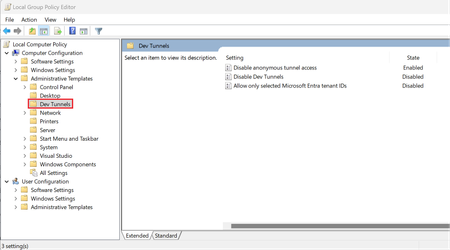
Dev Tunnels is a tunneling service that can boost your productivity when testing and debugging web apps, webhooks, APIs, and more. Today, we're excited to share Dev Tunnels now supports policies to disable anonymous tunnel access, disable Dev Tunnels, and allow only selected Microsoft Entra tenant IDs.Single, Short, Specific - Prompting GitHub Copilot for Visual Studio
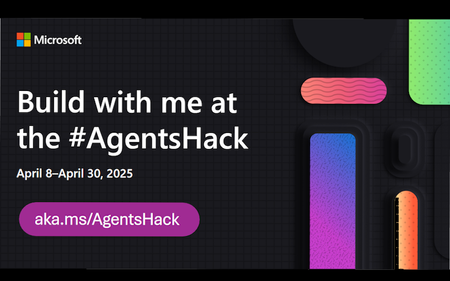
LLMs are very sensitive to the quality of the input (aka "prompt") that the user provides. A good prompt is often the key for a good answer. In this new article and short video, Gwyn "GPS" Peña-Siguenza shows us that "short" shouldn't mean "too short" and how a good specific prompt looks like.Microsoft AI Agents Hack April 8-30th 2025
Build, Innovate, and #Hacktogether Learn from 20+ expert-led sessions streamed live on YouTube, covering top frameworks like Semantic Kernel, Autogen, the new Azure AI Agents SDK and the Microsoft 365 Agents SDK. Get hands-on experience, unleash your creativity, and build powerful AI agents—then submit your hack for a chance to win amazing prizes! Key Dates Expert sessions: April 8th 2025 – April 30th 2025 Hack submission deadline: April 30th 2025, 11:59 PM PST Don't miss out — join us and start building the future of AI! Registration Register now! That form will register you for the hackathon. Afterwards, browse through the live stream schedule below and register for the sessions you're interested in. Once you're registered, introduce yourself and look for teammates! Project Submission Once your hack is ready, follow the submission process. Prizes and Categories Projects will be evaluated by a panel of judges, including Microsoft engineers, product managers, and developer advocates. Judging criteria will include innovation, impact, technical usability, and alignment with corresponding hackathon category. Each winning team in the categories below will receive a prize. Best Overall Agent - $20,000 Best Agent in Python - $5,000 Best Agent in C# - $5,000 Best Agent in Java - $5,000 Best Agent in JavaScript/TypeScript - $5,000 Best Copilot Agent (using Microsoft Copilot Studio or Microsoft 365 Agents SDK) - $5,000 Best Azure AI Agent Service Usage - $5,000 Each team can only win in one category. All participants who submit a project will receive a digital badge. Stream Schedule The series starts with a kick-off for all developers, and then dives into specific tracks for Python, Java, C#, and JavaScript developers. The Copilots track will focus on building intelligent copilots with Microsoft 365 and Copilot Studio. English Week 1: April 8th-11th Day/Time Topic Track 4/8 09:00 AM PT AI Agents Hackathon Kickoff All 4/9 09:00 AM PT Build your code-first app with Azure AI Agent Service Python 4/9 12:00 PM PT AI Agents for Java using Azure AI Foundry Java 4/9 03:00 PM PT Build your code-first app with Azure AI Agent Service Python 4/10 04:00 AM PT Building Secure and Intelligent Copilots with Microsoft 365 Copilots 4/10 09:00 AM PT Overview of Microsoft 365 Copilot Extensibility Copilots 4/10 12:00 PM PT Transforming business processes with multi-agent AI using Semantic Kernel Python 4/10 03:00 PM PT Build your code-first app with Azure AI Agent Service (.NET) C# Week 2: April 14th-18th Day/Time Topic Track 4/15 07:00 AM PT Your first AI Agent in JS with Azure AI Agent Service JS 4/15 09:00 AM PT Building Agentic Applications with AutoGen v0.4 Python 4/15 12:00 PM PT AI Agents + .NET Aspire C# 4/15 03:00 PM PT Prototyping AI Agents with GitHub Models Python 4/16 04:00 AM PT Multi-agent AI apps with Semantic Kernel and Azure Cosmos DB C# 4/16 06:00 AM PT Building declarative agents with Microsoft Copilot Studio & Teams Toolkit Copilots 4/16 09:00 AM PT Building agents with an army of models from the Azure AI model catalog Python 4/16 12:00 PM PT Multi-Agent API with LangGraph and Azure Cosmos DB Python 4/16 03:00 PM PT Mastering Agentic RAG Python 4/17 06:00 AM PT Build your own agent with OpenAI, .NET, and Copilot Studio C# 4/17 09:00 AM PT Building smarter Python AI agents with code interpreters Python 4/17 12:00 PM PT Building Java AI Agents using LangChain4j and Dynamic Sessions Java 4/17 03:00 PM PT Agentic Voice Mode Unplugged Python Week 3: April 21st-25th Day/Time Topic Track 4/21 12:00 PM PT Knowledge-augmented agents with LlamaIndex.TS JS 4/22 06:00 AM PT Building a AI Agent with Prompty and Azure AI Foundry Python 4/22 09:00 AM PT Real-time Multi-Agent LLM solutions with SignalR, gRPC, and HTTP based on Semantic Kernel Python 4/22 10:30 AM PT Learn Live: Fundamentals of AI agents on Azure - 4/22 12:00 PM PT Demystifying Agents: Building an AI Agent from Scratch on Your Own Data using Azure SQL C# 4/22 03:00 PM PT VoiceRAG: talk to your data Python 4/14 06:00 AM PT Prompting is the New Scripting: Meet GenAIScript JS 4/23 09:00 AM PT Building Multi-Agent Apps on top of Azure PostgreSQL Python 4/23 12:00 PM PT Agentic RAG with reflection Python 4/23 03:00 PM PT Multi-source data patterns for modern RAG apps C# 4/24 09:00 AM PT Extending AI Agents with Azure Functions Python, C# 4/24 12:00 PM PT Build real time voice agents with Azure Communication Services Python 4/24 03:00 PM PT Bringing robots to life: Real-time interactive experiences with Azure OpenAI GPT-4o Python Week 4: April 28th-30th Day/Time Topic Track 4/29, 01:00 PM UTC / 06:00 AM PT Irresponsible AI Agents Java 4/29, 04:00 PM UTC / 09:00 AM PT Securing AI agents on Azure Python Spanish / Español See all our Spanish sessions on the Spanish landing page. Consulta todas nuestras sesiones en español en la página de inicio en español. Portuguese / Português See our Portuguese sessions on the Portuguese landing page. Veja nossas sessões em português na página de entrada em português. Chinese / 简体字 See our Chinese sessions on the Chinese landing page. 请查看我们的中文课程在中文登录页面. Office Hours For additional help with your hacks, you can drop by Office Hours in our AI Discord channel. Here are the Office Hours scheduled so far: Day/Time Topic/Hosts Every Thursday, 12:30 PM PT Python + AI (English) Every Monday, 03:00 PM PT Python + AI (Spanish) Learning Resources Access resources here! Join TheSource EHub to explore top picks including trainings, livestreams, repositories, technical guides, blogs, downloads, certifications, and more, all updated monthly. The AI Agent section offers essential resources for creating AI Agents, while other sections provide insights into AI, development tools, and programming languages. You can also post questions in our discussions forum, or chat with attendees in the Discord channel.