visual studio
217 Topics
Blazor App No Longer Compiles
I just updated MS Visual Studio 2022 Community Edition to version 18.11.0. After the update, Blazor apps no longer compile in for the release version, they still work for the debug version of the project. This is true with existing projects and new Blazor App projects created with C#. I get this error message: ===================== 10/16/2026 4:16:12 AM Project: BillByrnes.csproj Recoverable System.AggregateException: One or more errors occurred. ---> (Inner Exception #0) Microsoft.Assumes+InternalErrorException: No pending webSession for web server 1 at Microsoft.Assumes.Fail(String message) at Microsoft.WebTools.ProjectSystem.HotReload.WebHotReloadAgent.StartSession(IWebServer webServer) at Microsoft.WebTools.ProjectSystem.Debugger.BaseDebugTargetsProvider.<OnAfterLaunchAsync>d__84.MoveNext() <--- (Inner Exception #0) =================== Any help would be appreciated. Thanks, Bill Byrnes email address removed for privacy reasons116Views0likes2Comments
Dataverse table access fails with TDS error 8657 in Fabric Dataflow
Hi everyone, I’m experiencing an issue with the msdyn_project table when connecting to Dataverse from Microsoft Fabric Dataflow Gen2. This is part of an existing production data pipeline that has been running on a scheduled refresh for several months. Background The existing pipeline has generally been working successfully. From time to time, we have experienced intermittent User Identity Failure during scheduled runs, but those failures have typically recovered automatically on a subsequent refresh. I am now making an update to the solution because I need to bring additional data into the Lakehouse, Semantic Model, and Power BI report. During testing, I created a new Dataflow Gen2 to connect to the same Dataverse environment. I can access and preview other Dataverse tables successfully, but I cannot preview the msdyn_project table. Error When I select msdyn_project, I receive: The service has encountered an error processing your request. Please try again. Error code 8657. A severe error occurred on the current command. The results, if any, should be discarded. Additional error details: DataSourceKind = CommonDataService ErrorCode = 10478 Number = 40001 Class = 16 State = 1 Troubleshooting I have confirmed the following: The existing Dataflow has been running successfully on a schedule for months. The Dataverse connection is working. Other Dataverse tables can be opened and previewed successfully. I created a new Dataflow Gen2 and reproduced the issue. The issue occurs specifically with msdyn_project. The error occurs when attempting to preview the source, before applying any Power Query transformations. Therefore, the issue does not appear to be related to my existing M code, Lakehouse destination, Semantic Model, or Power BI report. Has anyone encountered Dataverse TDS error 8657 / 40001 specifically when accessing msdyn_project through Microsoft Fabric? I’m looking for recommendations on how to diagnose the issue and determine whether a specific field, metadata change, or service-side issue is causing the failure. Thank you!Solved302Views0likes4Comments
Simple request for Visual Studio's Find and Replace operation
Doing a Find + Replace operation in VS, I could wish there was an option, when selecting to do so over the whole project or solution, to choose which types of files to include or exclude. For example, in a classic Web Forms project, I'd like to omit the designer pages. I've been caught out by this ore than once ... :( (More fool I...)368Views2likes2CommentsMastering Query Fields in Azure AI Document Intelligence with C#
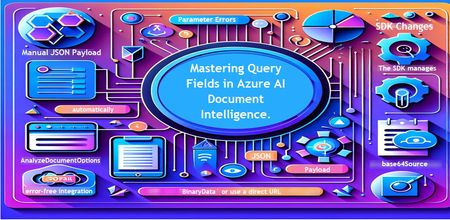
Introduction Azure AI Document Intelligence simplifies document data extraction, with features like query fields enabling targeted data retrieval. However, using these features with the C# SDK can be tricky. This guide highlights a real-world issue, provides a corrected implementation, and shares best practices for efficient usage. Use case scenario During the cause of Azure AI Document Intelligence software engineering code tasks or review, many developers encountered an error while trying to extract fields like "FullName," "CompanyName," and "JobTitle" using `AnalyzeDocumentAsync`: The error might be similar to Inner Error: The parameter urlSource or base64Source is required. This is a challenge referred to as parameter errors and SDK changes. Most problematic code are looks like below in C#: BinaryData data = BinaryData.FromBytes(Content); var queryFields = new List<string> { "FullName", "CompanyName", "JobTitle" }; var operation = await client.AnalyzeDocumentAsync( WaitUntil.Completed, modelId, data, "1-2", queryFields: queryFields, features: new List<DocumentAnalysisFeature> { DocumentAnalysisFeature.QueryFields } ); One of the reasons this failed was that the developer was using `Azure.AI.DocumentIntelligence v1.0.0`, where `base64Source` and `urlSource` must be handled internally. Because the older examples using `AnalyzeDocumentContent` no longer apply and leading to errors. Practical Solution Using AnalyzeDocumentOptions. Alternative Method using manual JSON Payload. Using AnalyzeDocumentOptions The correct method involves using AnalyzeDocumentOptions, which streamlines the request construction using the below steps: Prepare the document content: BinaryData data = BinaryData.FromBytes(Content); Create AnalyzeDocumentOptions: var analyzeOptions = new AnalyzeDocumentOptions(modelId, data) { Pages = "1-2", Features = { DocumentAnalysisFeature.QueryFields }, QueryFields = { "FullName", "CompanyName", "JobTitle" } }; - `modelId`: Your trained model’s ID. - `Pages`: Specify pages to analyze (e.g., "1-2"). - `Features`: Enable `QueryFields`. - `QueryFields`: Define which fields to extract. Run the analysis: Operation<AnalyzeResult> operation = await client.AnalyzeDocumentAsync( WaitUntil.Completed, analyzeOptions ); AnalyzeResult result = operation.Value; The reason this works: The SDK manages `base64Source` automatically. This approach matches the latest SDK standards. It results in cleaner, more maintainable code. Alternative method using manual JSON payload For advanced use cases where more control over the request is needed, you can manually create the JSON payload. For an example: var queriesPayload = new { queryFields = new[] { new { key = "FullName" }, new { key = "CompanyName" }, new { key = "JobTitle" } } }; string jsonPayload = JsonSerializer.Serialize(queriesPayload); BinaryData requestData = BinaryData.FromString(jsonPayload); var operation = await client.AnalyzeDocumentAsync( WaitUntil.Completed, modelId, requestData, "1-2", features: new List<DocumentAnalysisFeature> { DocumentAnalysisFeature.QueryFields } ); When to use the above: Custom request formats Non-standard data source integration Key points to remember Breaking changes exist between preview versions and v1.0.0 by checking the SDK version. Prefer `AnalyzeDocumentOptions` for simpler, error-free integration by using built-In classes. Ensure your content is wrapped in `BinaryData` or use a direct URL for correct document input: Conclusion Using AnalyzeDocumentOptions provides a cleaner and more reliable way to work with query fields in Azure AI Document Intelligence using C#. By aligning with the latest SDK approach, developers can simplify implementation, reduce common errors, and improve code maintainability. Keeping up with SDK enhancements and recommended practices ensures more accurate and efficient document data extraction. As Azure AI capabilities continue to evolve, adopting modern integration patterns will help you build scalable and future-ready document processing solutions with greater confidence. Reference Official AnalyzeDocumentAsync Documentation. Official Azure SDK documentation. Azure Document Intelligence C# SDK support add-on query field.647Views0likes0CommentsPair Programming and test-driven development with Visual Studio Live Share and GitHub Copilot
Pair programming and TDD are valuable software development techniques that can enhance the development process, and GitHub Copilot can help teams effectively utilize these practices to produce high-quality code.7.8KViews1like1CommentEnhancing Data Security and Digital Trust in the Cloud using Azure Services.
Enhancing Data Security and Digital Trust in the Cloud by Implementing Client-Side Encryption (CSE) using Azure Apps, Azure Storage and Azure Key Vault. Think of Client-Side Encryption (CSE) as a strategy that has proven to be most effective in augmenting data security and modern precursor to traditional approaches. CSE can provide superior protection for your data, particularly if an authentication and authorization account is compromised.3.2KViews0likes0CommentsGetting Started with the AI Toolkit: A Beginner’s Guide with Demos and Resources
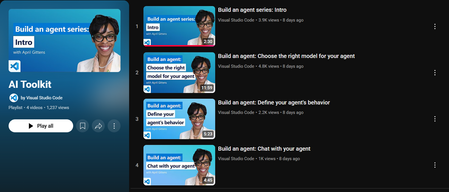
If you're curious about building AI solutions but don’t know where to start, Microsoft’s AI Toolkit is a great place to begin. Whether you’re a student, developer, or just someone exploring AI for the first time, this toolkit helps you build real-world solutions using Microsoft’s powerful AI services. In this blog, I’ll Walk you through what the AI Toolkit is, how you can get started, and where you can find helpful demos and ready-to-use code samples. What is the AI Toolkit? The AI Toolkit is a collection of tools, templates, and sample apps that make it easier to build AI-powered applications and copilots using Microsoft Azure. With the AI Toolkit, you can: Build intelligent apps without needing deep AI expertise. Use templates and guides that show you how everything works. Quickly prototype and deploy apps with natural language, speech, search, and more. Watch the AI Toolkit in Action Microsoft has created a video playlist that covers the AI Toolkit and shows you how to build apps step-by-step. You can watch the full playlist here: It is especially useful for developers who want to bring AI into their projects, but also for beginners who want to learn by doing. AI Toolkit Playlist – https://aka.ms/AIToolkit/videos These videos help you understand the flow of building AI agents, using Azure OpenAI, and other cognitive services in a hands-on way. Explore Sample Projects on GitHub Microsoft also provides a public GitHub repository where you can find real code examples built using the AI Toolkit. Here’s the GitHub repo: AI Toolkit Samples – https://github.com/Azure-Samples/AI_Toolkit_Samples This repository includes: Sample apps using Azure AI services like OpenAI, Cognitive Search, and Speech. Instructions to deploy apps using Azure. Code that you can clone, test, and build on top of. You don’t have to start from scratch just open the code, understand the structure, and make small edits to experiment. How to Get Started Here’s a simple path if you’re just starting: Watch 2 or 3 videos from the AI Toolkit Playlist. Go to the GitHub repository and try running one of the examples. Make small changes to the code (like updating the prompt or output). Try deploying the solution on Azure by following the guide in the repo. Keep building and learning. Why This Toolkit is Worth Exploring As someone who is also learning and experimenting, I found this toolkit to be: Easy to understand, even for beginners. Focused on real-world applications, not just theory. Helpful for building responsible AI solutions with good documentation. It gives a complete picture — from writing code to deploying apps. Final Thoughts The AI Toolkit helps you start your journey in AI without feeling overwhelmed. It provides real code, real use cases, and practical demos. With the support of Microsoft Learn and Azure samples, you can go from learning to building in no time. If you’re serious about building with AI, this is a resource worth exploring. Continue the discussion in the Azure AI Foundry Discord community at Https://aka.ms/AI/discord Join the Azure AI Foundry Discord Server! References AI Toolkit Playlist (YouTube) https://aka.ms/AIToolkit/videos AI Toolkit GitHub Repository https://github.com/Azure-Samples/AI_Toolkit_Samples Microsoft Learn: AI Toolkit Documentation https://learn.microsoft.com/en-us/azure/ai-services/toolkit/ Azure AI Services https://azure.microsoft.com/en-us/products/ai-services/2.3KViews0likes0CommentsModel Mondays S2E8: On-Device & Local AI
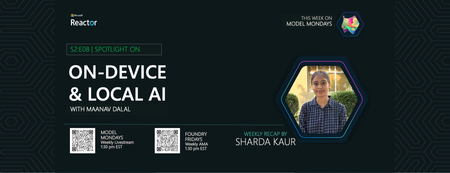
Model Mondays S2E8: On-Device & Local AI Welcome to Episode 8! This week, we explored how AI is moving from the cloud to your own device, making it faster, more private, and more accessible. We also saw a real-world customer story from Xander Glasses, showing how AI can help people with hearing loss. RFD Observability tools in Azure AI Foundry: Real-time model telemetry, auto evals, quick evals, Python grader. GitHub Copilot Pro with Spark: AI pair programmer for code explanation and workflow suggestions. Synthetic Data for Vision Models: Training accurate models with procedurally generated data. Agent-Friendly Websites: Making sites accessible to AI agents via APIs, semantic markup, and OpenAPI specs. MCP (Model Context Protocol): Standardizing agent memory and context for scalable AI.407Views0likes0CommentsIntegrating Azure DevOps with VS Code Agent using MCP (Model Context Protocol)
🧠 What is MCP (Model Context Protocol)? MCP is a standard interface that allows AI agents to securely interact with external systems such as Azure DevOps/ With MCP: Azure DevOps capabilities are exposed as tools GitHub Copilot can discover, reason, and execute actions All actions happen with user consent and authentication Want to learn more about MCP see https://github.com/microsoft/mcp-for-beginners ✅ Prerequisites Before starting, ensure you have: Visual Studio Code installed GitHub Copilot extension enabled Node.js 20+ installed Azure CLI installed Access to an Azure DevOps organisation 🖼️ Solution Architecture Below is a high-level view of how the integration works: VS Code → Copilot Agent → MCP Server → Azure DevOps ✅ Copilot acts as the orchestrator ✅ MCP acts as the bridge ✅ Azure DevOps is the system of record 🔹 Step 1: Authenticate with Azure 🔹 Step 2: Configure MCP in VS Code Create a configuration file: .vscode/mcp.json Add the following configuration: 🚀 What You Can Do with MCP Integration Once connected, you can: Retrieve and update work items Query repositories and pull requests Trigger pipelines Access test plans and wiki Automate repetitive DevOps operation 💡 Benefits Faster review cycles Automated summarisation of large diffs Better consistency across reviews ⚠️ Security and Best Practices MCP provides direct access to enterprise systems, so follow best practices: Use trusted MCP servers only Apply least-privilege access Avoid exposing sensitive tokens Review tool permissions before execution 🔮 What’s Next? Microsoft is evolving towards a Remote MCP Server (Preview): No local setup required Hosted integration with Azure DevOps Simplified onboarding for enterprise environments 🏁 Conclusion We are moving from: 🧑💻 Code-first workflows to 🤖 Agent-driven workflows With Azure DevOps MCP: ✅ You reduce context switching ✅ Improve developer productivity ✅ Enable intelligent DevOps automation Enable AI assistance with the Azure DevOps MCP Server - Azure Boards | Microsoft Learn1.5KViews0likes0Comments