visual studio
35 TopicsMastering Query Fields in Azure AI Document Intelligence with C#
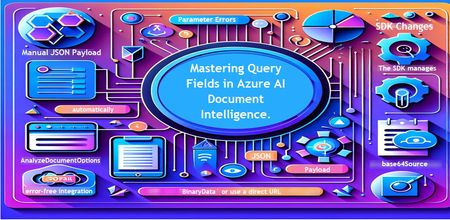
Introduction Azure AI Document Intelligence simplifies document data extraction, with features like query fields enabling targeted data retrieval. However, using these features with the C# SDK can be tricky. This guide highlights a real-world issue, provides a corrected implementation, and shares best practices for efficient usage. Use case scenario During the cause of Azure AI Document Intelligence software engineering code tasks or review, many developers encountered an error while trying to extract fields like "FullName," "CompanyName," and "JobTitle" using `AnalyzeDocumentAsync`: The error might be similar to Inner Error: The parameter urlSource or base64Source is required. This is a challenge referred to as parameter errors and SDK changes. Most problematic code are looks like below in C#: BinaryData data = BinaryData.FromBytes(Content); var queryFields = new List<string> { "FullName", "CompanyName", "JobTitle" }; var operation = await client.AnalyzeDocumentAsync( WaitUntil.Completed, modelId, data, "1-2", queryFields: queryFields, features: new List<DocumentAnalysisFeature> { DocumentAnalysisFeature.QueryFields } ); One of the reasons this failed was that the developer was using `Azure.AI.DocumentIntelligence v1.0.0`, where `base64Source` and `urlSource` must be handled internally. Because the older examples using `AnalyzeDocumentContent` no longer apply and leading to errors. Practical Solution Using AnalyzeDocumentOptions. Alternative Method using manual JSON Payload. Using AnalyzeDocumentOptions The correct method involves using AnalyzeDocumentOptions, which streamlines the request construction using the below steps: Prepare the document content: BinaryData data = BinaryData.FromBytes(Content); Create AnalyzeDocumentOptions: var analyzeOptions = new AnalyzeDocumentOptions(modelId, data) { Pages = "1-2", Features = { DocumentAnalysisFeature.QueryFields }, QueryFields = { "FullName", "CompanyName", "JobTitle" } }; - `modelId`: Your trained model’s ID. - `Pages`: Specify pages to analyze (e.g., "1-2"). - `Features`: Enable `QueryFields`. - `QueryFields`: Define which fields to extract. Run the analysis: Operation<AnalyzeResult> operation = await client.AnalyzeDocumentAsync( WaitUntil.Completed, analyzeOptions ); AnalyzeResult result = operation.Value; The reason this works: The SDK manages `base64Source` automatically. This approach matches the latest SDK standards. It results in cleaner, more maintainable code. Alternative method using manual JSON payload For advanced use cases where more control over the request is needed, you can manually create the JSON payload. For an example: var queriesPayload = new { queryFields = new[] { new { key = "FullName" }, new { key = "CompanyName" }, new { key = "JobTitle" } } }; string jsonPayload = JsonSerializer.Serialize(queriesPayload); BinaryData requestData = BinaryData.FromString(jsonPayload); var operation = await client.AnalyzeDocumentAsync( WaitUntil.Completed, modelId, requestData, "1-2", features: new List<DocumentAnalysisFeature> { DocumentAnalysisFeature.QueryFields } ); When to use the above: Custom request formats Non-standard data source integration Key points to remember Breaking changes exist between preview versions and v1.0.0 by checking the SDK version. Prefer `AnalyzeDocumentOptions` for simpler, error-free integration by using built-In classes. Ensure your content is wrapped in `BinaryData` or use a direct URL for correct document input: Conclusion Using AnalyzeDocumentOptions provides a cleaner and more reliable way to work with query fields in Azure AI Document Intelligence using C#. By aligning with the latest SDK approach, developers can simplify implementation, reduce common errors, and improve code maintainability. Keeping up with SDK enhancements and recommended practices ensures more accurate and efficient document data extraction. As Azure AI capabilities continue to evolve, adopting modern integration patterns will help you build scalable and future-ready document processing solutions with greater confidence. Reference Official AnalyzeDocumentAsync Documentation. Official Azure SDK documentation. Azure Document Intelligence C# SDK support add-on query field.596Views0likes0CommentsEnhancing Data Security and Digital Trust in the Cloud using Azure Services.
Enhancing Data Security and Digital Trust in the Cloud by Implementing Client-Side Encryption (CSE) using Azure Apps, Azure Storage and Azure Key Vault. Think of Client-Side Encryption (CSE) as a strategy that has proven to be most effective in augmenting data security and modern precursor to traditional approaches. CSE can provide superior protection for your data, particularly if an authentication and authorization account is compromised.3.1KViews0likes0CommentsIntegrating Azure DevOps with VS Code Agent using MCP (Model Context Protocol)
🧠 What is MCP (Model Context Protocol)? MCP is a standard interface that allows AI agents to securely interact with external systems such as Azure DevOps/ With MCP: Azure DevOps capabilities are exposed as tools GitHub Copilot can discover, reason, and execute actions All actions happen with user consent and authentication Want to learn more about MCP see https://github.com/microsoft/mcp-for-beginners ✅ Prerequisites Before starting, ensure you have: Visual Studio Code installed GitHub Copilot extension enabled Node.js 20+ installed Azure CLI installed Access to an Azure DevOps organisation 🖼️ Solution Architecture Below is a high-level view of how the integration works: VS Code → Copilot Agent → MCP Server → Azure DevOps ✅ Copilot acts as the orchestrator ✅ MCP acts as the bridge ✅ Azure DevOps is the system of record 🔹 Step 1: Authenticate with Azure 🔹 Step 2: Configure MCP in VS Code Create a configuration file: .vscode/mcp.json Add the following configuration: 🚀 What You Can Do with MCP Integration Once connected, you can: Retrieve and update work items Query repositories and pull requests Trigger pipelines Access test plans and wiki Automate repetitive DevOps operation 💡 Benefits Faster review cycles Automated summarisation of large diffs Better consistency across reviews ⚠️ Security and Best Practices MCP provides direct access to enterprise systems, so follow best practices: Use trusted MCP servers only Apply least-privilege access Avoid exposing sensitive tokens Review tool permissions before execution 🔮 What’s Next? Microsoft is evolving towards a Remote MCP Server (Preview): No local setup required Hosted integration with Azure DevOps Simplified onboarding for enterprise environments 🏁 Conclusion We are moving from: 🧑💻 Code-first workflows to 🤖 Agent-driven workflows With Azure DevOps MCP: ✅ You reduce context switching ✅ Improve developer productivity ✅ Enable intelligent DevOps automation Enable AI assistance with the Azure DevOps MCP Server - Azure Boards | Microsoft Learn1.3KViews0likes0Comments
Turning GitHub Copilot into a “Best Practices Coach” with Copilot Spaces + a Markdown Knowledge Base
Why Copilot Spaces + Markdown repos work so well When you ask Copilot generic questions (“How should we log errors?” “What’s our API versioning approach?”), the model will often respond with reasonable defaults. But reasonable defaults are not the same as your standards. Copilot Spaces solve the context problem by allowing you to attach a curated set of sources (files, folders, repos, PRs/issues, uploads, free text) plus explicit instructions—so Copilot answers in the context of your team’s rules and artifacts. Spaces can be shared with your team and stay updated as the underlying GitHub content changes—so your “best practices coach” stays evergreen. The architecture (high level) Here’s the mental model: Engineering Knowledge Base Repo: A dedicated repo containing your standards as Markdown (coding style, architecture decisions, security rules, testing conventions, examples, templates). Copilot Space: “Engineering Standards Coach”: A Space that attaches the knowledge base repo (or key folders/files within it), optionally your main application repo(s), and a short set of “rules of engagement” (instructions). In-repo reinforcement (optional but powerful): Custom instruction files (repo-wide + path-specific) and prompt files (slash commands) inside your production repos to standardize behavior and workflows. Step 1 Create a Knowledge Base repo (Markdown-first) Create a repo such as: engineering-knowledge-base platform-playbook org-standards A practical starter structure: engineering-knowledge-base/ README.md standards/ coding-style.md logging.md error-handling.md performance.md security/ secure-coding.md secrets.md threat-modeling.md architecture/ overview.md adr/ 0001-service-boundaries.md 0002-api-versioning.md testing/ unit-testing.md integration-testing.md contract-testing.md templates/ pr-review-checklist.md api-design-checklist.md definition-of-done.md Tip: Keep these docs opinionated, concrete, and example-heavy—Copilot works best when it can point to specific patterns rather than abstract principles. Step 2 Create a Copilot Space and attach your sources Create a space, name it, choose an owner (personal or organization), then add sources and instructions. Inside the Space, add two types of context: Instructions (how Copilot should behave) and Sources (your actual code and docs). 2.1 Instructions (how Copilot should behave in this Space) Example instructions you can paste: You are the Engineering Standards Coach for this organization. Goals: - Recommend solutions that follow our standards in the attached knowledge base. - When proposing code, align with our logging, error-handling, security, and testing guidelines. - When uncertain, ask for the missing repo context or point to the exact standard that applies. Output format: - Start with the standard(s) you are applying (with a link or filename reference). - Then provide the recommended implementation. - Include a lightweight checklist for reviewers. 2.2 Sources (your real “knowledge base”) Attach: The knowledge base repo (or just the folders that matter) Your main code repo(s) (or select folders) PR checklist and Definition of Done templates Key architecture docs, runbooks, or troubleshooting guides Step 3 (Optional) Add instruction files to your production repos Spaces are excellent for curated context and team-wide “ask me anything about our standards.” But you can reinforce consistency directly inside each repo by adding custom instruction files. 3.1 Repo-wide instructions (.github/copilot-instructions.md) Create: your-app-repo/.github/copilot-instructions.md # Repository Copilot Instructions ## Tech stack - Language: TypeScript (strict) - Framework: Node.js + Express - Testing: Jest - Lint/format: ESLint + Prettier ## Engineering rules - Use structured logging as defined in /docs/logging.md - Never log secrets or raw tokens - Prefer small, composable functions - All new endpoints must include: input validation, authz checks, unit tests, and consistent error handling ## Build & test - Install: npm ci - Test: npm test - Lint: npm run lint 3.2 Path-specific instructions (.github/instructions/*.instructions.md) Create: your-app-repo/.github/instructions/security.instructions.md --- applyTo: "**/*.ts" --- # Security rules (TypeScript) - Never introduce dynamic SQL construction; use parameterized queries only. - Any new external HTTP call must enforce timeouts and retry policy. - Any auth logic must include negative tests. Step 4 (Optional) Turn your best practices into “slash commands” with prompt files To standardize repeatable workflows like code review, test scaffolding, or endpoint scaffolding, create prompt files (slash commands) as .prompt.md files—commonly in .github/prompts/. Engineers invoke them manually in chat by typing /. Create: your-app-repo/.github/prompts/standards-code-review.prompt.md --- description: Review code against our org standards (security, perf, style, tests) --- You are a senior engineer performing a standards-based review. Use these checks: 1) Security: input validation, authz, secrets, injection risks 2) Reliability: error handling, retries/timeouts, edge cases 3) Observability: structured logs, metrics, tracing where relevant 4) Testing: required coverage, negative tests, naming conventions 5) Style: follow repository rules in .github/copilot-instructions.md Output: - Summary (2-3 lines) - Issues (severity: BLOCKER/REQUIRED/SUGGESTION) - Suggested patch snippets (only where confident) - “Ready to merge?” verdict Now any engineer can type /standards-code-review and get the same structured output every time, without rewriting the prompt. How teams actually use this day-to-day Recipe A Onboarding a new engineer Ask inside the Space: “Summarize our service architecture and coding conventions for onboarding. Link the key docs.” Recipe B Writing a feature with best-practice guardrails Ask in the Space: “We’re adding endpoint X. Generate a plan that follows our API versioning ADR and error-handling standard.” Recipe C Enforcing review standards consistently In the repo, run the prompt file: /standards-code-review. Governance and best practices (what to do / what to avoid) Keep Spaces purpose-built. Avoid dumping an entire org into one Space if your goal is consistent, grounded output. Prefer linking the “golden source.” Keep standards in a single repo and update them via PR—treat it like code. Make instructions short but strict. Detailed rules belong in your Markdown standards. Avoid conflicting instruction files. If instructions contradict each other, results can be inconsistent. References (official docs for further reading) About GitHub Copilot Spaces: https://docs.github.com/en/copilot/concepts/context/spaces Creating GitHub Copilot Spaces: https://docs.github.com/en/copilot/how-tos/provide-context/use-copilot-spaces/create-copilot-spaces Adding custom instructions for GitHub Copilot: https://docs.github.com/en/copilot/how-tos/copilot-cli/customize-copilot/add-custom-instructions Use custom instructions in VS Code: https://code.visualstudio.com/docs/copilot/customization/custom-instructions Use prompt files in VS Code: https://code.visualstudio.com/docs/copilot/customization/prompt-files Closing: the “best practices” flywheel Once you implement this pattern, you get a virtuous cycle: teams encode standards as Markdown; Copilot Spaces ground answers in those standards; prompt files and instruction files standardize execution; and code reviews shift from style policing to design and correctness.Supercharge Your Dev Workflows with GitHub Copilot Custom Skills
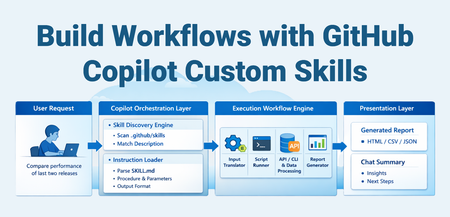
The Problem Every team has those repetitive, multi-step workflows that eat up time: Running a sequence of CLI commands, parsing output, and generating a report Querying multiple APIs, correlating data, and summarizing findings Executing test suites, analyzing failures, and producing actionable insights You've probably documented these in a wiki or a runbook. But every time, you still manually copy-paste commands, tweak parameters, and stitch results together. What if your AI coding assistant could do all of that — triggered by a single natural language request? That's exactly what GitHub Copilot Custom Skills enable. What Are Custom Skills? A skill is a folder containing a SKILL.md file (instructions for the AI), plus optional scripts, templates, and reference docs. When you ask Copilot something that matches the skill's description, it loads the instructions and executes the workflow autonomously. Think of it as giving your AI assistant a runbook it can actually execute, not just read. Without Skills With Skills Read the wiki for the procedure Copilot loads the procedure automatically Copy-paste 5 CLI commands Copilot runs the full pipeline Manually parse JSON output Script generates a formatted HTML report 15-30 minutes of manual work One natural language request, ~2 minutes How It Works The key insight: the skill file is the contract between you and the AI. You describe what to do and how, and Copilot handles the orchestration. Prerequisites Requirement Details VS Code Latest stable release GitHub Copilot Active Copilot subscription (Individual, Business, or Enterprise) Agent mode Select "Agent" mode in the Copilot Chat panel (the default in recent versions) Runtime tools Whatever your scripts need — Python, Node.js, .NET CLI, az CLI, etc. Note: Agent Skills follow an open standard — they work across VS Code, GitHub Copilot CLI, and GitHub Copilot coding agent. No additional extensions or cloud services are required for the skill system itself. Anatomy of a Skill .github/skills/my-skill/ ├── SKILL.md # Instructions (required) └── references/ ├── resources/ │ ├── run.py # Automation script │ ├── query-template.sql # Reusable query template │ └── config.yaml # Static configuration └── reports/ └── report_template.html # Output template The SKILL.md File Every skill has the same structure: --- name: my-skill description: 'What this does and when to use it. Include trigger phrases so Copilot knows when to load it. USE FOR: specific task A, task B. Trigger phrases: "keyword1", "keyword2".' argument-hint: 'What inputs the user should provide.' --- # My Skill ## When to Use - Situation A - Situation B ## Quick Start \```powershell cd .github/skills/my-skill/references/resources py run.py <arg1> <arg2> \``` ## What It Does | Step | Action | Purpose | |------|--------|---------| | 1 | Fetch data from source | Gather raw input | | 2 | Process and transform | Apply business logic | | 3 | Generate report | Produce actionable output | ## Output Description of what the user gets back. Key Design Principles Description is discovery. The description field is the only thing Copilot reads to decide whether to load your skill. Pack it with trigger phrases and keywords. Progressive loading. Copilot reads only name + description (~100 tokens) for all skills. It loads the full SKILL.md body only for matched skills. Reference files load only when the procedure references them. Self-contained procedures. Include everything the AI needs to execute — exact commands, parameter formats, file paths. Don't assume prior knowledge. Scripts do the heavy lifting. The AI orchestrates; your scripts execute. This keeps the workflow deterministic and reproducible. Example: Build a Deployment Health Check Skill Let's build a skill that checks the health of a deployment by querying an API, comparing against expected baselines, and generating a summary. Step 1 — Create the folder structure .github/skills/deployment-health/ ├── SKILL.md └── references/ └── resources/ ├── check_health.py └── endpoints.yaml Step 2 — Write the SKILL.md --- name: deployment-health description: 'Check deployment health across environments. Queries health endpoints, compares response times against baselines, and flags degraded services. USE FOR: deployment validation, health check, post-deploy verification, service status. Trigger phrases: "check deployment health", "is the deployment healthy", "post-deploy check", "service health".' argument-hint: 'Provide the environment name (e.g., staging, production).' --- # Deployment Health Check ## When to Use - After deploying to any environment - During incident triage to check service status - Scheduled spot checks ## Quick Start \```bash cd .github/skills/deployment-health/references/resources python check_health.py <environment> \``` ## What It Does 1. Loads endpoint definitions from `endpoints.yaml` 2. Calls each endpoint, records response time and status code 3. Compares against baseline thresholds 4. Generates an HTML report with pass/fail status ## Output HTML report at `references/reports/health_<environment>_<date>.html` Step 3 — Write the script # check_health.py import sys, yaml, requests, time, json from datetime import datetime def main(): env = sys.argv[1] with open("endpoints.yaml") as f: config = yaml.safe_load(f) results = [] for ep in config["endpoints"]: url = ep["url"].replace("{env}", env) start = time.time() resp = requests.get(url, timeout=10) elapsed = time.time() - start results.append({ "service": ep["name"], "status": resp.status_code, "latency_ms": round(elapsed * 1000), "threshold_ms": ep["threshold_ms"], "healthy": resp.status_code == 200 and elapsed * 1000 < ep["threshold_ms"] }) healthy = sum(1 for r in results if r["healthy"]) print(f"Health check: {healthy}/{len(results)} services healthy") # ... generate HTML report ... if __name__ == "__main__": main() Step 4 — Use it Just ask Copilot in agent mode: "Check deployment health for staging" Copilot will: Match against the skill description Load the SKILL.md instructions Run python check_health.py staging Open the generated report Summarize findings in chat More Skill Ideas Skills aren't limited to any specific domain. Here are patterns that work well: Skill What It Automates Test Regression Analyzer Run tests, parse failures, compare against last known-good run, generate diff report API Contract Checker Compare Open API specs between branches, flag breaking changes Security Scan Reporter Run SAST/DAST tools, correlate findings, produce prioritized report Cost Analysis Query cloud billing APIs, compare costs across periods, flag anomalies Release Notes Generator Parse git log between tags, categorize changes, generate changelog Infrastructure Drift Detector Compare live infra state vs IaC templates, flag drift Log Pattern Analyzer Query log aggregation systems, identify anomaly patterns, summarize Performance Bench marker Run benchmarks, compare against baselines, flag regressions Dependency Auditor Scan dependencies, check for vulnerabilities and outdated packages The pattern is always the same: instructions (SKILL.md) + automation script + output template. Tips for Writing Effective Skills Do Front-load the description with keywords — this is how Copilot discovers your skill Include exact commands — cd path/to/dir && python script.py <args> Document input/output clearly — what goes in, what comes out Use tables for multi-step procedures — easier for the AI to follow Include time zone conversion notes if dealing with timestamps Bundle HTML report templates — rich output beats plain text Don't Don't use vague descriptions — "A useful skill" won't trigger on anything Don't assume context — include all paths, env vars, and prerequisites Don't put everything in SKILL.md — use references/ for large files Don't hardcode secrets — use environment variables or Azure Key Vault Don't skip error guidance — tell the AI what common errors look like and how to fix them Skill Locations Skills can live at project or personal level: Location Scope Shared with team? .github/skills/<name>/ Project Yes (via source control) .agents/skills/<name>/ Project Yes (via source control) .claude/skills/<name>/ Project Yes (via source control) ~/.copilot/skills/<name>/ Personal No ~/.agents/skills/<name>/ Personal No ~/.claude/skills/<name>/ Personal No Project-level skills are committed to your repo and shared with the team. Personal skills are yours and roam with your VS Code settings sync. You can also configure additional skill locations via the chat.skillsLocations VS Code setting. How Skills Fit in the Copilot Customization Stack Skills are one of several customization primitives. Here's when to use what: Primitive Use When Workspace Instructions (.github/copilot-instructions.md) Always-on rules: coding standards, naming conventions, architectural guidelines File Instructions (.github/instructions/*.instructions.md) Rules scoped to specific file patterns (e.g., all *.test.ts files) Prompts (.github/prompts/*.prompt.md) Single-shot tasks with parameterized inputs Skills (.github/skills/<name>/SKILL.md) Multi-step workflows with bundled scripts and templates Custom Agents (.github/agents/*.agent.md) Isolated subagents with restricted tool access or multi-stage pipelines Hooks (.github/hooks/*.json) Deterministic shell commands at agent lifecycle events (auto-format, block tools) Plugins Installable skill bundles from the community (awesome-copilot) Slash Commands & Quick Creation Skills automatically appear as slash commands in chat. Type / to see all available skills. You can also pass context after the command: /deployment-health staging /webapp-testing for the login page Want to create a skill fast? Type /create-skill in chat and describe what you need. Copilot will ask clarifying questions and generate the SKILL.md with proper frontmatter and directory structure. You can also extract a skill from an ongoing conversation: after debugging a complex issue, ask "create a skill from how we just debugged that" to capture the multi-step procedure as a reusable skill. Controlling When Skills Load Use frontmatter properties to fine-tune skill availability: Configuration Slash command? Auto-loaded? Use case Default (both omitted) Yes Yes General-purpose skills user-invocable: false No Yes Background knowledge the model loads when relevant disable-model-invocation: true Yes No Skills you only want to run on demand Both set No No Disabled skills The Open Standard Agent Skills follow an open standard that works across multiple AI agents: GitHub Copilot in VS Code — chat and agent mode GitHub Copilot CLI — terminal workflows GitHub Copilot coding agent — automated coding tasks Claude Code, Gemini CLI — compatible agents via .claude/skills/ and .agents/skills/ Skills you write once are portable across all these tools. Getting Started Create .github/skills/<your-skill>/SKILL.md in your repo Write a keyword-rich description in the YAML frontmatter Add your procedure and reference scripts Open VS Code, switch to Agent mode, and ask Copilot to do the task Watch it discover your skill, load the instructions, and execute Or skip the manual setup — type /create-skill in chat and describe what you need. That's it. No extension to install. No config file to update. No deployment pipeline. Just markdown and scripts, version-controlled in your repo. Custom Skills turn your documented procedures into executable AI workflows. Start with your most painful manual task, wrap it in a SKILL.md, and let Copilot handle the rest. Further Reading: Official Agent Skills docs Community skills & plugins (awesome-copilot) Anthropic reference skillsMCP vs mcp-cli: Dynamic Tool Discovery for Token-Efficient AI Agents
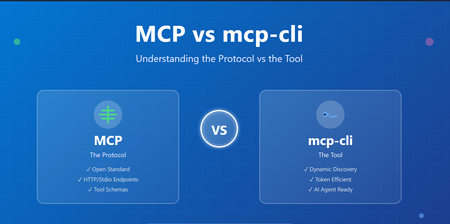
Introduction The AI agent ecosystem is evolving rapidly, and with it comes a scaling challenge that many developers are hitting context window bloat. When building systems that integrate with multiple MCP (Model Context Protocol) servers, you're forced to load all tool definitions upfront—consuming thousands of tokens just to describe what tools could be available. mcp-cli: a lightweight tool that changes how we interact with MCP servers. But before diving into mcp-cli, it's essential to understand the foundational protocol itself, the design trade-offs between static and dynamic approaches, and how they differ fundamentally. Part 1: Understanding MCP (Model Context Protocol) What is MCP? The Model Context Protocol (MCP) is an open standard for connecting AI agents and applications to external tools, APIs, and data sources. Think of it as a universal interface that allows: AI Agents (Claude, Gemini, etc.) to discover and call tools Tool Providers to expose capabilities in a standardized way Seamless Integration between diverse systems without custom adapters New to MCP see https://aka.ms/mcp-for-beginners How MCP Works MCP operates on a simple premise: define tools with clear schemas and let clients discover and invoke them. Basic MCP Flow: Tool Provider (MCP Server) ↓ [Tool Definitions + Schemas] ↓ AI Agent / Client ↓ [Discover Tools] → [Invoke Tools] → [Get Results] Example: A GitHub MCP server exposes tools like: search_repositories - Search GitHub repos create_issue - Create a GitHub issue list_pull_requests - List open PRs Each tool comes with a JSON schema describing its parameters, types, and requirements. The Static Integration Problem Traditionally, MCP integration works like this: Startup: Load ALL tool definitions from all servers Context Window: Send every tool schema to the AI model Invocation: Model chooses which tool to call Execution: Tool is invoked and result returned The Problem: When you have multiple MCP servers, the token cost becomes substantial: Scenario Token Count 6 MCP Servers, 60 tools (static loading) ~47,000 tokens After dynamic discovery ~400 tokens Token Reduction 99% 🚀 For a production system with 10+ servers exposing 100+ tools, you're burning through thousands of tokens just describing capabilities, leaving less context for actual reasoning and problem-solving. Key Issues: ❌ Reduced effective context length for actual work ❌ More frequent context compactions ❌ Hard limits on simultaneous MCP servers ❌ Higher API costs Part 2: Enter mcp-cli – Dynamic Context Discovery What is mcp-cli? mcp-cli is a lightweight CLI tool (written in Bun, compiled to a single binary) that implements dynamic context discovery for MCP servers. Instead of loading everything upfront, it pulls in information only when needed. Static vs. Dynamic: The Paradigm Shift Traditional MCP (Static Context): AI Agent Says: "Load all tool definitions from all servers" ↓ Context Window Bloat ❌ ↓ Limited space for reasoning mcp-cli (Dynamic Discovery): AI Agent Says: "What servers exist?" ↓ mcp-cli responds AI Agent Says: "What are the params for tool X?" ↓ mcp-cli responds AI Agent Says: "Execute tool X" mcp-cli executes and responds Result: You only pay for information you actually use. ✅ Core Capabilities mcp-cli provides three primary commands: 1. Discover - What servers and tools exist? mcp-cli Lists all configured MCP servers and their tools. 2. Inspect - What does a specific tool do? mcp-cli info <server> <tool> Returns the full JSON schema for a tool (parameters, descriptions, types). 3. Execute - Run a tool mcp-cli call <server> <tool> '{"arg": "value"}' Executes the tool and returns results. Key Features of mcp-cli Feature Benefit Stdio & HTTP Support Works with both local and remote MCP servers Connection Pooling Lazy-spawn daemon avoids repeated startup overhead Tool Filtering Control which tools are available via allowedTools/disabledTools Glob Searching Find tools matching patterns: mcp-cli grep "*mail*" AI Agent Ready Designed for use in system instructions and agent skills Lightweight Single binary, minimal dependencies Part 3: Detailed Comparison Table Aspect Traditional MCP mcp-cli Protocol HTTP/REST or Stdio Stdio/HTTP (via CLI) Context Loading Static (upfront) Dynamic (on-demand) Tool Discovery All at once Lazy enumeration Schema Inspection Pre-loaded On-request Token Usage High (~47k for 60 tools) Low (~400 for 60 tools) Best For Direct server integration AI agent tool use Implementation Server-side focus CLI-side focus Complexity Medium Low (CLI handles it) Startup Time One call Multiple calls (optimized) Scaling Limited by context Unlimited (pay per use) Integration Custom implementation Pre-built mcp-cli Part 4: When to Use Each Approach Use Traditional MCP (HTTP Endpoints) when: ✅ Building a direct server integration ✅ You have few tools (< 10) and don't care about context waste ✅ You need full control over HTTP requests/responses ✅ You're building a specialized integration (not AI agents) ✅ Real-time synchronous calls are required Use mcp-cli when: ✅ Integrating with AI agents (Claude, Gemini, etc.) ✅ You have multiple MCP servers (> 2-3) ✅ Token efficiency is critical ✅ You want a standardized, battle-tested tool ✅ You prefer CLI-based automation ✅ Connection pooling and lazy loading are beneficial ✅ You're building agent skills or system instructions Conclusion MCP (Model Context Protocol) defines the standard for tool sharing and discovery. mcp-cli is the practical tool that makes MCP efficient for AI agents by implementing dynamic context discovery. The fundamental difference: MCP mcp-cli What The protocol standard The CLI tool Where Both server and client Client-side CLI Problem Solved Tool standardization Context bloat Architecture Protocol Implementation Think of it this way: MCP is the language, mcp-cli is the interpreter that speaks fluently. For AI agent systems, dynamic discovery via mcp-cli is becoming the standard. For direct integrations, traditional MCP HTTP endpoints work fine. The choice depends on your use case, but increasingly, the industry is trending toward mcp-cli for its efficiency and scalability. Resources MCP Specification mcp-cli GitHub New to MCP see https://aka.ms/mcp-for-beginners Practical demo: AnveshMS/mcp-cli-example1.9KViews0likes0Comments
Exploring Azure Face API: Facial Landmark Detection and Real-Time Analysis with C#
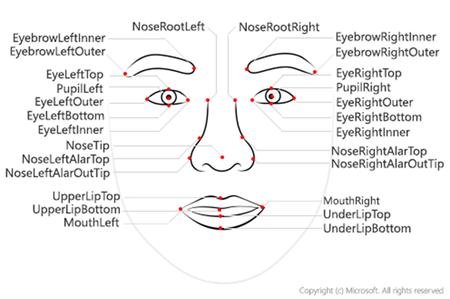
In today’s world, applications that understand and respond to human facial cues are no longer science fiction—they’re becoming a reality in domains like security, driver monitoring, gaming, and AR/VR. With Azure Face API, developers can leverage powerful cloud-based facial recognition and analysis tools without building complex machine learning models from scratch. In this blog, we’ll explore how to use C# to detect faces, identify key facial landmarks, estimate head pose, track eye and mouth movements, and process real-time video streams. Using OpenCV for visualization, we’ll show how to overlay landmarks, draw bounding boxes, and calculate metrics like Eye Aspect Ratio (EAR) and Mouth Aspect Ratio (MAR)—all in real time. You'll learn to: Set up Azure Face API Detect 27 facial landmarks Estimate head pose (yaw, pitch, roll) Calculate eye aspect ratio (EAR) and mouth openness Draw bounding boxes around features using OpenCV Process real-time video Prerequisites .NET 8 SDK installed Azure subscription with Face API resource Visual Studio 2022 or later Webcam for testing (optional) Basic understanding of C# and computer vision concepts Part 1: Azure Face API Setup 1.1 Install Required NuGet Packages dotnet add package Azure.AI.Vision.Face dotnet add package OpenCvSharp4 dotnet add package OpenCvSharp4.runtime.win 1.2 Create Azure Face API Resource Navigate to Azure Portal Search for "Face" and create a new Face API resource Choose your pricing tier (Free tier: 20 calls/min, 30K calls/month) Copy the Endpoint URL and API Key 1.3 Configure in .NET Application appsettings.json: { "Azure": { "FaceApi": { "Endpoint": "https://your-resource.cognitiveservices.azure.com/", "ApiKey": "your-api-key-here" } } } Initialize Face Client: using Azure; using Azure.AI.Vision.Face; using Microsoft.Extensions.Configuration; public class FaceAnalysisService { private readonly FaceClient _faceClient; private readonly ILogger<FaceAnalysisService> _logger; public FaceAnalysisService(ILogger<FaceAnalysisService> logger, IConfiguration configuration) { _logger = logger; string endpoint = configuration["Azure:FaceApi:Endpoint"]; string apiKey = configuration["Azure:FaceApi:ApiKey"]; _faceClient = new FaceClient(new Uri(endpoint), new AzureKeyCredential(apiKey)); _logger.LogInformation("FaceClient initialized with endpoint: {Endpoint}", endpoint); } } Part 2: Understanding Face Detection Models 2.1 Basic Face Detection public async Task<List<FaceDetectionResult>> DetectFacesAsync(byte[] imageBytes) { using var stream = new MemoryStream(imageBytes); var response = await _faceClient.DetectAsync( BinaryData.FromStream(stream), FaceDetectionModel.Detection03, FaceRecognitionModel.Recognition04, returnFaceId: false, returnFaceAttributes: new FaceAttributeType[] { FaceAttributeType.HeadPose }, returnFaceLandmarks: true, returnRecognitionModel: false ); _logger.LogInformation("Detected {Count} faces", response.Value.Count); return response.Value.ToList(); } Part 3: Facial Landmarks - The 27 Key Points 3.1 Understanding Facial Landmarks 3.2 Accessing Landmarks in Code public void PrintLandmarks(FaceDetectionResult face) { var landmarks = face.FaceLandmarks; if (landmarks == null) { _logger.LogWarning("No landmarks detected"); return; } // Eye landmarks Console.WriteLine($"Left Eye Outer: ({landmarks.EyeLeftOuter.X}, {landmarks.EyeLeftOuter.Y})"); Console.WriteLine($"Left Eye Inner: ({landmarks.EyeLeftInner.X}, {landmarks.EyeLeftInner.Y})"); Console.WriteLine($"Left Eye Top: ({landmarks.EyeLeftTop.X}, {landmarks.EyeLeftTop.Y})"); Console.WriteLine($"Left Eye Bottom: ({landmarks.EyeLeftBottom.X}, {landmarks.EyeLeftBottom.Y})"); // Mouth landmarks Console.WriteLine($"Upper Lip Top: ({landmarks.UpperLipTop.X}, {landmarks.UpperLipTop.Y})"); Console.WriteLine($"Under Lip Bottom: ({landmarks.UnderLipBottom.X}, {landmarks.UnderLipBottom.Y})"); // Nose landmarks Console.WriteLine($"Nose Tip: ({landmarks.NoseTip.X}, {landmarks.NoseTip.Y})"); } 3.3 Visualizing All Landmarks public void DrawAllLandmarks(FaceLandmarks landmarks, Mat frame) { void DrawPoint(FaceLandmarkCoordinate point, Scalar color) { if (point != null) { Cv2.Circle(frame, new Point((int)point.X, (int)point.Y), radius: 3, color: color, thickness: -1); } } // Eyes (Green) DrawPoint(landmarks.EyeLeftOuter, new Scalar(0, 255, 0)); DrawPoint(landmarks.EyeLeftInner, new Scalar(0, 255, 0)); DrawPoint(landmarks.EyeLeftTop, new Scalar(0, 255, 0)); DrawPoint(landmarks.EyeLeftBottom, new Scalar(0, 255, 0)); DrawPoint(landmarks.EyeRightOuter, new Scalar(0, 255, 0)); DrawPoint(landmarks.EyeRightInner, new Scalar(0, 255, 0)); DrawPoint(landmarks.EyeRightTop, new Scalar(0, 255, 0)); DrawPoint(landmarks.EyeRightBottom, new Scalar(0, 255, 0)); // Eyebrows (Cyan) DrawPoint(landmarks.EyebrowLeftOuter, new Scalar(255, 255, 0)); DrawPoint(landmarks.EyebrowLeftInner, new Scalar(255, 255, 0)); DrawPoint(landmarks.EyebrowRightOuter, new Scalar(255, 255, 0)); DrawPoint(landmarks.EyebrowRightInner, new Scalar(255, 255, 0)); // Nose (Yellow) DrawPoint(landmarks.NoseTip, new Scalar(0, 255, 255)); DrawPoint(landmarks.NoseRootLeft, new Scalar(0, 255, 255)); DrawPoint(landmarks.NoseRootRight, new Scalar(0, 255, 255)); DrawPoint(landmarks.NoseLeftAlarOutTip, new Scalar(0, 255, 255)); DrawPoint(landmarks.NoseRightAlarOutTip, new Scalar(0, 255, 255)); // Mouth (Blue) DrawPoint(landmarks.UpperLipTop, new Scalar(255, 0, 0)); DrawPoint(landmarks.UpperLipBottom, new Scalar(255, 0, 0)); DrawPoint(landmarks.UnderLipTop, new Scalar(255, 0, 0)); DrawPoint(landmarks.UnderLipBottom, new Scalar(255, 0, 0)); DrawPoint(landmarks.MouthLeft, new Scalar(255, 0, 0)); DrawPoint(landmarks.MouthRight, new Scalar(255, 0, 0)); // Pupils (Red) DrawPoint(landmarks.PupilLeft, new Scalar(0, 0, 255)); DrawPoint(landmarks.PupilRight, new Scalar(0, 0, 255)); } Part 4: Drawing Bounding Boxes Around Features 4.1 Eye Bounding Boxes /// <summary> /// Draws rectangles around eyes using OpenCV. /// </summary> public void DrawEyeBoxes(FaceLandmarks landmarks, Mat frame) { int boxWidth = 60; int boxHeight = 35; // Calculate Rectangles var leftEyeRect = new Rect((int)landmarks.EyeLeftOuter.X - boxWidth / 2, (int)landmarks.EyeLeftOuter.Y - boxHeight / 2, boxWidth, boxHeight); var rightEyeRect = new Rect((int)landmarks.EyeRightOuter.X - boxWidth / 2, (int)landmarks.EyeRightOuter.Y - boxHeight / 2, boxWidth, boxHeight); // Draw Rectangles (Green in BGR) Cv2.Rectangle(frame, leftEyeRect, new Scalar(0, 255, 0), 2); Cv2.Rectangle(frame, rightEyeRect, new Scalar(0, 255, 0), 2); // Add Labels Cv2.PutText(frame, "Left Eye", new Point(leftEyeRect.X, leftEyeRect.Y - 5), HersheyFonts.HersheySimplex, 0.4, new Scalar(0, 255, 0), 1); Cv2.PutText(frame, "Right Eye", new Point(rightEyeRect.X, rightEyeRect.Y - 5), HersheyFonts.HersheySimplex, 0.4, new Scalar(0, 255, 0), 1); } 4.2 Mouth Bounding Box /// <summary> /// Draws rectangle around mouth region. /// </summary> public void DrawMouthBox(FaceLandmarks landmarks, Mat frame) { int boxWidth = 80; int boxHeight = 50; // Calculate center based on the vertical lip landmarks int centerX = (int)((landmarks.UpperLipTop.X + landmarks.UnderLipBottom.X) / 2); int centerY = (int)((landmarks.UpperLipTop.Y + landmarks.UnderLipBottom.Y) / 2); var mouthRect = new Rect(centerX - boxWidth / 2, centerY - boxHeight / 2, boxWidth, boxHeight); // Draw Mouth Box (Blue in BGR) Cv2.Rectangle(frame, mouthRect, new Scalar(255, 0, 0), 2); // Add Label Cv2.PutText(frame, "Mouth", new Point(mouthRect.X, mouthRect.Y - 5), HersheyFonts.HersheySimplex, 0.4, new Scalar(255, 0, 0), 1); } 4.3 Face Bounding Box /// <summary> /// Draws rectangle around entire face using the face rectangle from API. /// </summary> public void DrawFaceBox(FaceDetectionResult face, Mat frame) { var faceRect = face.FaceRectangle; if (faceRect == null) { return; } var rect = new Rect( faceRect.Left, faceRect.Top, faceRect.Width, faceRect.Height ); // Draw Face Bounding Box (Red in BGR) Cv2.Rectangle(frame, rect, new Scalar(0, 0, 255), 2); // Add Label with dimensions Cv2.PutText(frame, $"Face {faceRect.Width}x{faceRect.Height}", new Point(rect.X, rect.Y - 10), HersheyFonts.HersheySimplex, 0.5, new Scalar(0, 0, 255), 2); } 4.4 Nose Bounding Box /// <summary> /// Draws bounding box around nose using nose landmarks. /// </summary> public void DrawNoseBox(FaceLandmarks landmarks, Mat frame) { // Calculate horizontal bounds from Alar tips int minX = (int)Math.Min(landmarks.NoseLeftAlarOutTip.X, landmarks.NoseRightAlarOutTip.X); int maxX = (int)Math.Max(landmarks.NoseLeftAlarOutTip.X, landmarks.NoseRightAlarOutTip.X); // Calculate vertical bounds from Root to Tip int minY = (int)Math.Min(landmarks.NoseRootLeft.Y, landmarks.NoseTip.Y); int maxY = (int)landmarks.NoseTip.Y; // Create Rect with a 10px padding buffer var noseRect = new Rect( minX - 10, minY - 10, (maxX - minX) + 20, (maxY - minY) + 20 ); // Draw Nose Box (Yellow in BGR) Cv2.Rectangle(frame, noseRect, new Scalar(0, 255, 255), 2); } Part 5: Geometric Calculations with Landmarks 5.1 Calculating Euclidean Distance /// <summary> /// Calculates distance between two landmark points. /// </summary> public static double CalculateDistance(dynamic point1, dynamic point2) { double dx = point1.X - point2.X; double dy = point1.Y - point2.Y; return Math.Sqrt(dx * dx + dy * dy); } 5.2 Eye Aspect Ratio (EAR) Formula /// <summary> /// Calculates the Eye Aspect Ratio (EAR) to detect eye closure. /// </summary> public double CalculateEAR( FaceLandmarkCoordinate top1, FaceLandmarkCoordinate top2, FaceLandmarkCoordinate bottom1, FaceLandmarkCoordinate bottom2, FaceLandmarkCoordinate inner, FaceLandmarkCoordinate outer) { // Vertical distances double v1 = CalculateDistance(top1, bottom1); double v2 = CalculateDistance(top2, bottom2); // Horizontal distance double h = CalculateDistance(inner, outer); // EAR formula: (||p2-p6|| + ||p3-p5||) / (2 * ||p1-p4||) return (v1 + v2) / (2.0 * h); } Simplified Implementation: /// <summary> /// Calculates Eye Aspect Ratio (EAR) for a single eye. /// Reference: "Real-Time Eye Blink Detection using Facial Landmarks" (Soukupová & Čech, 2016) /// </summary> public double ComputeEAR(FaceLandmarks landmarks, bool isLeftEye) { var top = isLeftEye ? landmarks.EyeLeftTop : landmarks.EyeRightTop; var bottom = isLeftEye ? landmarks.EyeLeftBottom : landmarks.EyeRightBottom; var inner = isLeftEye ? landmarks.EyeLeftInner : landmarks.EyeRightInner; var outer = isLeftEye ? landmarks.EyeLeftOuter : landmarks.EyeRightOuter; if (top == null || bottom == null || inner == null || outer == null) { _logger.LogWarning("Missing eye landmarks"); return 1.0; // Return 1.0 (open) to prevent false positives for drowsiness } double verticalDist = CalculateDistance(top, bottom); double horizontalDist = CalculateDistance(inner, outer); // Simplified EAR for Azure 27-point model double ear = verticalDist / horizontalDist; _logger.LogDebug( "EAR for {Eye}: {Value:F3}", isLeftEye ? "left" : "right", ear ); return ear; } Usage Example: var leftEAR = ComputeEAR(landmarks, isLeftEye: true); var rightEAR = ComputeEAR(landmarks, isLeftEye: false); var avgEAR = (leftEAR + rightEAR) / 2.0; Console.WriteLine($"Average EAR: {avgEAR:F3}"); // Open eyes: ~0.25-0.30 // Closed eyes: ~0.10-0.15 5.3 Mouth Aspect Ratio (MAR) /// <summary> /// Calculates Mouth Aspect Ratio relative to face height. /// </summary> public double CalculateMouthAspectRatio(FaceLandmarks landmarks, FaceRectangle faceRect) { double mouthHeight = landmarks.UnderLipBottom.Y - landmarks.UpperLipTop.Y; double mouthWidth = CalculateDistance(landmarks.MouthLeft, landmarks.MouthRight); double mouthOpenRatio = mouthHeight / faceRect.Height; double mouthWidthRatio = mouthWidth / faceRect.Width; _logger.LogDebug( "Mouth - Height ratio: {HeightRatio:F3}, Width ratio: {WidthRatio:F3}", mouthOpenRatio, mouthWidthRatio ); return mouthOpenRatio; } 5.4 Inter-Eye Distance /// <summary> /// Calculates the distance between pupils (inter-pupillary distance). /// </summary> public double CalculateInterEyeDistance(FaceLandmarks landmarks) { return CalculateDistance(landmarks.PupilLeft, landmarks.PupilRight); } /// <summary> /// Calculates distance between inner eye corners. /// </summary> public double CalculateInnerEyeDistance(FaceLandmarks landmarks) { return CalculateDistance(landmarks.EyeLeftInner, landmarks.EyeRightInner); } 5.5 Face Symmetry Analysis /// <summary> /// Analyzes facial symmetry by comparing left and right sides. /// </summary> public FaceSymmetryMetrics AnalyzeFaceSymmetry(FaceLandmarks landmarks) { double centerX = landmarks.NoseTip.X; double leftEyeDistance = CalculateDistance(landmarks.EyeLeftInner, new { X = centerX, Y = landmarks.EyeLeftInner.Y }); double leftMouthDistance = CalculateDistance(landmarks.MouthLeft, new { X = centerX, Y = landmarks.MouthLeft.Y }); double rightEyeDistance = CalculateDistance(landmarks.EyeRightInner, new { X = centerX, Y = landmarks.EyeRightInner.Y }); double rightMouthDistance = CalculateDistance(landmarks.MouthRight, new { X = centerX, Y = landmarks.MouthRight.Y }); return new FaceSymmetryMetrics { EyeSymmetryRatio = leftEyeDistance / rightEyeDistance, MouthSymmetryRatio = leftMouthDistance / rightMouthDistance, IsSymmetric = Math.Abs(leftEyeDistance - rightEyeDistance) < 5.0 }; } public class FaceSymmetryMetrics { public double EyeSymmetryRatio { get; set; } public double MouthSymmetryRatio { get; set; } public bool IsSymmetric { get; set; } } Part 6: Head Pose Estimation 6.1 Understanding Head Pose Angles Azure Face API provides three Euler angles for head orientation: 6.2 Accessing Head Pose Data public void AnalyzeHeadPose(FaceDetectionResult face) { var headPose = face.FaceAttributes?.HeadPose; if (headPose == null) { _logger.LogWarning("Head pose not available"); return; } double yaw = headPose.Yaw; double pitch = headPose.Pitch; double roll = headPose.Roll; Console.WriteLine("Head Pose:"); Console.WriteLine($" Yaw: {yaw:F2}° (Left/Right)"); Console.WriteLine($" Pitch: {pitch:F2}° (Up/Down)"); Console.WriteLine($" Roll: {roll:F2}° (Tilt)"); InterpretHeadPose(yaw, pitch, roll); } 6.3 Interpreting Head Pose public string InterpretHeadPose(double yaw, double pitch, double roll) { var directions = new List<string>(); // Interpret Yaw (horizontal) if (Math.Abs(yaw) < 10) directions.Add("Looking Forward"); else if (yaw < -20) directions.Add($"Turned Left ({Math.Abs(yaw):F0}°)"); else if (yaw > 20) directions.Add($"Turned Right ({yaw:F0}°)"); // Interpret Pitch (vertical) if (Math.Abs(pitch) < 10) directions.Add("Level"); else if (pitch < -15) directions.Add($"Looking Down ({Math.Abs(pitch):F0}°)"); else if (pitch > 15) directions.Add($"Looking Up ({pitch:F0}°)"); // Interpret Roll (tilt) if (Math.Abs(roll) > 15) { string side = roll < 0 ? "Left" : "Right"; directions.Add($"Tilted {side} ({Math.Abs(roll):F0}°)"); } return string.Join(", ", directions); } 6.4 Visualizing Head Pose on Frame /// <summary> /// Draws head pose information with color-coded indicators. /// </summary> public void DrawHeadPoseInfo(Mat frame, HeadPose headPose, FaceRectangle faceRect) { double yaw = headPose.Yaw; double pitch = headPose.Pitch; double roll = headPose.Roll; int centerX = faceRect.Left + faceRect.Width / 2; int centerY = faceRect.Top + faceRect.Height / 2; string poseText = $"Yaw: {yaw:F1}° Pitch: {pitch:F1}° Roll: {roll:F1}°"; Cv2.PutText(frame, poseText, new Point(faceRect.Left, faceRect.Top - 10), HersheyFonts.HersheySimplex, 0.5, new Scalar(255, 255, 255), 1); int arrowLength = 50; double yawRadians = yaw * Math.PI / 180.0; int arrowEndX = centerX + (int)(arrowLength * Math.Sin(yawRadians)); Cv2.ArrowedLine(frame, new Point(centerX, centerY), new Point(arrowEndX, centerY), new Scalar(0, 255, 0), 2, tipLength: 0.3); double pitchRadians = -pitch * Math.PI / 180.0; int arrowPitchEndY = centerY + (int)(arrowLength * Math.Sin(pitchRadians)); Cv2.ArrowedLine(frame, new Point(centerX, centerY), new Point(centerX, arrowPitchEndY), new Scalar(255, 0, 0), 2, tipLength: 0.3); } 6.5 Detecting Head Orientation States public enum HeadOrientation { Forward, Left, Right, Up, Down, TiltedLeft, TiltedRight, UpLeft, UpRight, DownLeft, DownRight } public List<HeadOrientation> DetectHeadOrientation(HeadPose headPose) { const double THRESHOLD = 15.0; bool lookingUp = headPose.Pitch > THRESHOLD; bool lookingDown = headPose.Pitch < -THRESHOLD; bool lookingLeft = headPose.Yaw < -THRESHOLD; bool lookingRight = headPose.Yaw > THRESHOLD; var orientations = new List<HeadOrientation>(); if (!lookingUp && !lookingDown && !lookingLeft && !lookingRight) orientations.Add(HeadOrientation.Forward); if (lookingUp && !lookingLeft && !lookingRight) orientations.Add(HeadOrientation.Up); if (lookingDown && !lookingLeft && !lookingRight) orientations.Add(HeadOrientation.Down); if (lookingLeft && !lookingUp && !lookingDown) orientations.Add(HeadOrientation.Left); if (lookingRight && !lookingUp && !lookingDown) orientations.Add(HeadOrientation.Right); if (lookingUp && lookingLeft) orientations.Add(HeadOrientation.UpLeft); if (lookingUp && lookingRight) orientations.Add(HeadOrientation.UpRight); if (lookingDown && lookingLeft) orientations.Add(HeadOrientation.DownLeft); if (lookingDown && lookingRight) orientations.Add(HeadOrientation.DownRight); return orientations; } Part 7: Real-Time Video Processing 7.1 Setting Up Video Capture using OpenCvSharp; public class RealTimeFaceAnalyzer : IDisposable { private VideoCapture? _capture; private Mat? _frame; private readonly FaceClient _faceClient; private bool _isRunning; public async Task StartAsync() { _capture = new VideoCapture(0); _frame = new Mat(); _isRunning = true; await Task.Run(() => ProcessVideoLoop()); } private async Task ProcessVideoLoop() { while (_isRunning) { if (_capture == null || !_capture.IsOpened()) break; _capture.Read(_frame); if (_frame == null || _frame.Empty()) { await Task.Delay(1); // Minimal delay to prevent CPU spiking continue; } Cv2.Resize(_frame, _frame, new Size(640, 480)); // Ensure we don't await indefinitely in the rendering loop _ = ProcessFrameAsync(_frame.Clone()); Cv2.ImShow("Face Analysis", _frame); if (Cv2.WaitKey(30) == 'q') break; } Dispose(); } private async Task ProcessFrameAsync(Mat frame) { // This is where your DrawFaceBox, DrawAllLandmarks, and EAR logic will sit. // Remember to use try-catch here to prevent API errors from crashing the loop. } public void Dispose() { _isRunning = false; _capture?.Dispose(); _frame?.Dispose(); Cv2.DestroyAllWindows(); } } 7.2 Optimizing API Calls Problem: Calling Azure Face API on every frame (30 fps) is expensive and slow. Solution: Call API once per second, cache results for 30 frames. private List<FaceDetectionResult> _cachedFaces = new(); private DateTime _lastDetectionTime = DateTime.MinValue; private readonly object _cacheLock = new(); private async Task ProcessFrameAsync(Mat frame) { if ((DateTime.Now - _lastDetectionTime).TotalSeconds >= 1.0) { _lastDetectionTime = DateTime.Now; byte[] imageBytes; Cv2.ImEncode(".jpg", frame, out imageBytes); var faces = await DetectFacesAsync(imageBytes); lock (_cacheLock) { _cachedFaces = faces; } } List<FaceDetectionResult> facesToProcess; lock (_cacheLock) { facesToProcess = _cachedFaces.ToList(); } foreach (var face in facesToProcess) { DrawFaceAnnotations(face, frame); } } Performance Improvement: 30x fewer API calls (1/sec instead of 30/sec) ~$0.02/hour instead of ~$0.60/hour Smooth 30 fps rendering < 100ms latency for visual updates 7.3 Drawing Complete Face Annotations private void DrawFaceAnnotations(FaceDetectionResult face, Mat frame) { DrawFaceBox(face, frame); if (face.FaceLandmarks != null) { DrawAllLandmarks(face.FaceLandmarks, frame); DrawEyeBoxes(face.FaceLandmarks, frame); DrawMouthBox(face.FaceLandmarks, frame); DrawNoseBox(face.FaceLandmarks, frame); double leftEAR = ComputeEAR(face.FaceLandmarks, isLeftEye: true); double rightEAR = ComputeEAR(face.FaceLandmarks, isLeftEye: false); double avgEAR = (leftEAR + rightEAR) / 2.0; Cv2.PutText(frame, $"EAR: {avgEAR:F3}", new Point(10, 30), HersheyFonts.HersheySimplex, 0.6, new Scalar(0, 255, 0), 2); } if (face.FaceAttributes?.HeadPose != null) { DrawHeadPoseInfo(frame, face.FaceAttributes.HeadPose, face.FaceRectangle); string orientation = InterpretHeadPose(face.FaceAttributes.HeadPose.Yaw, face.FaceAttributes.HeadPose.Pitch, face.FaceAttributes.HeadPose.Roll); Cv2.PutText(frame, orientation, new Point(10, 60), HersheyFonts.HersheySimplex, 0.6, new Scalar(255, 255, 0), 2); } } Part 8: Advanced Features and Use Cases 8.1 Face Tracking Across Frames public class FaceTracker { private class TrackedFace { public FaceRectangle Rectangle { get; set; } public DateTime LastSeen { get; set; } public int TrackId { get; set; } } private List<TrackedFace> _trackedFaces = new(); private int _nextTrackId = 1; public int TrackFace(FaceRectangle newFace) { const int MATCH_THRESHOLD = 50; var match = _trackedFaces.FirstOrDefault(tf => { double distance = Math.Sqrt(Math.Pow(tf.Rectangle.Left - newFace.Left, 2) + Math.Pow(tf.Rectangle.Top - newFace.Top, 2)); return distance < MATCH_THRESHOLD; }); if (match != null) { match.Rectangle = newFace; match.LastSeen = DateTime.Now; return match.TrackId; } var newTrack = new TrackedFace { Rectangle = newFace, LastSeen = DateTime.Now, TrackId = _nextTrackId++ }; _trackedFaces.Add(newTrack); return newTrack.TrackId; } public void RemoveOldTracks(TimeSpan maxAge) { _trackedFaces.RemoveAll(tf => DateTime.Now - tf.LastSeen > maxAge); } } 8.2 Multi-Face Detection and Analysis public async Task<FaceAnalysisReport> AnalyzeMultipleFacesAsync(byte[] imageBytes) { var faces = await DetectFacesAsync(imageBytes); var report = new FaceAnalysisReport { TotalFacesDetected = faces.Count, Timestamp = DateTime.Now, Faces = new List<SingleFaceAnalysis>() }; for (int i = 0; i < faces.Count; i++) { var face = faces[i]; var analysis = new SingleFaceAnalysis { FaceIndex = i, FaceLocation = face.FaceRectangle, FaceSize = face.FaceRectangle.Width * face.FaceRectangle.Height }; if (face.FaceLandmarks != null) { analysis.LeftEyeEAR = ComputeEAR(face.FaceLandmarks, true); analysis.RightEyeEAR = ComputeEAR(face.FaceLandmarks, false); analysis.InterPupillaryDistance = CalculateInterEyeDistance(face.FaceLandmarks); } if (face.FaceAttributes?.HeadPose != null) { analysis.HeadYaw = face.FaceAttributes.HeadPose.Yaw; analysis.HeadPitch = face.FaceAttributes.HeadPose.Pitch; analysis.HeadRoll = face.FaceAttributes.HeadPose.Roll; } report.Faces.Add(analysis); } report.Faces = report.Faces.OrderByDescending(f => f.FaceSize).ToList(); return report; } public class FaceAnalysisReport { public int TotalFacesDetected { get; set; } public DateTime Timestamp { get; set; } public List<SingleFaceAnalysis> Faces { get; set; } } public class SingleFaceAnalysis { public int FaceIndex { get; set; } public FaceRectangle FaceLocation { get; set; } public int FaceSize { get; set; } public double LeftEyeEAR { get; set; } public double RightEyeEAR { get; set; } public double InterPupillaryDistance { get; set; } public double HeadYaw { get; set; } public double HeadPitch { get; set; } public double HeadRoll { get; set; } } 8.3 Exporting Landmark Data to JSON using System.Text.Json; public string ExportLandmarksToJson(FaceDetectionResult face) { var landmarks = face.FaceLandmarks; var landmarkData = new { Face = new { Rectangle = new { face.FaceRectangle.Left, face.FaceRectangle.Top, face.FaceRectangle.Width, face.FaceRectangle.Height } }, Eyes = new { Left = new { Outer = new { landmarks.EyeLeftOuter.X, landmarks.EyeLeftOuter.Y }, Inner = new { landmarks.EyeLeftInner.X, landmarks.EyeLeftInner.Y }, Top = new { landmarks.EyeLeftTop.X, landmarks.EyeLeftTop.Y }, Bottom = new { landmarks.EyeLeftBottom.X, landmarks.EyeLeftBottom.Y } }, Right = new { Outer = new { landmarks.EyeRightOuter.X, landmarks.EyeRightOuter.Y }, Inner = new { landmarks.EyeRightInner.X, landmarks.EyeRightInner.Y }, Top = new { landmarks.EyeRightTop.X, landmarks.EyeRightTop.Y }, Bottom = new { landmarks.EyeRightBottom.X, landmarks.EyeRightBottom.Y } } }, Mouth = new { UpperLipTop = new { landmarks.UpperLipTop.X, landmarks.UpperLipTop.Y }, UnderLipBottom = new { landmarks.UnderLipBottom.X, landmarks.UnderLipBottom.Y }, Left = new { landmarks.MouthLeft.X, landmarks.MouthLeft.Y }, Right = new { landmarks.MouthRight.X, landmarks.MouthRight.Y } }, Nose = new { Tip = new { landmarks.NoseTip.X, landmarks.NoseTip.Y }, RootLeft = new { landmarks.NoseRootLeft.X, landmarks.NoseRootLeft.Y }, RootRight = new { landmarks.NoseRootRight.X, landmarks.NoseRootRight.Y } }, HeadPose = face.FaceAttributes?.HeadPose != null ? new { face.FaceAttributes.HeadPose.Yaw, face.FaceAttributes.HeadPose.Pitch, face.FaceAttributes.HeadPose.Roll } : null }; return JsonSerializer.Serialize(landmarkData, new JsonSerializerOptions { WriteIndented = true }); } Part 9: Practical Applications 9.1 Gaze Direction Estimation public enum GazeDirection { Center, Left, Right, Up, Down, UpLeft, UpRight, DownLeft, DownRight } public GazeDirection EstimateGazeDirection(HeadPose headPose) { const double THRESHOLD = 15.0; bool lookingUp = headPose.Pitch > THRESHOLD; bool lookingDown = headPose.Pitch < -THRESHOLD; bool lookingLeft = headPose.Yaw < -THRESHOLD; bool lookingRight = headPose.Yaw > THRESHOLD; if (lookingUp && lookingLeft) return GazeDirection.UpLeft; if (lookingUp && lookingRight) return GazeDirection.UpRight; if (lookingDown && lookingLeft) return GazeDirection.DownLeft; if (lookingDown && lookingRight) return GazeDirection.DownRight; if (lookingUp) return GazeDirection.Up; if (lookingDown) return GazeDirection.Down; if (lookingLeft) return GazeDirection.Left; if (lookingRight) return GazeDirection.Right; return GazeDirection.Center; } 9.2 Expression Analysis Using Landmarks public class ExpressionAnalyzer { public bool IsSmiling(FaceLandmarks landmarks) { double mouthCenterY = (landmarks.UpperLipTop.Y + landmarks.UnderLipBottom.Y) / 2; double leftCornerY = landmarks.MouthLeft.Y; double rightCornerY = landmarks.MouthRight.Y; return leftCornerY < mouthCenterY && rightCornerY < mouthCenterY; } public bool IsMouthOpen(FaceLandmarks landmarks, FaceRectangle faceRect) { double mouthHeight = landmarks.UnderLipBottom.Y - landmarks.UpperLipTop.Y; double mouthOpenRatio = mouthHeight / faceRect.Height; return mouthOpenRatio > 0.08; // 8% of face height } public bool AreEyesClosed(FaceLandmarks landmarks) { double leftEAR = ComputeEAR(landmarks, isLeftEye: true); double rightEAR = ComputeEAR(landmarks, isLeftEye: false); double avgEAR = (leftEAR + rightEAR) / 2.0; return avgEAR < 0.18; // Threshold for closed eyes } } 9.3 Face Orientation for AR/VR Applications public class FaceOrientationFor3D { public (Vector3 forward, Vector3 up, Vector3 right) GetFaceOrientation(HeadPose headPose) { double yawRad = headPose.Yaw * Math.PI / 180.0; double pitchRad = headPose.Pitch * Math.PI / 180.0; double rollRad = headPose.Roll * Math.PI / 180.0; var forward = new Vector3((float)(Math.Sin(yawRad) * Math.Cos(pitchRad)), (float)(-Math.Sin(pitchRad)), (float)(Math.Cos(yawRad) * Math.Cos(pitchRad))); var up = new Vector3((float)(Math.Sin(yawRad) * Math.Sin(pitchRad) * Math.Cos(rollRad) - Math.Cos(yawRad) * Math.Sin(rollRad)), (float)(Math.Cos(pitchRad) * Math.Cos(rollRad)), (float)(Math.Cos(yawRad) * Math.Sin(pitchRad) * Math.Cos(rollRad) + Math.Sin(yawRad) * Math.Sin(rollRad))); var right = Vector3.Cross(up, forward); return (forward, up, right); } } public struct Vector3 { public float X, Y, Z; public Vector3(float x, float y, float z) { X = x; Y = y; Z = z; } public static Vector3 Cross(Vector3 a, Vector3 b) => new Vector3(a.Y * b.Z - a.Z * b.Y, a.Z * b.X - a.X * b.Z, a.X * b.Y - a.Y * b.X); } Conclusion This technical guide has explored the capabilities of Azure Face API for facial analysis in C#. We've covered: Key Capabilities Demonstrated Facial Landmark Detection - Accessing 27 precise points on the face Head Pose Estimation - Tracking yaw, pitch, and roll angles Geometric Calculations - Computing EAR, distances, and ratios Visual Annotations - Drawing bounding boxes with OpenCV Real-Time Processing - Optimized video stream analysis Technical Achievements Computer Vision Math: Euclidean distance calculations Eye Aspect Ratio (EAR) formula Mouth aspect ratio measurements Face symmetry analysis OpenCV Integration: Drawing bounding boxes and landmarks Color-coded feature highlighting Real-time annotation overlays Video capture and processing Practical Applications This technology enables: 👁️ Gaze tracking for UI/UX studies 🎮 Head-controlled game interfaces 📸 Auto-focus camera systems 🎭 Expression analysis for feedback 🥽 AR/VR avatar control 📊 Attention analytics for presentations ♿ Accessibility features for disabled users Performance Metrics Detection Accuracy: 95%+ for frontal faces Landmark Precision: ±2-3 pixels Processing Latency: 200-500ms per API call Frame Rate: 30 fps with caching Further Exploration Advanced Topics to Explore: Face Recognition - Identify individuals Age/Gender Detection - Demographic analysis Emotion Detection - Facial expression classification Face Verification - 1:1 identity confirmation Similar Face Search - 1:N face matching Face Grouping - Cluster similar faces Call to Action 📌 Explore these resources to get started: Official Documentation Azure Face API Documentation Face API REST Reference Azure Face SDK for .NET Related Libraries OpenCVSharp - OpenCV wrapper for .NET System.Drawing - .NET image processing Source Code GitHub Repository: ravimodi_microsoft/SmartDriver Sample Code: Included in this articleImplementing A2A protocol in NET: A Practical Guide
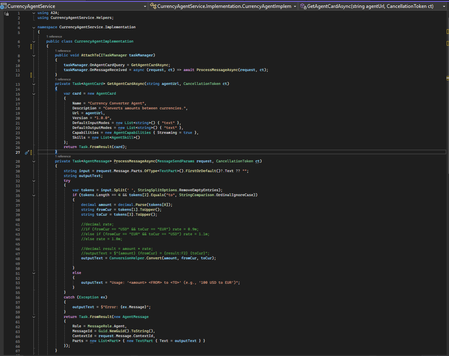
As AI systems mature into multi‑agent ecosystems, the need for agents to communicate reliably and securely has become fundamental. Traditionally, agents built on different frameworks like Semantic Kernel, LangChain, custom orchestrators, or enterprise APIs do not share a common communication model. This creates brittle integrations, duplicate logic, and siloed intelligence. The Agent‑to‑Agent Standard (A2AS) addresses this gap by defining a universal, vendor‑neutral protocol for structured agent interoperability. A2A establishes a common language for agents, built on familiar web primitives: JSON‑RPC 2.0 for messaging and HTTPS for transport. Each agent exposes a machine‑readable Agent Card describing its capabilities, supported input/output modes, and authentication requirements. Interactions are modeled as Tasks, which support synchronous, streaming, and long‑running workflows. Messages exchanged within a task contain Parts; text, structured data, files, or streams, that allow agents to collaborate without exposing internal implementation details. By standardizing discovery, communication, authentication, and task orchestration, A2A enables organizations to build composable AI architectures. Specialized agents can coordinate deep reasoning, planning, data retrieval, or business automation regardless of their underlying frameworks or hosting environments. This modularity, combined with industry adoption and Linux Foundation governance, positions A2A as a foundational protocol for interoperable AI systems. A2AS in .NET — Implementation Guide Prerequisites • .NET 8 SDK • Visual Studio 2022 (17.8+) • A2A and A2A.AspNetCore packages • Curl/Postman (optional, for direct endpoint testing) The open‑source A2A project provides a full‑featured .NET SDK, enabling developers to build and host A2A agents using ASP.NET Core or integrate with other agents as a client. Two A2A and A2A.AspNetCore packages power the experience. The SDK offers: A2AClient - to call remote agents TaskManager - to manage incoming tasks & message routing AgentCard / Message / Task models - strongly typed protocol objects MapA2A() - ASP.NET Core router integration that auto‑generates protocol endpoints This allows you to expose an A2A‑compliant agent with minimal boilerplate. Project Setup Create two separate projects: CurrencyAgentService → ASP.NET Core web project that hosts the agent A2AClient → Console app that discovers the agent card and sends a message Install the packages from the pre-requisites in the above projects. Building a Simple A2A Agent (Currency Agent Example) Below is a minimal Currency Agent implemented in ASP.NET Core. It responds by converting amounts between currencies. Step 1: In CurrencyAgentService project, create the CurrencyAgentImplementation class to implement the A2A agent. The class contains the logic for the following: a) Describing itself (agent “card” metadata). b) Processing the incoming text messages like “100 USD to EUR”. c) Returning a single text response with the conversion. The AttachTo(ITaskManager taskManager) method hooks two delegates on the provided taskManager - a) OnAgentCardQuery → GetAgentCardAsync: returns agent metadata. b) OnMessageReceived → ProcessMessageAsync: handles incoming messages and produces a response. Step 2: In the Program.cs of the Currency Agent Solution, create a TaskManager , and attach the agent to it, and expose the A2A endpoint. Typical flow: GET /agent → A2A host asks OnAgentCardQuery → returns the card POST /agent with a text message → A2A host calls OnMessageReceived → returns the conversion text. All fully A2A‑compliant. Calling an A2A Agent from .NET To interact with any A2A‑compliant agent from .NET, the client follows a predictable sequence: identify where the agent lives, discover its capabilities through the Agent Card, initialize a correctly configured A2AClient, construct a well‑formed message, send it asynchronously, and finally interpret the structured response. This ensures your client is fully aligned with the agent’s advertised contract and remains resilient as capabilities evolve. Below are the steps implemented to call the A2A agent from the A2A client: Identify the agent endpoint: Why: You need a stable base URL to resolve the agent’s metadata and send messages. What: Construct a Uri pointing to the agent service, e.g., https://localhost:7009/agent. Discover agent capabilities via an Agent Card. Why: Agent Cards provide a contract: name, description, final URL to call, and features (like streaming). This de-couples your client from hard-coded assumptions and enables dynamic capability checks. What: Use A2ACardResolver with the endpoint Uri, then call GetAgentCardAsync() to obtain an AgentCard. Initialize the A2AClient with the resolved URL. Why: The client encapsulates transport details and ensures messages are sent to the correct agent endpoint, which may differ from the discovery URL. What: Create A2AClient using new Uri (currencyCard.Url) from the Agent Card for correctness. Construct a well-formed agent request message. Why: Agents typically require structured messages for roles, traceability, and multi-part inputs. A unique message ID supports deduplication and logging. What: Build an AgentMessage: • Role = MessageRole.User clarifies intent. • MessageId = Guid.NewGuid().ToString() ensures uniqueness. • Parts contains content; for simple queries, a single TextPart with the prompt (e.g., “100 USD to EUR”). Package and send the message. Why: MessageSendParams can carry the message plus any optional settings (e.g., streaming flags or context). Using a dedicated params object keeps the API extensible. What: Wrap the AgentMessage in MessageSendParams and call SendMessageAsync(...) on the A2AClient. Outcome: Await the asynchronous response to avoid blocking and to stay scalable. Interpret the agent response. Why: Agents can return multiple Parts (text, data, attachments). Extracting the appropriate part avoids assumptions and keeps your client robust. What: Cast to AgentMessage, then read the first TextPart’s Text for the conversion result in this scenario. Best Practices 1. Keep Agents Focused and Single‑Purpose Design each agent around a clear, narrow capability (e.g., currency conversion, scheduling, document summarization). Single‑responsibility agents are easier to reason about, scale, and test, especially when they become part of larger multi‑agent workflows. 2. Maintain Accurate and Helpful Agent Cards The Agent Card is the first interaction point for any client. Ensure it accurately reflects: Supported input/output formats Streaming capabilities Authentication requirements (if any) Version information A clean and honest card helps clients integrate reliably without guesswork. 3. Prefer Structured Inputs and Outputs Although A2A supports plain text, using structured payloads through DataPart objects significantly improves consistency. JSON inputs and outputs reduce ambiguity, eliminate prompt‑engineering edge cases, and make agent behavior more deterministic especially when interacting with other automated agents. 4. Use Meaningful Task States Treat A2A Tasks as proper state machines. Transition through states intentionally (Submitted → Working → Completed, or Working → InputRequired → Completed). This gives clients clarity on progress, makes long‑running operations manageable, and enables more sophisticated control flows. 5. Provide Helpful Error Messages Make use of A2A and JSON‑RPC error codes such as -32602 (invalid input) or -32603 (internal error), and include additional context in the error payload. Avoid opaque messages, error details should guide the client toward recovery or correction. 6. Keep Agents Stateless Where Possible Stateless agents are easier to scale and less prone to hidden failures. When state is necessary, ensure it is stored externally or passed through messages or task contexts. For local POCs, in‑memory state is acceptable, but design with future statelessness in mind. 7. Validate Input Strictly Do not assume incoming messages are well‑formed. Validate fields, formats, and required parameters before processing. For example, a currency conversion agent should confirm both currencies exist and the value is numeric before attempting a conversion. 8. Design for Streaming Even if Disabled Streaming is optional, but it’s a powerful pattern for agents that perform progressive reasoning or long computations. Structuring your logic so it can later emit partial TextPart updates makes it easy to upgrade from synchronous to streaming workflows. 9. Include Traceability Metadata Embed and log identifiers such as TaskId, MessageId, and timestamps. These become crucial for debugging multi‑agent scenarios, improving observability, and correlating distributed workflows—especially once multiple agents collaborate. 10. Offer Clear Guidance When Input Is Missing Instead of returning a generic failure, consider shifting the task to InputRequired and explaining what the client should provide. This improves usability and makes your agent self‑documenting for new consumers.Azure Skilling at Microsoft Ignite 2025
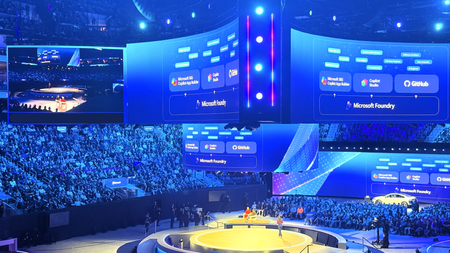
The energy at Microsoft Ignite was unmistakable. Developers, architects, and technical decision-makers converged in San Francisco to explore the latest innovations in cloud technology, AI applications, and data platforms. Beyond the keynotes and product announcements was something even more valuable: an integrated skilling ecosystem designed to transform how you build with Azure. This year Azure Skilling at Microsoft Ignite 2025 brought together distinct learning experiences, over 150+ hands-on labs, and multiple pathways to industry-recognized credentials—all designed to help you master skills that matter most in today's AI-driven cloud landscape. Just Launched at Ignite Microsoft Ignite 2025 offered an exceptional array of learning opportunities, each designed to meet developers anywhere on the skilling journey. Whether you joined us in-person or on-demand in the virtual experience, multiple touchpoints are available to deepen your Azure expertise. Ignite 2025 is in the books, but you can still engage with the latest Microsoft skilling opportunities, including: The Azure Skills Challenge provides a gamified learning experience that lets you compete while completing task-based achievements across Azure's most critical technologies. These challenges aren't just about badges and bragging rights—they're carefully designed to help you advance technical skills and prepare for Microsoft role-based certifications. The competitive element adds urgency and motivation, turning learning into an engaging race against the clock and your peers. For those seeking structured guidance, Plans on Learn offer curated sets of content designed to help you achieve specific learning outcomes. These carefully assembled learning journeys include built-in milestones, progress tracking, and optional email reminders to keep you on track. Each plan represents 12-15 hours of focused learning, taking you from concept to capability in areas like AI application development, data platform modernization, or infrastructure optimization. The Microsoft Reactor Azure Skilling Series, running December 3-11, brings skilling to life through engaging video content, mixing regular programming with special Ignite-specific episodes. This series will deliver technical readiness and programming guidance in a livestream presentation that's more digestible than traditional documentation. Whether you're catching episodes live with interactive Q&A or watching on-demand later, you’ll get world-class instruction that makes complex topics approachable. Beyond Ignite: Your Continuous Learning Journey Here's the critical insight that separates Ignite attendees who transform their careers from those who simply collect swag: the real learning begins after the event ends. Microsoft Ignite is your launchpad, not your destination. Every module you start, every lab you complete, and every challenge you tackle connects to a comprehensive learning ecosystem on Microsoft Learn that's available 24/7, 365 days a year. Think of Ignite as your intensive immersion experience—the moment when you gain context, build momentum, and identify the skills that will have the biggest impact on your work. What you do in the weeks and months following determines whether that momentum compounds into career-defining expertise or dissipates into business as usual. For those targeting career advancement through formal credentials, Microsoft Certifications, Applied Skills and AI Skills Navigator, provide globally recognized validation of your expertise. Applied Skills focus on scenario-based competencies, demonstrating that you can build and deploy solutions, not simply answer theoretical questions. Certifications cover role-based scenarios for developers, data engineers, AI engineers, and solution architects. The assessment experiences include performance-based testing in dedicated Azure tenants where you complete real configuration and development tasks. And finally, the NEW AI Skills Navigator is an agentic learning space, bringing together AI-powered skilling experiences and credentials in a single, unified experience with Microsoft, LinkedIn Learning and GitHub – all in one spot Why This Matters: The Competitive Context The cloud skills race is intensifying. While our competitors offer robust training and content, Microsoft's differentiation comes not from having more content—though our 1.4 million module completions last fiscal year and 35,000+ certifications awarded speak to scale—but from integration of services to orchestrate workflows. Only Microsoft offers a truly unified ecosystem where GitHub Copilot accelerates your development, Azure AI services power your applications, and Azure platform services deploy and scale your solutions—all backed by integrated skilling content that teaches you to maximize this connected experience. When you continue your learning journey after Ignite, you're not just accumulating technical knowledge. You're developing fluency in an integrated development environment that no competitor can replicate. You're learning to leverage AI-powered development tools, cloud-native architectures, and enterprise-grade security in ways that compound each other's value. This unified expertise is what transforms individual developers into force-multipliers for their organizations. Start Now, Build Momentum, Never Stop Microsoft Ignite 2025 offered the chance to compress months of learning into days of intensive, hands-on experience, but you can still take part through the on-demand videos, the Global Ignite Skills Challenge, visiting the GitHub repos for the /Ignite25 labs, the Reactor Azure Skilling Series, and the curated Plans on Learn provide multiple entry points regardless of your current skill level or preferred learning style. But remember: the developers who extract the most value from Ignite are those who treat the event as the beginning, not the culmination, of their learning journey. They join hackathons, contribute to GitHub repositories, and engage with the Azure community on Discord and technical forums. The question isn't whether you'll learn something valuable from Microsoft Ignite 2025-that's guaranteed. The question is whether you'll convert that learning into sustained momentum that compounds over months and years into career-defining expertise. The ecosystem is here. The content is ready. Your skilling journey doesn't end when Ignite does—it accelerates.3.9KViews0likes0CommentsStudy Buddy: Learning Data Science and Machine Learning with an AI Sidekick
If you've ever wished for a friendly companion to guide you through the world of data science and machine learning, you're not alone. As part of the "For Beginners" curriculum, I recently built a Study Buddy Agent, an AI-powered assistant designed to help learners explore data science interactively, intuitively, and joyfully. Why a Study Buddy? Learning something new can be overwhelming, especially when you're navigating complex topics like machine learning, statistics, or Python programming. The Study Buddy Agent is here to change that. It brings the curriculum to life by answering questions, offering explanations, and nudging learners toward deeper understanding, all in a conversational format. Think of it as your AI-powered lab partner: always available, never judgmental, and endlessly curious. Built with chatmodes, Powered by Purpose The agent lives inside a .chatmodes file in the https://github.com/microsoft/Data-Science-For-Beginners/blob/main/.github/chatmodes/study-mode.chatmode.md. This file defines how the agent behaves, what tone it uses, and how it interacts with learners. I designed it to be friendly, encouraging, and beginner-first—just like the curriculum itself. It’s not just about answering questions. The Study Buddy is trained to: Reinforce key concepts from the curriculum Offer hints and nudges when learners get stuck Encourage exploration and experimentation Celebrate progress and milestones What’s Under the Hood? The agent uses GitHub Copilot's chatmode, which allows developers to define custom behaviors for AI agents. By aligning the agent’s responses with the curriculum’s learning objectives, we ensure that learners stay on track while enjoying the flexibility of conversational learning. How You Can Use It YouTube Video here: Study Buddy - Data Science AI Sidekick Clone the repo: Head to the https://github.com/microsoft/Data-Science-For-Beginners and clone it locally or use Codespaces. Open the GitHub Copilot Chat, and select Study Buddy: This will activate the Study Buddy. Start chatting: Ask questions, explore topics, and let the agent guide you. What’s Next? This is just the beginning. I’m exploring ways to: Expand the agent to other beginner curriculums (Web Dev, AI, IoT) Integrate feedback loops so learners can shape the agent’s evolution Final Thoughts In my role, I believe learning should be inclusive, empowering, and fun. The Study Buddy Agent is a small step toward that vision, a way to make data science feel less like a mountain and more like a hike with a good friend. Try it out, share your feedback, and let’s keep building tools that make learning magical. Join us on Discord to share your feedback.