visual studio
215 Topics
What's the future of RDLC ("client-side SSRS", aka "ReportViewer")?
This is the information I could gather so far: Getting an RDLC renderer for .NET 5+ is currently the fourth highest-voted feature on the SQL Server user wishlist. Unfortunately, there are currently no plans to do that (see the comments here). There are some enthusiast ports/recompilations floating around on github and nuget, but they are not official. The SQL Server Reporting Services Team Blog is dead, the last entry is from 2018. There's a third-party company providing an RDLC renderer, but Microsoft acquired them in 2018. Nothing has been heard since. There is currently no ReportViewer designer for Visual Studio 2022. Getting one is currently the fourth highest-voted feature on the Visual Studio 2022 wishlist. From a business perspective, I can totally understand that Microsoft is not giving this highly-loved feature the resources it needs. After all, they are basically giving away a great reporting engine for free, undermining their own SQL Server and Power BI sales. And they are not even hiding the fact that they'd rather have people purchase Power BI subscriptions, which is perfectly fine. They are a company, not a charity. Unfortunately, adding a dependency to a third-party cloud service is a no-go for many software development scenarios. Thus, I would like to start a discussion on the following points: It seems to me that MS no longer wants people to use their RLDC reporting engine in new projects. Is this observation correct? If you have a large repository of RDLC reports in your project, what are your migration plans? Are there drop-in replacements from third parties? Would Microsoft consider open-sourcing the RLDC engine, so that the community can "keep the product alive" for legacy scenarios and prevent this from being a blocker in .NET 5+ migrations? Best regards Heinzi13KViews10likes1CommentImplementing A2A protocol in NET: A Practical Guide
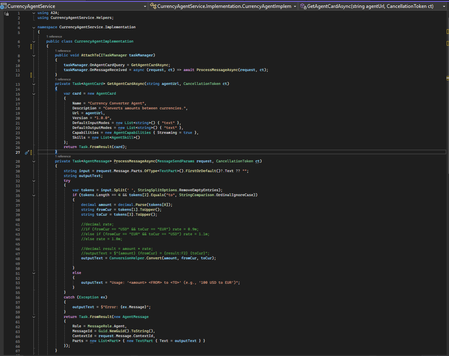
As AI systems mature into multi‑agent ecosystems, the need for agents to communicate reliably and securely has become fundamental. Traditionally, agents built on different frameworks like Semantic Kernel, LangChain, custom orchestrators, or enterprise APIs do not share a common communication model. This creates brittle integrations, duplicate logic, and siloed intelligence. The Agent‑to‑Agent Standard (A2AS) addresses this gap by defining a universal, vendor‑neutral protocol for structured agent interoperability. A2A establishes a common language for agents, built on familiar web primitives: JSON‑RPC 2.0 for messaging and HTTPS for transport. Each agent exposes a machine‑readable Agent Card describing its capabilities, supported input/output modes, and authentication requirements. Interactions are modeled as Tasks, which support synchronous, streaming, and long‑running workflows. Messages exchanged within a task contain Parts; text, structured data, files, or streams, that allow agents to collaborate without exposing internal implementation details. By standardizing discovery, communication, authentication, and task orchestration, A2A enables organizations to build composable AI architectures. Specialized agents can coordinate deep reasoning, planning, data retrieval, or business automation regardless of their underlying frameworks or hosting environments. This modularity, combined with industry adoption and Linux Foundation governance, positions A2A as a foundational protocol for interoperable AI systems. A2AS in .NET — Implementation Guide Prerequisites • .NET 8 SDK • Visual Studio 2022 (17.8+) • A2A and A2A.AspNetCore packages • Curl/Postman (optional, for direct endpoint testing) The open‑source A2A project provides a full‑featured .NET SDK, enabling developers to build and host A2A agents using ASP.NET Core or integrate with other agents as a client. Two A2A and A2A.AspNetCore packages power the experience. The SDK offers: A2AClient - to call remote agents TaskManager - to manage incoming tasks & message routing AgentCard / Message / Task models - strongly typed protocol objects MapA2A() - ASP.NET Core router integration that auto‑generates protocol endpoints This allows you to expose an A2A‑compliant agent with minimal boilerplate. Project Setup Create two separate projects: CurrencyAgentService → ASP.NET Core web project that hosts the agent A2AClient → Console app that discovers the agent card and sends a message Install the packages from the pre-requisites in the above projects. Building a Simple A2A Agent (Currency Agent Example) Below is a minimal Currency Agent implemented in ASP.NET Core. It responds by converting amounts between currencies. Step 1: In CurrencyAgentService project, create the CurrencyAgentImplementation class to implement the A2A agent. The class contains the logic for the following: a) Describing itself (agent “card” metadata). b) Processing the incoming text messages like “100 USD to EUR”. c) Returning a single text response with the conversion. The AttachTo(ITaskManager taskManager) method hooks two delegates on the provided taskManager - a) OnAgentCardQuery → GetAgentCardAsync: returns agent metadata. b) OnMessageReceived → ProcessMessageAsync: handles incoming messages and produces a response. Step 2: In the Program.cs of the Currency Agent Solution, create a TaskManager , and attach the agent to it, and expose the A2A endpoint. Typical flow: GET /agent → A2A host asks OnAgentCardQuery → returns the card POST /agent with a text message → A2A host calls OnMessageReceived → returns the conversion text. All fully A2A‑compliant. Calling an A2A Agent from .NET To interact with any A2A‑compliant agent from .NET, the client follows a predictable sequence: identify where the agent lives, discover its capabilities through the Agent Card, initialize a correctly configured A2AClient, construct a well‑formed message, send it asynchronously, and finally interpret the structured response. This ensures your client is fully aligned with the agent’s advertised contract and remains resilient as capabilities evolve. Below are the steps implemented to call the A2A agent from the A2A client: Identify the agent endpoint: Why: You need a stable base URL to resolve the agent’s metadata and send messages. What: Construct a Uri pointing to the agent service, e.g., https://localhost:7009/agent. Discover agent capabilities via an Agent Card. Why: Agent Cards provide a contract: name, description, final URL to call, and features (like streaming). This de-couples your client from hard-coded assumptions and enables dynamic capability checks. What: Use A2ACardResolver with the endpoint Uri, then call GetAgentCardAsync() to obtain an AgentCard. Initialize the A2AClient with the resolved URL. Why: The client encapsulates transport details and ensures messages are sent to the correct agent endpoint, which may differ from the discovery URL. What: Create A2AClient using new Uri (currencyCard.Url) from the Agent Card for correctness. Construct a well-formed agent request message. Why: Agents typically require structured messages for roles, traceability, and multi-part inputs. A unique message ID supports deduplication and logging. What: Build an AgentMessage: • Role = MessageRole.User clarifies intent. • MessageId = Guid.NewGuid().ToString() ensures uniqueness. • Parts contains content; for simple queries, a single TextPart with the prompt (e.g., “100 USD to EUR”). Package and send the message. Why: MessageSendParams can carry the message plus any optional settings (e.g., streaming flags or context). Using a dedicated params object keeps the API extensible. What: Wrap the AgentMessage in MessageSendParams and call SendMessageAsync(...) on the A2AClient. Outcome: Await the asynchronous response to avoid blocking and to stay scalable. Interpret the agent response. Why: Agents can return multiple Parts (text, data, attachments). Extracting the appropriate part avoids assumptions and keeps your client robust. What: Cast to AgentMessage, then read the first TextPart’s Text for the conversion result in this scenario. Best Practices 1. Keep Agents Focused and Single‑Purpose Design each agent around a clear, narrow capability (e.g., currency conversion, scheduling, document summarization). Single‑responsibility agents are easier to reason about, scale, and test, especially when they become part of larger multi‑agent workflows. 2. Maintain Accurate and Helpful Agent Cards The Agent Card is the first interaction point for any client. Ensure it accurately reflects: Supported input/output formats Streaming capabilities Authentication requirements (if any) Version information A clean and honest card helps clients integrate reliably without guesswork. 3. Prefer Structured Inputs and Outputs Although A2A supports plain text, using structured payloads through DataPart objects significantly improves consistency. JSON inputs and outputs reduce ambiguity, eliminate prompt‑engineering edge cases, and make agent behavior more deterministic especially when interacting with other automated agents. 4. Use Meaningful Task States Treat A2A Tasks as proper state machines. Transition through states intentionally (Submitted → Working → Completed, or Working → InputRequired → Completed). This gives clients clarity on progress, makes long‑running operations manageable, and enables more sophisticated control flows. 5. Provide Helpful Error Messages Make use of A2A and JSON‑RPC error codes such as -32602 (invalid input) or -32603 (internal error), and include additional context in the error payload. Avoid opaque messages, error details should guide the client toward recovery or correction. 6. Keep Agents Stateless Where Possible Stateless agents are easier to scale and less prone to hidden failures. When state is necessary, ensure it is stored externally or passed through messages or task contexts. For local POCs, in‑memory state is acceptable, but design with future statelessness in mind. 7. Validate Input Strictly Do not assume incoming messages are well‑formed. Validate fields, formats, and required parameters before processing. For example, a currency conversion agent should confirm both currencies exist and the value is numeric before attempting a conversion. 8. Design for Streaming Even if Disabled Streaming is optional, but it’s a powerful pattern for agents that perform progressive reasoning or long computations. Structuring your logic so it can later emit partial TextPart updates makes it easy to upgrade from synchronous to streaming workflows. 9. Include Traceability Metadata Embed and log identifiers such as TaskId, MessageId, and timestamps. These become crucial for debugging multi‑agent scenarios, improving observability, and correlating distributed workflows—especially once multiple agents collaborate. 10. Offer Clear Guidance When Input Is Missing Instead of returning a generic failure, consider shifting the task to InputRequired and explaining what the client should provide. This improves usability and makes your agent self‑documenting for new consumers.Review GitHub Pull Requests in Visual Studio 2022
Used the GitHub Extension for Visual Studio 2019 to review Pull Requests. Now it looks like that extension is included in VS 2022. However, when going to 'Git/GitHub/View Pull Requests' it redirects me to the browser. Do you know how you can review pull requests in VS 2022 ?10KViews7likes5CommentsSupercharge Your Dev Workflows with GitHub Copilot Custom Skills
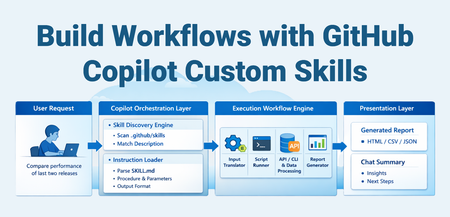
The Problem Every team has those repetitive, multi-step workflows that eat up time: Running a sequence of CLI commands, parsing output, and generating a report Querying multiple APIs, correlating data, and summarizing findings Executing test suites, analyzing failures, and producing actionable insights You've probably documented these in a wiki or a runbook. But every time, you still manually copy-paste commands, tweak parameters, and stitch results together. What if your AI coding assistant could do all of that — triggered by a single natural language request? That's exactly what GitHub Copilot Custom Skills enable. What Are Custom Skills? A skill is a folder containing a SKILL.md file (instructions for the AI), plus optional scripts, templates, and reference docs. When you ask Copilot something that matches the skill's description, it loads the instructions and executes the workflow autonomously. Think of it as giving your AI assistant a runbook it can actually execute, not just read. Without Skills With Skills Read the wiki for the procedure Copilot loads the procedure automatically Copy-paste 5 CLI commands Copilot runs the full pipeline Manually parse JSON output Script generates a formatted HTML report 15-30 minutes of manual work One natural language request, ~2 minutes How It Works The key insight: the skill file is the contract between you and the AI. You describe what to do and how, and Copilot handles the orchestration. Prerequisites Requirement Details VS Code Latest stable release GitHub Copilot Active Copilot subscription (Individual, Business, or Enterprise) Agent mode Select "Agent" mode in the Copilot Chat panel (the default in recent versions) Runtime tools Whatever your scripts need — Python, Node.js, .NET CLI, az CLI, etc. Note: Agent Skills follow an open standard — they work across VS Code, GitHub Copilot CLI, and GitHub Copilot coding agent. No additional extensions or cloud services are required for the skill system itself. Anatomy of a Skill .github/skills/my-skill/ ├── SKILL.md # Instructions (required) └── references/ ├── resources/ │ ├── run.py # Automation script │ ├── query-template.sql # Reusable query template │ └── config.yaml # Static configuration └── reports/ └── report_template.html # Output template The SKILL.md File Every skill has the same structure: --- name: my-skill description: 'What this does and when to use it. Include trigger phrases so Copilot knows when to load it. USE FOR: specific task A, task B. Trigger phrases: "keyword1", "keyword2".' argument-hint: 'What inputs the user should provide.' --- # My Skill ## When to Use - Situation A - Situation B ## Quick Start \```powershell cd .github/skills/my-skill/references/resources py run.py <arg1> <arg2> \``` ## What It Does | Step | Action | Purpose | |------|--------|---------| | 1 | Fetch data from source | Gather raw input | | 2 | Process and transform | Apply business logic | | 3 | Generate report | Produce actionable output | ## Output Description of what the user gets back. Key Design Principles Description is discovery. The description field is the only thing Copilot reads to decide whether to load your skill. Pack it with trigger phrases and keywords. Progressive loading. Copilot reads only name + description (~100 tokens) for all skills. It loads the full SKILL.md body only for matched skills. Reference files load only when the procedure references them. Self-contained procedures. Include everything the AI needs to execute — exact commands, parameter formats, file paths. Don't assume prior knowledge. Scripts do the heavy lifting. The AI orchestrates; your scripts execute. This keeps the workflow deterministic and reproducible. Example: Build a Deployment Health Check Skill Let's build a skill that checks the health of a deployment by querying an API, comparing against expected baselines, and generating a summary. Step 1 — Create the folder structure .github/skills/deployment-health/ ├── SKILL.md └── references/ └── resources/ ├── check_health.py └── endpoints.yaml Step 2 — Write the SKILL.md --- name: deployment-health description: 'Check deployment health across environments. Queries health endpoints, compares response times against baselines, and flags degraded services. USE FOR: deployment validation, health check, post-deploy verification, service status. Trigger phrases: "check deployment health", "is the deployment healthy", "post-deploy check", "service health".' argument-hint: 'Provide the environment name (e.g., staging, production).' --- # Deployment Health Check ## When to Use - After deploying to any environment - During incident triage to check service status - Scheduled spot checks ## Quick Start \```bash cd .github/skills/deployment-health/references/resources python check_health.py <environment> \``` ## What It Does 1. Loads endpoint definitions from `endpoints.yaml` 2. Calls each endpoint, records response time and status code 3. Compares against baseline thresholds 4. Generates an HTML report with pass/fail status ## Output HTML report at `references/reports/health_<environment>_<date>.html` Step 3 — Write the script # check_health.py import sys, yaml, requests, time, json from datetime import datetime def main(): env = sys.argv[1] with open("endpoints.yaml") as f: config = yaml.safe_load(f) results = [] for ep in config["endpoints"]: url = ep["url"].replace("{env}", env) start = time.time() resp = requests.get(url, timeout=10) elapsed = time.time() - start results.append({ "service": ep["name"], "status": resp.status_code, "latency_ms": round(elapsed * 1000), "threshold_ms": ep["threshold_ms"], "healthy": resp.status_code == 200 and elapsed * 1000 < ep["threshold_ms"] }) healthy = sum(1 for r in results if r["healthy"]) print(f"Health check: {healthy}/{len(results)} services healthy") # ... generate HTML report ... if __name__ == "__main__": main() Step 4 — Use it Just ask Copilot in agent mode: "Check deployment health for staging" Copilot will: Match against the skill description Load the SKILL.md instructions Run python check_health.py staging Open the generated report Summarize findings in chat More Skill Ideas Skills aren't limited to any specific domain. Here are patterns that work well: Skill What It Automates Test Regression Analyzer Run tests, parse failures, compare against last known-good run, generate diff report API Contract Checker Compare Open API specs between branches, flag breaking changes Security Scan Reporter Run SAST/DAST tools, correlate findings, produce prioritized report Cost Analysis Query cloud billing APIs, compare costs across periods, flag anomalies Release Notes Generator Parse git log between tags, categorize changes, generate changelog Infrastructure Drift Detector Compare live infra state vs IaC templates, flag drift Log Pattern Analyzer Query log aggregation systems, identify anomaly patterns, summarize Performance Bench marker Run benchmarks, compare against baselines, flag regressions Dependency Auditor Scan dependencies, check for vulnerabilities and outdated packages The pattern is always the same: instructions (SKILL.md) + automation script + output template. Tips for Writing Effective Skills Do Front-load the description with keywords — this is how Copilot discovers your skill Include exact commands — cd path/to/dir && python script.py <args> Document input/output clearly — what goes in, what comes out Use tables for multi-step procedures — easier for the AI to follow Include time zone conversion notes if dealing with timestamps Bundle HTML report templates — rich output beats plain text Don't Don't use vague descriptions — "A useful skill" won't trigger on anything Don't assume context — include all paths, env vars, and prerequisites Don't put everything in SKILL.md — use references/ for large files Don't hardcode secrets — use environment variables or Azure Key Vault Don't skip error guidance — tell the AI what common errors look like and how to fix them Skill Locations Skills can live at project or personal level: Location Scope Shared with team? .github/skills/<name>/ Project Yes (via source control) .agents/skills/<name>/ Project Yes (via source control) .claude/skills/<name>/ Project Yes (via source control) ~/.copilot/skills/<name>/ Personal No ~/.agents/skills/<name>/ Personal No ~/.claude/skills/<name>/ Personal No Project-level skills are committed to your repo and shared with the team. Personal skills are yours and roam with your VS Code settings sync. You can also configure additional skill locations via the chat.skillsLocations VS Code setting. How Skills Fit in the Copilot Customization Stack Skills are one of several customization primitives. Here's when to use what: Primitive Use When Workspace Instructions (.github/copilot-instructions.md) Always-on rules: coding standards, naming conventions, architectural guidelines File Instructions (.github/instructions/*.instructions.md) Rules scoped to specific file patterns (e.g., all *.test.ts files) Prompts (.github/prompts/*.prompt.md) Single-shot tasks with parameterized inputs Skills (.github/skills/<name>/SKILL.md) Multi-step workflows with bundled scripts and templates Custom Agents (.github/agents/*.agent.md) Isolated subagents with restricted tool access or multi-stage pipelines Hooks (.github/hooks/*.json) Deterministic shell commands at agent lifecycle events (auto-format, block tools) Plugins Installable skill bundles from the community (awesome-copilot) Slash Commands & Quick Creation Skills automatically appear as slash commands in chat. Type / to see all available skills. You can also pass context after the command: /deployment-health staging /webapp-testing for the login page Want to create a skill fast? Type /create-skill in chat and describe what you need. Copilot will ask clarifying questions and generate the SKILL.md with proper frontmatter and directory structure. You can also extract a skill from an ongoing conversation: after debugging a complex issue, ask "create a skill from how we just debugged that" to capture the multi-step procedure as a reusable skill. Controlling When Skills Load Use frontmatter properties to fine-tune skill availability: Configuration Slash command? Auto-loaded? Use case Default (both omitted) Yes Yes General-purpose skills user-invocable: false No Yes Background knowledge the model loads when relevant disable-model-invocation: true Yes No Skills you only want to run on demand Both set No No Disabled skills The Open Standard Agent Skills follow an open standard that works across multiple AI agents: GitHub Copilot in VS Code — chat and agent mode GitHub Copilot CLI — terminal workflows GitHub Copilot coding agent — automated coding tasks Claude Code, Gemini CLI — compatible agents via .claude/skills/ and .agents/skills/ Skills you write once are portable across all these tools. Getting Started Create .github/skills/<your-skill>/SKILL.md in your repo Write a keyword-rich description in the YAML frontmatter Add your procedure and reference scripts Open VS Code, switch to Agent mode, and ask Copilot to do the task Watch it discover your skill, load the instructions, and execute Or skip the manual setup — type /create-skill in chat and describe what you need. That's it. No extension to install. No config file to update. No deployment pipeline. Just markdown and scripts, version-controlled in your repo. Custom Skills turn your documented procedures into executable AI workflows. Start with your most painful manual task, wrap it in a SKILL.md, and let Copilot handle the rest. Further Reading: Official Agent Skills docs Community skills & plugins (awesome-copilot) Anthropic reference skillsOpen AI’s GPT-5.1-codex-max in Microsoft Foundry: Igniting a New Era for Enterprise Developers
Announcing GPT-5.1-codex-max: The Future of Enterprise Coding Starts Now We’re thrilled to announce the general availability of OpenAI's GPT-5.1-codex-max in Microsoft Foundry Models; a leap forward that redefines what’s possible for enterprise-grade coding agents. This isn’t just another model release; it’s a celebration of innovation, partnership, and the relentless pursuit of developer empowerment. At Microsoft Ignite, we unveiled Microsoft Foundry: a unified platform where businesses can confidently choose the right model for every job, backed by enterprise-grade reliability. Foundry brings together the best from OpenAI, Anthropic, xAI, Black Forest Labs, Cohere, Meta, Mistral, and Microsoft’s own breakthroughs, all under one roof. Our partnership with Anthropic is a testament to our commitment to giving developers access to the most advanced, safe, and high-performing models in the industry. And now, with GPT-5.1-codex-max joining the Foundry family, the possibilities for intelligent applications and agentic workflows have never been greater. GPT 5.1-codex-max is available today in Microsoft Foundry and accessible in Visual Studio Code via the Foundry extension . Meet GPT-5.1-codex-max: Enterprise-Grade Coding Agent for Complex Projects GPT-5.1-codex-max is engineered for those who build the future. Imagine tackling complex, long-running projects without losing context or momentum. GPT-5.1-codex-max delivers efficiency at scale, cross-platform readiness, and proven performance with top scores on SWE-Bench (77.9), the gold standard for AI coding. With GPT-5.1-codex-max, developers can focus on creativity and problem-solving, while the model handles the heavy lifting. GPT-5.1-codex-max isn’t just powerful; it’s practical, designed to solve real challenges for enterprise developers: Multi-Agent Coding Workflows: Automate repetitive tasks across microservices, maintaining shared context for seamless collaboration. Enterprise App Modernization: Effortlessly refactor legacy .NET and Java applications into cloud-native architectures. Secure API Development: Generate and validate secure API endpoints, with `compliance checks built-in for peace of mind. Continuous Integration Support: Integrate GPT-5.1-codex-max into CI/CD pipelines for automated code reviews and test generation, accelerating delivery cycles. These use cases are just the beginning. GPT-5.1-codex-max is your partner in building robust, scalable, and secure solutions. Foundry: Platform Built for Developers Who Build the Future Foundry is more than a model catalog—it’s an enterprise AI platform designed for developers who need choice, reliability, and speed. • Choice Without Compromise: Access the widest range of models, including frontier models from leading model providers. • Enterprise-Grade Infrastructure: Built-in security, observability, and governance for responsible AI at scale. • Integrated Developer Experience: From GitHub to Visual Studio Code, Foundry connects with tools developers love for a frictionless build-to-deploy journey. Start Building Smarter with GPT-5.1-codex-max in Foundry The future is here, and it’s yours to shape. Supercharge your coding workflows with GPT-5.1-codex-max in Microsoft Foundry today. Learn more about Microsoft Foundry: aka.ms/IgniteFoundryModels. Watch Ignite sessions for deep dives and demos: ignite.microsoft.com. Build faster, smarter, and with confidence on the platform redefining enterprise AI.5.7KViews3likes5CommentsUnlocking AI-Driven Data Access: Azure Database for MySQL Support via the Azure MCP Server
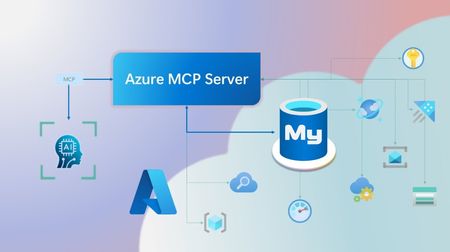
Step into a new era of data-driven intelligence with the fusion of Azure MCP Server and Azure Database for MySQL, where your MySQL data is no longer just stored, but instantly conversational, intelligent and action-ready. By harnessing the open-standard Model Context Protocol (MCP), your AI agents can now query, analyze and automate in natural language, accessing tables, surfacing insights and acting on your MySQL-driven business logic as easily as chatting with a colleague. It’s like giving your data a voice and your applications a brain, all within Azure’s trusted cloud platform. We are excited to announce that we have added support for Azure Database for MySQL in Azure MCP Server. The Azure MCP Server leverages the Model Context Protocol (MCP) to allow AI agents to seamlessly interact with various Azure services to perform context-aware operations such as querying databases and managing cloud resources. Building on this foundation, the Azure MCP Server now offers a set of tools that AI agents and apps can invoke to interact with Azure Database for MySQL - enabling them to list and query databases, retrieve schema details of tables, and access server configurations and parameters. These capabilities are delivered through the same standardized interface used for other Azure services, making it easier to the adopt the MCP standard for leveraging AI to work with your business data and operations across the Azure ecosystem. Before we delve into these new tools and explore how to get started with them, let’s take a moment to refresh our understanding of MCP and the Azure MCP Server - what they are, how they work, and why they matter. MCP architecture and key components The Model Context Protocol (MCP) is an emerging open protocol designed to integrate AI models with external data sources and services in a scalable, standardized, and secure manner. MCP dictates a client-server architecture with four key components: MCP Host, MCP Client, MCP Server and external data sources, services and APIs that provide the data context required to enhance AI models. To explain briefly, an MCP Host (AI apps and agents) includes an MCP client component that connects to one or more MCP Servers. These servers are lightweight programs that securely interface with external data sources, services and APIs and exposes them to MCP clients in the form of standardized capabilities called tools, resources and prompts. Learn more: MCP Documentation What is Azure MCP Server? Azure offers a multitude of cloud services that help developers build robust applications and AI solutions to address business needs. The Azure MCP Server aims to expose these powerful services for agentic usage, allowing AI systems to perform operations that are context-aware of your Azure resources and your business data within them, while ensuring adherence to the Model Context Protocol. It supports a wide range of Azure services and tools including Azure AI Search, Azure Cosmos DB, Azure Storage, Azure Monitor, Azure CLI and Developer CLI extensions. This means that you can empower AI agents, apps and tools to: Explore your Azure resources, such as listing and retrieving details on your Azure subscriptions, resource groups, services, databases, and tables. Search, query and analyze your data and logs. Execute CLI and Azure Developer CLI commands directly, and more! Learn more: Azure MCP Server GitHub Repository Introducing new Azure MCP Server tools to interact with Azure Database for MySQL The Azure MCP Server now includes the following tools that allow AI agents to interact with Azure Database for MySQL and your valuable business data residing in these servers, in accordance with the MCP standard: Tool Description Example Prompts azmcp_mysql_server_list List all MySQL servers in a subscription & resource group "List MySQL servers in resource group 'prod-rg'." "Show MySQL servers in region 'eastus'." azmcp_mysql_server_config_get Retrieve the configuration of a MySQL server "What is the backup retention period for server 'my-mysql-server'?" "Show storage allocation for server 'my-mysql-server'." azmcp_mysql_server_param_get Retrieve a specific parameter of a MySQL server "Is slow_query_log enabled on server my-mysql-server?" "Get innodb_buffer_pool_size for server my-mysql-server." azmcp_mysql_server_param_set Set a specific parameter of a MySQL server to a specific value "Set max_connections to 500 on server my-mysql-server." "Set wait_timeout to 300 on server my-mysql-server." azmcp_mysql_table_list List all tables in a MySQL database "List tables starting with 'tmp_' in database 'appdb'." "How many tables are in database 'analytics'?" azmcp_mysql_table_schema_get Get the schema of a specific table in a MySQL database "Show indexes for table 'transactions' in database 'billing'." "What is the primary key for table 'users' in database 'auth'?" azmcp_mysql_database_query Executes a SELECT query on a MySQL Database. The query must start with SELECT and cannot contain any destructive SQL operations for security reasons. “How many orders were placed in the last 30 days in the salesdb.orders table?” “Show the number of new users signed up in the last week in appdb.users grouped by day.” These interactions are secured using Microsoft Entra authentication, which enables seamless, identity-based access to Azure Database for MySQL - eliminating the need for password storage and enhancing overall security. How are these new tools in the Azure MCP Server different from the standalone MCP Server for Azure Database for MySQL? We have integrated the key capabilities of the Azure Database for MySQL MCP server into the Azure MCP Server, making it easier to connect your agentic apps not only to Azure Database for MySQL but also to other Azure services through one unified and secure interface! How to get started Installing and running the Azure MCP Server is quick and easy! Use GitHub Copilot in Visual Studio Code to gain meaningful insights from your business data in Azure Database for MySQL. Pre-requisites Install Visual Studio Code. Install GitHub Copilot and GitHub Copilot Chat extensions. An Azure Database for MySQL with Microsoft Entra authentication enabled. Ensure that the MCP Server is installed on a system with network connectivity and credentials to connect to Azure Database for MySQL. Installation and Testing Please use this guide for installation: Azure MCP Server Installation Guide Try the following prompts with your Azure Database for MySQL: Azure Database for MySQL tools for Azure MCP Server Try it out and share your feedback! Start using Azure MCP Server with the MySQL tools today and let our cloud services become your AI agent’s most powerful ally. We’re counting on your feedback - every comment, suggestion, or bug-report helps us build better tools together. Stay tuned: more features and capabilities are on the horizon! Feel free to comment below or write to us with your feedback and queries at AskAzureDBforMySQL@service.microsoft.com.544Views3likes0CommentsBuild your first ML-Model with ML.NET Model Builder
Excited to dive into machine learning in .NET? With the aid of tools like ML.NET Model Builder and Visual Studio, it's a breeze. Here's a preview of the steps you'll take: 1. Download Visual Studio 2022 with .NET desktop development and ML.NET Model Builder. 2. Create a .NET console app named myMLApp. 3. Add a machine learning model named SentimentModel.mbconfig. 4. Choose the Data classification scenario. 5. Select Local (CPU) as the training environment. 6. Prepare and import your data. 7. Train the model. 8. Evaluate its performance. 9. Consume the model using provided code. 10. Run and debug to observe the results. Now you're all set to leverage ML.NET's prowess for predictive models in your .NET apps!14KViews3likes0CommentsHow to use Comments as Prompts in GitHub Copilot for Visual Studio
GitHub Copilot is a coding assistant powered by Artificial Intelligence (AI), which can run in various environments and help you be more efficient in your daily coding tasks. In this new short video, Bruno shows you how to use inline comments to generate code with GitHub Copilot.