virtual machine scale sets
7 Topics
Azure Elastic SAN Next Generation public preview: Mission-critical performance & cloud-native scale
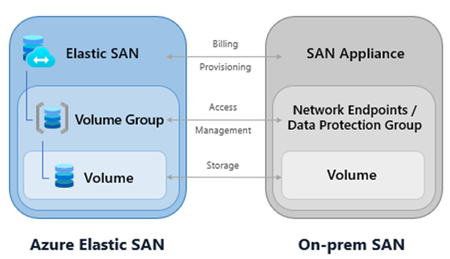
Mission-critical applications such as SAP HANA, Epic, and core transactional databases demand consistently high performance and predictable low latency. Cloud-native platforms running stateful applications, vector databases, and fast-growing fleets of AI agent environments need persistent storage that can scale across thousands of volumes. Meeting these growing storage demands without overprovisioning resources or adding operational complexity is a common challenge that organizations face today. To address this challenge, we are announcing the public preview of Azure Elastic SAN Next Generation, bringing together the performance mission-critical applications demand, the scale cloud-native workloads need, and the cost efficiency enabled by Elastic SAN’s storage consolidation model and dynamic performance sharing. Elastic SAN Next Generation expands the workloads that can benefit from Elastic SAN—whether you’re migrating an on-premises SAN estate, modernizing enterprise applications, or building cloud-native applications. At a glance Mission-critical performance. Up to 400,000 IOPS and 10,000 MB/s per volume, with low sub-millisecond latency and noisy-neighbor protection for Business Critical volume groups. Cloud-native scale. Up to 1 PiB of capacity, 4 million IOPS, 160 GB/s of throughput, and 20,000 volumes per SAN. Cost efficiency. Thin provisioning, autoscale, thin cloning (coming soon), and independent scaling of capacity and performance, built on the consolidation economics of Elastic SAN. Data protection and recovery. Instant snapshots with automatic hardening, complemented by application-consistent backups through Commvault and Druva. Elastic SAN Next Generation builds on the Elastic SAN foundation customers already know: a familiar SAN, volume-group, and volume hierarchy; enterprise-grade security, data protection and resiliency; and shared storage infrastructure that lowers storage TCO and simplifies storage management. Mission-critical performance for your most demanding applications For I/O-intensive enterprise applications, storage performance directly affects how quickly transactions complete and how predictably applications respond under load. Consolidation is valuable only when the storage platform can meet those requirements. The new Business Critical tier delivers up to 5× the IOPS and nearly 8× the throughput per volume compared with today’s General Purpose iSCSI volumes, alongside low sub-millisecond latency. Quality of Service (QoS) provides noisy-neighbor protection at the Business Critical volume-group level, protecting configured IOPS and throughput allocations from contention elsewhere on the SAN. For customers migrating an on-premises SAN estate, moving data is only part of the challenge—the destination must also meet the different service levels their applications depend on. Business Critical and General Purpose bring that familiar tiered-storage approach to Azure, with higher performance and noisy-neighbor protection extending Elastic SAN to more demanding applications. This helps customers map workloads across their SAN estate to appropriate storage tiers and plan storage migrations at the SAN level—helping accelerate SAN migrations to Azure during datacenter exits and hardware refreshes. These applications also benefit from the economics of a shared SAN. Customers can reserve performance for critical workloads while sharing available performance across volumes and provisioning capacity to match their needs—helping improve utilization and reduce overprovisioning. For the representative workload configuration evaluated, Elastic SAN Next Generation offers approximately 43% lower monthly storage costs than competing cloud provider. See “Consolidation economics in practice” below for more details. Scale persistent storage for cloud-native and AI workloads Growing SaaS database fleets, distributed vector databases, and persistent agent stores and workspaces can create demand for thousands of volumes. Across these workloads, customers need storage that keeps pace while remaining simple to provision, organize, and manage. Elastic SAN Next Generation supports up to 20,000 volumes per SAN at preview, with higher limits on the roadmap. For database fleets and agent platforms using persistent block storage on Azure, this provides room to expand through a familiar SAN management model. Volumes remain organized into groups, with network and security policies applied centrally rather than configured volume by volume—bringing scale and management simplicity together as application estates grow. Shared performance helps improve utilization as activity varies across databases and agent environments, while thin provisioning and autoscale help align capacity provisioning with growth. Thin cloning (coming soon) will provide space-efficient, instantly mountable volume copies for agent workspaces that start from a common baseline—helping teams expand these environments without making a full data copy for each one. More workloads. Greater control. Better storage economics. Across these workloads, Elastic SAN Next Generation helps customers match performance and connectivity to their applications, provision resources efficiently as demand grows, and protect data with appropriate recovery options. Choose the performance and connectivity that fit your workloads Assign a QoS tier to each volume group: Business Critical offers reserved IOPS and throughput for noisy-neighbor protection and can draw on available shared performance beyond its reservation. General Purpose uses dynamically shared performance without reservations. The new Direct Attach option combines a familiar disk-attachment workflow for supported Azure virtual machines, with SAN-level provisioning and volume group management. Customers don’t need to configure guest-side iSCSI sessions. iSCSI remains available to provide low-cost external storage for bare-metal environments, including Azure VMware Solution (AVS) and Nutanix, and for any workload that needs high volume density per host. Take agent sandboxes as an example. If each agent gets its own isolated volume, a single VM can need 100+ volumes. iSCSI handles that scale and still delivers the raw performance of block storage. QoS tier Connectivity Performance model Max IOPS per volume Max throughput per volume Example workload profiles Business Critical Direct Attach Volume-group performance reservations with noisy-neighbor protection; low sub-millisecond latency 400,000 10,000 MB/s Transaction-heavy databases and demanding enterprise applications General Purpose Direct Attach Shared performance; sub-millisecond latency 80,000 2,000 MB/s Vector databases, open-source databases, persistent application stores General Purpose iSCSI Shared performance 80,000 1,280 MB/s Azure VMware Solution, Nutanix, and other iSCSI-preferred environments Per-volume performance depends on volume capacity, any reservations on the Volume Group and the performance provisioned at the SAN level. Lower storage TCO as your workloads grow Performance sharing improves utilization. Flexible provisioning complements it by helping customers keep capacity and performance spending aligned with what their applications need: Thin provisioning: give applications room to grow without buying all that capacity upfront. The aggregate logical capacity assigned to volumes can be up to 5× the SAN’s provisioned capacity. Capacity charges remain based on the SAN capacity provisioned—not the full logical capacity assigned to volumes. Autoscale: reduce manual capacity management. Automatically grow SAN capacity based on utilization thresholds you define, helping accommodate growth without repeatedly resizing capacity yourself. Independent provisioning: buy capacity and performance according to your needs. Provision capacity, IOPS, and throughput independently at the SAN level, rather than purchasing additional capacity solely to obtain more performance. Thin cloning (coming soon): create new copies without duplicating all the data upfront.Create space-efficient, instantly mountable copies of Business Critical volumes for development, testing, and agent workspaces that start from a common baseline. Consolidation economics in practice Consider a workload portfolio of mission-critical databases, cloud-native workloads and their application servers, requiring 150 TiB of logical volume capacity to accommodate 60 TiB of current data and projected near-term growth. Thin provisioning allows customers to present the full logical capacity to their VMs, while initially provisioning and paying for 66 TiB of SAN capacity: 60 TiB for current data and 6 TiB of headroom with autoscaling enabled. The model also assumes workload peaks do not fully coincide: their combined peak requires 400,000 IOPS & 12.8 GBps, compared with 600,000 IOPS & 19.2 GBps when provisioning each workload independently for its peak. Resources and cost Elastic SAN Next Generation Other Cloud Provider Total logical volume capacity 150 TiB 150 TiB Current data usage 60 TiB 60 TiB Provisioned capacity 66 TiB 150 TiB Provisioned IOPS 400,000 600,000 Provisioned throughput (MBps) 12,800 19,200 Modeled monthly storage cost $25,764.05 $45,536.30 At this initial utilization, the modeled monthly storage cost is approximately 43% lower with Elastic SAN Next Generation. The savings reflect capacity provisioned for current data (including headroom), included baseline performance of 2000 IOPS & 64 MBps per provisioned TiB, and dynamic performance sharing across workloads whose peaks do not fully coincide. As data usage grows, autoscale increases provisioned SAN capacity up to the configured maximum of 150 TiB, with capacity charges increasing accordingly. Enhanced Data Protection and Recovery As more applications rely on shared storage, recovery becomes an essential part of the storage strategy. Elastic SAN Next Generation combines native snapshots with partner-enabled backup and recovery, supporting both rapid volume recovery and application-aware protection. Instant snapshots with automatic hardening. Incremental, crash-consistent snapshots provide instant access and instant restore for five hours after creation. In parallel, each snapshot is automatically hardened to lower-cost storage. Once hardened, its lifecycle is independent of the source volume, preserving a recovery point even if that volume is deleted. Hardened snapshots support standard restores, with an option for faster restores. Application-consistent backups through leading partners. Leading third-party backup partners such as Commvault and Druva build on Elastic SAN snapshots to provide enterprise-grade protection, including application-consistent backups, advanced backup policies and retention management, and recovery workflows ranging from cross-region disaster recovery to granular file and folder restore. Integration with Veeam is on the roadmap - Capabilities and supported scenarios vary by integration. Get started with the public preview Azure Elastic SAN Next Generation is now in public preview with locally redundant storage (LRS) in France Central and Southeast Asia. UK South, East US and West US 2 are coming soon. Start with a representative workload and evaluate the tier, connectivity, and provisioning model that fit your environment. Review the documentation for supported VM configurations, connectivity options, and preview limitations before you begin. Sign up for the preview: aka.ms/esannextgenpreviewsignup Explore the documentation: aka.ms/esannextgendocs Whether you’re modernizing the applications that run your business or building the platforms that come next, Azure Elastic SAN Next Generation expands your storage choices—with performance matched to your workloads, room to grow, and a familiar model for keeping storage efficient and manageable. Mission-critical performance. Cloud-native scale. The consolidation economics of Elastic SAN. We can’t wait to see what you build.381Views0likes0CommentsAzure NetApp Files: The Data Backbone for NVIDIA AI Model Training, Inference, and Microsoft Foundry
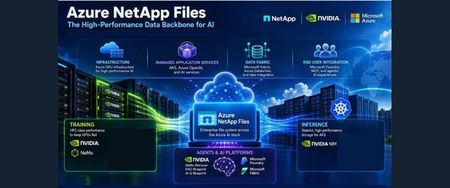
Azure NetApp Files provides a unified data foundation for enterprise AI, connecting data mobility, model training, inference, and agentic workflows. This article explores how caching, replication, high-throughput storage, low-latency checkpointing, and rapid dataset cloning help bring data closer to GPU compute and support efficient experimentation. It also examines persistent storage for containerized inference on Azure Kubernetes Service and integration with NVIDIA’s AI stack, Microsoft Foundry, and Microsoft Fabric. Two reference use cases illustrate its role in supporting domain-specific model training and modernizing AI inference while reducing infrastructure complexity.414Views0likes0CommentsMore EDA Job Sets per Volume: Azure NetApp Files Raises the Performance Bar
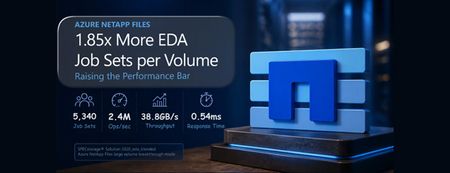
Azure NetApp Files raises the performance ceiling for cloud-based electronic design automation (EDA) with a new independently published SPECstorage® Solution 2020 EDA_BLENDED result for a single large volume in breakthrough mode: 5,340 job sets, 2.4 million operations per second, 38,776 MB/s peak throughput, and 0.54 ms overall response time. Delivering 1.85 times the job sets, operations, and throughput of the previous single-volume result while preserving sub-millisecond latency through most load points, the result enables more concurrent simulations, shorter regression cycles, and better utilization of compute and tool licenses without dataset sharding. Combined with proven linear scale-out and generally available Azure NetApp Files cache volumes that provide on-demand access to on-premises data, it gives EDA teams a practical foundation for high-performance cloud deployment and bursting.381Views0likes0CommentsSecure, Keyless Application Access with Managed Identities - Now GA in Azure Files SMB
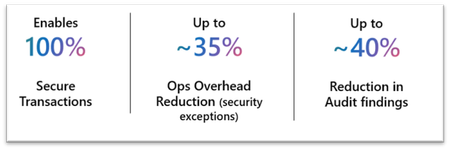
As enterprises modernize applications and strengthen their security posture, identity is central to how applications access shared storage. Traditional identity models relying on account keys, stored credentials, or domain‑joined infrastructure add operational overhead and introduce security risks such as credential leakage, lack of identity attribution, and excessive privilege if shared keys are compromised. Today, we are excited to announce the General Availability (GA) of Managed Identity support for Azure Files over SMB, enabling applications and virtual machines to securely access Azure Files without secrets, passwords, or key distribution. Managed Identity support enables customers to meet modern enterprise security standards without reliance on storage account keys, streamlining how organizations securely enable file‑based application access and reducing the operational overhead of filing internal exceptions. New storage accounts can support secure, identity‑based SMB access out of the box, while existing deployments can get secure by enabling Managed Identity authentication. From web application workloads such as WordPress, to databases on Azure Kubernetes Service (AKS), to CI/CD pipelines, applications require secure access. In a world where security is foundational, continued reliance on key-based access conflicts with Zero Trust principles and least privilege access. What’s New In GA AKS Workload Identity Support AKS Workload Identity (preview) extends the traditional managed identity model for Kubernetes by shifting the identity from the node to pods. Instead of inheriting the identity of the underlying cluster, each Kubernetes pod can use its own federated identity, mapped directly to a Microsoft Entra ID principal. This feature enables: Pod-level identity isolation, rather than cluster-level Least-privilege access with secure RBAC Seamless scaling and redeployment, without identity reconfiguration No secrets, no key rotation, no credential injection When combined with Azure Files over SMB, Workload Identity allows AKS workloads to access shared file storage securely and natively per pod, using the same identity-driven model as cluster level managed identities. Now available with AKS 1.35, for customers specifically in the financial services industries, AKS Workload Identity enables per‑application, least‑privilege access to Azure Files without credentials, improving isolation and auditability. This allows regulated, stateful workloads to run securely on AKS while meeting strict compliance and regulatory requirements. Co-existence of Application Identities and end-user identity access Azure Files now enables both Managed Identity and end‑user access on the same storage account, with users and applications independently authenticated via Entra ID and authorized through a shared permissions model. This unified access model eliminates the need for duplicate storage or credentials, enabling secure collaboration, troubleshooting, and automation on shared data without compromising governance or compliance. This supports scenarios such as: Developers accessing the same file share as an application for debugging Admins managing content used by automated workflows Hybrid environments with user-driven and app-driven access Simplified Storage Account enablement via the Azure portal We have now added a dedicated Managed Identity property that makes enabling identity‑based SMB access simple and transparent via the Azure portal for new as well as existing storage accounts. With a single configuration at the storage account level, customers can allow applications to authenticate to Azure Files using Managed Identities. This portal experience supports incremental adoption, making it easy to modernize authentication while maintaining compatibility with existing user access and governance models. Get Started with Managed Identities with SMB Azure Files Start using Managed Identities with Azure Files today at no additional cost. This feature is supported on HDD and SSD SMB shares across all billing models. Refer to our documentation for complete set-up guidance. Whether provisioning new storage or enhancing existing deployments, this capability provides secure, enterprise‑grade access with a streamlined configuration experience. For any questions, reach out to the team at azurefiles@microsoft.com.1.3KViews0likes0Comments